.webp)
Thank you! Your submission has been received!
Oops! Something went wrong while submitting the form.
Get SaaSFrame Pro
Monthly
$18
Quarterly
$48
Yearly
$180
Upgrade to access this feature
Browse all screens & flows
Filter and search screens & flows
Access Figma files
Access mobile versions
Bookmark screens & flows
Join now
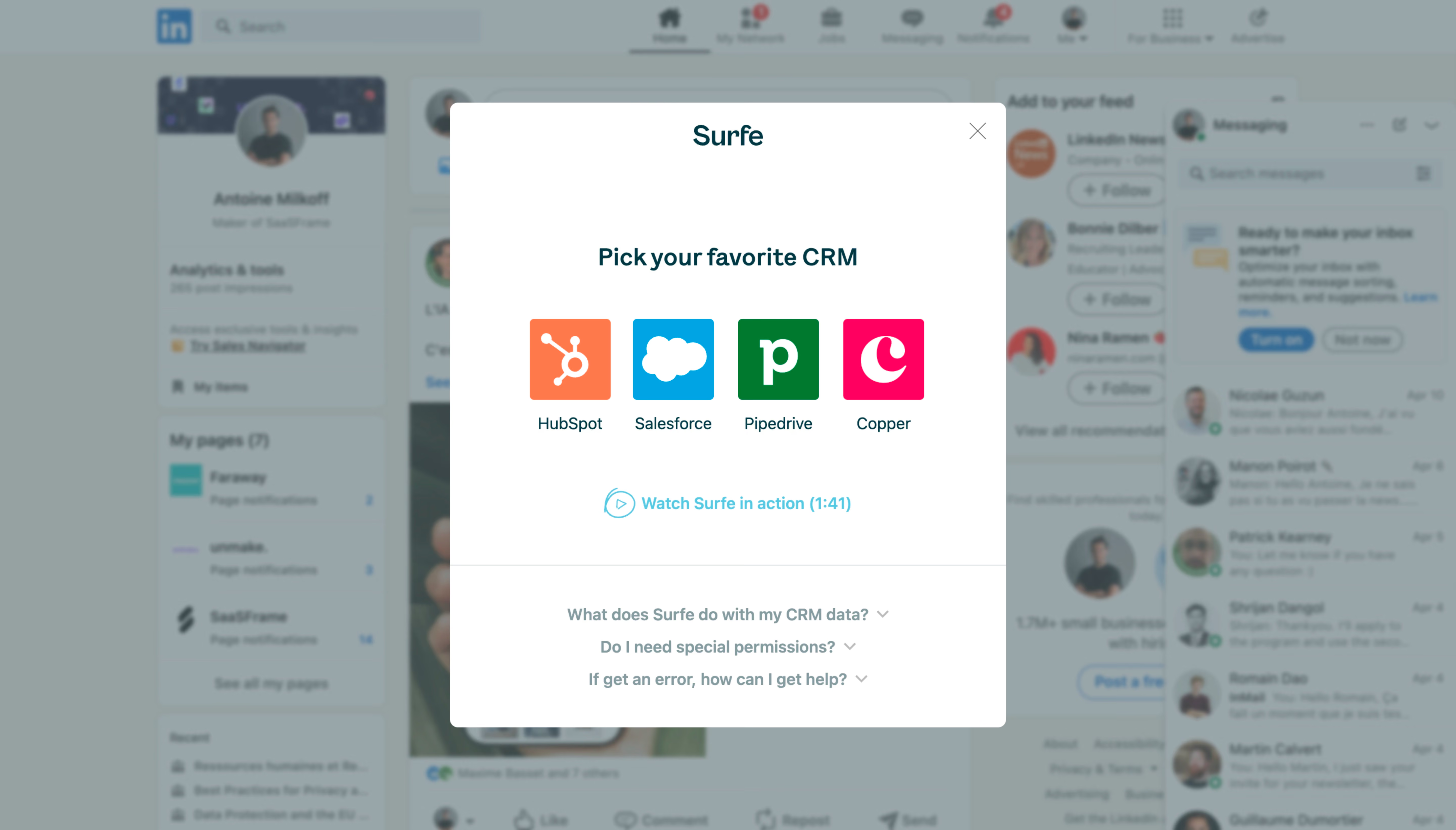
Surfe User Onboarding

Surfe
Connect your CRM with LinkedIn
Designed by
No items found.

Bookmark
Bookmark

Design with AI
Thank you! Your submission has been received!
Oops! Something went wrong while submitting the form.
# Design from Reference: Surfe User Onboarding
Create an original, high-fidelity visual design inspired by the reference. Prioritize composition, typography, colors, spacing, and component styling over technical implementation.
## Reference
- **Product:** Surfe
- **Category:** User Onboarding
- **Screenshot:** https://cdn.prod.website-files.com/5e9dc792e1210c5325f7ebbc/6acb6a5203442b22fb62ac51_6acb694e55968e6fef880de4_cms-33dc9c47a703141c8e9e8b70.webp
Analyze the screenshot first. If inaccessible, request it rather than guessing.
## Content
{{content.instructions}}
{{content.data}}
Preserve essential messaging and factual accuracy. Adapt structure and copy length for visual balance; never invent product claims.
## Visual Design
### Overall aesthetic
- **Style:** Clean white onboarding modal over a blurred, blue-gray-dimmed social-network page.
- **Character:** Dark teal headings, colorful CRM logos and a cyan video link create a focused integration-selection experience.
- **Capture:** The image measures 5760 × 3284 pixels. CSS estimates assume a 4× capture, equivalent to approximately 1440 × 821 CSS pixels; actual scale and font identity are unverified.
### Page composition
- **Backdrop:** A LinkedIn-style feed with left profile, central content and right recommendations/messages remains visible through blur and tint.
- **Modal:** A centered white rectangle approximately 550 × 618 CSS pixels begins near x445, y102.
- **Brand row:** Surfe is centered near the top; a gray X sits upper right.
- **Main task:** A bold CRM-selection heading sits above four equal logo/name options in a horizontal row.
- **Video route:** A cyan play icon and short demonstration link sit beneath the choices.
- **Help area:** A horizontal divider introduces three centered collapsed FAQ questions at the bottom.
### Information hierarchy
- **Brand:** The centered product name identifies the onboarding layer independently from the social-network background.
- **Task:** The CRM-selection heading leads the interactive content.
- **Choices:** Four large colored logos are the strongest visual elements, with dark labels underneath.
- **Secondary action:** The demonstration link is clearly separated below the choice row.
- **Reassurance:** Three muted FAQ prompts address data, permissions and support.
- **State scope:** No CRM is visibly selected and no authorization or connection result is shown.
### Typography
- **Family:** A clean sans-serif is visible; exact identity is unverified.
- **Brand label:** Approximately 28-pixel CSS size, medium-to-semibold.
- **Task heading:** Approximately 24 pixels, bold, with around 32-pixel line height.
- **CRM labels:** Approximately 16 pixels, regular-to-medium.
- **Video link:** Approximately 16 pixels and semibold.
- **FAQ prompts:** Approximately 16 pixels, semibold, in muted blue-gray.
### Colors & surfaces
- **Measured modal:** White #FFFFFF fills the panel.
- **Measured overlay appearance:** Blue-gray #9AA6A9 and #95A1A2 dominate the composited blurred background; these are visible screenshot colors, not verified underlying page tokens.
- **Measured logo accent:** Orange #FF7A4C occurs in the HubSpot mark.
- **Other logo colors:** Cyan-blue, green and magenta distinguish the remaining CRM options.
- **Text:** Deep teal supports brand, title and option labels; FAQ text is lighter gray-teal.
- **Link accent:** Bright cyan identifies the video route.
- **Depth:** Blur and tint create separation; the modal has small rounded corners and little visible shadow.
### Components
- **Modal frame:** Approximately 550 pixels wide with 8-pixel corners.
- **Close icon:** A thin gray X sits about 20 pixels from the upper/right edges.
- **CRM options:** Four approximately 80 × 80-pixel colored logo squares sit in one row with labels below.
- **Visible services:** HubSpot, Salesforce, Pipedrive and Copper.
- **Video control:** A circular outlined play symbol precedes the demonstration text and displayed duration.
- **FAQ rows:** Three centered question labels each end with a small down chevron; all answers are collapsed.
- **Divider:** A thin pale rule spans the panel above the help area.
- **State scope:** No hover, focus, selected option, expanded answer or loading feedback is visible.
### Visual rhythm
- **Vertical spacing:** A large gap separates brand identity from the task heading.
- **Choice cadence:** Equal logo sizes and consistent gaps create a balanced four-option row.
- **Action separation:** The video link has generous whitespace above and below it.
- **Help grouping:** FAQ prompts use a compact approximately 32-pixel vertical rhythm.
- **Focus:** The bright centered panel contrasts with broad subdued background margins.
### Responsive
- **Recommendation — modal:** Use fluid width with safe viewport gutters.
- **Recommendation — options:** Wrap the four logos into two columns when needed, retaining labels and touch targets.
- **Recommendation — height:** Allow internal or page scrolling on short screens without hiding dismissal.
- **Recommendation — FAQ:** Let questions wrap and keep chevrons associated with their rows.
- **Recommendation — accessibility:** Manage focus within the modal and provide explicit labels for CRM choices. No mobile layout is evidenced.
### Adaptation guidance
- **Preserve integration-first onboarding:** Ask for the CRM before introducing detailed setup.
- **Use recognizable service identity:** Keep logos consistently sized despite differing shapes.
- **Keep reassurance nearby:** Retain data, permissions and support questions below the main task.
- **Separate demonstration:** Keep the video route secondary to CRM selection.
- **Define connection states separately:** Authorization, success, failure and expanded FAQ content are outside the captured state.
- **Treat the backdrop as context:** Recreate the onboarding layer independently of personal feed details.
Use this context to reproduce the reference's visual language: layout, typography, colors, spacing, borders, radii, and distinctive elements. The screenshot takes priority if descriptions conflict.
## Direction
{{preferences.fidelityInstructions}}
## Output
{{output.instructions}}
Deliver a polished, cohesive design with precise alignment, hierarchy, and spacing. Produce the requested visual artifact, not just a description. If unsupported, explain the limitation.

.avif)
Category
Patterns
Tech Stack




Added on
April 13, 2023


Similar screens






Upgrade to SaaSFrame Pro now to see similar examples.
Monthly
$18 /month
Billed $18 monthly
Browse all screens & flows
Filter and search screens & flows
Search text in screenshots
Access Figma files
Access mobile versions
Join now
Quarterly
$16 /month
Billed $48 quarterly
Browse all screens & flows
Filter and search screens & flows
Search text in screenshots
Access Figma files
Access mobile versions
Join now
Yearly
$15 /month
Billed $180 yearly
Browse all screens & flows
Filter and search screens & flows
Search text in screenshots
Access Figma files
Access mobile versions
Join now