Share
16
Controls for sharing content through links, invitations, permissions, or public access.
.webp)
Sharing makes a SaaS resource available to another person or audience. It can involve a named invitation, a link, an embedded view, or an exported copy. A useful sharing interface explains what is being shared, who can reach it, what they can do, and how the owner can change that access later.
Clay, Latitude, and Pitch show different sharing decisions: audience and information scope, a whole app versus a selected block, and a presentation link with configurable capabilities. The captures support analysis of the controls and explanations shown. They do not establish the products’ current policies or unobserved enforcement behavior.
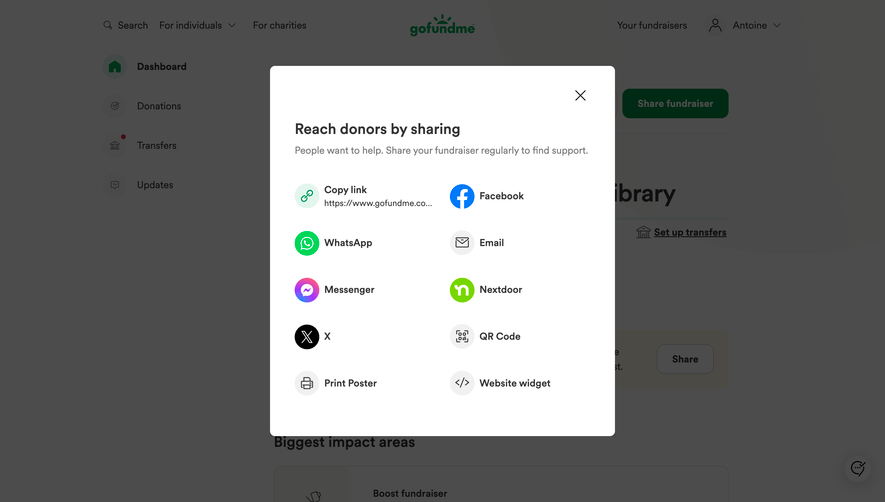
A Share action can mean inviting someone to collaborate, creating a public viewing link, or sending a separate copy. These outcomes have different implications. Make the intended operation understandable inside the panel rather than relying on the familiar label.
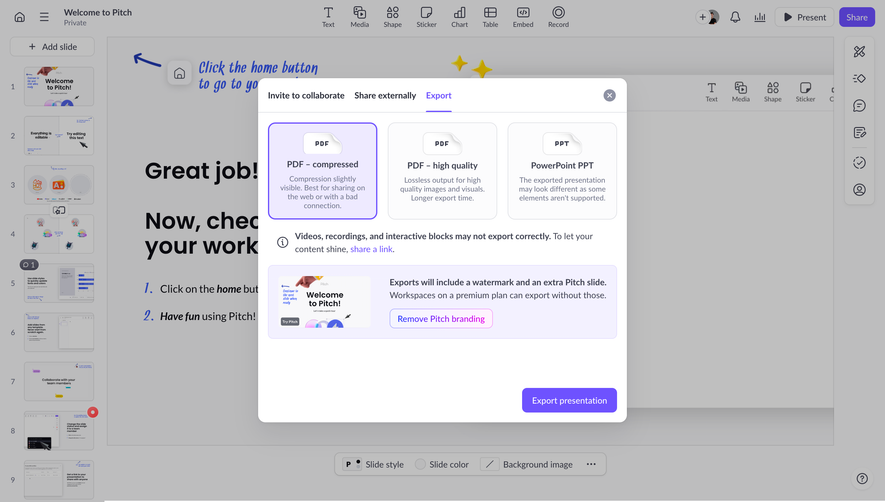
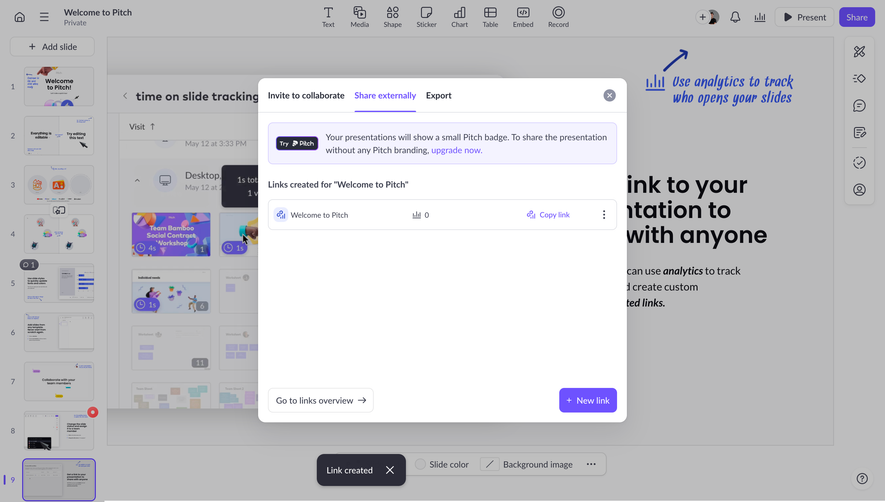
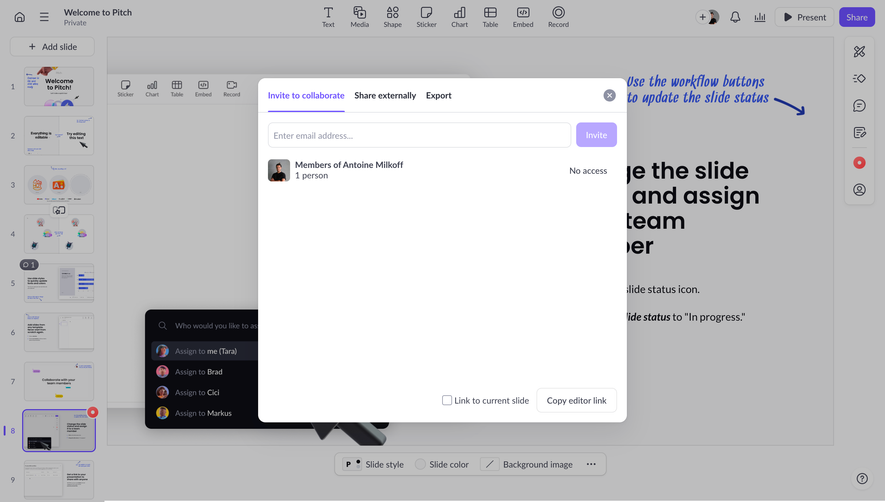
Pitch’s captured sharing interface separates Invite to collaborate, Share externally, and Export into tabs. That distinction helps people choose between ongoing collaboration, external access, and a portable artifact. A team member and an outside viewer do not necessarily need the same route.
Keep the resource name visible. Sharing from a dashboard, editor, or search result can otherwise leave someone unsure whether the action affects one document, a folder, or an entire project. When several resources are selected, explain the scope before granting access.
Clay’s captured Share dialog shows an audience restriction that limits viewing to invited people and a separate content setting labeled Public Info only. These are different dimensions: the first concerns recipients, while the second concerns the information exposed.
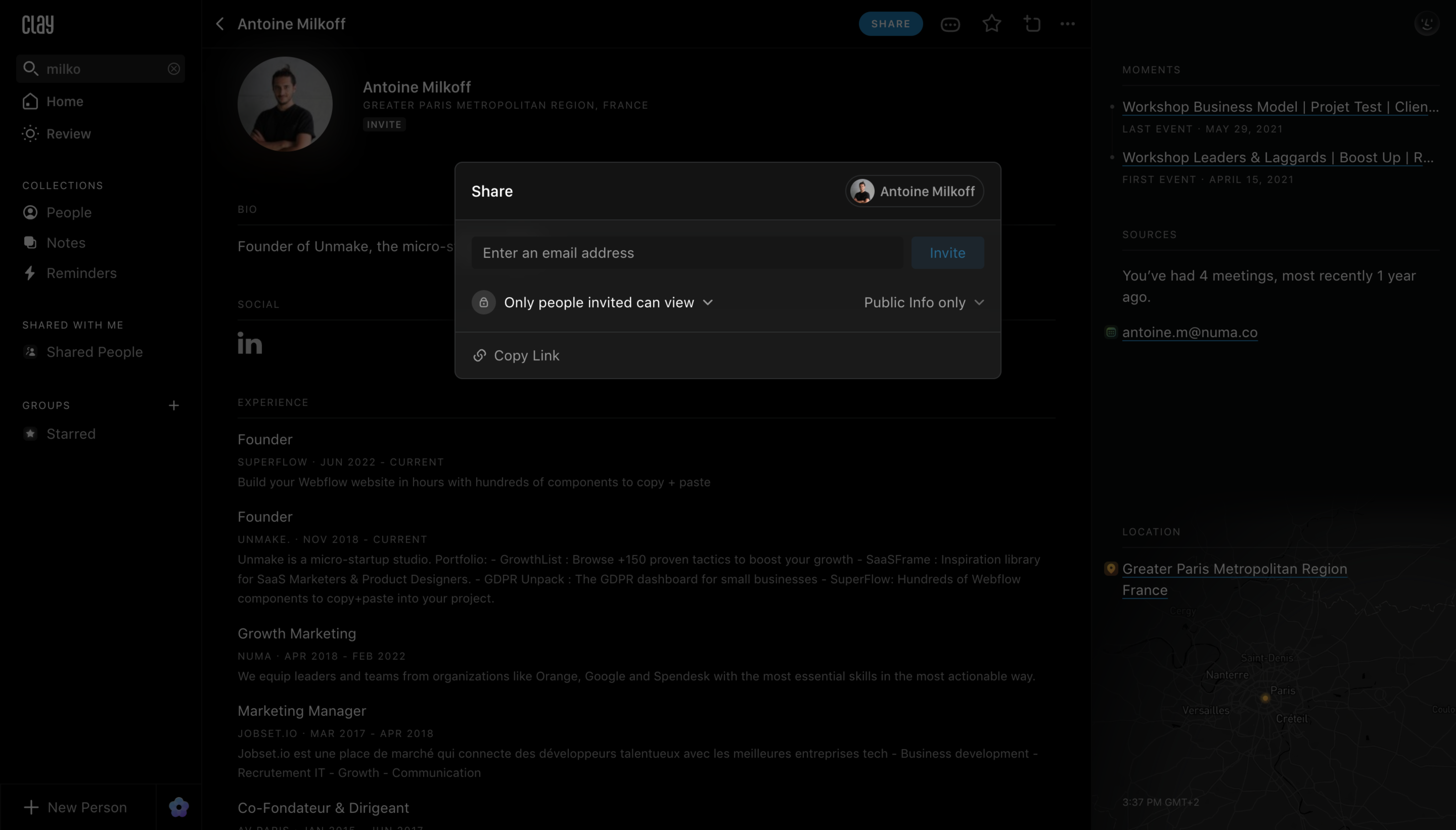
This distinction is useful whenever a resource contains information with different sharing needs. A contact record, dashboard, or project may have a public summary and private context. Make the relationship explicit instead of using a single label that could refer to either audience or content.
If a preview of the recipient’s view is available, it can help the sender review what will be exposed. The preview must reflect the actual selected policy. Do not present a simplified preview that silently omits content the recipient can still access.
View, comment, edit, duplicate, and manage access represent different capabilities. Use role labels that correspond to the actual resource model and provide explanations when the distinctions are not obvious.
A person sharing a presentation may want recipients to view it without duplicating it. A person sharing an internal report may want comments without edit access. Avoid treating “can access” as a complete permission description.
Show the scope of a role before invitation or link creation. If one setting applies to all named recipients, make that common scope clear. If the product supports different roles per person, keep the individual choices readable before the operation is committed.
Clay’s dialog includes Copy Link while showing that only invited people can view. A copyable URL can identify a resource without making it available to every person who receives it. The interface should preserve that distinction.
Use copy feedback that confirms the clipboard action. “Link copied” does not imply “access granted” or “invitation sent.” If additional access setup is required, explain that step close to the link.
For a restricted link, help senders predict the recipient experience. A person without access may need to request it or use the correct identity. Do not let the sender discover the restriction only after the recipient reports a dead end.
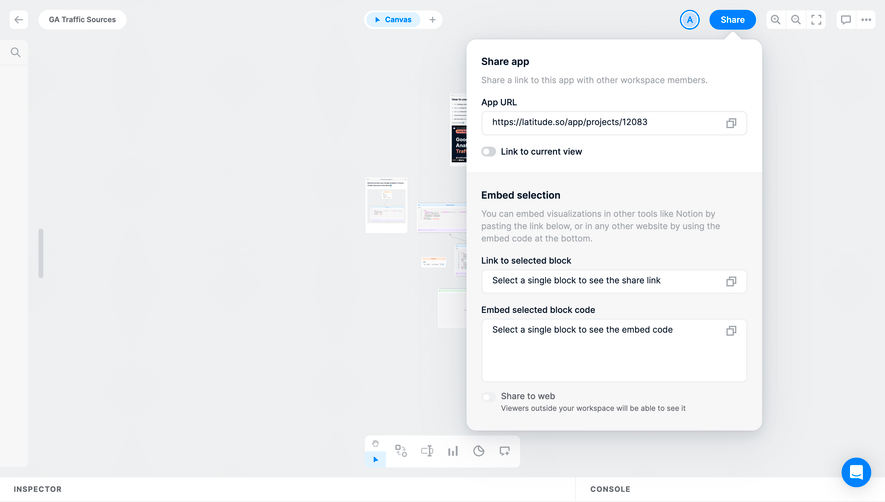
Latitude’s capture offers an app URL and a separate Embed selection area. The selected-block link and embed-code fields instruct the person to select a single block. A Link to current view control provides another context choice.
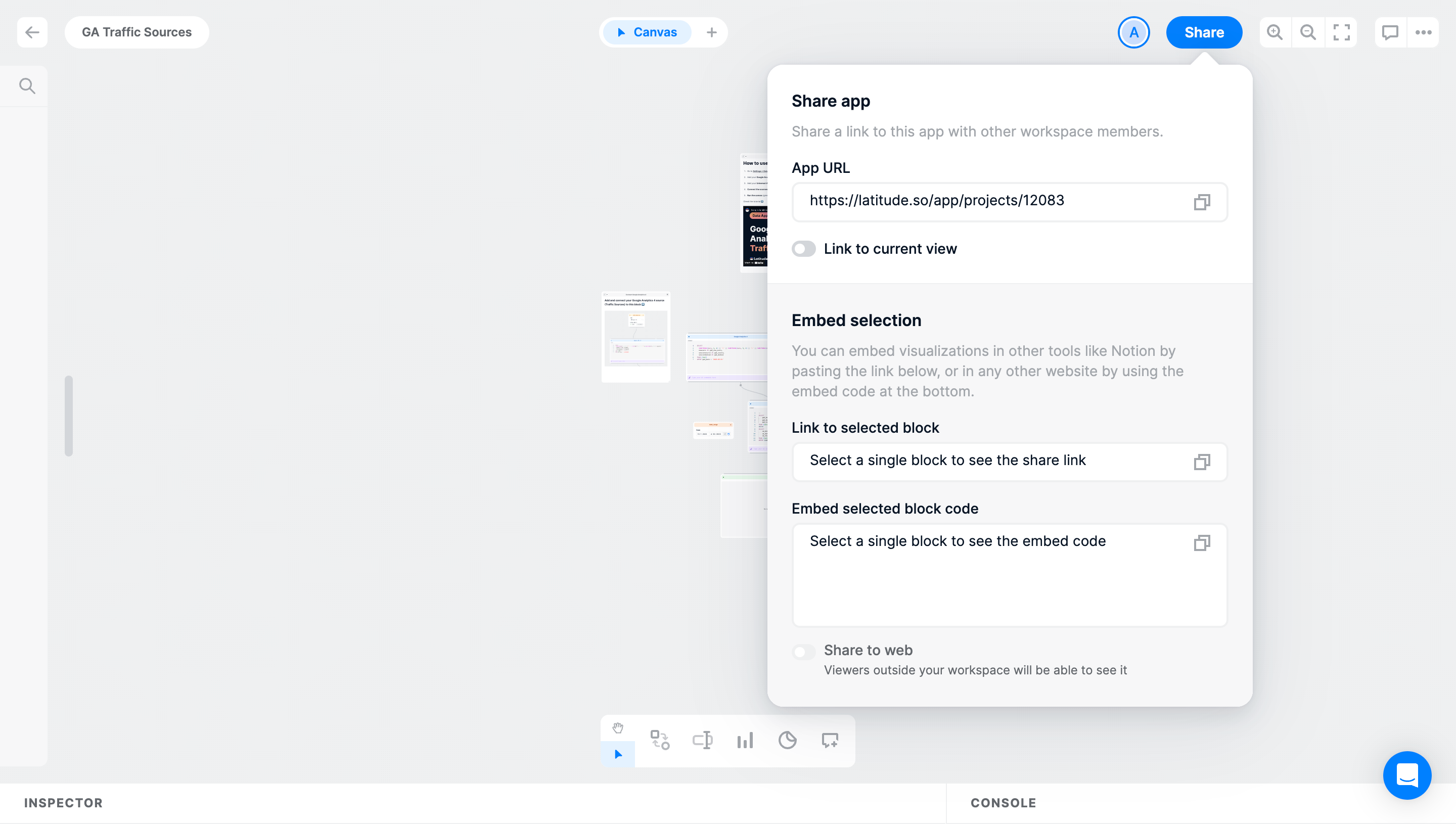
Partial sharing can help someone communicate a relevant chart or section without asking the recipient to find it in a larger resource. Define whether the link opens the live block, a snapshot, or a filtered view. Those models affect what the recipient sees later.
Make prerequisites actionable. If a single selection is required, explain it and provide a clear way back to the canvas. Avoid an empty disabled field with no reason. When the selection changes, update the generated information consistently.
Latitude’s captured Share to web setting explains that viewers outside the workspace will be able to see the content. That description names the audience boundary. A control that changes external availability needs that context before activation.
Distinguish publicly accessible, accessible to anyone with the link, and restricted to named recipients where the product supports those models. The terms should match the actual policy. A vague “public” label can leave people uncertain about discovery and authentication requirements.
Changing external availability can affect an existing link. Explain whether the current URL remains valid, whether recipients need to sign in, and what happens after access is revoked according to the implementation.
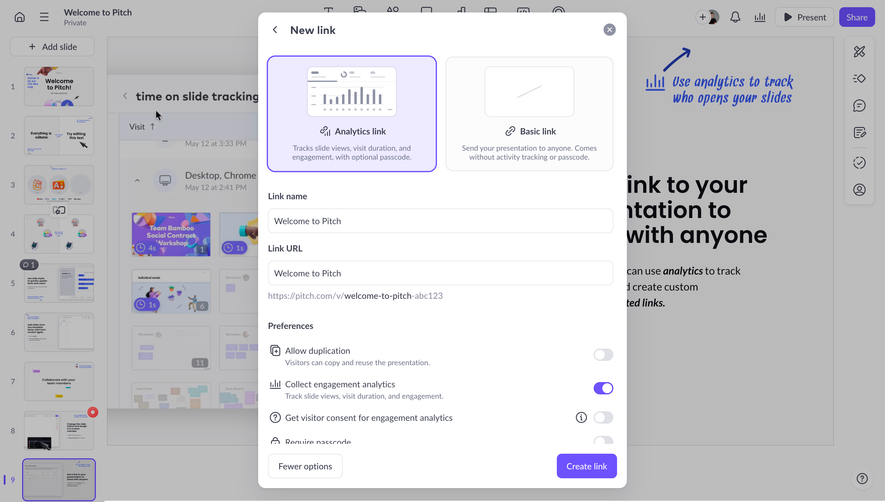
Pitch’s new-link interface presents Analytics link and Basic link as different options. Their descriptions distinguish activity tracking and passcode availability. The captured advanced preferences also include duplication and engagement-analytics controls.
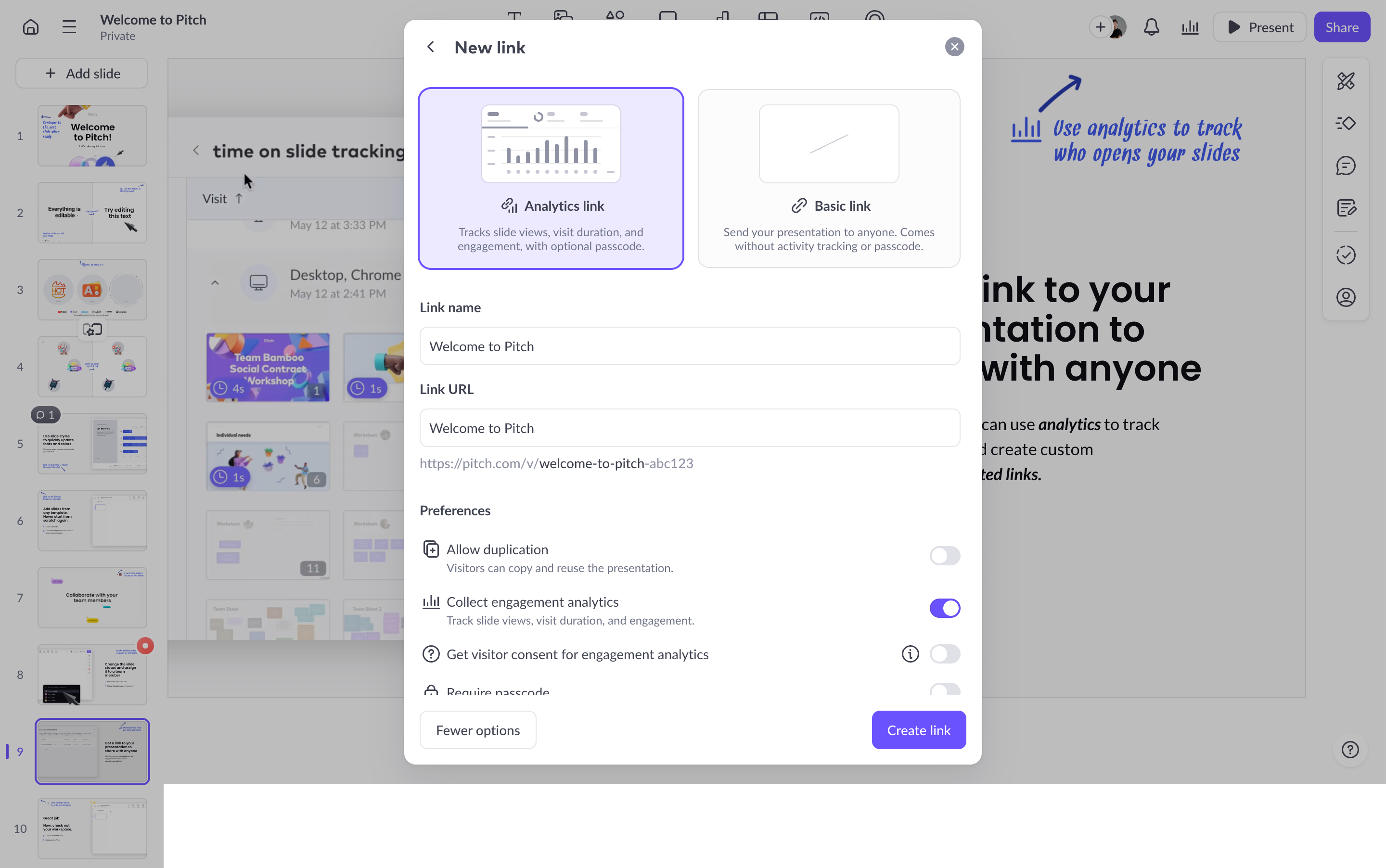
A share link can carry more than an access rule. It may include a presentation mode, download permission, duplication permission, expiration, or tracking. Group these choices by purpose so the person does not mistake a reporting option for a security restriction.
Use defaults that fit the resource and expected audience. Explain the current settings in a reviewable way before creation. A large advanced panel should not bury the one setting that meaningfully changes who can access the content.
Pitch’s creation panel separates the link name from its URL. Named links can help owners distinguish an investor presentation, client review, or public campaign when several routes lead to the same resource.
If the product permits multiple links, show which settings belong to each. Revoking one link should not appear to revoke all access unless that is the actual behavior. Existing named invitations may also remain valid independently of a public link.
Keep link management available after creation. Owners may need to copy a route again, inspect its policy, or remove it. A temporary success message is not a substitute for a persistent management destination.
A recipient may follow a restricted link while signed into a different account. Explain the mismatch and provide the allowed correction route. Avoid silently creating another account or making a generic error the only response.
Where the recipient can request access, identify the resource and relevant owner context only to the extent permitted. Show the submitted request state without claiming approval. The requester needs to know what happened and what they can do next.
For named invitations, preserve the resource context through sign-in or signup. Successfully authenticating is not the same as receiving the resource permission. The final landing state should reflect the actual access result.
Access can end through a revoked link, removed invitation, expired permission, or changed workspace policy. These states need meaningful recovery routes. A missing-resource message should not be used indiscriminately when the person can request renewed access.
Explain the effect to the owner before revocation when it matters. Disabling a live link can prevent future access, but an exported or downloaded copy may persist elsewhere. Do not imply that every shared artifact can be withdrawn by changing one setting.
For expiring links, show the relevant time context and renewal process. The owner should understand whether renewal extends the existing URL or creates another route. Recipients should receive a clear state when the old link is no longer usable.
A live resource link can reflect later edits, while an exported file generally represents content at a particular moment. An embed may have its own update and access rules. State those distinctions where they affect the sender’s task.
Someone sending a report may want a stable record. Someone collaborating on a draft may want the latest version. The interface should help them choose a suitable route rather than presenting every sharing format as equivalent.
Make export scope and omitted content clear. Comments, hidden sections, interactive controls, or linked data may not transfer to a static format. Explain material differences before someone relies on the copy for a handoff.
Pitch’s capture describes analytics in terms of slide views, visit duration, and engagement, and shows a separate visitor-consent preference. This makes tracking part of link configuration rather than an invisible side effect of copying a URL.
Describe the actual data collected and the available controls using product-specific wording. A tracking indicator should not imply certainty about a named person if the system only observes an anonymous session or device.
Do not equate a link open with understanding, approval, or completed collaboration. Reporting can help a sender follow up, but the interface should distinguish observed activity from inferred intent.
Provide clear names for email fields, role choices, copy buttons, and switches. If sharing opens a modal or popover, focus and dismissal should remain predictable. A person should be able to review audience and scope using a keyboard.
On mobile, keep the selected policy and final action readable. Long URLs need access to their full value without forcing horizontal page scrolling. Confirmation should establish whether a link was created, a setting saved, or an invitation sent.
Preserve input after a failed request. If only part of a batch succeeds, identify the remaining entries rather than reporting a blanket success. Do not leave the interface showing broader access than the server accepted.
Not necessarily. Copying identifies the resource. Its access policy determines who can open it.
No. A live link can show later updates, while an exported copy usually preserves a particular version and may omit interactive features.
Show an appropriate sign-in, identity correction, or access-request route according to the product’s policy. Avoid an unexplained dead end.
Explore Roles & Permissions for access capabilities, Invite Team Members for workspace membership, Log In for recipient identity, and Settings & Preferences for organization-wide sharing policies.
Compare the gallery from both sides: the owner deciding what to expose and the recipient trying to reach the intended resource. Clear sharing keeps those two perspectives connected through the full access lifecycle.