.webp)
Thank you! Your submission has been received!
Oops! Something went wrong while submitting the form.
Get SaaSFrame Pro
Monthly
$18
Quarterly
$48
Yearly
$180
Upgrade to access this feature
Browse all screens & flows
Filter and search screens & flows
Access Figma files
Access mobile versions
Bookmark screens & flows
Join now
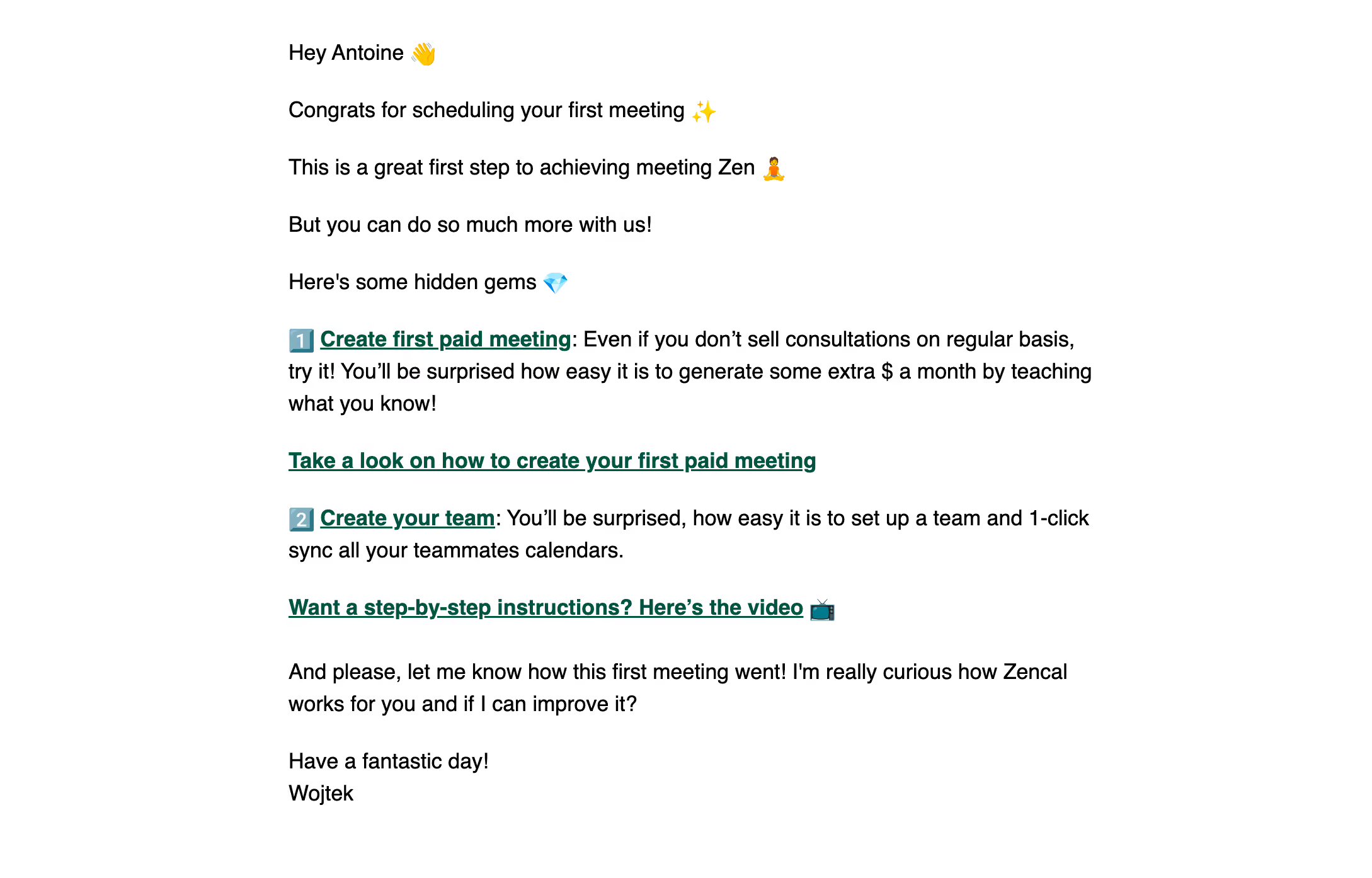
Zencal Onboarding Email

Zencal
Scheduling for paid meetings & teams
Designed by
No items found.

Bookmark
Bookmark

Design with AI
Thank you! Your submission has been received!
Oops! Something went wrong while submitting the form.
# Design from Reference: Zencal Onboarding Email
Create an original, high-fidelity visual design inspired by the reference. Prioritize composition, typography, colors, spacing, and component styling over technical implementation.
## Reference
- **Product:** Zencal
- **Category:** Onboarding Email
- **Screenshot:** https://cdn.prod.website-files.com/5e9dc792e1210c5325f7ebbc/6acb6ad9bf2e69a0c03b69e1_6acb6a0427f191c7ced05238_cms-de3978155199c3932a1026f8.webp
Analyze the screenshot first. If inaccessible, request it rather than guessing.
## Content
{{content.instructions}}
{{content.data}}
Preserve essential messaging and factual accuracy. Adapt structure and copy length for visual balance; never invent product claims.
## Visual Design
### Overall aesthetic
- **Style:** Plain, personal onboarding email on a white canvas, with black text and dark-green linked emphasis.
- **Character:** Greeting, congratulatory language, emoji and an individual sign-off create a conversational tone.
- **Capture:** The image measures 2178 × 1394 pixels. CSS estimates assume a 2× capture, equivalent to approximately 1089 × 697 CSS pixels; actual email scale and font identity are unverified.
### Page composition
- **Message column:** A left-aligned text column approximately 650 CSS pixels wide is centered within broad white margins.
- **Opening sequence:** Several short paragraphs greet the recipient, celebrate a first meeting and introduce additional capabilities.
- **Feature guidance:** Two numbered-emoji sections describe paid meetings and team setup, each followed by a separate prominent tutorial link.
- **Closing:** A feedback request and short personal sign-off finish the message.
- **Surface:** No logo header, card, colored band, button or footer navigation is visible.
### Information hierarchy
- **Personal opening:** The greeting and milestone acknowledgment lead without a large headline.
- **Feature labels:** Bold dark-green underlined phrases introduce the two capabilities within regular explanatory text.
- **Tutorial routes:** Standalone bold links create the strongest action emphasis.
- **Sequence cues:** Numbered emoji distinguish the two recommendations without a formal list container.
- **Feedback:** A final paragraph invites a reply before the sign-off.
- **State scope:** Only this single email is shown; no product interface or destination content is visible.
### Typography
- **Family:** A conventional sans-serif is visible; exact identity is unverified.
- **Body:** Approximately 18-pixel CSS size with around 26-pixel line height.
- **Linked emphasis:** The same scale uses bold weight and underline in dark green.
- **Paragraph rhythm:** Short opening statements remain regular weight, creating hierarchy through spacing rather than type-size changes.
- **Sign-off:** The closing uses the normal body style, reinforcing the personal format.
### Colors & surfaces
- **Measured base:** White #FFFFFF fills the canvas.
- **Measured text:** Black #000000 carries most of the message.
- **Measured link accent:** Dark green #005342 appears in emphasized links.
- **Supporting pixels:** Dark #0D0D0D and related near-black antialiasing occur around text.
- **Emoji:** Small colorful symbols provide local accents, including greeting, celebration, numbered steps and video reference.
- **Depth:** No visible borders, shadows or gradients are used.
### Components
- **Greeting:** A short personal salutation includes a waving-hand emoji.
- **Milestone statements:** Several separated one-line paragraphs establish the onboarding context.
- **Feature blocks:** Each numbered-emoji block combines an underlined bold linked label with regular explanatory prose.
- **Tutorial links:** Separate green underlined lines point to instructional resources, one with a small video-style emoji.
- **Feedback paragraph:** A two-line question precedes the closing.
- **Signature:** A brief wish and individual name end the message; no portrait or branded footer appears.
### Visual rhythm
- **Reading measure:** The narrow column and wide margins keep the text-led design readable.
- **Opening spacing:** Approximately 24–30 CSS pixels separate the short introductory paragraphs.
- **Feature grouping:** Explanatory copy stays attached to its label, with larger breaks before tutorial links and the next recommendation.
- **Closing pause:** A larger gap separates feature guidance from the feedback request and sign-off.
- **Consistency:** One body scale and selective bold green links maintain a simple visual system.
### Responsive
- **Recommendation — width:** Use fluid text width with a readable maximum and 20–24-pixel side padding.
- **Recommendation — links:** Allow long tutorial-link phrases to wrap without horizontal overflow.
- **Recommendation — spacing:** Preserve paragraph separation rather than shrinking type on small screens.
- **Recommendation — semantics:** Keep link emphasis understandable without relying on color alone. No mobile email rendering is evidenced.
### Adaptation guidance
- **Preserve the milestone narrative:** Acknowledge initial success before introducing additional capabilities.
- **Keep recommendations limited:** Use two clearly separated next-step ideas with direct instructional routes.
- **Reuse plain-email styling:** Retain white canvas, black body copy and dark-green underlined actions.
- **Maintain a personal close:** Keep the feedback invitation and concise individual sign-off.
- **Use semantic paragraphs and links:** Ensure the structure survives email-client limitations.
- **Avoid inferring product states:** The screenshot does not show meeting creation, team setup or tutorial destinations.
Use this context to reproduce the reference's visual language: layout, typography, colors, spacing, borders, radii, and distinctive elements. The screenshot takes priority if descriptions conflict.
## Direction
{{preferences.fidelityInstructions}}
## Output
{{output.instructions}}
Deliver a polished, cohesive design with precise alignment, hierarchy, and spacing. Produce the requested visual artifact, not just a description. If unsupported, explain the limitation.

.avif)
Category
Patterns
No items found.
Tech Stack



Added on
May 22, 2023



Similar screens




Upgrade to SaaSFrame Pro now to see similar examples.
Monthly
$18 /month
Billed $18 monthly
Browse all screens & flows
Filter and search screens & flows
Search text in screenshots
Access Figma files
Access mobile versions
Join now
Quarterly
$16 /month
Billed $48 quarterly
Browse all screens & flows
Filter and search screens & flows
Search text in screenshots
Access Figma files
Access mobile versions
Join now
Yearly
$15 /month
Billed $180 yearly
Browse all screens & flows
Filter and search screens & flows
Search text in screenshots
Access Figma files
Access mobile versions
Join now