Design with AI
Generate a new design based on this screen using your own content.
# Design from Reference: Whimsical Invite Team Members
Create an original, high-fidelity visual design inspired by the reference. Prioritize composition, typography, colors, spacing, and component styling over technical implementation.
## Reference
- **Product:** Whimsical
- **Category:** Invite Team Members
- **Screenshot:** https://cdn.prod.website-files.com/5e9dc792e1210c5325f7ebbc/6acbcd8f33302e716eaa4676_6acbcb22502da208ecdc5d35_cms-6887119d80f289c0b126312e.webp
Analyze the screenshot first. If inaccessible, request it rather than guessing.
## Content
{{content.instructions}}
{{content.data}}
Preserve essential messaging and factual accuracy. Adapt structure and copy length for visual balance; never invent product claims.
## Visual Design
### Overall aesthetic
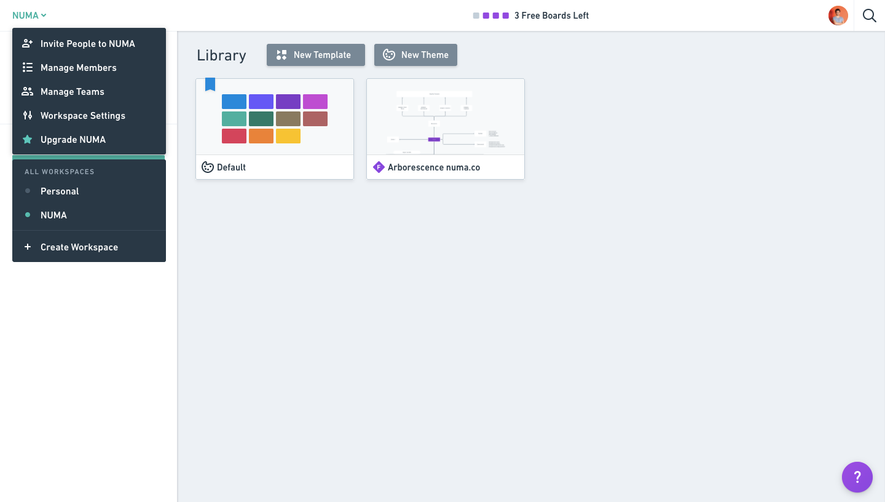
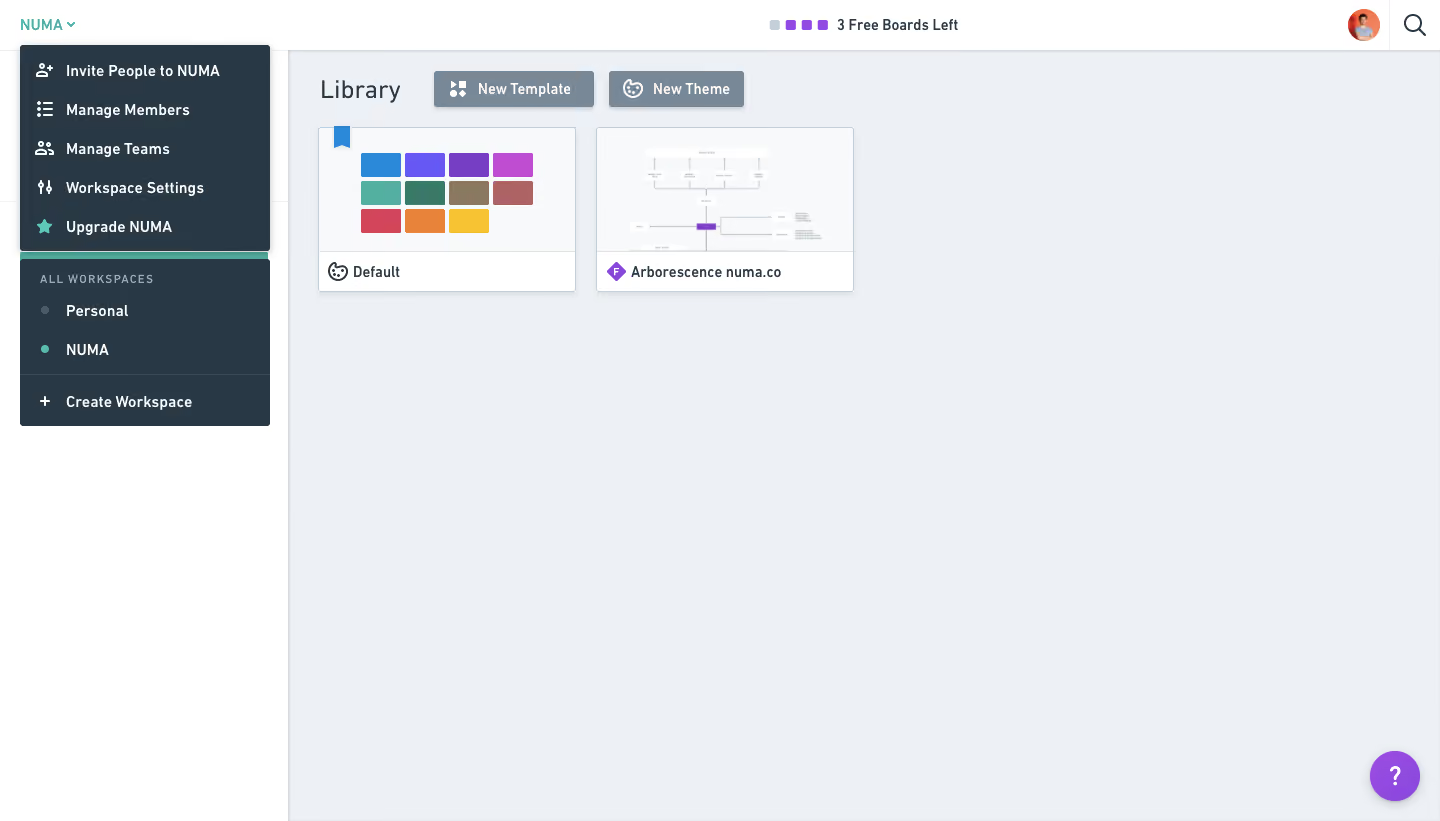
- **Style:** A utilitarian diagram-library workspace uses a pale blue-gray canvas, white shell and a dark open workspace menu.
- **Character:** Compact controls, colorful thumbnail content and small teal/purple accents contrast with extensive unused canvas space.
### Page composition
- **Capture:** The source is 1440 × 821 pixels. Sizes below approximate image pixels; CSS scale is unverified.
- **Shell:** A roughly 50-pixel white top bar spans the screen, above a white left rail around 288 pixels wide and a pale main workspace.
- **Open menu:** A dark dropdown approximately 250 pixels wide overlays the left rail beneath the workspace name.
- **Library:** The main region starts with a heading and two creation buttons, then two thumbnail cards in one row.
- **Utilities:** A free-board allowance sits near the top center; avatar/search controls align right and a purple help circle anchors the bottom right.
### Information hierarchy
- **Menu focus:** Five icon-led workspace actions form the top group, including an invitation entry. No invitation form is visible.
- **Workspace switching:** A small uppercase label introduces two workspace options beneath a divider; a create-workspace row ends the menu.
- **Library content:** Heading and creation controls precede a theme preview and a diagram thumbnail.
- **Status:** Small colored squares and a short allowance label communicate usage in the top bar.
### Typography
- **Family:** A slightly condensed-looking sans serif appears throughout; exact identity is unverified.
- **Heading:** Library is around 24 pixels, regular weight.
- **Menu and controls:** Approximately 14 pixels, semibold, with mildly open tracking.
- **Group label:** About 11 pixels, uppercase and widely tracked; secondary status text remains compact.
### Colors & surfaces
- **Measured canvas:** Pale blue-gray #EDF1F5 fills the workspace; white #FFFFFF defines shell and card footers.
- **Menu:** Dark blue-gray #293845 contrasts with pale menu text.
- **Controls:** Muted slate #788896 fills the two creation buttons.
- **Preview surface:** #F7F9FA appears in card imagery. Teal workspace indicators and purple help/action accents are visible; their exact hex values are unverified.
- **Depth:** Fine borders and soft shadows lift the dropdown, cards and rectangular toolbar controls.
### Components
- **Menu rows:** Approximately 39 pixels high, with small white outline icons and consistently aligned text.
- **Workspace options:** Small circular status markers precede names; dividers separate switching and creation regions.
- **Creation buttons:** Compact slate rectangles around 36 pixels high with white icons and labels, small corner radii and shadows.
- **Library cards:** Approximately 258 × 164 pixels with thin cool borders, large preview regions and white labeled footers.
- **Help launcher:** A roughly 50-pixel purple circle contains a white question mark and soft shadow.
### Visual rhythm
- **Top concentration:** Almost all content sits in the upper third, leaving a broad empty work surface.
- **Alignment:** Library heading, cards and main content share a roughly 30-pixel inset from the rail.
- **Spacing:** Cards have a roughly 20-pixel gap; menu actions use consistent vertical pitch.
### Responsive
- **Evidence:** Only the desktop library and open menu are observed; mobile behavior is unverified.
- **Recommended shell:** Collapse the left rail and constrain the dropdown within viewport bounds on narrow screens.
- **Recommended cards:** Wrap thumbnail cards to one column and allow creation controls to wrap without shrinking labels.
- **Accessibility:** Give icon controls labels and preserve clear keyboard focus and menu navigation.
### Adaptation guidance
- **Preserve:** Keep the pale workspace, dark grouped menu and compact thumbnail cards.
- **Scope:** Reconstruct the visible workspace menu; the record title does not establish an invitation dialog.
- **Implementation:** Separate shell, workspace-switcher menu and library grid so each can reflow independently.
- **Behavior:** Define selection, menu dismissal and creation actions explicitly; no resulting action is shown.
Use this context to reproduce the reference's visual language: layout, typography, colors, spacing, borders, radii, and distinctive elements. The screenshot takes priority if descriptions conflict.
## Direction
{{preferences.fidelityInstructions}}
## Output
{{output.instructions}}
Deliver a polished, cohesive design with precise alignment, hierarchy, and spacing. Produce the requested visual artifact, not just a description. If unsupported, explain the limitation.
.webp)



.avif)