Generate a new design based on this screen using your own content.
Thank you! Your submission has been received!
Oops! Something went wrong while submitting the form.
# Design from Reference: Steep Analytics
Create an original, high-fidelity visual design inspired by the reference. Prioritize composition, typography, colors, spacing, and component styling over technical implementation.
## Reference
- **Product:** Steep
- **Category:** Analytics
- **Screenshot:** https://cdn.prod.website-files.com/5e9dc792e1210c5325f7ebbc/6acad56f86f1bee9c3650761_6acad49d610f0f51f4eea52a_cms-33696e81fad47ba0e4d9bc80.webp
Analyze the screenshot first. If inaccessible, request it rather than guessing.
## Content
{{content.instructions}}
{{content.data}}
Preserve essential messaging and factual accuracy. Adapt structure and copy length for visual balance; never invent product claims.
## Visual Design
Use this context to reproduce the reference's visual language: layout, typography, colors, spacing, borders, radii, and distinctive elements. The screenshot takes priority if descriptions conflict.
## Direction
{{preferences.fidelityInstructions}}
## Output
{{output.instructions}}
Deliver a polished, cohesive design with precise alignment, hierarchy, and spacing. Produce the requested visual artifact, not just a description. If unsupported, explain the limitation.
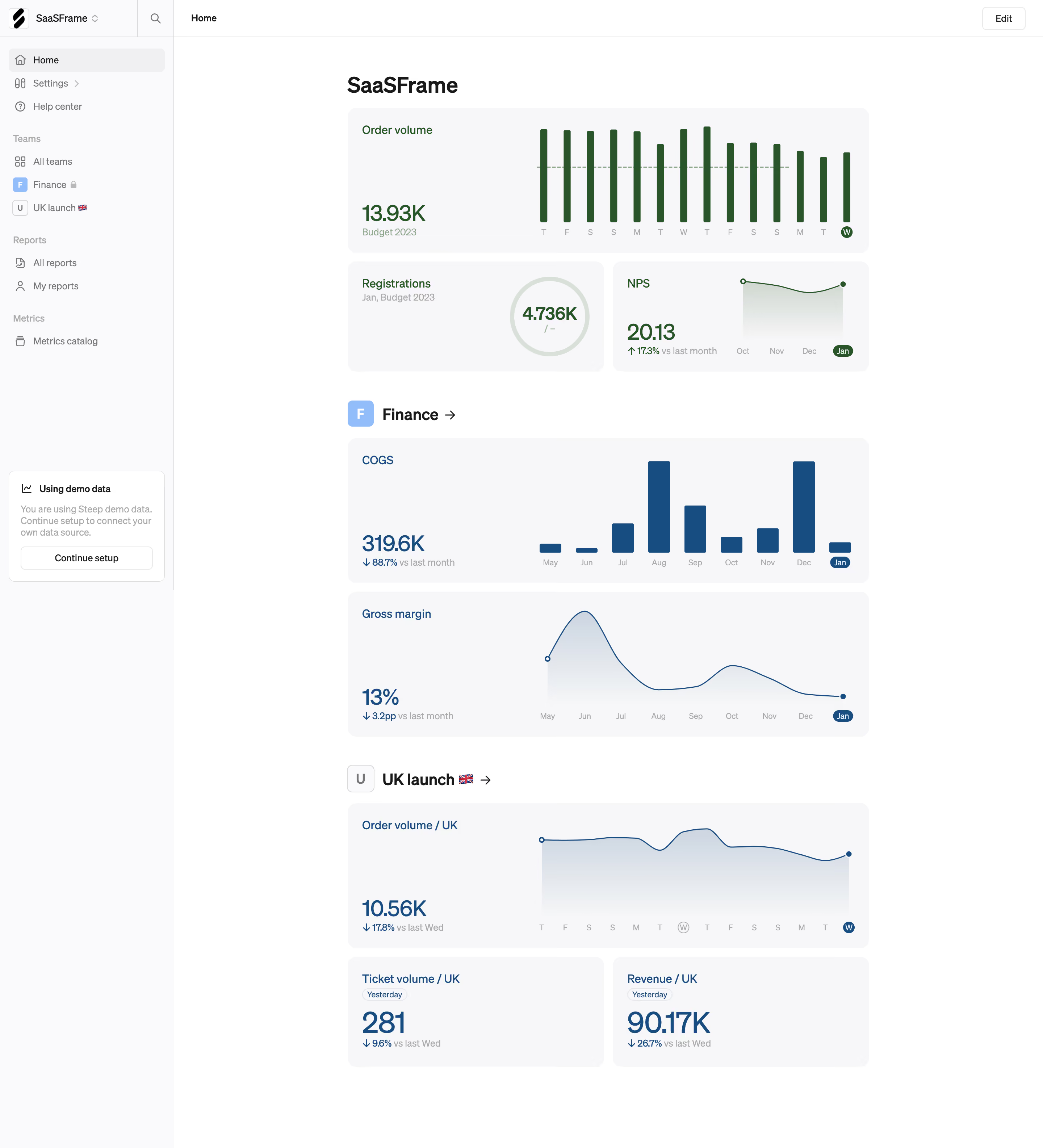
SaaSFrame's home dashboard nails the art of information density without chaos. The first thing that hits you is how much white space surrounds each metric card. Nothing feels cramped. Order volume sits up top with those dark green bar charts pulling your eye immediately, and the dashed budget line gives instant context without a single label needed.
Smart Visual Hierarchy Through Restraint
The layout flows naturally: company-wide KPIs first, then team sections like Finance and UK Launch stacked below with clear headers and arrow links. Each section feels like its own mini-report. Typography is clean and utilitarian. Big bold numbers like 319.6K and 13% do the heavy lifting while smaller gray subtext handles comparisons. The red and green percentage indicators are subtle but effective.
What Makes It Stand Out
That left sidebar is dead simple. No icon overload, no nested menus. The "Using demo data" nudge card at the bottom is a smart onboarding touch. Also love how the highlighted "Jan" and "W" circles on chart axes mark the current period. Tiny detail, big clarity.
.webp)



.avif)