Design with AI
Generate a new design based on this screen using your own content.
# Design from Reference: Reveal Set your role
Create an original, high-fidelity visual design inspired by the reference. Prioritize composition, typography, colors, spacing, and component styling over technical implementation.
## Reference
- **Product:** Reveal
- **Category:** Account Setup
- **Screenshot:** https://cdn.prod.website-files.com/5e9dc792e1210c5325f7ebbc/6acbbe3c476aea3982e3fac2_6acbbd6d8fac5a61406f158c_cms-5756cd549591092e66ddffed.webp
Analyze the screenshot first. If inaccessible, request it rather than guessing.
## Content
{{content.instructions}}
{{content.data}}
Preserve essential messaging and factual accuracy. Adapt structure and copy length for visual balance; never invent product claims.
## Visual Design
### Overall aesthetic
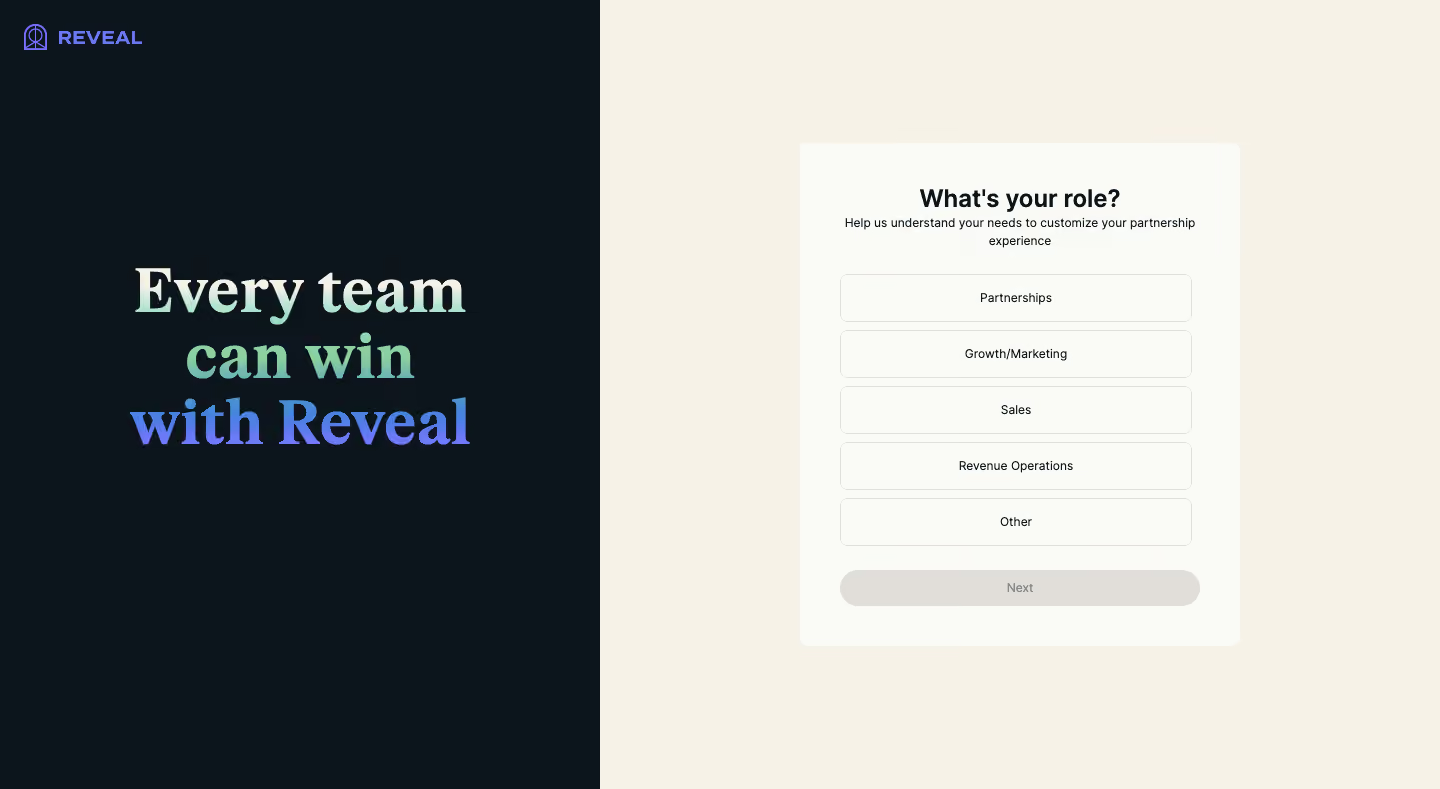
- **Style:** Split onboarding page with a dark brand statement on the left and a warm cream role-selection form on the right.
- **Scale:** Source 1440 × 789px. Measurements refer to screenshot pixels; CSS/device scale is unverified.
### Page composition
- **Split:** The dark left panel occupies roughly 600px, about 42% of the page; the cream right region fills the remainder.
- **Brand panel:** A small violet Reveal logo sits upper left. A large centered three-line serif statement occupies the middle.
- **Form:** A roughly 440 × 502px off-white card is centered within the right region, containing title, explanation, five role choices and a Next action.
### Information hierarchy
- **Question:** What's your role? leads the form, followed by a short two-line personalization explanation.
- **Choices:** Partnerships, Growth/Marketing, Sales, Revenue Operations and Other appear as equal full-width outlined options.
- **State:** No choice is visibly selected. Next is gray and appears disabled; no back control or progress indicator is shown.
### Typography
- **Families:** Bold editorial serif for the brand statement and sans-serif for the form; exact identities are unverified.
- **Roles:** Estimated statement 60–64px bold with tight leading, form heading 24px bold, explanatory copy and role labels around 12–13px.
- **Brand emphasis:** The statement uses a vertical light-to-mint-to-blue/violet color progression across its lines.
### Colors & surfaces
- **Sampled palette:** ICC-aware sRGB samples include dark #0C151B, cream #F6F2E8, card #FAFAF6, disabled gray #E1DEDA and violet #7177F9.
- **Contrast:** Dark form text sits on warm off-white; the left statement is luminous against near-black.
- **Depth:** The form card is flat with soft corners; option boundaries are thin neutral outlines without visible shadows.
### Components
- **Form card:** Approximately 8px corners and around 40px horizontal padding.
- **Role options:** Roughly 352 × 48px outlined rounded rectangles, about 8px corners and 8px vertical gaps, with centered labels.
- **Next:** Full-width pale-gray pill around 36px high, separated from options by about 24px; text is subdued.
- **Brand mark:** Compact outline icon plus uppercase Reveal wordmark in violet.
### Visual rhythm
- **Repetition:** Identical options create a clear comparison list. Tight question/helper spacing contrasts with larger separation before the choices.
- **Balance:** The bold serif statement fills the otherwise quiet left panel, while the right form remains compact and orderly.
### Responsive
- **Recommended adaptation:** Only desktop is observed. Stack or collapse the brand panel and retain the role form as the main mobile focus.
- **Controls:** Keep option touch targets generous and define clear selected/focus states without relying solely on color.
### Adaptation guidance
- **Preserve:** Keep role selection simple, mutually clear and tied to a short explanation of personalization.
- **Adapt:** Use relevant real roles and a truthful product statement. Do not infer a selected option or enabled progression state from this capture.
Use this context to reproduce the reference's visual language: layout, typography, colors, spacing, borders, radii, and distinctive elements. The screenshot takes priority if descriptions conflict.
## Direction
{{preferences.fidelityInstructions}}
## Output
{{output.instructions}}
Deliver a polished, cohesive design with precise alignment, hierarchy, and spacing. Produce the requested visual artifact, not just a description. If unsupported, explain the limitation.
.webp)


.avif)