Help & Support
1
In-product access to documentation, support requests, help resources, or assistance.
.webp)
Help and support gives users a route forward when the main product interface no longer answers their question. The experience may include documentation, contextual explanations, troubleshooting, contact options, and service-status information. Its purpose is to restore progress without making people abandon the task or repeat information the product already knows.
Different situations require different routes. A new user may need a tutorial; an experienced user may need the exact meaning of an option; someone facing a failed operation may need diagnosis or human support. A useful help system distinguishes these needs instead of placing every resource behind one generic search box.
Start with where users become uncertain. A field-level question calls for a short explanation near the control. A complex setup may need a guide with prerequisites and a clear sequence. A broken integration may need a diagnostic view and a way to contact support with the relevant context.
Moving every answer into an external knowledge base can make the product look clean while increasing the effort of recovery. Conversely, embedding an entire manual inside a tooltip overwhelms the task. Use the smallest explanation that resolves the immediate question and link to depth when it is genuinely needed.
Distinguish help from feedback. “How do I fix this?” and “I would like this feature” need different workflows. A contact menu should not force users to select an inaccurate category just to reach a person.
Help should also remain available after onboarding. A user may return months later with a different role or task. Do not make documentation accessible only through a dismissed welcome checklist.
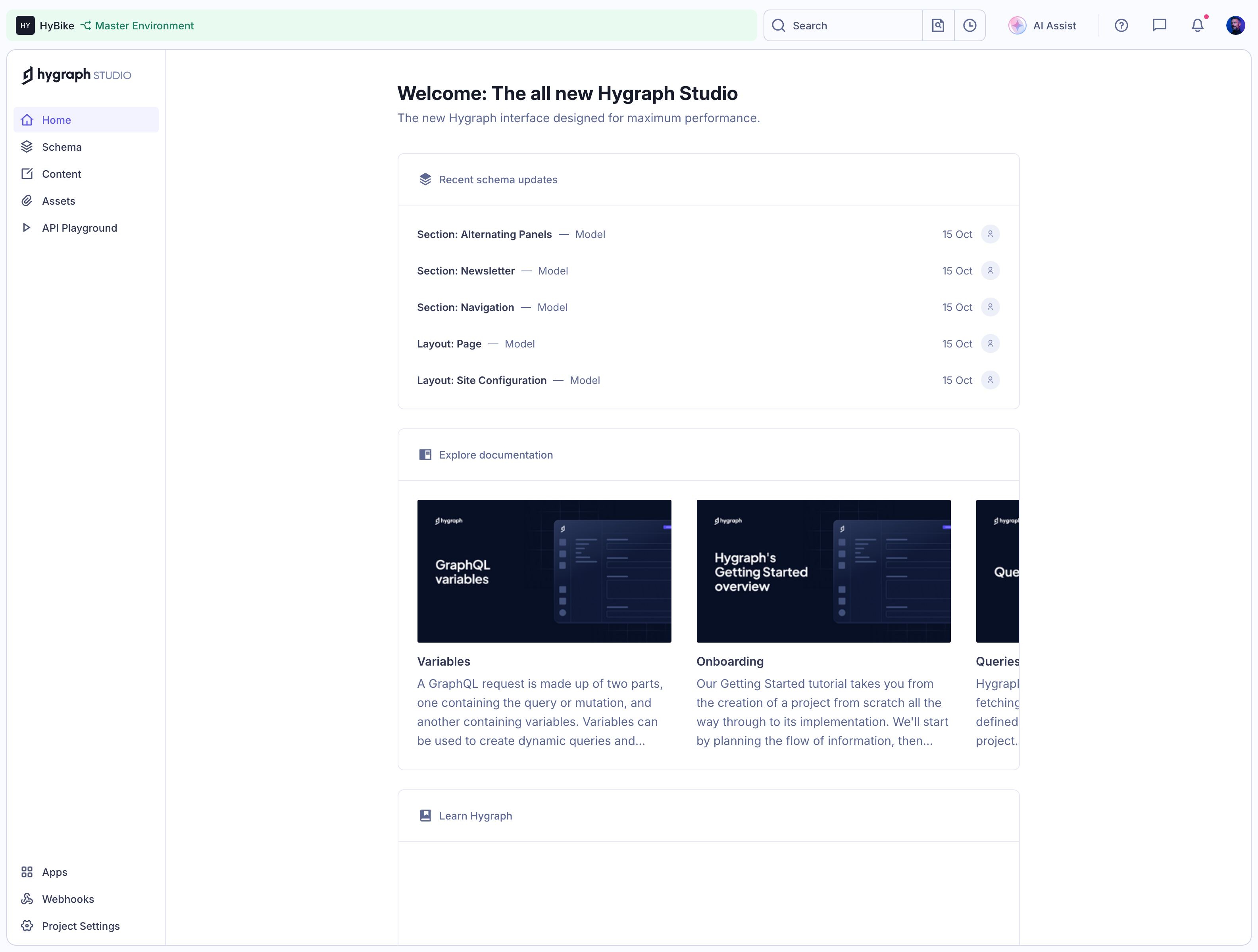
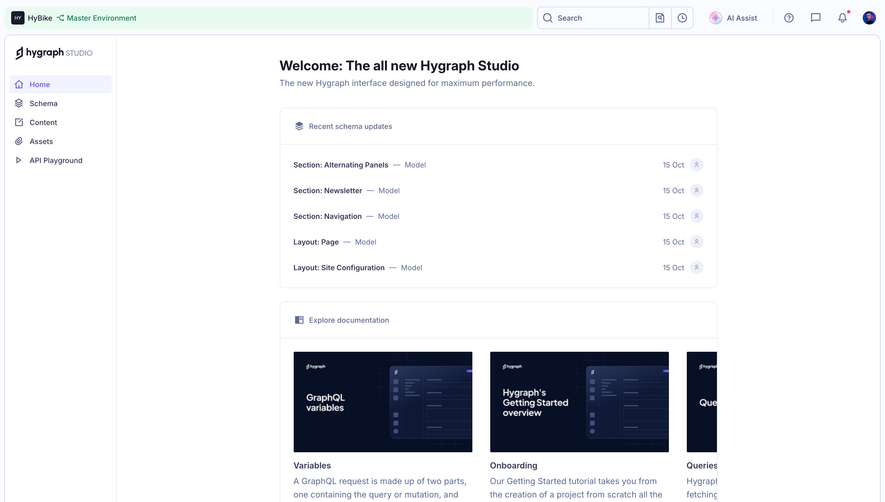
The captured Hygraph Studio dashboard combines recent schema updates with an “Explore documentation” section. The visible cards include GraphQL variables, a getting-started overview, and queries. Each pairs a title with a short description. A separate “Learn Hygraph” section appears below.
The structure gives users more than a link labeled “Docs.” It offers recognizable topics and a preview of what each resource explains. Someone who is unfamiliar with variables can choose a focused article; someone starting a project can choose the onboarding overview.
Placing these resources on the home screen supports discovery before a problem occurs. The tradeoff is that a dashboard should still prioritize the user’s work. Documentation cards need to remain relevant as the workspace matures rather than permanently occupying the most valuable space.
The top toolbar also shows a question-mark icon. The screenshot establishes its visible presence, but not what it opens. A production design should make such an icon’s function clear through an accessible label and test whether users recognize it as the route to help.
A developer configuring an API and an editor publishing content may use the same product with different vocabularies. Organize help around tasks and audience needs rather than assuming the internal product taxonomy is self-explanatory.
Hygraph’s captured cards mix a technical topic with a getting-started overview. That can serve different experience levels, provided the destination makes prerequisites clear. A beginner should not be dropped into a reference page that assumes an already configured project.
Use role or context when the product has reliable information about it, but let users reach the full help system. Over-personalized shortcuts can hide resources someone needs while taking on a new responsibility. Relevant suggestions should be aids, not gates.
Keep training material distinct from urgent troubleshooting. A user facing a blocked publish action needs an answer or contact path quickly. A long video course may be valuable later without being the right immediate response.
A card title should describe the problem or concept covered. “Learn more” is a weak destination label when several links appear together. “Connect your data source” or “Understand publishing permissions” tells someone what to expect before opening the article.
Use a short preview to establish scope. Does the guide cover a first setup, advanced configuration, or a particular error? The Hygraph screenshot’s descriptions help distinguish a variables article from a getting-started tutorial without requiring the user to open both.
A resource’s format can also matter. A video, reference document, checklist, and interactive walkthrough require different time and attention. State the format where it helps users choose, and provide a written route when a video is impractical.
Do not promise an immediate fix when a resource only provides background. Accurate labeling helps users decide whether to read, search further, or contact support instead.
When help opens from a task, preserve the task state. A user should not lose a draft, selected item, or filter simply because they asked for guidance. A side panel or new browser tab can be appropriate depending on the content and interaction.
Contextual help should recognize the relevant feature where possible. Opening a generic homepage from every field creates an extra navigation burden. A link near a particular setting should lead to the explanation of that setting, not merely the company’s documentation index.
If an in-product panel contains a multi-step article, keep navigation and a return path understandable. Avoid a narrow scrolling region that traps focus or obscures the save action behind it. On small screens, a full-screen help view may be clearer than squeezing the task and article together.
For troubleshooting, retain the error message and diagnostic identifier. People need the evidence while following instructions. Requiring them to remember a code after dismissing the error makes recovery harder.
Help search should accommodate common words, product labels, and recognizable error text. Users often describe the outcome they want rather than the technical name of the component. Indexing only internal terminology can make a relevant article effectively invisible.
Result previews should show why the resource matches. A title, concise excerpt, and useful category can help users avoid opening several near-identical pages. If the product has version-specific documentation, show the relevant context clearly.
A no-result state needs a next step. Offer a different query suggestion, a browse route, or contact support when appropriate. Do not present an empty search as the end of assistance.
Keep the query available when a user opens a result and returns. The investigation should be cumulative rather than requiring the same search repeatedly. Track failed searches as a possible content gap, while avoiding the assumption that every failure can be solved with another article.
Self-service resources can reduce routine questions, but they should not make contacting a person unnecessarily difficult. A user who has already tried the suggested steps needs a clear route to describe the remaining problem.
Explain what the support channel provides. A ticket form, live chat, and community forum have different expectations. State availability or response expectations only when the service can actually support them. Do not style an asynchronous form as though a person is waiting live.
Collect information that helps resolve the case: the affected feature, the observed result, and relevant context. Where the product already knows workspace and resource identifiers, include them appropriately rather than forcing users to retype them. Let users review attachments or diagnostic information before submission.
After sending, confirm the actual result and provide a reference or continuation route. A success message should tell the user what happens next, where replies will arrive, and whether they can keep working.
A system-wide issue needs a visible status route and consistent messaging. Sending each affected user through a lengthy contact form can create avoidable uncertainty and support volume. Link the relevant incident when it explains the current failure.
Do not assume every error is an outage. A permission problem, invalid input, and service incident need different explanations. Contextual diagnosis should be based on known system state rather than a generic “check the status page” response.
If the product includes an incident banner, keep it scoped and update it as the situation changes. Old outage messaging can make users doubt a functioning feature. The support journey should help distinguish a known issue from a case requiring individual investigation.
An AI help assistant can make documentation easier to query, but its answers need the same clarity as the rest of the support system. Show sources when available, explain material uncertainty, and make it possible to escalate rather than repeat an unhelpful answer.
Do not claim that an assistant performed a setting change when it only described instructions. Separate guidance from actions and confirm actual system outcomes. If the assistant can act, its permissions and confirmation model must match the task.
Keep the conversation available when escalating so the user does not have to start over. A human agent should receive useful context rather than an opaque AI summary that omits the original problem. Give the user a way to correct that summary if it matters to the handoff.
Documentation can become misleading when labels, permissions, or navigation change. Treat help links and screenshots as part of the feature’s maintenance. An article that points to a removed button is a product defect for the person trying to follow it.
Version or update information can help users evaluate relevance, but a recent date alone does not prove accuracy. Review the instructions against the working interface. Archive obsolete paths without leaving dead ends for links users may already have saved.
Measure whether people recover their task, not merely whether they click a resource. A highly visited article may indicate valuable guidance or a confusing feature. Combine usage signals with support questions and direct observation.
Test a beginner question, a precise field question, an error, a no-result search, and a case that needs human help. Check whether users preserve their work, find the appropriate resource, and understand the next step.
Choose the format that preserves work and provides enough room for the content. Short contextual guidance can fit in a panel; longer documentation may need a full page.
Provide an understandable route when self-service cannot resolve the task, when a case needs account-specific investigation, or when the service promises that channel.
Whether users can understand the issue and resume their task. Resource clicks and search volume are supporting signals, not proof of successful assistance.
Study SaaSFrame’s help and support examples with error states, citations and sources, and onboarding checklists to compare learning and recovery paths.