Changelog
0
A chronological presentation of product releases, improvements, fixes, or updates.
.webp)
A changelog explains how a product changes over time. It helps existing users discover useful additions, understand altered behavior, and decide whether an update affects their work. In SaaS products, it can also help prospective users see how the product is maintained, provided the entries contain meaningful information rather than a stream of promotional headlines.
The pattern's central problem is relevance. Most readers do not need every internal development detail. They need to know what changed, who can use it, and what action is required. A useful changelog combines a dependable history with enough guidance to make the change usable.
Start with the behavior before and after the change. “New export options” is less informative than explaining which format is now available and when it helps. A clear consequence gives the reader a reason to inspect the entry.
Distinguish additions, improvements, fixes, and changes that require action. These categories can share a history, but their meaning should remain visible. A minor visual adjustment and a change to an integration contract should not receive identical urgency merely because both shipped recently.
Keep the changelog separate from a roadmap. A roadmap describes intended direction; a changelog describes changes that have reached a defined availability state. If an entry concerns early access, label it clearly rather than presenting future or limited availability as a general release.
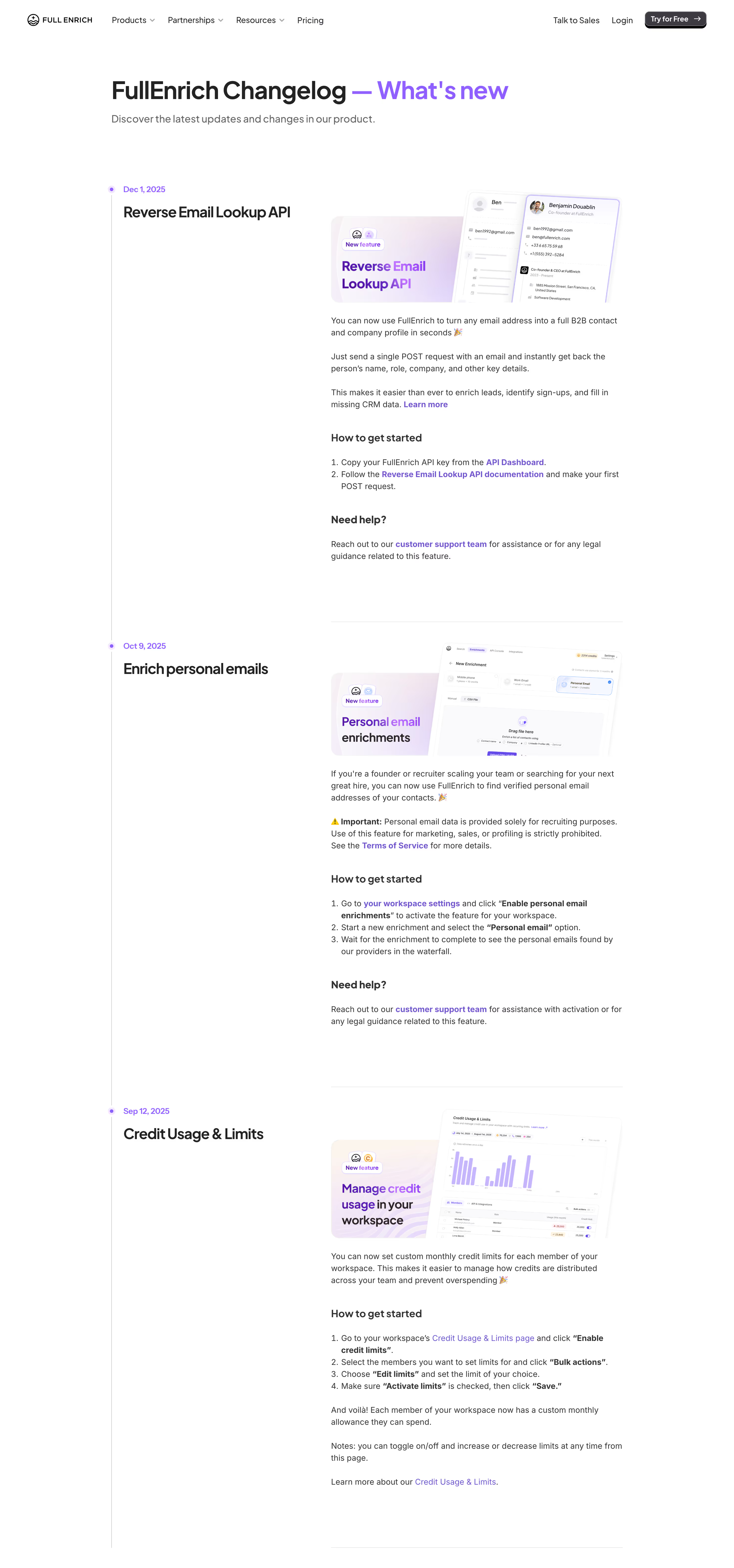
The FullEnrich screenshot presents a dated vertical history. Visible entries include an API-related addition, an enrichment feature, and credit-usage controls. Each entry pairs a title and illustration with explanatory text. Several include How to get started and Need help sections.
That structure bridges the gap between awareness and use. A reader who learns that a capability exists can also find the relevant activation area or documentation. The entry is not limited to announcing progress; it helps the user take the next step.
The captured enrichment entry also contains a visible limitation notice. The useful interface principle is placing consequential constraints near the benefit description, where readers can encounter both. This guide does not verify current policy or provide advice about that feature's permitted use.
The release illustrations contribute context, but the instructions carry much of the utility. For your own changelog, make screenshots substantiate the change and link to the actual supporting destination. Avoid images that merely repeat a headline without explaining anything about the new experience.
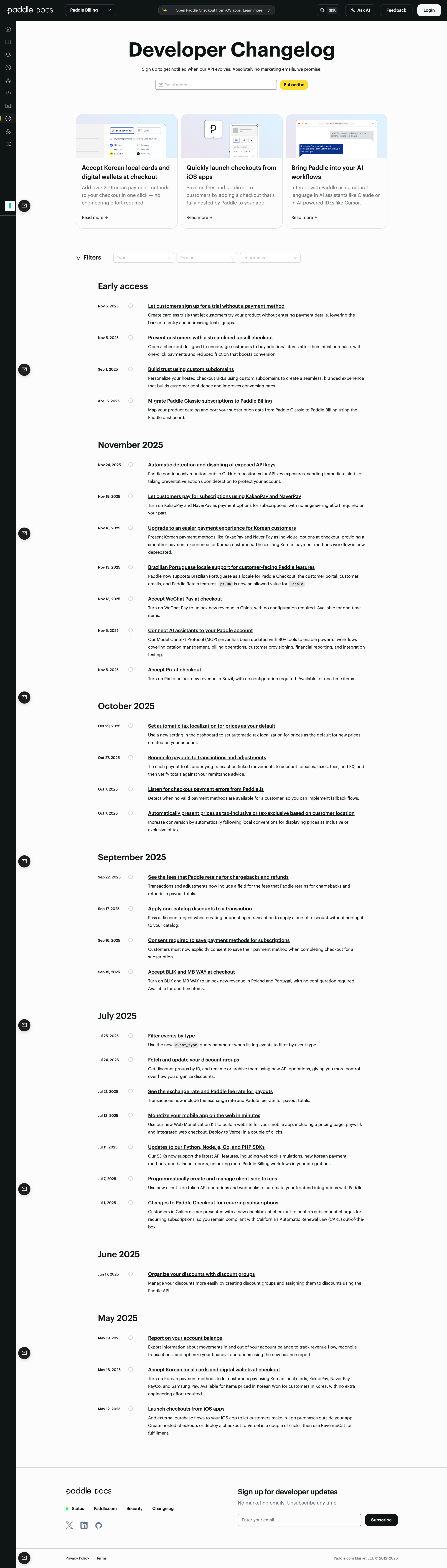
The Paddle screenshot opens with featured cards and a subscription field. Below them, Type, Product, and Importance filters precede an Early access section and monthly groups of dated entries. The archive uses concise titles and descriptions linked to additional detail.
The different layers support different reading tasks. Featured cards expose prominent developments. Monthly groups support historical scanning. Filters can help readers narrow a large history to the product area or change type relevant to them.
The separate Early access heading is particularly useful because availability is not binary. A capability can be announced but limited to a subset of users or a specific enrollment process. The visible category helps distinguish that state from ordinary dated releases.
The screenshot shows filter controls, not their behavior. It does not establish how importance is assigned or how results combine. Define those rules in your own product and make the labels meaningful rather than copying a filter bar without a reliable classification model.
An entry should state whether the change is generally available, rolling out, limited to particular plans, or part of an opt-in program when those distinctions matter. The date alone cannot explain who can use it.
Identify required action. A feature may appear automatically, require enabling a setting, or depend on an updated client or integration. Tell readers what applies instead of sending them to explore the product without a destination.
For behavior changes, explain relevant compatibility or migration requirements with the implementation team. Link to a maintained guide where the change is complex. A brief announcement should not be the only source for a task that needs detailed preparation.
If availability changes after publication, maintain the entry coherently. An updated note can explain the new state while preserving the original historical context. Do not silently rewrite dates or claims in a way that makes the archive difficult to interpret.
Reverse chronological order is a familiar route through recent changes, but the displayed date needs a clear meaning. Announcement date, release date, and availability date can differ. Choose a convention and explain exceptions when they affect users.
Group entries when it improves scanning. Monthly sections, as visible in Paddle's archive, can make a long history easier to browse. Individual dates remain useful for matching an observed change to a specific release.
Keep a stable route to an entry. A permalink helps users share an update internally, refer to it in support, or return from a notification. A changelog that exposes only one continuously changing page makes those tasks harder.
For a large history, provide navigation that preserves search or filters. A user inspecting an older entry should be able to return to the same archive segment rather than restart at the newest release.
A concise archive summary should state the consequence clearly. The detail entry can explain context, use, limitations, and supporting resources. This division lets users scan first and read deeper when the change is relevant.
Choose language for the audience. A developer changelog can use product-specific API terms where they are necessary, while a general product update should explain the user's task. Avoid exposing internal implementation details that do not help the reader decide or act.
For a fix, describe the resolved user-visible problem without inventing a broader benefit. For an improvement, explain what became easier or different. Vague phrases about performance or a better experience need specific support to be useful.
Do not make every update sound equally transformative. Consistent, measured language helps readers distinguish routine maintenance from a substantial change. A credible archive benefits from precision more than enthusiasm.
Select a screenshot that makes the change visible. If a release concerns a new configuration option, show that option in context. If it concerns a revised workflow, a short sequence or annotated comparison may be more useful than a whole-page image.
Keep the image near the explanation it supports. Add meaningful alt text and a caption where context is needed. The screenshot should not force readers to infer which tiny region changed.
State the capture's role accurately. A mockup of a planned feature and a screenshot of a released interface are different evidence. Do not present a design proposal as proof that the feature is available.
Maintain image and text alignment when the interface evolves. An older release can remain historically valid, but its activation instructions may need a link to current documentation. Preserve the archive while avoiding a misleading present-day walkthrough.
Product area, change type, and availability can help users find relevant updates. Importance can be useful if the classification is consistent and understandable. An unlabeled or subjective priority scheme can make users overlook changes that matter to their specific work.
Define how filters combine and show the active constraints. A no-match state should help revise the selection rather than suggest that no updates exist. Keep date navigation coherent with the filtered set.
Search can support known terms, integration names, or a feature users remember. Titles and summaries need enough specificity to make that retrieval possible. A history full of generic “improvements” is difficult to search even with a good search component.
Do not let filtering hide consequential notices from affected users without another communication route. The archive is one channel; a required action may need more direct contextual communication in the product.
A subscription helps readers receive future updates. Explain what it includes and keep the signup promise aligned with the messages actually sent. Paddle's captured page presents developer-update subscription separately from the archive content.
An in-product notice can reach users at a relevant moment. It should link to a specific change and provide an appropriate dismissal or read state. Repeatedly presenting the same announcement can turn discovery into interruption.
Match communication intensity to consequence. A small improvement may fit a quiet archive entry. A change requiring action may need a targeted notice. The goal is useful awareness, not maximizing the number of channels carrying every release.
Preserve a route back to the history after a notice is dismissed. Users may not be ready to evaluate the update when it first appears. A discoverable What's New destination supports later review.
A release can be delayed, adjusted, or withdrawn. When that affects the entry's meaning, add a clear update rather than leaving a confident announcement unchanged. The archive should reflect the product's actual state.
Separate a correction to the article from a change to the product. A fixed typo does not need the same treatment as a capability being removed. Choose the level of historical detail according to the consequence for readers.
Links to documentation and activation routes need maintenance. A broken link can prevent users from adopting a feature even when the changelog description is accurate. Include destination checks in the publication process.
Assign ownership for the archive. Product, engineering, support, and marketing can contribute, but someone needs to verify availability, terminology, and the final user's next step. A changelog is a product information surface rather than a miscellaneous news feed.
Page visits show that users reached the archive. Entry engagement can show interest. Neither proves that the reader understood the change or successfully used it. Review the next relevant action where that can be observed.
Test finding a release, explaining its availability, and locating the starting instructions. Ask users to identify a change relevant to their role among several unrelated updates. These tasks reveal weaknesses in titles, taxonomy, and guidance.
Include keyboard navigation, narrow-screen reading, long entries, and filtered empty states. Featured imagery should not obscure the core timeline. A changelog needs to remain readable as the archive grows.
No. A changelog records changes with a defined availability state. A roadmap communicates intended direction. Label early access or limited rollout so that readers do not confuse announcement with general availability.
Use imagery when it helps explain the change. A precise text entry can be sufficient for a small fix or technical change. Avoid decorative screenshots that add size without adding understanding.
Long enough to explain the consequence, availability, and next step. Complex changes may need linked documentation, while a concise summary can support scanning in the archive.
Explore changelog examples on SaaSFrame to compare release timelines, filters, activation guidance, and update-discovery surfaces.