Design with AI
Generate a new design based on this screen using your own content.
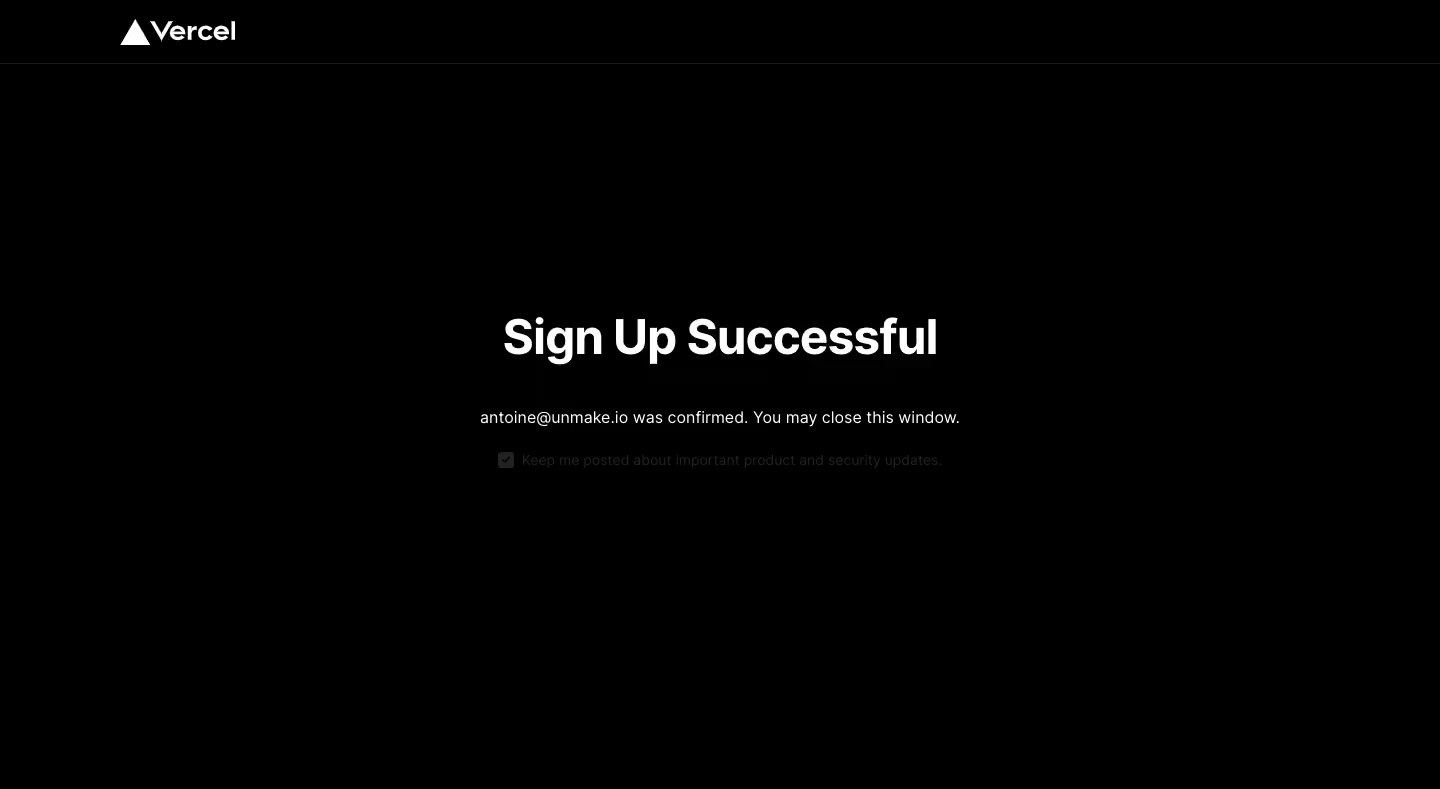
# Design from Reference: Vercel Image confirmed page
Create an original, high-fidelity visual design inspired by the reference. Prioritize composition, typography, colors, spacing, and component styling over technical implementation.
## Reference
- **Product:** Vercel
- **Category:** Success
- **Screenshot:** https://cdn.prod.website-files.com/5e9dc792e1210c5325f7ebbc/6acbbeba39e7f22db402879f_6acbbdf60f0c77113b581945_cms-50ea64c4425c6ee6990b889f.webp
Analyze the screenshot first. If inaccessible, request it rather than guessing.
## Content
{{content.instructions}}
{{content.data}}
Preserve essential messaging and factual accuracy. Adapt structure and copy length for visual balance; never invent product claims.
## Visual Design
### Overall aesthetic
- **Style:** An extremely minimal dark confirmation screen with a white brand mark, one bold status heading, and a short explanatory sentence.
- **Mood:** Quiet and conclusive, using typography and negative space rather than illustrations or a success card.
### Page composition
- **Capture and scale:** The screenshot is 1440 × 789 pixels. Approximate dimensions below refer to screenshot pixels; CSS scale is unverified.
- **Header:** A roughly 64 px-tall black header contains a white Vercel logo aligned approximately 120 px from the left edge. A very dark horizontal rule separates it from the body.
- **Status block:** A compact horizontally centered group sits near the vertical middle. It contains the heading, a centered confirmation sentence, and a smaller checked subscription-preference line beneath. No enclosing panel or primary action is visible.
### Information hierarchy
- **Primary status:** The large bold successful-signup heading is the strongest visual element.
- **Supporting information:** The next line confirms the account email and explains that the window can be closed.
- **Preference:** The checked product/security-update preference is much dimmer than the confirmation text and remains tertiary.
### Typography
- **Family:** A clean neutral sans serif is visible; its exact identity is unverified.
- **Heading:** Approximately 48 px, weight 700, with a compact 58 px line-height and slightly tight tracking.
- **Supporting copy:** The confirmation is approximately 16–17 px regular. The preference line is around 14–15 px, with a small inline checkbox.
### Colors & surfaces
- **Foundation:** Sampled sRGB black #000000 covers nearly the entire image; #FFFFFF defines the logo and headline.
- **Subtle detail:** Sampled dark grays include #1A1A1A, #222222, #111111, and #171717. They support the faint divider and low-emphasis preference treatment.
- **Contrast:** The confirmation sentence is light gray, while the preference is unusually low contrast against black.
### Components
- **Brand:** The white triangular symbol and wordmark form a compact header lockup.
- **Status group:** Use a plain text stack with no border, radius, shadow, icon badge, or colored success panel.
- **Preference control:** A small checked square precedes a single-line label. Its interaction or disabled state cannot be determined from the still image.
### Visual rhythm
- **Spacing:** Allow roughly 40–48 px between heading and confirmation line, then 24–28 px before the preference.
- **Negative space:** Keep broad empty regions around the centered content so the state reads immediately.
### Responsive
- **Observed state:** Only desktop is visible.
- **Recommended reflow:** Use 20–24 px page padding, reduce the heading to roughly 32–36 px CSS, and allow both supporting lines to wrap naturally. Keep the preference label associated with its checkbox.
### Adaptation guidance
- **Preserve:** Retain the black field, restrained header, clear centered status, and short completion message.
- **Adapt:** Insert the new product's real confirmation state and next-step instruction. Do not reuse the reference's account address.
- **Readability:** Maintain sufficient contrast for any actionable preference rather than reproducing the very dim reference treatment.
Use this context to reproduce the reference's visual language: layout, typography, colors, spacing, borders, radii, and distinctive elements. The screenshot takes priority if descriptions conflict.
## Direction
{{preferences.fidelityInstructions}}
## Output
{{output.instructions}}
Deliver a polished, cohesive design with precise alignment, hierarchy, and spacing. Produce the requested visual artifact, not just a description. If unsupported, explain the limitation.
.webp)



.avif)