Generate a new design based on this screen using your own content.
Thank you! Your submission has been received!
Oops! Something went wrong while submitting the form.
# Design from Reference: Superlist User Onboarding
Create an original, high-fidelity visual design inspired by the reference. Prioritize composition, typography, colors, spacing, and component styling over technical implementation.
## Reference
- **Product:** Superlist
- **Category:** User Onboarding
- **Screenshot:** https://cdn.prod.website-files.com/5e9dc792e1210c5325f7ebbc/6acad51a5a5fdf4c30310d8d_6acad43f11963fdadfb617d1_cms-d7e3e20276f0c11cdf8d832f.webp
Analyze the screenshot first. If inaccessible, request it rather than guessing.
## Content
{{content.instructions}}
{{content.data}}
Preserve essential messaging and factual accuracy. Adapt structure and copy length for visual balance; never invent product claims.
## Visual Design
Use this context to reproduce the reference's visual language: layout, typography, colors, spacing, borders, radii, and distinctive elements. The screenshot takes priority if descriptions conflict.
## Direction
{{preferences.fidelityInstructions}}
## Output
{{output.instructions}}
Deliver a polished, cohesive design with precise alignment, hierarchy, and spacing. Produce the requested visual artifact, not just a description. If unsupported, explain the limitation.
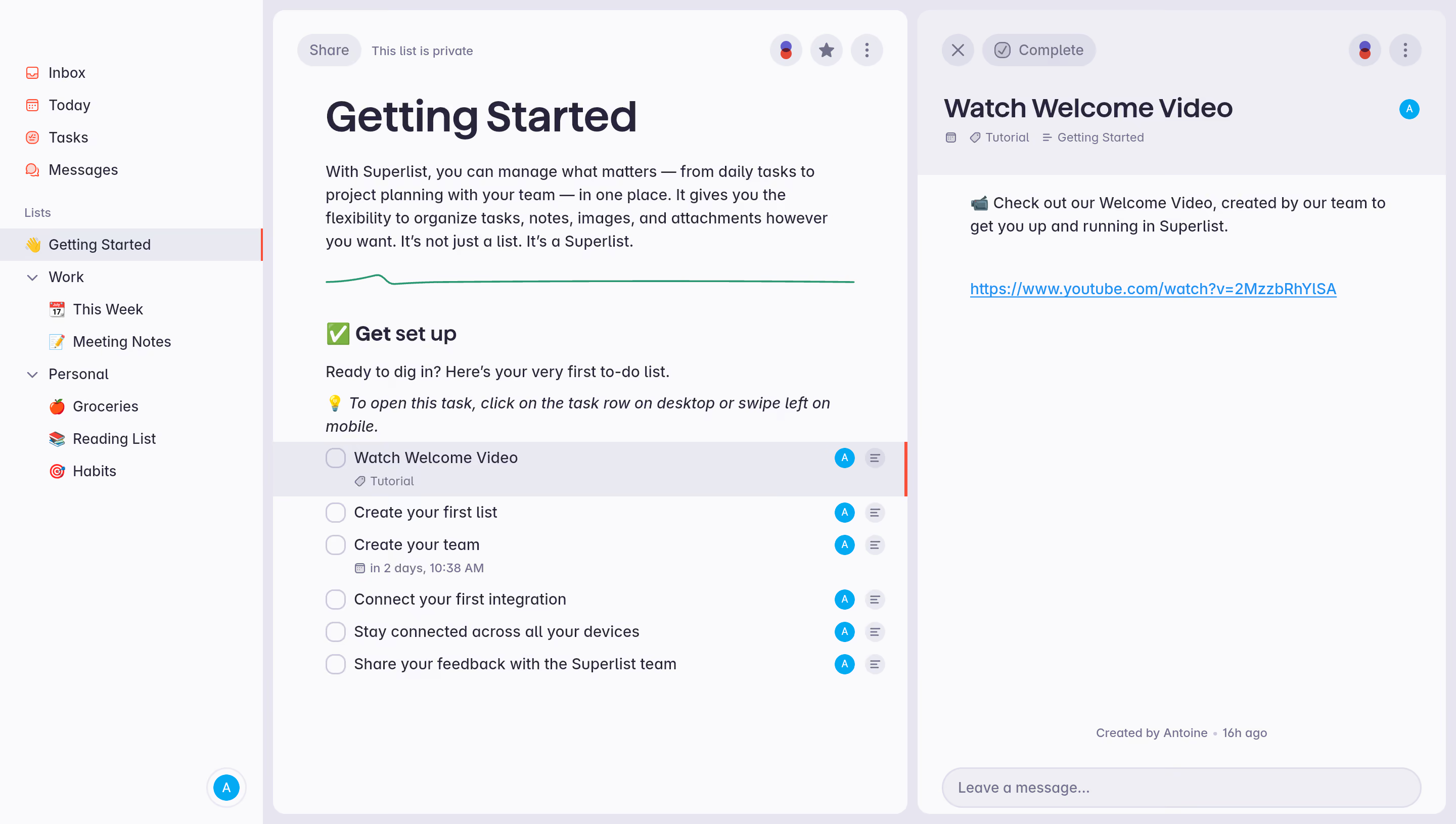
First thing you notice is how much breathing room there is. The left sidebar keeps navigation tight and organized with emoji-prefixed lists like 🍅 Groceries and 🎯 Habits. It's playful without being childish. The hierarchy between Work and Personal sections is dead simple.
The Layout Does the Thinking for You
Three-column structure works hard here. Sidebar, task list, task detail panel. Your eyes move left to right naturally. The "Getting Started" list doubles as an onboarding flow, which is smart. Each task row is clean with just enough metadata. That red accent bar on the selected task is subtle but effective for orientation. Due dates and tags sit quietly below task titles without cluttering things up.
Typography and Color Keep It Grounded
Big bold header for "Getting Started" anchors the page. Body text is a warm gray, not harsh black. The blue avatar badges add just enough color to break the monotony. That green squiggly divider is a fun little detail. The whole palette feels intentionally muted, letting the content lead. It's confident design that doesn't try too hard.
.webp)




.avif)