.webp)
Thank you! Your submission has been received!
Oops! Something went wrong while submitting the form.
Get SaaSFrame Pro
Monthly
$18
Quarterly
$48
Yearly
$180
Upgrade to access this feature
Browse all screens & flows
Filter and search screens & flows
Access Figma files
Access mobile versions
Bookmark screens & flows
Join now
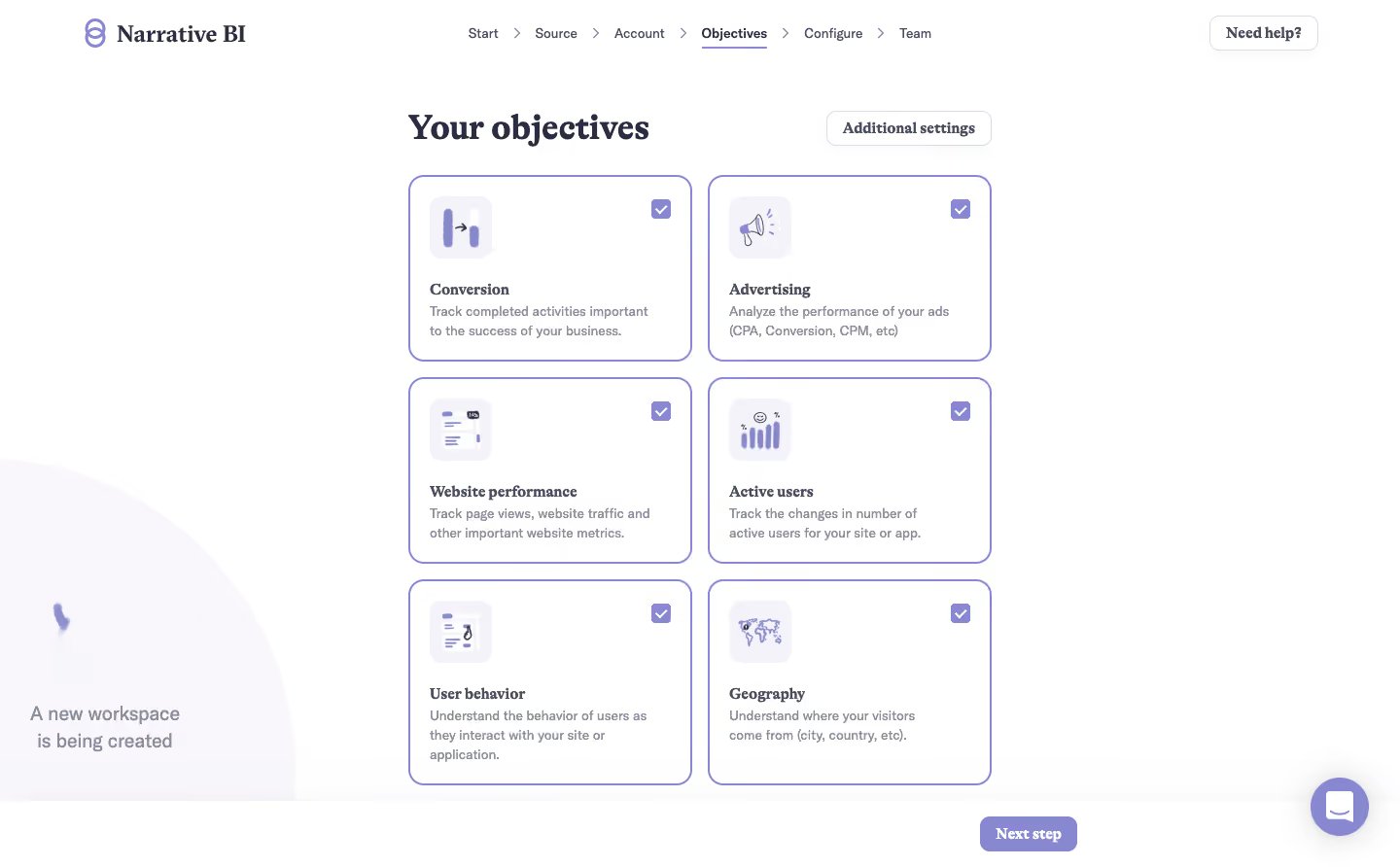
Narrative BI User Onboarding

Narrative BI
Actionable Analytics for Growth teams
Designed by


Bookmark
Bookmark

Design with AI
Thank you! Your submission has been received!
Oops! Something went wrong while submitting the form.
# Design from Reference: Narrative BI User Onboarding
Create an original, high-fidelity visual design inspired by the reference. Prioritize composition, typography, colors, spacing, and component styling over technical implementation.
## Reference
- **Product:** Narrative BI
- **Category:** User Onboarding
- **Screenshot:** https://cdn.prod.website-files.com/5e9dc792e1210c5325f7ebbc/6acbbeca39e7f22db40289a9_6acbbe10a4008ddb747711a8_cms-30f5c1de4c450dac0cc83b70.webp
Analyze the screenshot first. If inaccessible, request it rather than guessing.
## Content
{{content.instructions}}
{{content.data}}
Preserve essential messaging and factual accuracy. Adapt structure and copy length for visual balance; never invent product claims.
## Visual Design
### Overall aesthetic
- **Character:** A gentle onboarding screen combines dark serif headings, lavender selection outlines and small illustrated objective cards.
- **Capture evidence:** The screenshot measures 1440 × 892 pixels. Approximate dimensions refer to image pixels; a near-1× CSS scale is plausible but unverified.
- **Tone:** A centered card grid and restrained palette create a guided, approachable setup experience.
### Page composition
- **Top navigation:** Brand sits left, a six-stage progress trail spans the center and Need help? sits right.
- **Current step:** Objectives is bold and underlined in the progress trail.
- **Main content:** A centered roughly 600px-wide area contains the Your objectives heading, an Additional settings control and a two-column by three-row card grid.
- **Lower-left status:** A pale oversized circular decoration contains a small animated-looking figure and workspace-creation message; motion itself is unverified.
- **Bottom controls:** A thin full-width lower bar holds Next step toward the right of the content area. A circular lavender chat control sits at the lower right.
### Information hierarchy
- **Step context:** The top trail establishes sequence before the main heading.
- **Objective choices:** Six cards represent conversion, advertising, website performance, active users, behavior and geography.
- **Selected state:** All six cards show lavender outlines and checked upper-right boxes.
- **Card structure:** An illustrated icon precedes a bold title and short muted description.
- **Primary action:** The filled lavender Next step button stands apart from the outlined Additional settings action.
### Typography
- **Family pairing:** Bold serif headings and card labels contrast with a neutral sans-serif for descriptions and progress navigation. Exact identities are unverified.
- **Main title:** Approximately 36px bold serif with around 43px line-height.
- **Card titles:** Approximately 16px bold serif.
- **Descriptions:** Approximately 14px sans-serif with 20px line-height, muted gray-purple.
- **Progress labels:** Approximately 14px, with a semibold current step.
- **Buttons:** Approximately 16px bold serif, matching the heading character.
### Colors & surfaces
- **Canvas:** Sampled #FFFFFF supplies the main page and card interiors.
- **Lavender accent:** Sampled #8788CF supplies selected outlines, checkboxes and the primary action.
- **Pale decoration:** Sampled #F9F7FB forms the lower-left background shape.
- **Icon tiles:** Sampled #F3F2F8 supports pale square illustration backings.
- **Secondary text:** Sampled #8B8C9B supplies muted descriptions and status copy.
- **Primary ink:** Dark purple-gray provides strong heading contrast without a pure-black appearance.
### Components
- **Objective cards:** Approximately 292px wide and 192–212px tall, with 2px lavender outlines, around 16px radii and 20px padding.
- **Illustration tiles:** Roughly 64px rounded squares contain small lavender line-art/graphic illustrations.
- **Checkboxes:** Approximately 20px filled lavender squares with white ticks sit in the upper-right card corners.
- **Step trail:** Text labels are separated by small gray chevrons, with a lavender underline on the current stage.
- **Secondary action:** Additional settings is an outlined white rectangle with rounded corners.
- **Primary action:** Next step is a compact lavender rounded rectangle with white text.
- **Chat launcher:** A roughly 60px lavender circle contains a white chat symbol and soft shadow.
### Visual rhythm
- **Grid gaps:** Approximately 16–18px separates columns and rows.
- **Main alignment:** Heading and grid share a stable left edge around 420px from the image boundary.
- **Card spacing:** Icon, title and description are separated into a clear top-to-bottom reading sequence.
- **Outer whitespace:** Broad margins isolate the objective selection from navigation and decorative status content.
- **Bottom separation:** A pale horizontal rule distinguishes navigation controls from the card area.
### Responsive
- **Evidence limit:** Only the desktop step is visible; selection changes and loading behavior are unverified.
- **Grid recommendation:** Convert to a single column when two cards no longer fit comfortably.
- **Progress recommendation:** Use a compact current-step label and accessible progress menu instead of squeezing all stages.
- **Decoration recommendation:** Reposition or simplify the lower-left status illustration to avoid competing with choices.
- **Action recommendation:** Keep Next step reachable and prevent chat controls from overlapping it.
### Adaptation guidance
- **Selection model:** Use accessible checkbox-card semantics with the whole card as a clear selection target.
- **Visual consistency:** Reuse lavender outlines, icon tiles and serif card labels across onboarding choices.
- **State feedback:** Define selected, unselected, focus and disabled states; this capture only shows the selected state.
- **Progress clarity:** Keep the top trail synchronized with the current stage and expose workspace-creation status as meaningful text.
- **Accessibility:** Maintain readable contrast for muted descriptions and provide keyboard navigation through cards and actions.
Use this context to reproduce the reference's visual language: layout, typography, colors, spacing, borders, radii, and distinctive elements. The screenshot takes priority if descriptions conflict.
## Direction
{{preferences.fidelityInstructions}}
## Output
{{output.instructions}}
Deliver a polished, cohesive design with precise alignment, hierarchy, and spacing. Produce the requested visual artifact, not just a description. If unsupported, explain the limitation.

.avif)
Category
Patterns


Added on
February 4, 2023





Similar screens






Upgrade to SaaSFrame Pro now to see similar examples.
Monthly
$18 /month
Billed $18 monthly
Browse all screens & flows
Filter and search screens & flows
Search text in screenshots
Access Figma files
Access mobile versions
Join now
Quarterly
$16 /month
Billed $48 quarterly
Browse all screens & flows
Filter and search screens & flows
Search text in screenshots
Access Figma files
Access mobile versions
Join now
Yearly
$15 /month
Billed $180 yearly
Browse all screens & flows
Filter and search screens & flows
Search text in screenshots
Access Figma files
Access mobile versions
Join now