.webp)
Thank you! Your submission has been received!
Oops! Something went wrong while submitting the form.
Get SaaSFrame Pro
Monthly
$18
Quarterly
$48
Yearly
$180
Upgrade to access this feature
Browse all screens & flows
Filter and search screens & flows
Access Figma files
Access mobile versions
Bookmark screens & flows
Join now
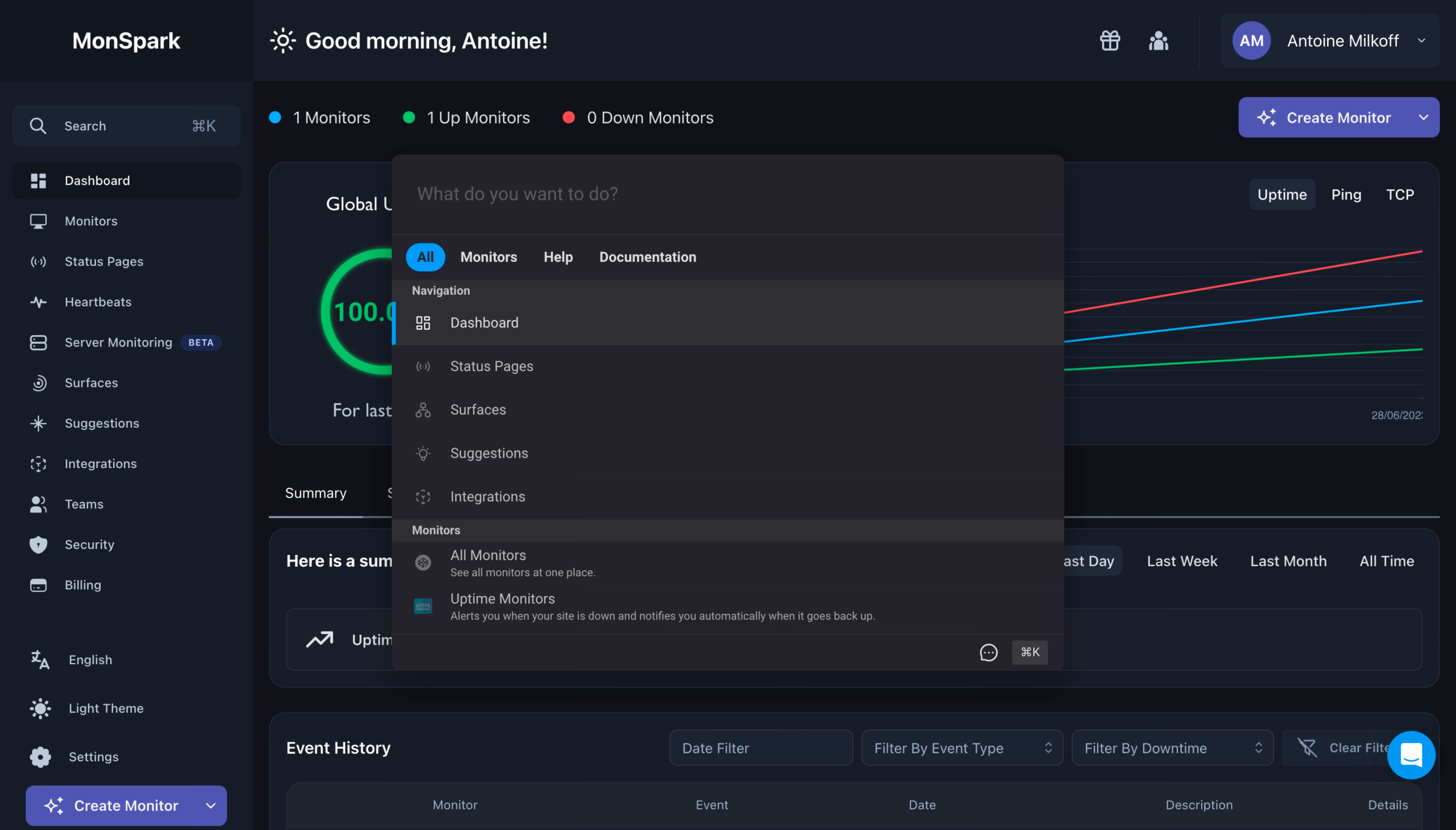
MonSpark Search Modal

MonSpark
All In One Website Monitoring
Designed by
No items found.

Bookmark
Bookmark

Design with AI
Thank you! Your submission has been received!
Oops! Something went wrong while submitting the form.
# Design from Reference: MonSpark Search Modal
Create an original, high-fidelity visual design inspired by the reference. Prioritize composition, typography, colors, spacing, and component styling over technical implementation.
## Reference
- **Product:** MonSpark
- **Category:** Search Modal
- **Screenshot:** https://cdn.prod.website-files.com/5e9dc792e1210c5325f7ebbc/6acb65c4b206c0d3f8f0f648_6acb6506b206c0d3f8f0a335_cms-e7939f49e7e567f1d1a7042c.webp
Analyze the screenshot first. If inaccessible, request it rather than guessing.
## Content
{{content.instructions}}
{{content.data}}
Preserve essential messaging and factual accuracy. Adapt structure and copy length for visual balance; never invent product claims.
## Visual Design
### Overall aesthetic
- **Style:** Dark monitoring dashboard with a centered command-search palette in slightly warmer charcoal.
- **Character:** Compact icon-led rows, cyan active selection and violet creation controls create a keyboard-oriented technical workspace.
- **Capture:** The image measures 5760 × 3284 pixels. CSS estimates assume a 4× capture, equivalent to approximately 1440 × 821 CSS pixels; actual scale and font identity are unverified.
### Page composition
- **Dashboard shell:** A roughly 250-CSS-pixel left rail contains search, navigation and a lower creation action. The top bar contains greeting and account utilities.
- **Background content:** Monitor counts, a large uptime/chart panel, summary module and partial event-history table remain visible.
- **Search palette:** A centered overlay approximately 664 × 511 pixels begins near x388, y153.
- **Palette structure:** A large prompt field sits above category tabs, followed by grouped navigation and monitor results.
- **Bottom utilities:** A small chat symbol and keyboard-shortcut badge sit in the palette's lower-right footer.
### Information hierarchy
- **Search task:** The large empty prompt at the top invites an action query.
- **Categories:** All is selected in cyan; Monitors, Help and Documentation remain plain labels.
- **Result groups:** Small headings separate navigation destinations from monitor tools.
- **Active result:** Dashboard uses a lighter row and cyan left-edge marker.
- **Result detail:** Monitor entries include smaller explanatory subtitles, while navigation entries use single-line labels.
- **Background context:** Dashboard metrics remain secondary behind the palette.
- **State scope:** The query is empty and no result has been activated.
### Typography
- **Family:** A neutral UI sans-serif is visible; exact identity is unverified.
- **Search prompt:** Approximately 18-pixel CSS size, regular, muted gray.
- **Category tabs:** Approximately 14 pixels, semibold.
- **Result labels:** Approximately 14 pixels with 20-pixel line height.
- **Group labels:** Approximately 12 pixels, bold.
- **Subtitles:** Approximately 11–12 pixels, muted gray.
- **Background headings:** Larger 18–24-pixel headings remain visible but subordinate to the overlay.
### Colors & surfaces
- **Measured palette:** Charcoal #242329 fills much of the command panel; #2F2E35 supports the selected row.
- **Measured shell:** #161C27 and #0E1118 support the dashboard.
- **Measured controls:** #1F2530 and #1B2331 occur in supporting panels/inputs.
- **Measured violet:** #4E55B3 fills creation controls.
- **Accent roles:** Cyan marks the selected category and result edge; green/red distinguish monitor status and chart lines.
- **Text:** Light gray labels contrast with darker muted prompt/subtitle text.
- **Depth:** The palette has rounded corners and a soft dark shadow, with thin separators between groups.
### Components
- **Command input:** A large borderless-looking top field spans the palette width with generous padding.
- **Category row:** Four compact labels sit beneath a divider; All uses a small cyan pill.
- **Navigation rows:** Five visible icon-label entries use roughly 43-pixel row heights.
- **Selected row:** A full-width lighter fill and narrow cyan leading bar identify Dashboard.
- **Monitor results:** Two visible entries pair small icons with label/subtitle groups.
- **Shortcut badge:** A small dark keycap-style control shows a command shortcut in the footer.
- **Dashboard context:** Behind the palette, a circular uptime indicator and multi-line chart occupy a wide card.
- **Support:** A bright-blue circular launcher overlays the lower-right corner.
- **State scope:** No typed query, empty result, loading state or help answer is shown.
### Visual rhythm
- **Palette alignment:** Input, tabs and result groups share a stable full-width frame.
- **Compact cadence:** Equal-height result rows support fast scanning.
- **Group contrast:** Slightly lighter heading strips divide result types.
- **Overlay balance:** The medium-width palette sits over a much wider dashboard, preserving context around its edges.
- **Density:** Dense command results contrast with larger background metric panels.
### Responsive
- **Recommendation — palette:** Use fluid width with safe gutters and a height that permits scrolling.
- **Recommendation — results:** Preserve icon, title and subtitle alignment on narrow screens.
- **Recommendation — tabs:** Allow category wrapping or horizontal scrolling with clear selection.
- **Recommendation — keyboard:** Maintain focused input, arrow-key selection and explicit activation semantics.
- **Recommendation — background:** Prevent accidental dashboard interaction while search is active. No mobile state is evidenced.
### Adaptation guidance
- **Preserve command grouping:** Keep navigation and monitor actions clearly categorized.
- **Use dual selection cues:** Retain active-row fill plus a colored edge, alongside semantic selection.
- **Reuse dark tokens:** Maintain charcoal palette surface, cool dark shell and cyan active emphasis.
- **Keep subtitles concise:** Explain tool outcomes without overwhelming compact result rows.
- **Define search states:** Typed queries, filtering, empty results and activation feedback are outside the capture.
- **Maintain focus behavior:** Open with input focus and restore focus on dismissal.
Use this context to reproduce the reference's visual language: layout, typography, colors, spacing, borders, radii, and distinctive elements. The screenshot takes priority if descriptions conflict.
## Direction
{{preferences.fidelityInstructions}}
## Output
{{output.instructions}}
Deliver a polished, cohesive design with precise alignment, hierarchy, and spacing. Produce the requested visual artifact, not just a description. If unsupported, explain the limitation.

.avif)
Category
Patterns
Tech Stack


Added on
June 28, 2023
Similar screens






Upgrade to SaaSFrame Pro now to see similar examples.
Monthly
$18 /month
Billed $18 monthly
Browse all screens & flows
Filter and search screens & flows
Search text in screenshots
Access Figma files
Access mobile versions
Join now
Quarterly
$16 /month
Billed $48 quarterly
Browse all screens & flows
Filter and search screens & flows
Search text in screenshots
Access Figma files
Access mobile versions
Join now
Yearly
$15 /month
Billed $180 yearly
Browse all screens & flows
Filter and search screens & flows
Search text in screenshots
Access Figma files
Access mobile versions
Join now