Design with AI
Generate a new design based on this screen using your own content.
# Design from Reference: Meiro Set Challenge Subject
Create an original, high-fidelity visual design inspired by the reference. Prioritize composition, typography, colors, spacing, and component styling over technical implementation.
## Reference
- **Product:** Meiro
- **Category:** Add & Edit
- **Screenshot:** https://cdn.prod.website-files.com/5e9dc792e1210c5325f7ebbc/6acadbe3d05a3f53c0a86267_6acadb2dca6d79c1e0c8dbac_cms-2544a5e46e9ddfa8c562bd1b.webp
Analyze the screenshot first. If inaccessible, request it rather than guessing.
## Content
{{content.instructions}}
{{content.data}}
Preserve essential messaging and factual accuracy. Adapt structure and copy length for visual balance; never invent product claims.
## Visual Design
### Overall aesthetic
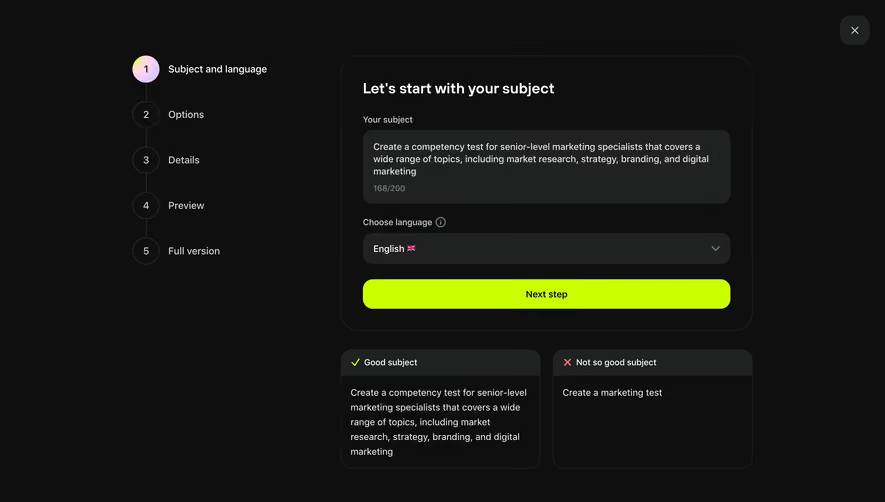
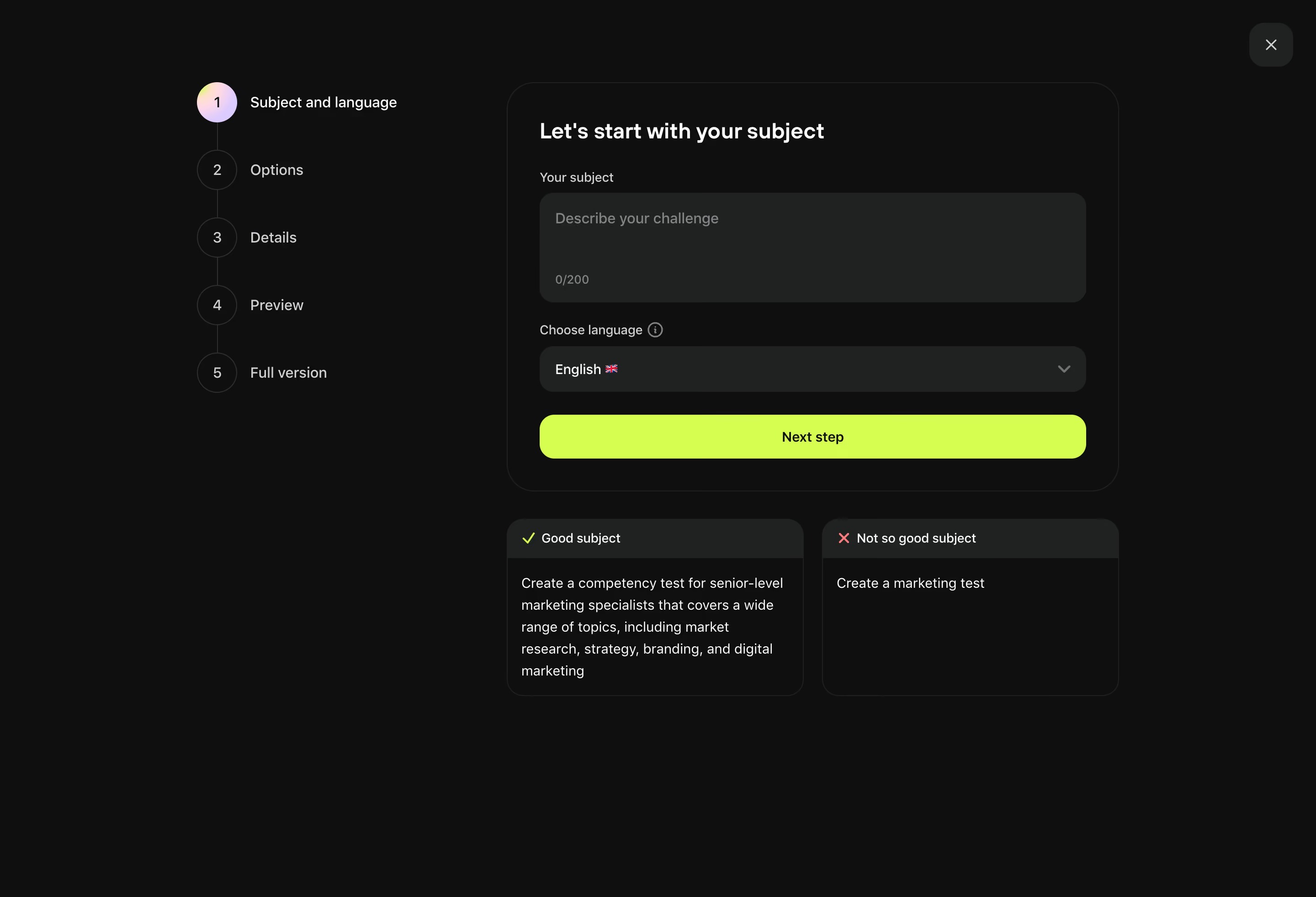
- **Character:** Dark challenge-creation wizard with fluorescent lime action and concise example guidance.
### Page composition
- **Canvas:** 2880 × 1964 screenshot pixels; CSS estimates assume approximately 2× capture scale.
- **Structure:** Left five-step vertical progress rail; broad outlined form panel; two example cards below; close control at upper right.
### Information hierarchy
- **Priority:** Subject textarea and language selector lead to Next step. Good/bad subject examples clarify expected specificity.
### Typography
- **Family:** Neutral sans-serif; exact font is unverified.
- **Scale:** Estimated CSS heading 24px bold, body/step labels 16px and field labels 14px.
### Colors & surfaces
- **Sampled palette:** Background #0E0F0F; controls/header surfaces #202222; lime #CAFF00; white #FFFFFF; secondary #CDD1D1; muted #7F8484.
- **State:** Active step uses pastel gradient circle; good/bad examples use lime check and coral cross.
### Components
- **Form:** Large multiline field with character counter, full-width rounded language dropdown and lime button.
- **Geometry:** Estimated 28px form radius, 16px input/example radii, 36px padding and 48px action height.
### Visual rhythm
- **Spacing:** About 24px between fields; two equal example panels separated by 20px; broad empty page margins.
### Responsive
- **Guidance:** Mobile is not shown. Place progress above form and stack examples without shrinking textarea.
### Adaptation guidance
- **Transfer:** Preserve guided input, language choice and contrasting examples. Adapt prompt expectations to the target creation workflow.
Use this context to reproduce the reference's visual language: layout, typography, colors, spacing, borders, radii, and distinctive elements. The screenshot takes priority if descriptions conflict.
## Direction
{{preferences.fidelityInstructions}}
## Output
{{output.instructions}}
Deliver a polished, cohesive design with precise alignment, hierarchy, and spacing. Produce the requested visual artifact, not just a description. If unsupported, explain the limitation.
.webp)



.avif)