Design with AI
Generate a new design based on this screen using your own content.
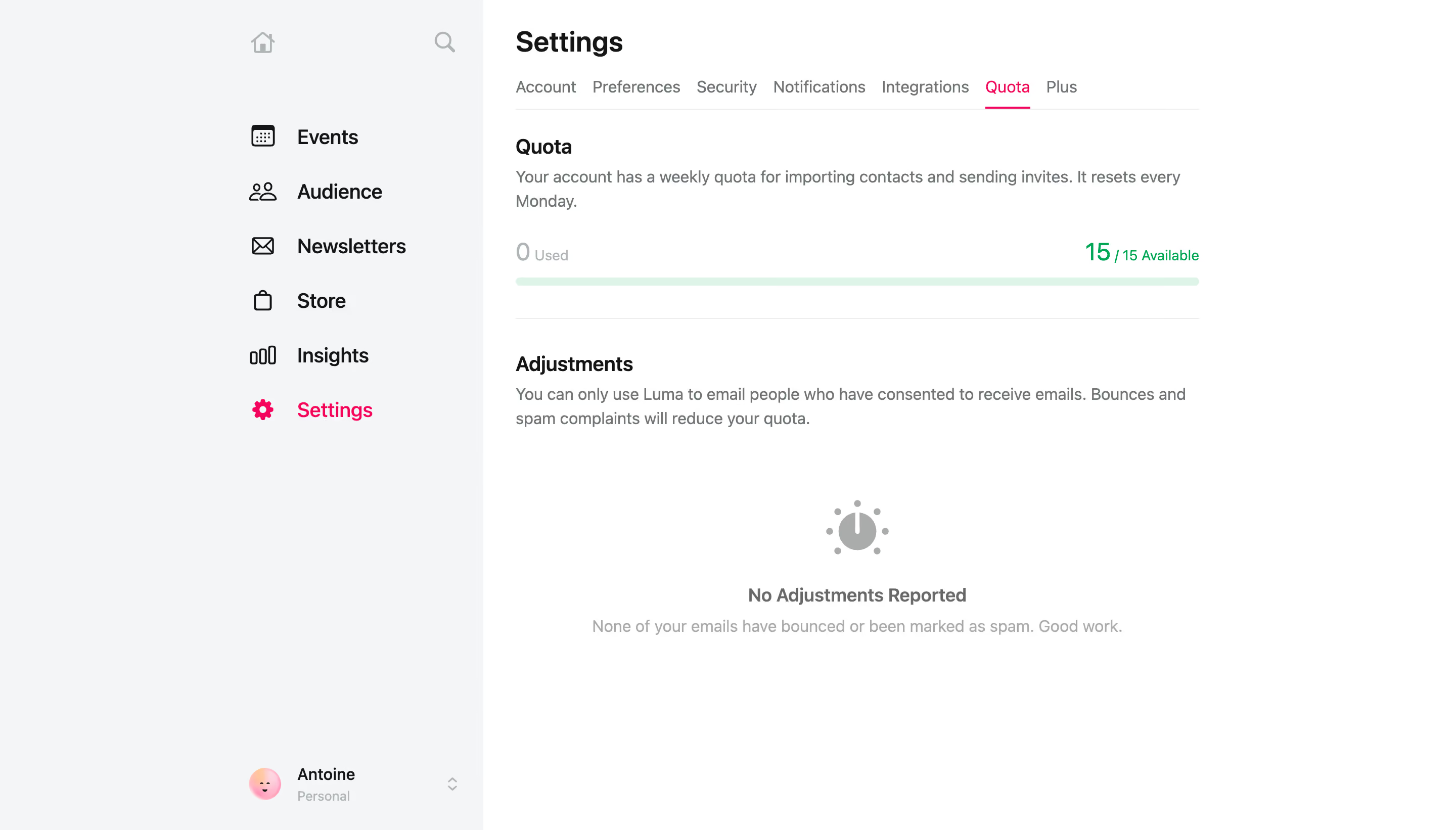
# Design from Reference: Luma Quota Settings
Create an original, high-fidelity visual design inspired by the reference. Prioritize composition, typography, colors, spacing, and component styling over technical implementation.
## Reference
- **Product:** Luma
- **Category:** Usage
- **Screenshot:** https://cdn.prod.website-files.com/5e9dc792e1210c5325f7ebbc/6acb723610423f7ec1f6518f_6acb70ad18ad202d01d98f78_cms-2d39661cc674db7a126a7a6b.webp
Analyze the screenshot first. If inaccessible, request it rather than guessing.
## Content
{{content.instructions}}
{{content.data}}
Preserve essential messaging and factual accuracy. Adapt structure and copy length for visual balance; never invent product claims.
## Visual Design
### Overall aesthetic
- **Character:** Minimal quota settings with green capacity feedback and pink navigation emphasis.
### Page composition
- **Canvas:** 2880 × 1642 screenshot px. Pale sidebar, Settings title/tab row, quota explanation, thin capacity bar, and adjustments empty state.
### Information hierarchy
- **Priority:** Quota tab is active; used/available values flank the bar, then explanatory adjustment text and empty-state symbol.
### Typography
- **Scale:** Estimated CSS at assumed 2× capture: title 28 px, section headings 20 px, body 16 px, supporting labels 14 px. Family unverified.
### Colors & surfaces
- **Palette:** Sampled sRGB #FFFFFF, sidebar #F4F5F7, bar #DFF4E8, secondary #707578, dark #141517, and muted #AAACAB. Pink identifies active settings.
### Components
- **Details:** Flat tab underline, thin pill capacity bar, green availability value, horizontal divider, and gray circular indicator illustration.
### Visual rhythm
- **Spacing:** Estimated 675 CSS px content width and 32 px section gaps; large whitespace below the empty state.
### Responsive
- **Adaptation:** Mobile is not shown. Collapse sidebar and horizontally scroll settings tabs.
### Adaptation guidance
- **Transfer:** Preserve explicit used/available hierarchy and adjustment explanation. Populate real quotas and reset rules.
Use this context to reproduce the reference's visual language: layout, typography, colors, spacing, borders, radii, and distinctive elements. The screenshot takes priority if descriptions conflict.
## Direction
{{preferences.fidelityInstructions}}
## Output
{{output.instructions}}
Deliver a polished, cohesive design with precise alignment, hierarchy, and spacing. Produce the requested visual artifact, not just a description. If unsupported, explain the limitation.