1. Header Section: The webpage has a header section which includes the Ludus logo, the product tour page title, and a navigation menu bar. The menu bar contains links to other pages on the Ludus website. 2. Welcome Section: This section displays a short welcome message with a video thumbnail showcasing the Ludus product in action. Visitors can click on the thumbnail to watch the video. 3. Features Section: In this section, various features of the Ludus product are displayed in an animated manner. The section has five different elements, and each element has an animated icon and text description. 4. Design and Layout Section: In this section, the visitors can see a preview of different designs and layouts that can be achieved using Ludus. The designs include text, images, shapes, icons, and embedded videos. 5. Collaboration Section: This section highlights the collaboration features of the Ludus product. A visitor can learn and understand how Ludus streamlines team feedback and communication while working on a project. 6. Pricing Section: In this section, the pricing plan of different Ludus plans is displayed along with the features on offer. 7. Frequently Asked Questions (FAQ) Section: This section displays answers to several commonly asked questions of potential Ludus users. The section is in a collapsible format for better user experience. 8. Sign-up Section: At the bottom of the webpage, visitors can sign up with their email to get started with Ludus. The section also has a short description of the benefits of using Ludus for creating and presenting stunning presentations. Overall, the page follows a clear and concise layout, with a good balance of text and multimedia elements to keep visitors engaged.

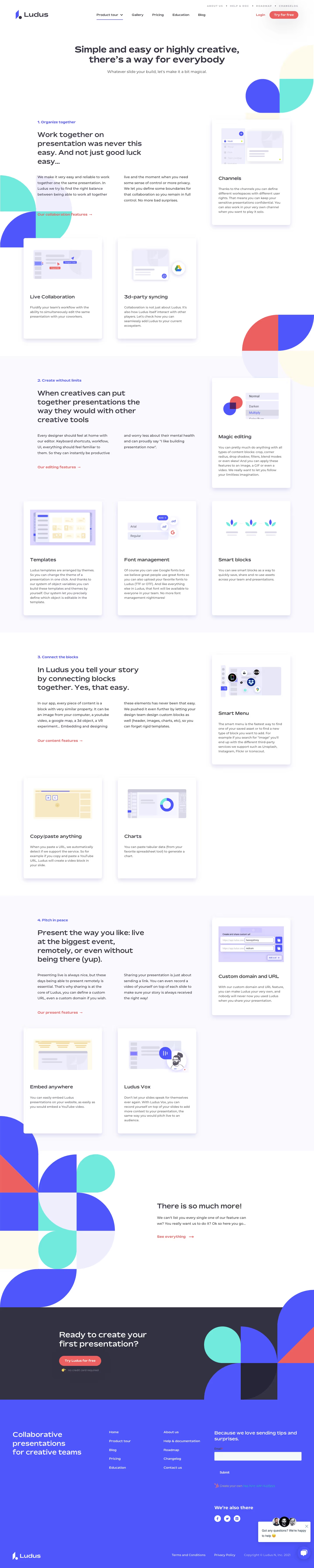

Ludus Features Page

Ludus
Limitless creativity for your slides
Designed by
No items found.
Category
Patterns
No items found.
Tech Stack
Added on
October 20, 2020