.webp)
Thank you! Your submission has been received!
Oops! Something went wrong while submitting the form.
Get SaaSFrame Pro
Monthly
$18
Quarterly
$48
Yearly
$180
Upgrade to access this feature
Browse all screens & flows
Filter and search screens & flows
Access Figma files
Access mobile versions
Bookmark screens & flows
Join now
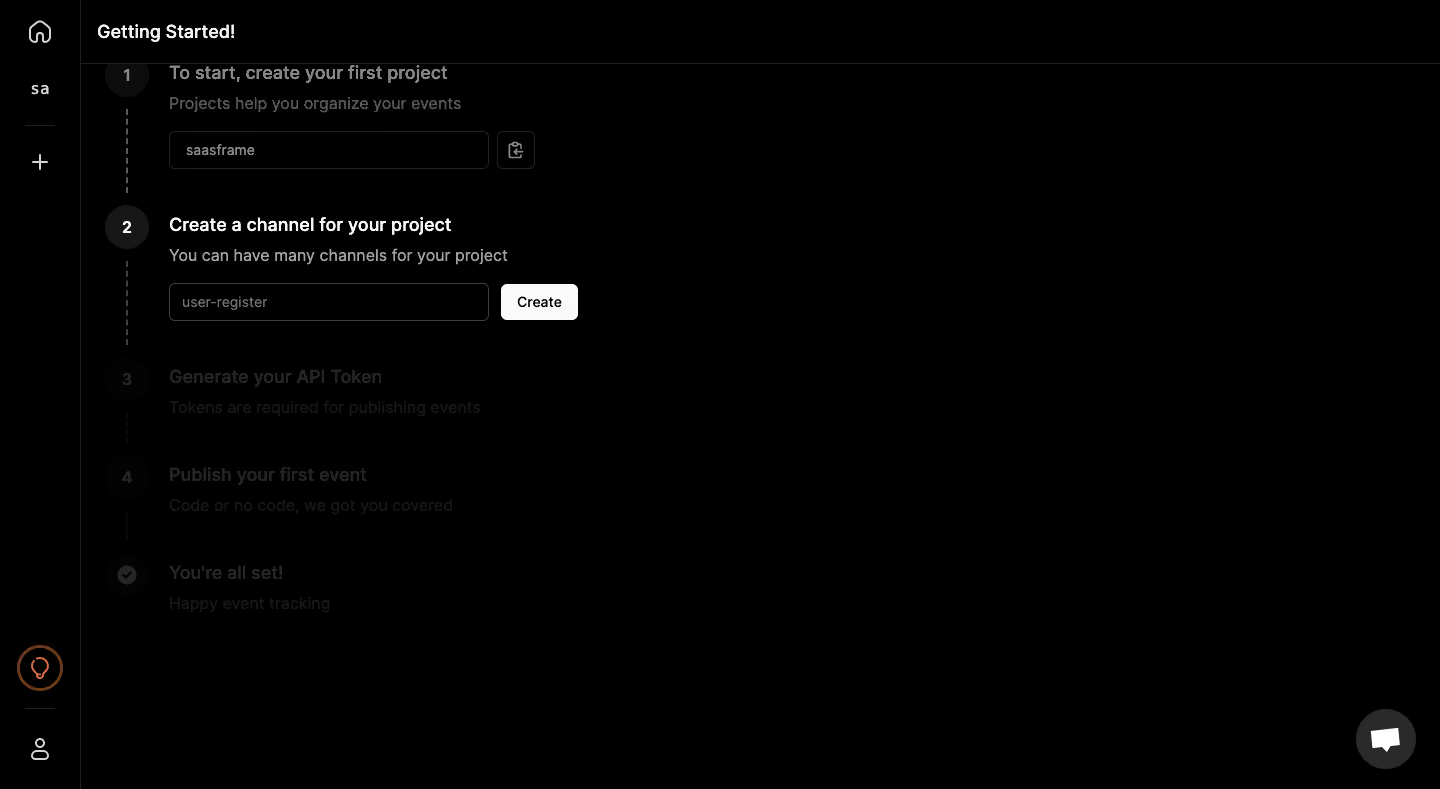
Logsnag User Onboarding

Logsnag
Realtime monitoring
Designed by
No items found.

Bookmark
Bookmark

Design with AI
Thank you! Your submission has been received!
Oops! Something went wrong while submitting the form.
# Design from Reference: Logsnag User Onboarding
Create an original, high-fidelity visual design inspired by the reference. Prioritize composition, typography, colors, spacing, and component styling over technical implementation.
## Reference
- **Product:** Logsnag
- **Category:** User Onboarding
- **Screenshot:** https://cdn.prod.website-files.com/5e9dc792e1210c5325f7ebbc/6acbbe45476aea3982e3fbf6_6acbbd796e4b025d03e0575c_cms-46e6852942425cfbda5f764b.webp
Analyze the screenshot first. If inaccessible, request it rather than guessing.
## Content
{{content.instructions}}
{{content.data}}
Preserve essential messaging and factual accuracy. Adapt structure and copy length for visual balance; never invent product claims.
## Visual Design
### Overall aesthetic
- **Character:** A stark dark onboarding checklist uses a nearly black canvas, white active-step text, muted inactive steps, and one bright Create button.
- **Tone:** The interface is compact and developer-oriented, with minimal decoration and a clear sequential task structure.
- **Observed scale:** The source measures 1440 × 789 pixels. Sizes below refer to image pixels; CSS estimates assume an unverified 1× capture.
### Page composition
- **Icon rail:** A narrow left strip contains home, a short workspace label, plus, lower guidance/profile icons, and thin separators.
- **Header:** Getting Started! sits at the top of the main area above a horizontal rule.
- **Checklist:** A narrow content column begins near the main area’s left edge. Numbered circles connect through dashed vertical lines.
- **Active step:** The second step contains a heading, helper sentence, channel-name input, and adjacent Create button.
- **Other steps:** The first project step appears above; token generation, first-event publication, and a final completion label appear below in much darker text.
- **Support:** A circular chat launcher sits near the lower-right corner. Most of the workspace to the right is empty black.
### Information hierarchy
- **Active task:** Create a channel for your project is the brightest and strongest checklist heading.
- **Supporting instruction:** A lighter gray sentence explains that projects can contain many channels.
- **Input/action:** The channel field and white Create button form the immediate task.
- **Sequence:** Numbered markers and dashed connectors establish the order of project, channel, token, event, and completion stages.
- **State limit:** The first field contains a project value, but the image does not prove completed token generation or event publication.
- **Security scope:** No actual API token is visible. Token generation is only a later-step label.
### Typography
- **Typeface appearance:** A neutral sans-serif is used throughout. Exact family is unverified.
- **Page heading:** Approximately 20 pixels, semibold/bold.
- **Step headings:** Around 19–20 pixels, semibold, with the active step bright white.
- **Helper text:** Approximately 16–17 pixels with comfortable line-height.
- **Inputs/button:** Around 14 pixels, regular/medium.
- **Progress numbers:** Approximately 16–18 pixels, centered inside dark circular markers.
### Colors & surfaces
- **Measured base:** #000000 dominates the page.
- **Measured dark detail:** #1F1F1F, #2A2A2A, #252525, and #171717 occur in markers, borders, and inactive content.
- **Measured bright surface:** #FAFAFA supplies the Create-button family.
- **Text tiers:** Active heading is near-white; helper copy is gray; later steps are very dim.
- **Accent:** A lower lightbulb-like rail icon uses an orange outline.
- **Flat construction:** Thin rules, outlined inputs, and simple circles provide structure without shadows or cards.
### Components
- **Progress markers:** Dark circular numbered badges align on a vertical spine, connected by dashed lines.
- **Project field:** A dark outlined input contains a project value and a small adjacent icon control.
- **Channel field:** A roughly 320 × 38-pixel outlined input contains a short channel-name value.
- **Create button:** A white rounded rectangle approximately 77 × 36 pixels sits beside the field.
- **Later-step labels:** Token generation and first-event publication are dimmed, followed by a circular check marker and completion text.
- **Rail utilities:** Small line icons and thin separators organize the narrow navigation.
- **Chat control:** A dark gray circle contains a white message symbol.
- **Unshown states:** Channel creation success, generated token, code examples, event result, focus, and validation are not visible.
### Visual rhythm
- **Vertical sequence:** Markers, dashed connectors, headings, helper lines, and controls create a clear top-to-bottom path.
- **Compact left alignment:** All task content remains near the left, leaving a broad empty right region.
- **State contrast:** Brightness distinguishes the current step from surrounding steps.
- **Minimal color:** White/gray hierarchy carries the interface, with only a small orange utility accent.
### Responsive
- **Evidence limit:** Only a desktop checklist is captured. Mobile and step-expansion behavior are unverified.
- **Recommended layout:** Use a fluid task column and stack input/button when horizontal space is limited.
- **Recommended navigation:** Keep the icon rail accessible through labels or a compact menu on small screens.
- **Recommended progress:** Provide a programmatic current-step label and do not rely only on low opacity.
- **Recommended contrast:** Ensure inactive-but-readable instructions and focus states remain accessible.
### Adaptation guidance
- **Preserve sequential setup:** Keep project, channel, token, and event tasks distinct.
- **Do not infer completion:** Final labels are part of the checklist, not evidence of successful setup.
- **Handle credentials safely:** Define token creation/reveal/copy behavior from actual requirements and avoid embedding real secrets in examples.
- **Use clear validation:** Provide channel naming rules, errors, loading, and success feedback.
- **Use safe sample values:** Replace captured project/channel values with approved examples.
- **Build from restrained tokens:** Black canvas, dark outlines, white active text/action, and explicit step semantics are sufficient.
Use this context to reproduce the reference's visual language: layout, typography, colors, spacing, borders, radii, and distinctive elements. The screenshot takes priority if descriptions conflict.
## Direction
{{preferences.fidelityInstructions}}
## Output
{{output.instructions}}
Deliver a polished, cohesive design with precise alignment, hierarchy, and spacing. Produce the requested visual artifact, not just a description. If unsupported, explain the limitation.

.avif)
Category
Patterns
Tech Stack


Added on
February 5, 2023
Found in 1 flow



Similar screens







Upgrade to SaaSFrame Pro now to see similar examples.
Monthly
$18 /month
Billed $18 monthly
Browse all screens & flows
Filter and search screens & flows
Search text in screenshots
Access Figma files
Access mobile versions
Join now
Quarterly
$16 /month
Billed $48 quarterly
Browse all screens & flows
Filter and search screens & flows
Search text in screenshots
Access Figma files
Access mobile versions
Join now
Yearly
$15 /month
Billed $180 yearly
Browse all screens & flows
Filter and search screens & flows
Search text in screenshots
Access Figma files
Access mobile versions
Join now