Design with AI
Generate a new design based on this screen using your own content.
# Design from Reference: Hume AI API Keys
Create an original, high-fidelity visual design inspired by the reference. Prioritize composition, typography, colors, spacing, and component styling over technical implementation.
## Reference
- **Product:** Hume AI
- **Category:** Settings
- **Screenshot:** https://cdn.prod.website-files.com/5e9dc792e1210c5325f7ebbc/6acad404c910b3adf9e48b74_6acad190b2165b6c7fffcd21_cms-35c8f1271de2832b59d26956.webp
Analyze the screenshot first. If inaccessible, request it rather than guessing.
## Content
{{content.instructions}}
{{content.data}}
Preserve essential messaging and factual accuracy. Adapt structure and copy length for visual balance; never invent product claims.
## Visual Design
### Overall aesthetic
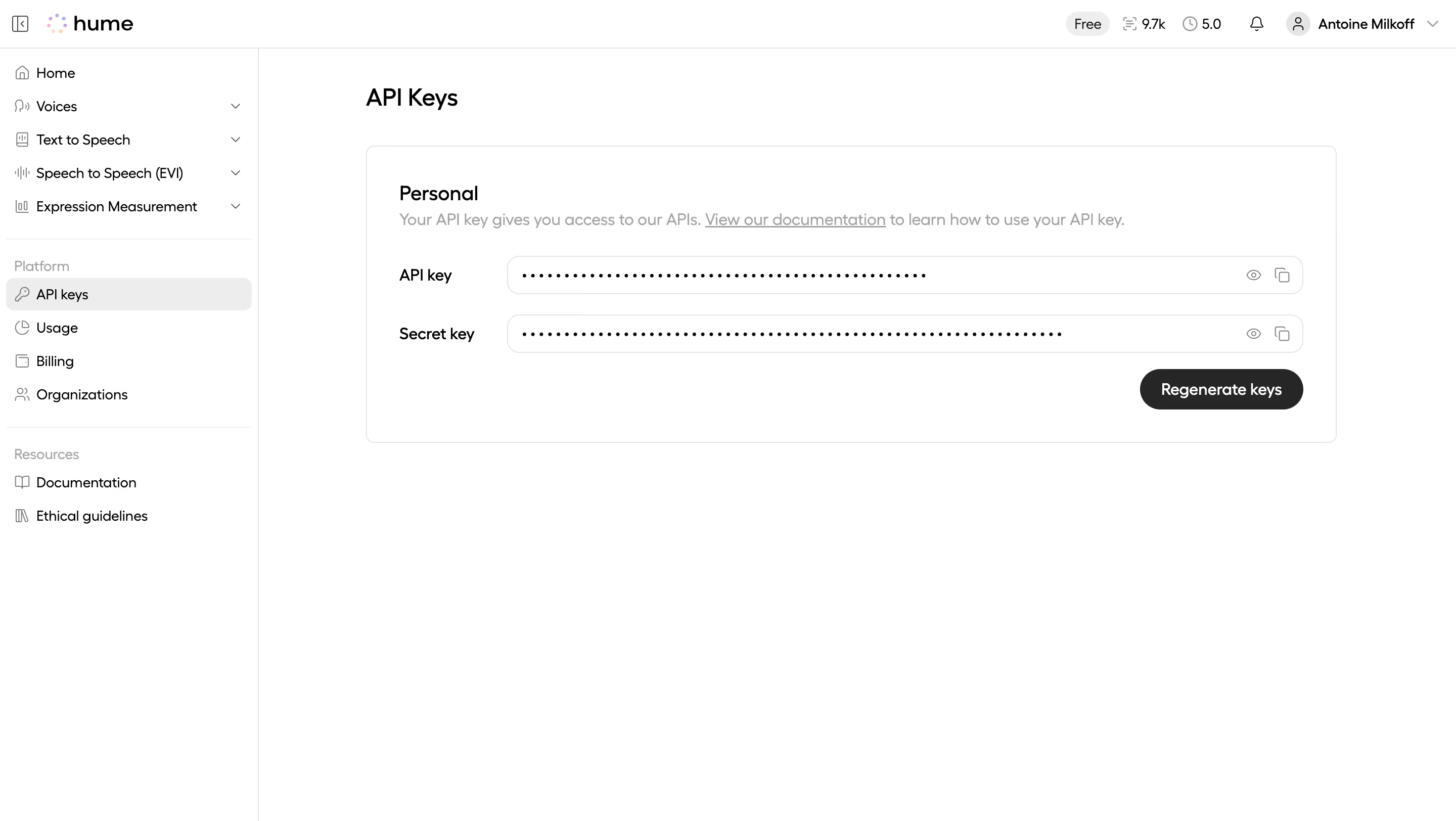
- **Character:** A minimal white developer-settings page with a narrow navigation sidebar and one bordered credentials panel.
- **Focus:** Grayscale styling and masked key rows prioritize utility over decoration.
### Page composition
- **Capture scale:** The source measures 2880 × 1624 pixels. A roughly 1440 × 812 CSS-pixel viewport at 2× scale is plausible but unverified.
- **Shell:** A roughly 255-pixel estimated CSS sidebar sits beneath a slim top header with brand and account/usage utilities.
- **Main content:** API Keys appears above a large Personal panel around 960 pixels wide.
- **Panel layout:** A short description precedes two horizontally aligned label/field rows and a right-aligned Regenerate keys pill.
- **Whitespace:** Most of the lower workspace is empty.
### Information hierarchy
- **Page title:** API Keys is the main heading.
- **Panel title:** Personal introduces the credential scope, followed by a documentation link in muted explanatory text.
- **Credentials:** API key and Secret key labels precede fully masked values.
- **Action:** Regenerate keys is the only filled panel action; eye/copy icons sit at the right of each masked field.
### Typography
- **Family:** A rounded sans serif is visible; exact identity is unverified.
- **Heading:** Approximately 24 estimated CSS pixels, medium to semibold.
- **Panel title:** Around 20 pixels; descriptions, labels and action text are about 16 pixels.
- **Navigation:** Approximately 14 pixels with compact line height; group headings use lighter gray.
### Colors & surfaces
- **Measured palette:** ICC-aware sRGB sampling yields white #FFFFFF, border #E5E5E5, selected surface #EDEDED, dark action #262626, black #000000 and muted text #A3A3A3.
- **Minor accents:** The brand mark contains small pastel dots; the rest of the interface is predominantly grayscale.
- **Geometry:** The panel and credential fields have thin gray borders and rounded corners around 8–12 estimated CSS pixels, without visible heavy shadow.
### Components
- **Masked fields:** Two long outlined pill-like rows show bullet masking, with eye and copy icons at right. No credential characters are exposed.
- **Regeneration action:** A dark rounded pill around 160 × 40 estimated CSS pixels sits beneath the fields.
- **Sidebar:** Product groups, Platform and Resources use icon-and-label rows; API keys has a pale selected background.
- **Header utilities:** Small plan/usage indicators, notification icon and account menu align right.
### Visual rhythm
- **Padding:** The Personal panel uses roughly 32-pixel estimated CSS insets.
- **Row alignment:** Labels occupy a fixed left column and credential fields share equal width.
- **Spacing:** Around 20 pixels separates credential rows, with a smaller gap before the action and broad whitespace outside the panel.
### Responsive
- **Recommendation:** Collapse the sidebar and stack field labels above masked controls at narrow widths.
- **Recommendation:** Keep reveal/copy targets distinct and prevent long masked content from forcing overflow. No mobile rendering is shown.
### Adaptation guidance
- **Preserve:** Retain masking by default, clear credential labels and explicit copy/reveal affordances.
- **Implement:** Use accessible icon labels and a clear regeneration confirmation/state flow; behavior is not verified by the screenshot.
- **Privacy:** Do not infer key values or lengths from masking, and use generic account details in reusable examples.
Use this context to reproduce the reference's visual language: layout, typography, colors, spacing, borders, radii, and distinctive elements. The screenshot takes priority if descriptions conflict.
## Direction
{{preferences.fidelityInstructions}}
## Output
{{output.instructions}}
Deliver a polished, cohesive design with precise alignment, hierarchy, and spacing. Produce the requested visual artifact, not just a description. If unsupported, explain the limitation.
.webp)



.avif)