Design with AI
Generate a new design based on this screen using your own content.
# Design from Reference: GraphCMS Edit digital asset modal
Create an original, high-fidelity visual design inspired by the reference. Prioritize composition, typography, colors, spacing, and component styling over technical implementation.
## Reference
- **Product:** GraphCMS
- **Category:** Add & Edit
- **Screenshot:** https://cdn.prod.website-files.com/5e9dc792e1210c5325f7ebbc/6acad09c51f927271bf81f21_6acad031e575349288e37963_cms-ed9e11a036bb11b668a60917.webp
Analyze the screenshot first. If inaccessible, request it rather than guessing.
## Content
{{content.instructions}}
{{content.data}}
Preserve essential messaging and factual accuracy. Adapt structure and copy length for visual balance; never invent product claims.
## Visual Design
### Overall aesthetic
- **Style:** Enterprise configuration interface with a bright white editing panel over a muted blue-gray scrim, compact navy text and violet actions.
- **Capture scale:** Source screenshot is 2880 × 2400px. Sizes below estimate a 1440 × 1200 CSS viewport at 2× capture scale.
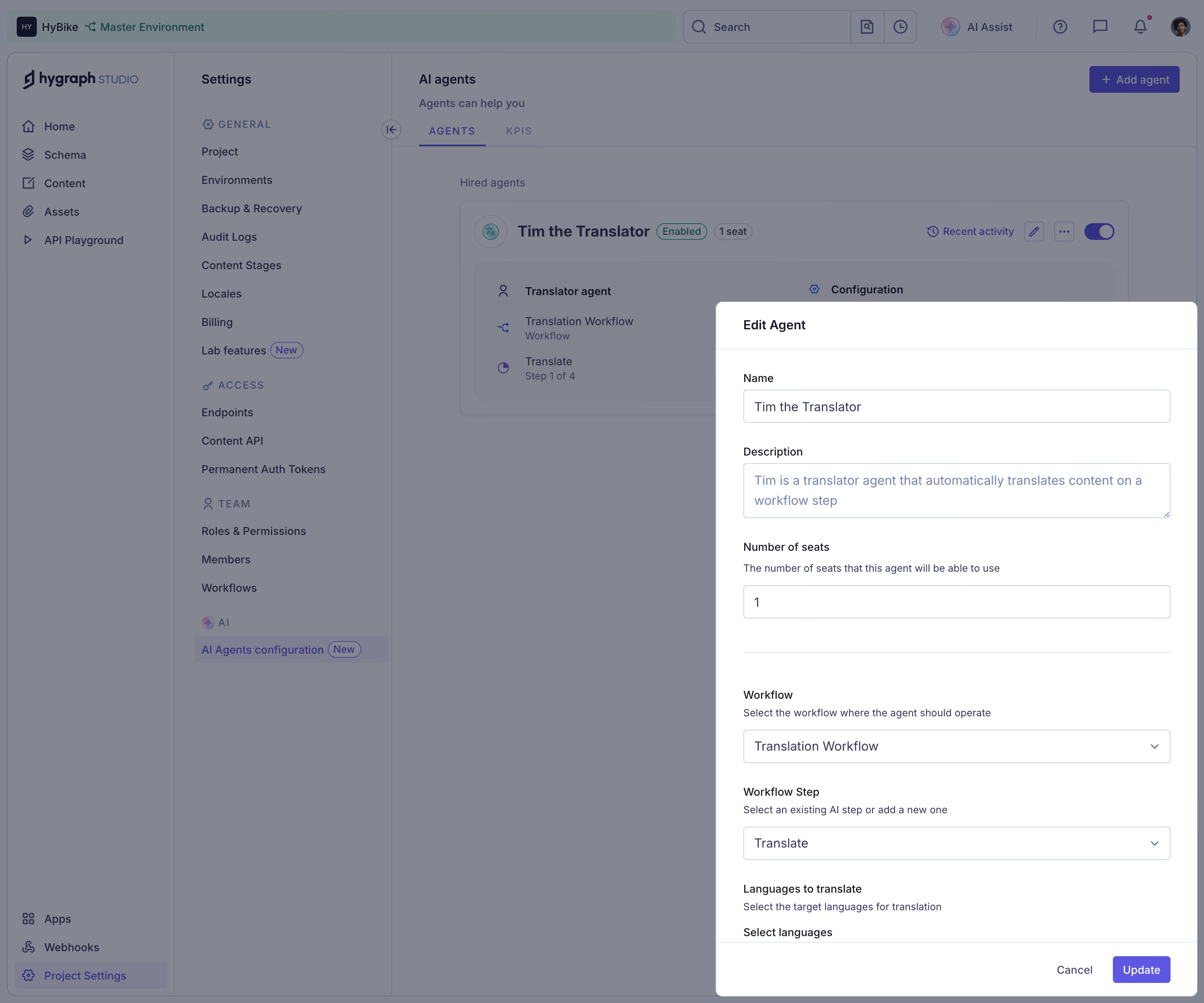
- **Visible subject:** The screenshot shows Hygraph's Edit Agent form, despite the record title referring to a digital asset modal.
### Page composition
- **Application shell:** A top workspace/environment bar spans the page. A primary navigation rail around 210px wide and secondary settings rail around 260px wide occupy the left.
- **Background content:** The AI agents page shows Agents/KPIs tabs and a hired-agent card with enabled status, seat badge, workflow summary and utility controls.
- **Editing panel:** A roughly 576 × 830px white panel is aligned near the lower-right edge, beginning around x856/y362. Header and footer are separated from the form by thin rules.
### Information hierarchy
- **Agent identity:** Name and Description lead the form, followed by Number of seats and a short helper sentence.
- **Workflow configuration:** A divider introduces Workflow, Workflow Step and Languages to translate, each with explanatory copy.
- **Completion:** Cancel and a violet Update button occupy the bottom-right footer. The language-selection label is visible just above that footer; its options are not shown.
### Typography
- **Family:** Neutral sans-serif; exact font identity is unverified.
- **Roles:** Estimated panel title 16px medium, field labels 14px medium, helper text 12–13px/18px and input values 15px/22px.
- **Background hierarchy:** Section labels use small uppercase tracked text; navigation links remain compact, around 14px.
### Colors & surfaces
- **Sampled palette:** ICC-aware sRGB samples include white #FFFFFF, dimmed blue-gray #848691 and #818491, related overlay tones #81848F and #79848A, and pale border #D0D4E5.
- **Semantic roles:** Violet identifies Update, selected navigation and agent utilities. Navy text anchors the form; helper copy uses subdued blue-gray.
- **Overlay distinction:** The large gray-blue samples belong to the dimmed background and should not be copied as the undimmed application's base surface.
### Components
- **Panel treatment:** Approximately 8px outer corners, white fill and a fine neutral boundary. Header is about 56px high; footer about 64px.
- **Inputs:** Full-width outlined controls around 510px wide and 40px high, with 4px corners, pale lavender-gray borders and inset text.
- **Description:** A roughly 66px-high textarea shows two lines of content and a resize handle.
- **Selects:** Workflow and Workflow Step use the same full-width input styling with small right-side chevrons; no dropdown is expanded.
- **Footer actions:** Plain Cancel text sits beside a compact violet Update rectangle, roughly 70 × 32px with small corners.
- **Background card:** The hired-agent card includes an Enabled badge, 1 seat pill, recent activity link, edit/overflow controls and a toggle.
### Visual rhythm
- **Form cadence:** Labels sit close to their controls, while larger gaps separate identity fields and workflow settings. A horizontal divider reinforces that transition.
- **Alignment:** Labels, helpers, inputs and divider share a consistent left edge with about 32px panel padding.
- **Layering:** The bright panel concentrates attention while leaving enough background visible to explain the agent's location in settings.
### Responsive
- **Recommended adaptation:** Only desktop is observed. Make the edit panel full-screen on narrow displays, with a scrollable form and accessible footer actions.
- **Navigation:** Collapse both background navigation rails rather than squeezing them alongside the editor. Keep helper text and long workflow names readable.
### Adaptation guidance
- **Preserve:** Keep identity fields before workflow configuration, concise helpers, consistent outlined controls and clear Update/Cancel actions.
- **Adapt:** Use actual agent fields, workflows and language options. Follow the visible agent-editing structure rather than inventing asset-editing controls from the record title.
Use this context to reproduce the reference's visual language: layout, typography, colors, spacing, borders, radii, and distinctive elements. The screenshot takes priority if descriptions conflict.
## Direction
{{preferences.fidelityInstructions}}
## Output
{{output.instructions}}
Deliver a polished, cohesive design with precise alignment, hierarchy, and spacing. Produce the requested visual artifact, not just a description. If unsupported, explain the limitation.
.webp)



.avif)