Design with AI
Generate a new design based on this screen using your own content.
# Design from Reference: Front Account Setup
Create an original, high-fidelity visual design inspired by the reference. Prioritize composition, typography, colors, spacing, and component styling over technical implementation.
## Reference
- **Product:** Front
- **Category:** Account Setup
- **Screenshot:** https://cdn.prod.website-files.com/5e9dc792e1210c5325f7ebbc/6acb6d97b206c0d3f8f3a37f_6acb6bd4994832179b56e108_cms-e5022b95c5a1ca3474733290.webp
Analyze the screenshot first. If inaccessible, request it rather than guessing.
## Content
{{content.instructions}}
{{content.data}}
Preserve essential messaging and factual accuracy. Adapt structure and copy length for visual balance; never invent product claims.
## Visual Design
### Overall aesthetic
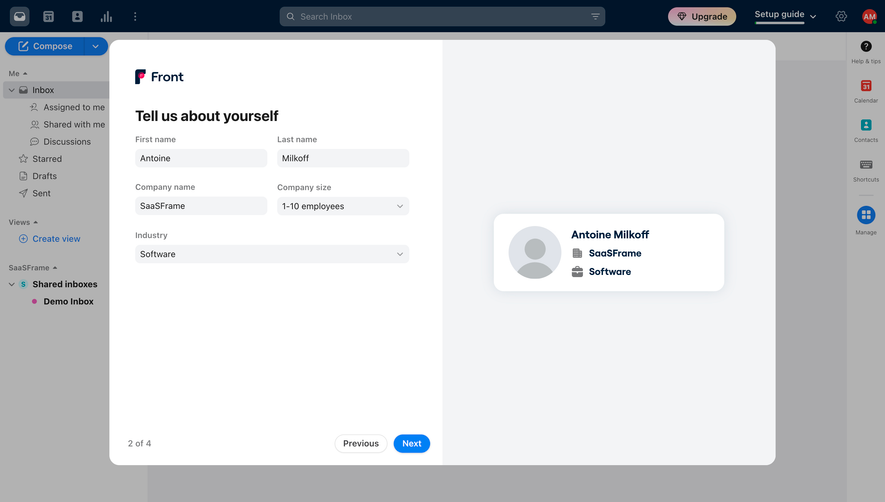
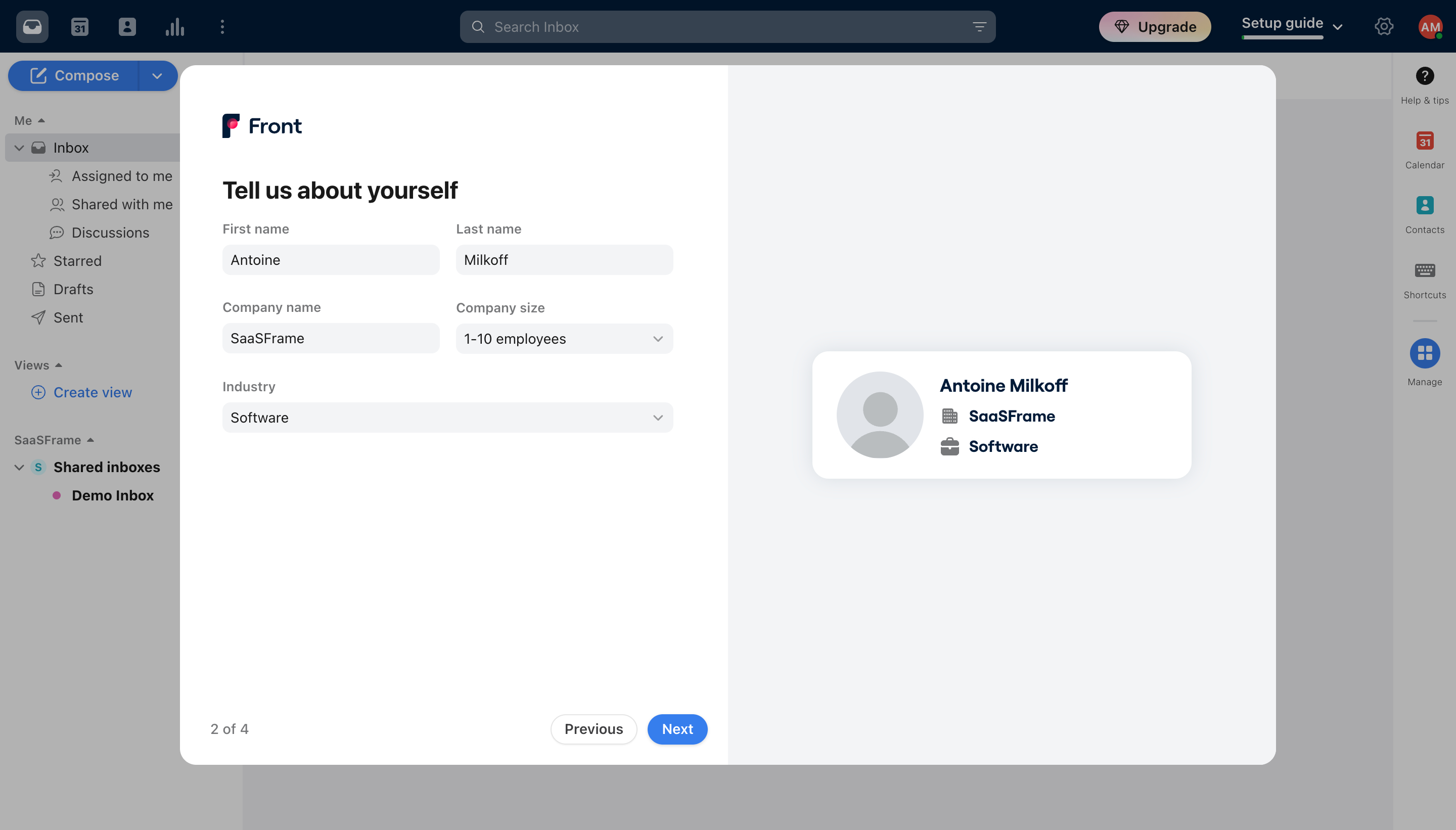
- **Style:** Friendly account-onboarding modal with a white form half, pale-gray preview half and compact blue progression action.
- **Scale:** Source 2880 × 1642px; sizes estimate a 1440px-wide CSS viewport at 2× capture scale.
### Page composition
- **Application context:** A dimmed inbox shell remains visible around the modal, including navy top bar, mailbox navigation and right utility rail.
- **Modal:** Approximately 1084 × 692px panel centered near x178/y64, divided into equal white and pale-gray halves with rounded outer corners.
- **Form half:** Front branding, Tell us about yourself heading and five fields occupy the upper left; progress and navigation anchor the bottom.
- **Preview half:** A centered white profile card displays avatar, name, company and industry.
### Information hierarchy
- **Identity:** First/last names appear side by side, followed by company name/company size, then a full-width industry select.
- **Preview:** The card repeats entered identity data with company/briefcase icons, visually linking the form to the resulting profile.
- **Progress:** 2 of 4 appears lower left, with Previous and blue Next at the lower-right edge of the form half.
### Typography
- **Family:** Neutral sans-serif with slightly rounded preview lettering; exact font identities are unverified.
- **Roles:** Estimated heading 24px bold, field labels 14px medium, values 14px and preview name about 18px bold.
- **Secondary text:** Progress and labels use muted gray; preview content is dark navy.
### Colors & surfaces
- **Sampled palette:** ICC-aware sRGB samples include white #FFFFFF, pale gray #F3F4F6, navy #001429 and secondary #334251. #B2B2B2 and #AAAAAC belong to the dimmed application.
- **Accents:** Bright blue identifies Next; the Front logo adds a small pink accent.
- **Depth:** Inputs are pale-gray filled. The profile preview has large rounded corners and a soft shadow.
### Components
- **Inputs:** Approximately 214px-wide paired fields, around 30px high, with 8px corners and no strong border. Industry spans the combined row width.
- **Selects:** Company size and industry show chevrons at the right; no menus are expanded.
- **Profile card:** Approximately 376 × 126px with 18px corners, a large circular placeholder avatar and stacked identity labels.
- **Navigation:** Previous is a white outlined pill; Next is a blue filled pill, both compact around 30px high.
### Visual rhythm
- **Alignment:** Paired fields use a consistent central gutter; full-width industry aligns with the outer field edges.
- **Whitespace:** Large blank lower regions keep the short form and centered preview calm, while bottom navigation remains stable.
### Responsive
- **Recommended adaptation:** Only desktop is observed. Stack the preview below the form and convert paired fields to one column on narrow screens.
- **Progression:** Keep progress and Previous/Next reachable without obscuring fields or keyboard input.
### Adaptation guidance
- **Preserve:** Keep identity fields grouped logically, a clear step indicator and a preview that reflects entered data.
- **Adapt:** Use real company-size/industry options and avoid implying additional required fields or validation states not shown.
Use this context to reproduce the reference's visual language: layout, typography, colors, spacing, borders, radii, and distinctive elements. The screenshot takes priority if descriptions conflict.
## Direction
{{preferences.fidelityInstructions}}
## Output
{{output.instructions}}
Deliver a polished, cohesive design with precise alignment, hierarchy, and spacing. Produce the requested visual artifact, not just a description. If unsupported, explain the limitation.
.webp)



.avif)