.webp)
Thank you! Your submission has been received!
Oops! Something went wrong while submitting the form.
Get SaaSFrame Pro
Monthly
$18
Quarterly
$48
Yearly
$180
Upgrade to access this feature
Browse all screens & flows
Filter and search screens & flows
Access Figma files
Access mobile versions
Bookmark screens & flows
Join now
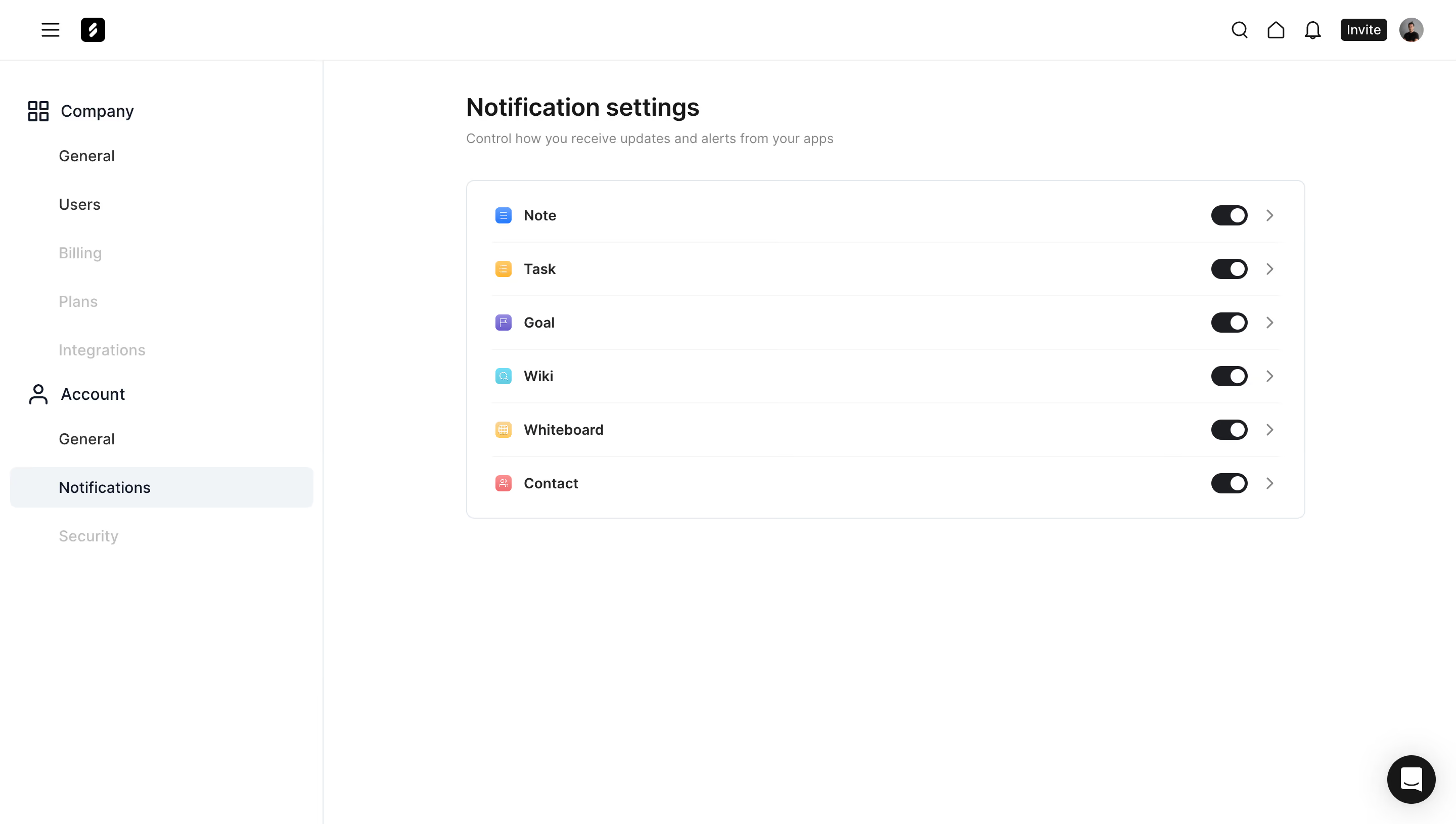
Frame Notifications Settings

Frame
Unified suite of collaboration apps for teams
Designed by
No items found.

Bookmark
Bookmark

Design with AI
Thank you! Your submission has been received!
Oops! Something went wrong while submitting the form.
# Design from Reference: Frame Notifications Settings
Create an original, high-fidelity visual design inspired by the reference. Prioritize composition, typography, colors, spacing, and component styling over technical implementation.
## Reference
- **Product:** Frame
- **Category:** Settings
- **Screenshot:** https://cdn.prod.website-files.com/5e9dc792e1210c5325f7ebbc/6acad9c2a43009b06fe6bf8c_6acad94994f34fb45f83ae04_cms-9eb218623669595f7d668ff9.webp
Analyze the screenshot first. If inaccessible, request it rather than guessing.
## Content
{{content.instructions}}
{{content.data}}
Preserve essential messaging and factual accuracy. Adapt structure and copy length for visual balance; never invent product claims.
## Visual Design
### Overall aesthetic
- **Style:** Minimal white account-settings interface with fine structural rules and a compact notification-control panel.
- **Character:** Neutral typography, monochrome navigation, restrained colored app icons, and generous unused canvas.
- **Surface treatment:** Flat page and sidebar; one outlined settings container and a floating dark support button provide the principal component boundaries.
### Page composition
- **Capture and scale:** 2880 × 1630 image px. CSS estimates assume a 2× capture, equivalent to about 1440 × 815 CSS px; scale is unverified.
- **Top bar:** Approximately 60px high, with menu and brand at left; search, home, bell, Invite, and avatar controls at right.
- **Sidebar:** Approximately 320px wide with a vertical dividing line. Company and Account headings organize indented navigation.
- **Main content:** Begins around x=460 CSS px; heading and subtitle precede an approximately 830 × 335px settings panel.
- **Control list:** Six equal-height rows for Note, Task, Goal, Wiki, Whiteboard, and Contact. App icon and label align left; toggle and chevron align right.
- **Support placement:** Circular support control sits near the lower-right viewport corner, clear of the settings panel.
### Information hierarchy
- **Page title:** Notification settings is the strongest text element, followed by a muted one-line explanation.
- **Navigation state:** Notifications is highlighted within Account; pale labels visually de-emphasize several other navigation entries without proving their disabled behavior.
- **App controls:** Colored icons distinguish the six app types while repeated black switches emphasize a common setting pattern.
- **Detail affordance:** Right chevrons suggest a deeper settings view; the screenshot does not show it open.
### Typography
- **Family:** Neutral proportional sans serif; exact identity is unverified.
- **Page title:** Approximately 24px semibold with 30px line-height.
- **Subtitle:** Approximately 14px regular, gray, with 20px line-height.
- **Sidebar:** Group labels around 16px; indented destinations around 14–16px.
- **Rows:** Approximately 14px semibold labels with about 20px line-height.
- **Estimation:** Sizes and weights are inferred under the unverified 2× scale, not extracted font metadata.
### Colors & surfaces
- **Canvas:** Sampled #FFFFFF.
- **Selected navigation:** Sampled #F0F4F7, a pale blue-gray.
- **Primary dark roles:** Sampled #171717 and #1D1E22 across text and dark controls.
- **Dividers:** Sampled #E3E7EB and #EEEEEE in fine boundaries.
- **Secondary neutral:** Sampled #F5F5F5; muted labels use lighter gray than main copy.
- **Icon accents:** Blue, amber, purple, cyan, and coral appear only in small app tiles, leaving the surrounding shell neutral.
### Components
- **Settings panel:** Thin blue-gray outline, approximately 8px radius, and about 24px horizontal padding.
- **Rows:** Roughly 53px high, separated by very light horizontal rules inset from the panel edges.
- **App tiles:** Approximately 16px square with small rounded corners and white pictograms; about 12px separates tile and label.
- **Switches:** Approximately 36 × 20px, black capsule track and white circular thumb at the right. All six share this captured right-position state.
- **Chevrons:** Small gray right arrows beyond the switches, aligned consistently.
- **Selected destination:** Broad pale rectangle with about 6px radius and inset label, approximately 40px high.
- **Top actions:** Compact dark Invite button, monochrome line icons, and small circular avatar.
- **Support control:** Roughly 48px dark circle with a white chat symbol and broad soft shadow.
### Visual rhythm
- **Alignment:** Heading, subtitle, and panel share a left edge; row labels and all right-hand controls form stable vertical lanes.
- **Spacing:** Around 32px separates the subtitle from the panel; larger whitespace surrounds the compact control group.
- **Sidebar rhythm:** Indented destination rows maintain roughly 48px pitch, with larger breaks around group headings.
- **Repetition:** Equal rows and identical switch positions make comparison immediate.
### Responsive
- **Observed state:** Desktop only; smaller viewports and switch interactions are unverified.
- **Layout recommendation:** Collapse the sidebar into a menu and let the main panel fill the available width with 20–24px gutters.
- **Row recommendation:** Preserve label and switch alignment, with adequate touch targets around small icons and chevrons.
- **Support recommendation:** Keep the floating chat control away from the final settings row and keyboard focus targets.
### Adaptation guidance
- **Preserve:** Quiet white shell, grouped account navigation, a single compact settings panel, and colored app identifiers.
- **Starting dimensions:** About 320px sidebar, 830px panel, 53px rows, 24px panel padding, and 8px radius under the unverified 2× assumption.
- **State modeling:** Define actual notification values explicitly; the observed right-position switches alone do not establish backend behavior.
- **Interaction recommendation:** Use labeled accessible switches and separate detail-navigation targets, with visible focus and clear state announcements.
- **Content adaptation:** Replace app types and navigation groups with supplied product structure while retaining consistent row geometry.
Use this context to reproduce the reference's visual language: layout, typography, colors, spacing, borders, radii, and distinctive elements. The screenshot takes priority if descriptions conflict.
## Direction
{{preferences.fidelityInstructions}}
## Output
{{output.instructions}}
Deliver a polished, cohesive design with precise alignment, hierarchy, and spacing. Produce the requested visual artifact, not just a description. If unsupported, explain the limitation.

.avif)
Category
Tech Stack

Added on
October 2, 2023
Similar screens



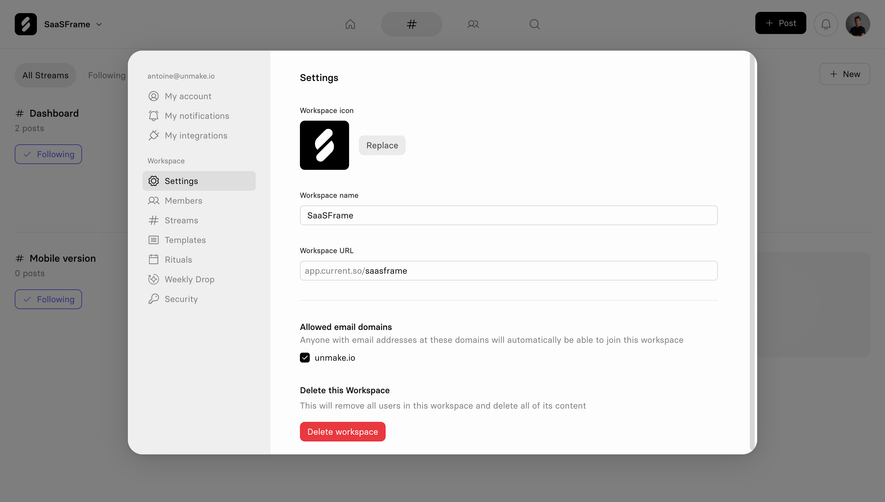



Upgrade to SaaSFrame Pro now to see similar examples.
Monthly
$18 /month
Billed $18 monthly
Browse all screens & flows
Filter and search screens & flows
Search text in screenshots
Access Figma files
Access mobile versions
Join now
Quarterly
$16 /month
Billed $48 quarterly
Browse all screens & flows
Filter and search screens & flows
Search text in screenshots
Access Figma files
Access mobile versions
Join now
Yearly
$15 /month
Billed $180 yearly
Browse all screens & flows
Filter and search screens & flows
Search text in screenshots
Access Figma files
Access mobile versions
Join now