Design with AI
Generate a new design based on this screen using your own content.
# Design from Reference: EigenPal Visual workflow builder
Create an original, high-fidelity visual design inspired by the reference. Prioritize composition, typography, colors, spacing, and component styling over technical implementation.
## Reference
- **Product:** EigenPal
- **Category:** Flowchart
- **Screenshot:** https://cdn.prod.website-files.com/5e9dc792e1210c5325f7ebbc/6acad04b34c900e8fc1b490d_6ac5731358c1338c451af667_richtext-5eeb02900b736281f9f2.webp
Analyze the screenshot first. If inaccessible, request it rather than guessing.
## Content
{{content.instructions}}
{{content.data}}
Preserve essential messaging and factual accuracy. Adapt structure and copy length for visual balance; never invent product claims.
## Visual Design
### Overall aesthetic
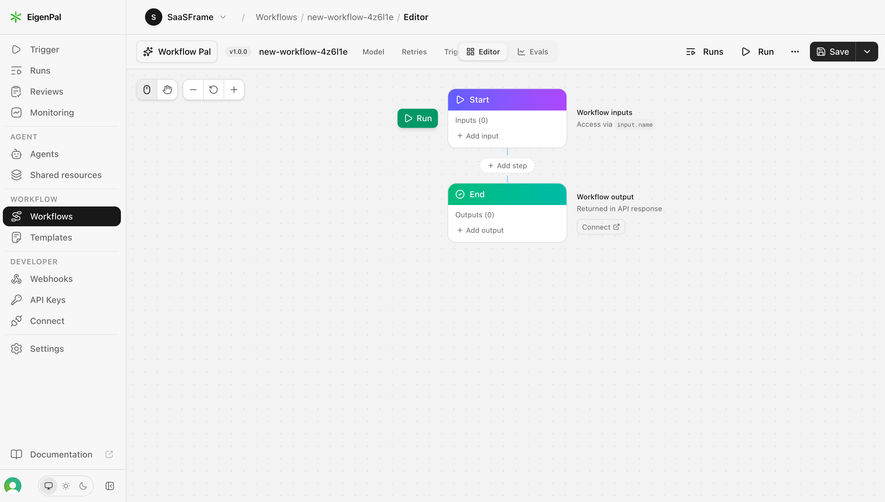
- **Character:** A compact workflow editor uses a neutral application shell, a lightly dotted canvas and small colored node headers.
- **Emphasis:** Most of the canvas is intentionally empty, allowing a minimal Start-to-End flow to remain the focal object.
### Page composition
- **Capture scale:** The source is 2880 × 1624 pixels. At a plausible but unverified 2× scale, the interface is approximately 1440 × 812 CSS pixels; sizes below use this estimate.
- **Sidebar:** An approximately 207-pixel fixed-width column contains brand, grouped navigation, selected Workflows item, documentation and bottom appearance/profile controls.
- **Top shell:** A breadcrumb row sits above a workflow toolbar with assistant access, version/name, configuration tabs, Editor/Evals switch and run/save actions.
- **Canvas:** The remaining workspace contains top-left interaction/zoom tools and a vertically connected Start node, add-step control and End node near the upper center.
- **Annotations:** Input/output explanatory text sits to the right of the corresponding nodes; a separate green Run button sits left of the Start node.
### Information hierarchy
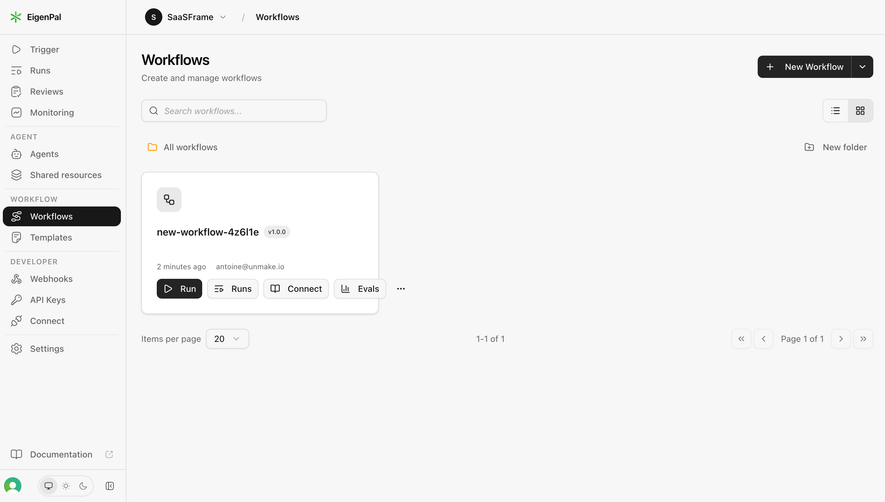
- **Location:** Workspace breadcrumb, workflow name and selected Editor view establish context before the graph.
- **Graph structure:** Purple Start and teal End headers provide the strongest canvas color, making direction and endpoints apparent.
- **Action priority:** Dark Save and green Run controls stand apart from subdued tabs, secondary icons and node helper text.
### Typography
- **Family:** A compact sans serif is used throughout; exact family is unverified.
- **Shell text:** Main navigation and toolbar labels are estimated at 14 pixels, with selected or emphasized labels slightly heavier.
- **Node text:** Node names are around 14 pixels; helper labels and input/output counts are about 12 pixels with subdued gray coloring.
- **Group labels:** Sidebar categories use small uppercase text with expanded tracking and muted contrast.
### Colors & surfaces
- **Measured surfaces:** #F3F3F3 and #F7F7F7 form dominant neutral workspace/shell surfaces; nodes and raised controls use #FFFFFF.
- **Measured contrast:** Near-black #181818 provides selected navigation and dark controls; #DEDEDE appears in light boundaries.
- **Graph accents:** The Start header blends purple toward magenta; the End header is bright teal and the separate Run control green. These accent identities are visually observed rather than exact sampled hex values.
### Components
- **Selected navigation:** A near-black rounded row with white icon/text spans almost the sidebar width; other rows retain gray line icons and transparent backgrounds.
- **Nodes:** Each is approximately 193 × 95 estimated CSS pixels with a thin border, 12-pixel corner radius and a colored header around 35 pixels high.
- **Connection:** A thin vertical line links the nodes through a small dashed, pill-shaped Add step control.
- **Canvas tools:** Small white segmented controls provide pointer/pan selection and minus/reset/plus zoom actions, with subtle borders and shadows.
- **Toolbar actions:** Save is a dark split button with a separate dropdown segment; the Editor view is a raised light pill among muted adjacent options.
### Visual rhythm
- **Navigation density:** Sidebar rows use roughly 34-pixel vertical intervals, with thin dividers and uppercase labels separating groups.
- **Graph spacing:** The two nodes align precisely on one vertical axis; a roughly 55-pixel interval accommodates the insertion control.
- **Whitespace:** The graph occupies only the upper portion of the large dotted canvas, leaving generous space for later expansion.
### Responsive
- **Observed state:** A desktop editing workspace is supplied; compact layouts and canvas interactions are not demonstrated.
- **Recommended shell:** Collapse the sidebar and move low-priority toolbar options into menus before compressing graph labels.
- **Recommended canvas:** Preserve pan/zoom access and minimum node widths; allow workspace scrolling rather than shrinking every control.
### Adaptation guidance
- **Preserve clarity:** Keep the quiet dotted canvas, strong endpoint colors and vertically aligned minimal graph.
- **Use consistent controls:** Match compact sidebar rows, segmented canvas tools, rounded nodes and restrained gray borders.
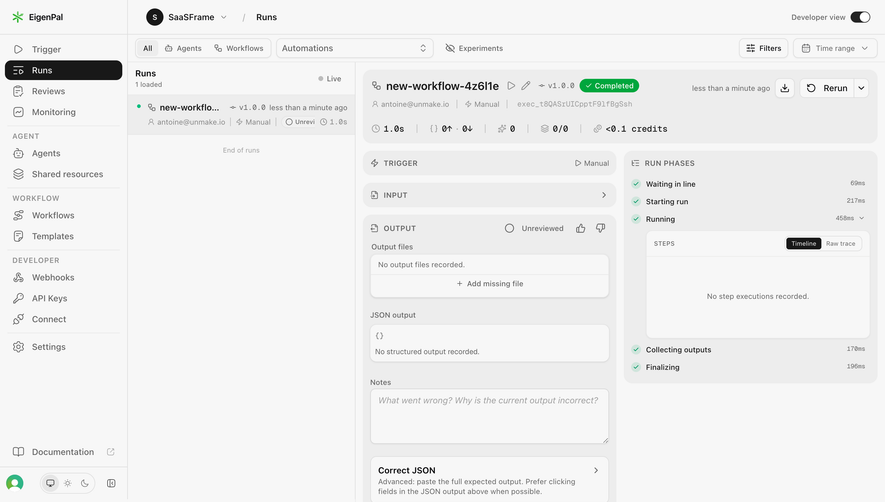
- **State fidelity:** Reproduce the selected Workflows and Editor states; do not infer outputs, execution results or hidden workflow steps.
- **Accessibility:** Provide keyboard alternatives for graph actions, visible focus and non-color cues for node roles.
Use this context to reproduce the reference's visual language: layout, typography, colors, spacing, borders, radii, and distinctive elements. The screenshot takes priority if descriptions conflict.
## Direction
{{preferences.fidelityInstructions}}
## Output
{{output.instructions}}
Deliver a polished, cohesive design with precise alignment, hierarchy, and spacing. Produce the requested visual artifact, not just a description. If unsupported, explain the limitation.
.webp)




.avif)