Design with AI
Generate a new design based on this screen using your own content.
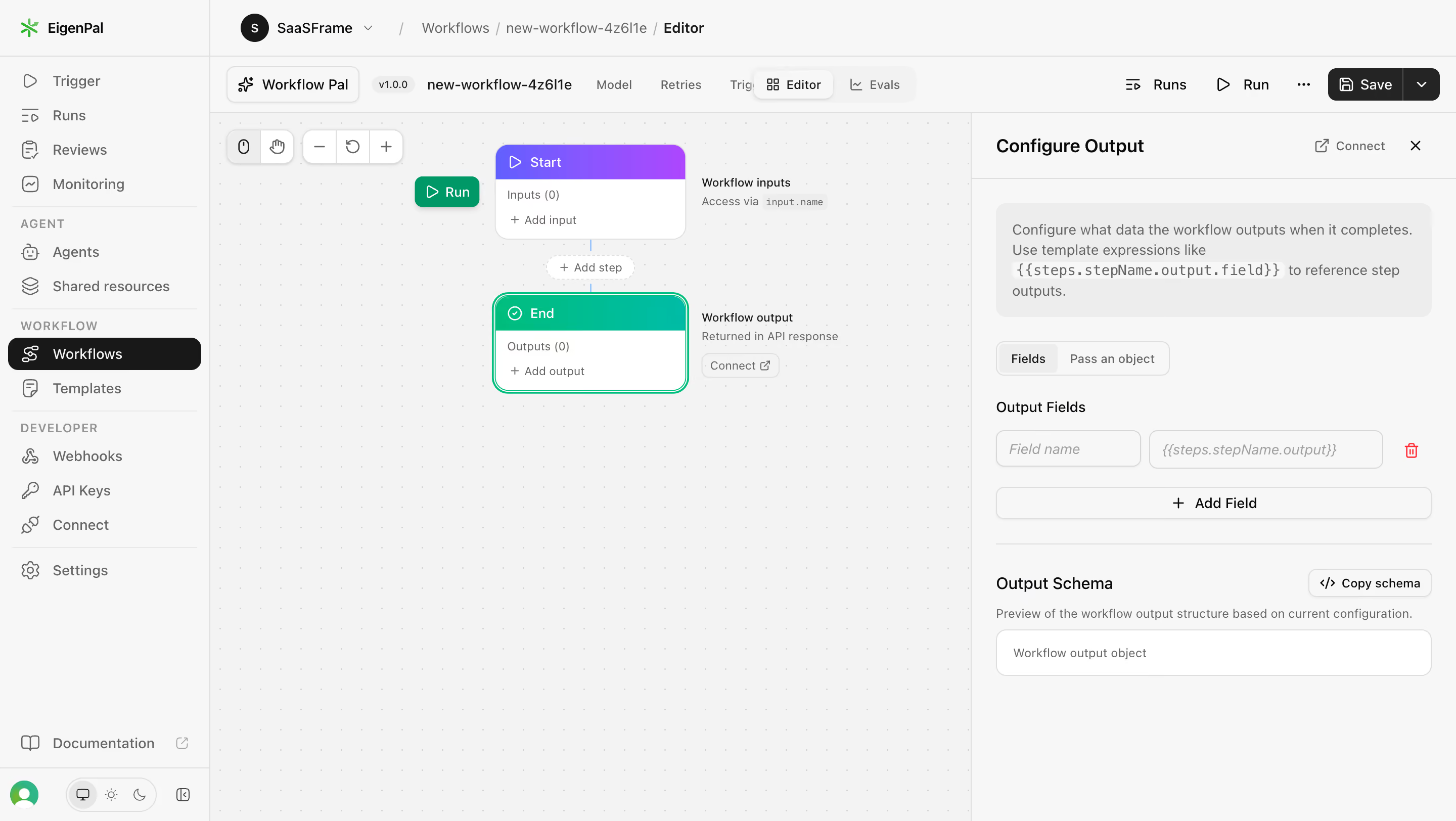
# Design from Reference: EigenPal Configure workflow output
Create an original, high-fidelity visual design inspired by the reference. Prioritize composition, typography, colors, spacing, and component styling over technical implementation.
## Reference
- **Product:** EigenPal
- **Category:** Add & Edit
- **Screenshot:** https://cdn.prod.website-files.com/5e9dc792e1210c5325f7ebbc/6acad04b34c900e8fc1b48f0_6acacfdc0aa47f6da2c97cfd_cms-b4bfbd198f276faa80e2ad4d.webp
Analyze the screenshot first. If inaccessible, request it rather than guessing.
## Content
{{content.instructions}}
{{content.data}}
Preserve essential messaging and factual accuracy. Adapt structure and copy length for visual balance; never invent product claims.
## Visual Design
### Overall aesthetic
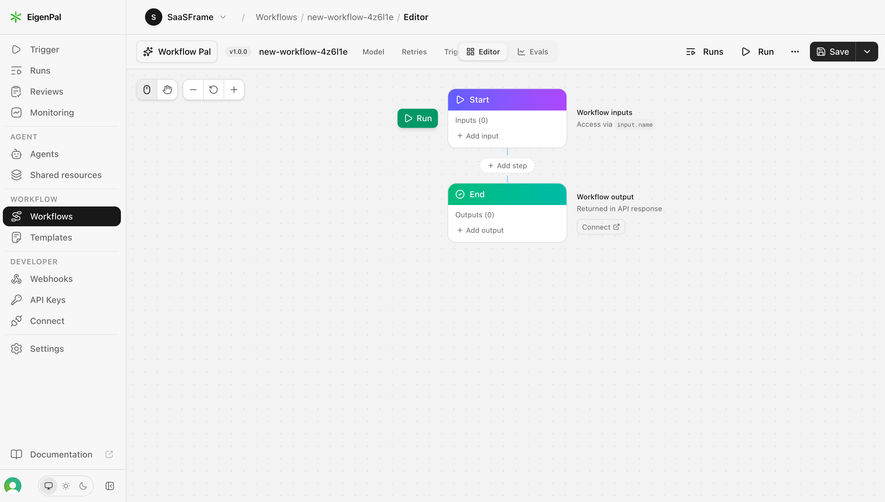
- **Style:** Light technical workflow editor with a dotted canvas, monochrome navigation and color-coded node headers.
- **Emphasis:** Purple Start and teal End nodes stand out from restrained gray chrome; a selected-node outline connects canvas focus to the output inspector.
### Page composition
- **Canvas:** Source 2880 × 1624 pixels; geometry uses the 1400 × 789 inspection rendering. Approximate 2× CSS capture is plausible but unverified.
- **Shell:** A roughly 202px sidebar holds grouped navigation. Breadcrumb/workspace and editor toolbar occupy two rows across the top.
- **Editor:** Dotted working area extends from x202 to x934, with pan/zoom controls upper left and a two-node vertical workflow near the center.
- **Inspector:** A right panel around 466px wide begins at x934, with Configure Output heading, help block, output fields and schema preview.
- **Footer utilities:** Documentation, profile and display/theme controls anchor the sidebar bottom.
### Information hierarchy
- **Workspace:** Breadcrumbs and workflow name establish editing context; Editor tab is selected.
- **Flow:** Start connects vertically through an Add step control to End. Both show zero configured inputs/outputs.
- **Selection:** End is outlined in teal; adjacent copy identifies it as workflow output returned in the API response.
- **Inspector:** Instructional text precedes Fields/Pass an object tabs, a field row, Add Field action and Output Schema preview.
- **Actions:** Run and Save remain prominent in the upper toolbar.
### Typography
- **Inspector heading:** Approximately 18px semibold sans serif.
- **Navigation/toolbars:** Around 14px regular-to-medium; workflow name and active controls use stronger weight.
- **Node/helper text:** Approximately 11–12px, with compact 16px line height.
- **Technical tokens:** Template expressions and preview snippets use a small monospace face; exact font families are unverified.
### Colors & surfaces
- **Measured base:** #F7F7F7 shell, #F3F3F3 canvas and #FFFFFF node/control surfaces.
- **Measured neutrals:** #EDEDED help fill, #DEDEDE boundaries, #181818 dark foreground and #656565 secondary text.
- **Additional surface:** #F2F2F2 appears in pale UI regions.
- **Node accents:** Purple gradient Start header, saturated teal End header/outline and green Run control provide localized color.
- **Depth:** Small control shadows and thin outlines distinguish floating nodes and toolbar groups.
### Components
- **Sidebar selection:** Black pill-like row approximately 185 × 32px with white icon/text.
- **Workflow nodes:** Approximately 183 × 93px, white body, colored 34px header and about 12px radius; End has a second teal selection outline.
- **Connector:** Fine vertical blue line links nodes with a small dashed Add step pill between them.
- **Canvas tools:** Compact segmented pan/zoom controls with white fills, light borders and subtle shadows.
- **Help block:** Approximately 419 × 110px pale-gray rounded rectangle with multiline copy and inline monospace expression.
- **Output row:** Two adjacent rounded inputs for name/expression, red trash icon and a full-width outlined Add Field control below.
- **Schema:** Divided subsection with small Copy schema button and a bordered white preview area.
- **States:** Fields mode and End node are selected; no configured output, run result or saved confirmation is visible.
### Visual rhythm
- **Inspector padding:** Approximately 24px horizontal inset, with 24–28px gaps between major groups.
- **Node spacing:** Around 52px separates Start bottom and End top, occupied by the add-step affordance.
- **Form rhythm:** Compact 36px inputs and roughly 16px group gaps keep technical configuration dense but readable.
- **Canvas balance:** Large empty dotted space leaves room to expand the workflow.
### Responsive
- **Observed scope:** Desktop editor only; narrow-screen behavior is unverified.
- **Recommended inspector:** Use a collapsible inspector or dedicated configuration view on small screens.
- **Recommended canvas:** Preserve pan/zoom and node readability rather than shrinking the full editor.
- **Recommended chrome:** Condense secondary toolbar actions while keeping Run/Save accessible.
### Adaptation guidance
- **Preserve:** Spatial workflow model, color-coded node roles and synchronized inspector selection.
- **Data:** Bind field names, expressions and schema preview to actual workflow configuration; do not infer outputs from placeholder text.
- **Interaction:** Define add/remove, validation, run and save states explicitly.
- **Accessibility:** Provide keyboard node selection, named icon controls and a structured alternative to the spatial canvas.
Use this context to reproduce the reference's visual language: layout, typography, colors, spacing, borders, radii, and distinctive elements. The screenshot takes priority if descriptions conflict.
## Direction
{{preferences.fidelityInstructions}}
## Output
{{output.instructions}}
Deliver a polished, cohesive design with precise alignment, hierarchy, and spacing. Produce the requested visual artifact, not just a description. If unsupported, explain the limitation.
.webp)



.avif)