Design with AI
Generate a new design based on this screen using your own content.
# Design from Reference: Current Delete Workspace
Create an original, high-fidelity visual design inspired by the reference. Prioritize composition, typography, colors, spacing, and component styling over technical implementation.
## Reference
- **Product:** Current
- **Category:** Delete
- **Screenshot:** https://cdn.prod.website-files.com/5e9dc792e1210c5325f7ebbc/6acb6772994832179b5607de_6acb66cd955d9ae8dea55a66_cms-8b24ec09504f8748a6bdfa50.webp
Analyze the screenshot first. If inaccessible, request it rather than guessing.
## Content
{{content.instructions}}
{{content.data}}
Preserve essential messaging and factual accuracy. Adapt structure and copy length for visual balance; never invent product claims.
## Visual Design
### Overall aesthetic
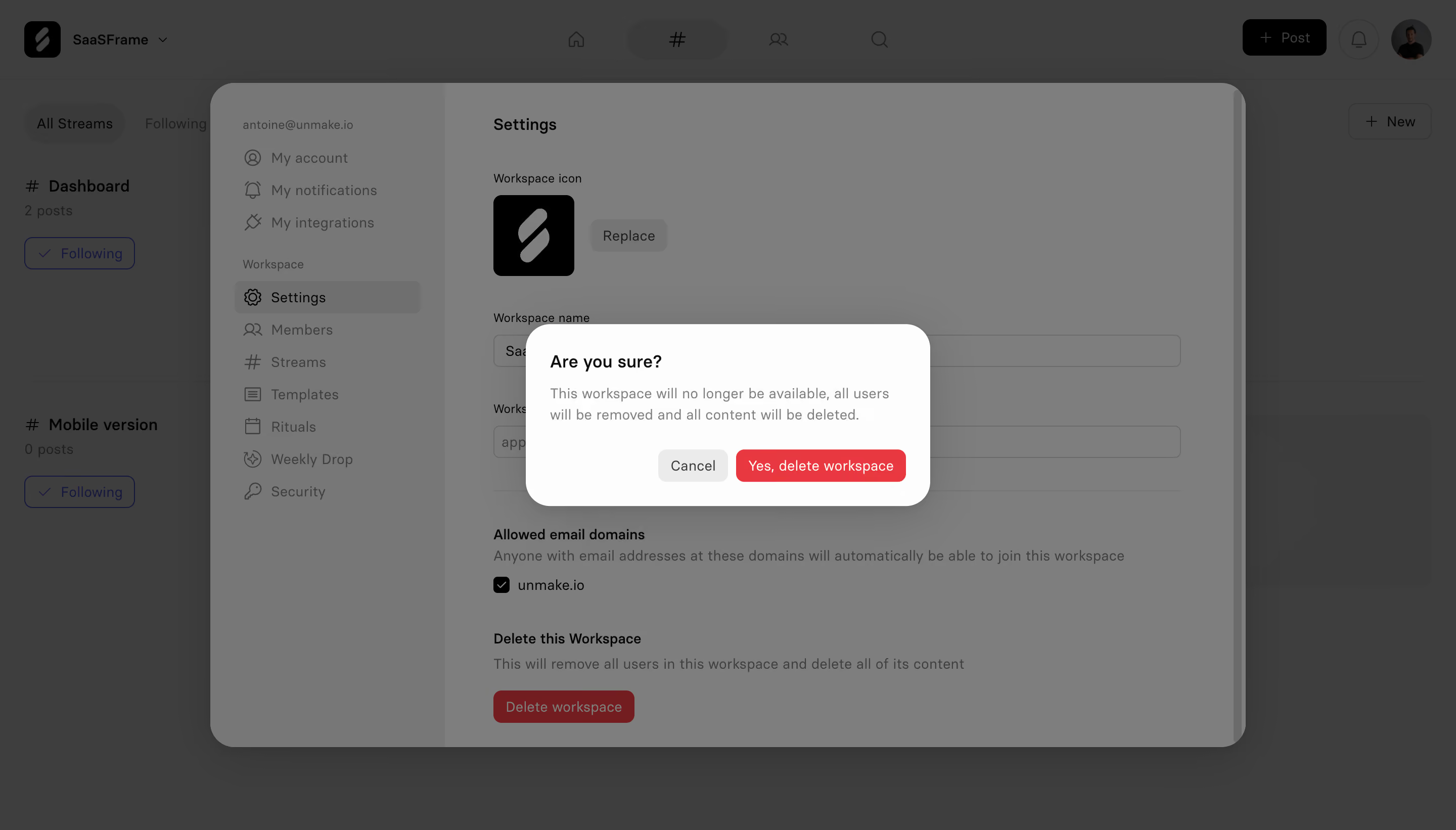
- **Character:** Neutral workspace-settings modal with a second high-contrast destructive confirmation dialog layered above a darkened interface.
- **Evidence and scale:** Screenshot is 2880 × 1642 image pixels. Sizes estimate a 1440 × 821 CSS viewport at 2× capture scale; DPR and font family are unverified.
### Page composition
- **Background:** Workspace stream view remains dimmed behind a large rounded settings panel.
- **Settings layer:** Left menu and right form show workspace icon/name, allowed domains and a lower deletion section.
- **Confirmation:** Small centered white dialog asks for confirmation, explains consequences and presents Cancel plus red deletion action.
- **Layering:** Two levels of dimming separate the active confirmation from settings and the application behind.
### Information hierarchy
- **Active question:** Bold short dialog heading is the strongest foreground text.
- **Consequences:** Two-line gray explanation sits directly below, before the actions.
- **Destructive action:** Red filled button clearly contrasts with neutral Cancel.
- **Underlying context:** Red deletion button remains visible in the settings panel but is subordinate to the confirmation.
### Typography
- **Dialog heading:** Approximately 17px CSS semibold.
- **Explanation:** Around 14px gray with 21px leading.
- **Actions:** Around 14px regular-to-medium.
- **Settings:** Underlying labels around 14px and section titles around 16px; exact font family and computed weights are unverified.
### Colors & surfaces
- **Measured overlay layers:** Gray #7E7E7E/#777777 and darker #3E3E3E dominate dimmed surfaces.
- **Measured dialog:** Near-white #FDFDFD.
- **Measured destructive accent:** Red #E83940, with darker #741D20 in dimmed underlying controls.
- **Neutral controls:** Pale gray Cancel fill and dark text contrast with the red action.
### Components
- **Settings shell:** Broad modal roughly 1020 × 660px CSS, large rounded corners and soft shadow; left navigation uses a darker selected row.
- **Confirmation shell:** Approximately 400 × 180px, radius near 24px, white fill and strong soft shadow.
- **Action row:** Right-aligned neutral Cancel around 70 × 32px and red confirm around 168 × 32px, small radii.
- **Underlying fields:** Workspace icon/replace control, wide name/URL inputs, checked allowed-domain row and red deletion button.
- **Backdrop:** Uniform dark overlays suppress background contrast and establish a modal task.
### Visual rhythm
- **Dialog padding:** Around 24px on all sides; heading, explanation and action row form a compact vertical stack.
- **Action spacing:** Roughly 8px separates buttons.
- **Centered focus:** Small confirmation sits at the visual center of the much larger settings layer.
- **Contrast:** Bright dialog/red action stand out against grayscale dimming.
### Responsive
- **Observed limit:** Desktop confirmation only; cancellation, deletion and mobile behavior are unobserved.
- **Recommended layout:** Fit the dialog within narrow viewport margins and allow consequence text/actions to wrap.
- **Recommended modal behavior:** Keep focus in the active confirmation and restore it to the initiating control on dismissal.
- **Recommended hierarchy:** Preserve a clear neutral escape route and explicit destructive label.
### Adaptation guidance
- **Preserve clarity:** State the affected object and consequences before a destructive action.
- **Use layering carefully:** Only the top confirmation should appear active and keyboard-reachable.
- **Implementation:** Provide accessible dialog labels, focus management and explicit action states. This screenshot is visual evidence only and does not authorize workspace deletion.
Use this context to reproduce the reference's visual language: layout, typography, colors, spacing, borders, radii, and distinctive elements. The screenshot takes priority if descriptions conflict.
## Direction
{{preferences.fidelityInstructions}}
## Output
{{output.instructions}}
Deliver a polished, cohesive design with precise alignment, hierarchy, and spacing. Produce the requested visual artifact, not just a description. If unsupported, explain the limitation.
.webp)



.avif)