.webp)
Thank you! Your submission has been received!
Oops! Something went wrong while submitting the form.
Get SaaSFrame Pro
Monthly
$18
Quarterly
$48
Yearly
$180
Upgrade to access this feature
Browse all screens & flows
Filter and search screens & flows
Access Figma files
Access mobile versions
Bookmark screens & flows
Join now
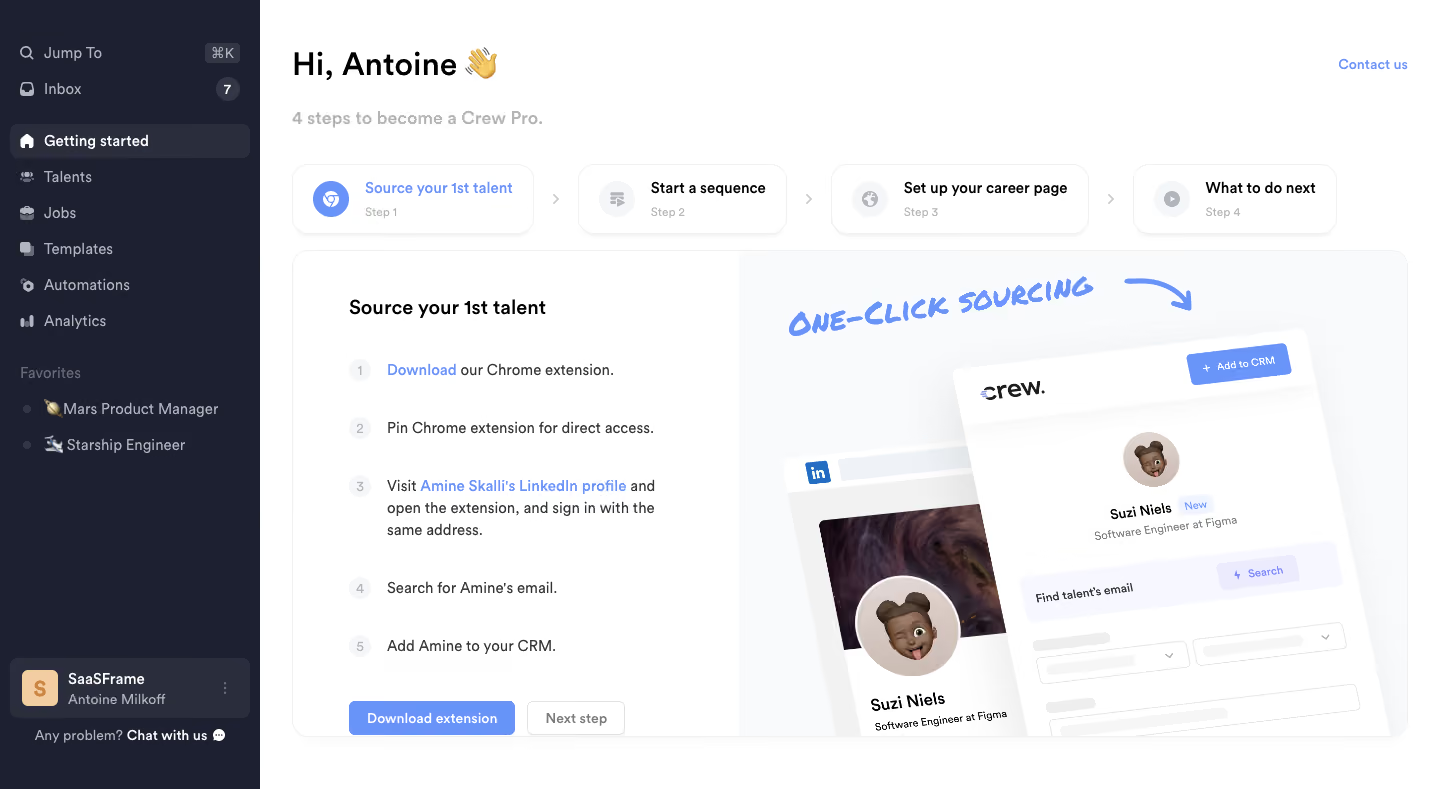
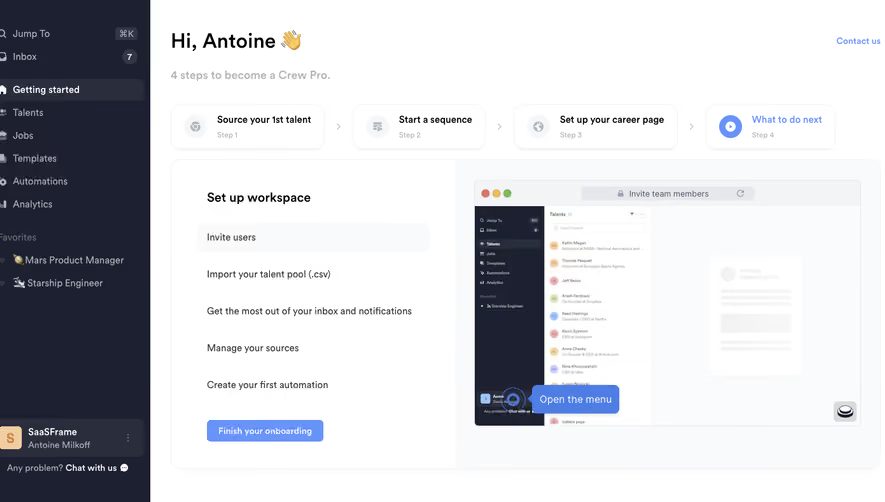
Crew User Onboarding

Crew
Recruiting CRM built for collaboration
Designed by
No items found.

Bookmark
Bookmark

Design with AI
Thank you! Your submission has been received!
Oops! Something went wrong while submitting the form.
# Design from Reference: Crew User Onboarding
Create an original, high-fidelity visual design inspired by the reference. Prioritize composition, typography, colors, spacing, and component styling over technical implementation.
## Reference
- **Product:** Crew
- **Category:** User Onboarding
- **Screenshot:** https://cdn.prod.website-files.com/5e9dc792e1210c5325f7ebbc/6acbbdabd6be908889c4e769_6acbbce19ffd93ab51c20677_cms-7c190e9fafa79ac2560e468c.webp
Analyze the screenshot first. If inaccessible, request it rather than guessing.
## Content
{{content.instructions}}
{{content.data}}
Preserve essential messaging and factual accuracy. Adapt structure and copy length for visual balance; never invent product claims.
## Visual Design
### Overall aesthetic
- **Style:** Recruiting-product onboarding dashboard with a dark navy sidebar, white workspace and periwinkle-blue accents.
- **Character:** A personal greeting, emoji details and tilted product artwork make a structured checklist feel friendly.
- **Capture:** The image measures 1440 × 789 image pixels. CSS estimates assume approximately 1:1 capture scale; browser scale and font identities are unverified.
### Page composition
- **Sidebar:** A 260-pixel dark rail contains search/command access, inbox, product navigation, favorite jobs and a bottom workspace/support area.
- **Welcome area:** A large greeting and muted four-step introduction sit at the upper left of the main region; a contact link aligns right.
- **Step overview:** Four rounded step cards form a horizontal sequence with chevrons between them.
- **Active step:** A large rounded panel below splits into a left instructional checklist and a right product illustration.
- **Instructions:** Five numbered items explain extension-based sourcing, followed by a blue download action and a muted next-step control.
- **Artwork:** Tilted social-profile and extension panels overlap beneath a hand-drawn sourcing label and arrow.
### Information hierarchy
- **Welcome:** The bold personalized greeting is the largest text; the progress introduction is secondary.
- **Step sequence:** The first step is blue and visually active; the remaining cards use darker titles and pale icons.
- **Active task:** A bold sourcing heading introduces the left checklist.
- **Instruction emphasis:** Blue inline links distinguish download and example-profile references within otherwise dark copy.
- **Primary action:** Download extension is stronger than the pale outlined Next step control.
- **Supporting context:** Sidebar favorites and workspace details remain peripheral to the onboarding task.
### Typography
- **Family:** A neutral UI sans-serif is visible; exact font identity is unverified.
- **Greeting:** Approximately 32-pixel CSS size, bold, with around 40-pixel line height.
- **Progress introduction:** Approximately 18 pixels, semibold, in light gray.
- **Task heading:** Approximately 20 pixels and semibold.
- **Step cards and checklist:** Approximately 14–16 pixels; checklist lines use around 22-pixel line height.
- **Small labels:** Step numbers and card metadata are around 12 pixels.
- **Artwork annotation:** A large blue hand-lettered phrase differs deliberately from the UI font.
### Colors & surfaces
- **Measured sidebar:** Deep navy #1D2030 fills the rail; #2A2D3C supports selected/workspace blocks.
- **Measured main surface:** White #FFFFFF dominates the canvas.
- **Measured pale surfaces:** #F9FAFC and #F7F8FF support the illustration area and product mockup details.
- **Accent roles:** Periwinkle blue marks the active step, links, download button and annotation.
- **Text hierarchy:** Black headings contrast with gray body/metadata; sidebar text is light gray on navy.
- **Depth:** Step cards and the large panel have fine outlines and soft low shadows; mockups use stronger overlapping depth.
### Components
- **Selected navigation:** Getting started uses a rounded darker row with a white home icon.
- **Inbox badge:** A small dark circular count badge aligns at the row's right.
- **Favorites:** Two emoji-led job links appear beneath a muted group label.
- **Step cards:** Four white rounded rectangles around 70 pixels high contain circular icons, bold titles and small step numbers.
- **Active panel:** Approximately 1116 × 488 pixels with 16-pixel corners and a roughly 40/60 instructional/artwork split.
- **Checklist markers:** Five small pale-gray numbered circles align with instruction paragraphs.
- **Actions:** A blue rounded download button around 166 × 34 pixels sits beside a smaller pale outlined next control.
- **Product illustration:** A tilted extension panel overlaps a social profile, showing a portrait, role information and email-search/add controls as illustrative media.
- **Bottom workspace card:** A colored initial tile, workspace/user labels and overflow icon sit above a small support prompt.
- **State scope:** The first onboarding step is displayed; no completion checkmarks, extension download result or later step content is visible.
### Visual rhythm
- **Main gutters:** Approximately 32 pixels separate the sidebar edge from the content.
- **Header spacing:** Greeting, progress line and step cards form a clear vertical introduction.
- **Checklist cadence:** Numbered items use generous 34–44-pixel gaps, accommodating wrapped instructions.
- **Step flow:** Equal card heights and intervening chevrons communicate a linear sequence.
- **Density contrast:** The sparse checklist balances the large detailed illustration; the sidebar remains compact.
### Responsive
- **Recommendation — navigation:** Collapse the dark rail on narrow screens.
- **Recommendation — step overview:** Wrap or horizontally scroll step cards with clear active-state labeling.
- **Recommendation — active panel:** Stack instructions above artwork and preserve readable checklist widths.
- **Recommendation — actions:** Keep download and next-step controls visible without overlap.
- **Recommendation — media:** Scale illustrative controls as artwork rather than presenting them as live page inputs. No mobile state is evidenced.
### Adaptation guidance
- **Preserve step orientation:** Keep the four-step overview visible near the active task.
- **Make the first task concrete:** Retain numbered sourcing instructions and a clear extension-installation route.
- **Reuse selection tokens:** Apply the same blue accent to active steps, links and primary action.
- **Separate demonstration from action:** Keep tilted product mockups visually distinct from actual checklist controls.
- **Define completion feedback:** Implement installed-extension, finished-step and progression states separately.
- **Maintain accessible order:** Ensure the numbered instructions and actionable links follow a coherent keyboard and reading sequence.
Use this context to reproduce the reference's visual language: layout, typography, colors, spacing, borders, radii, and distinctive elements. The screenshot takes priority if descriptions conflict.
## Direction
{{preferences.fidelityInstructions}}
## Output
{{output.instructions}}
Deliver a polished, cohesive design with precise alignment, hierarchy, and spacing. Produce the requested visual artifact, not just a description. If unsupported, explain the limitation.

.avif)
Category


Added on
February 14, 2023
Found in 1 flow



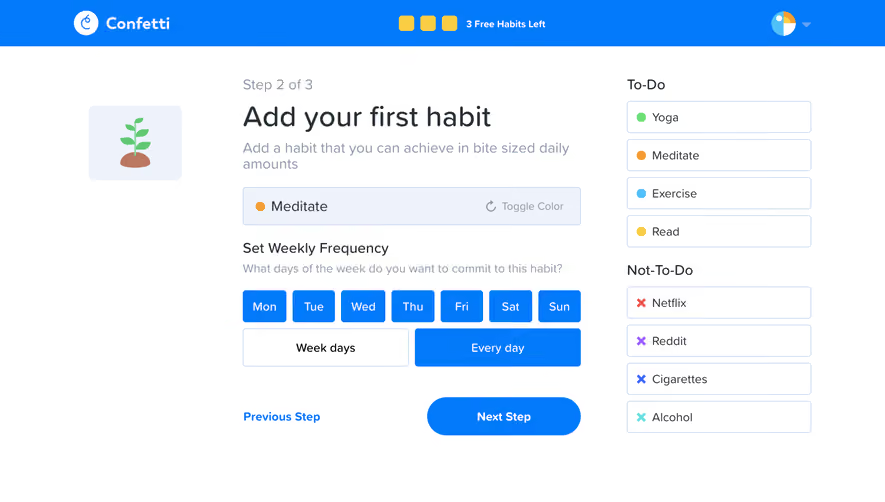
Similar screens






Upgrade to SaaSFrame Pro now to see similar examples.
Monthly
$18 /month
Billed $18 monthly
Browse all screens & flows
Filter and search screens & flows
Search text in screenshots
Access Figma files
Access mobile versions
Join now
Quarterly
$16 /month
Billed $48 quarterly
Browse all screens & flows
Filter and search screens & flows
Search text in screenshots
Access Figma files
Access mobile versions
Join now
Yearly
$15 /month
Billed $180 yearly
Browse all screens & flows
Filter and search screens & flows
Search text in screenshots
Access Figma files
Access mobile versions
Join now