Design with AI
Generate a new design based on this screen using your own content.
# Design from Reference: Cohere Account Setup
Create an original, high-fidelity visual design inspired by the reference. Prioritize composition, typography, colors, spacing, and component styling over technical implementation.
## Reference
- **Product:** Cohere
- **Category:** Discovery Questions
- **Screenshot:** https://cdn.prod.website-files.com/5e9dc792e1210c5325f7ebbc/6acb725eb10d21a746c4796c_6acb70f43ceaa499b8768563_cms-32080ea935ebe7de2cbe9425.webp
Analyze the screenshot first. If inaccessible, request it rather than guessing.
## Content
{{content.instructions}}
{{content.data}}
Preserve essential messaging and factual accuracy. Adapt structure and copy length for visual balance; never invent product claims.
## Visual Design
### Overall aesthetic
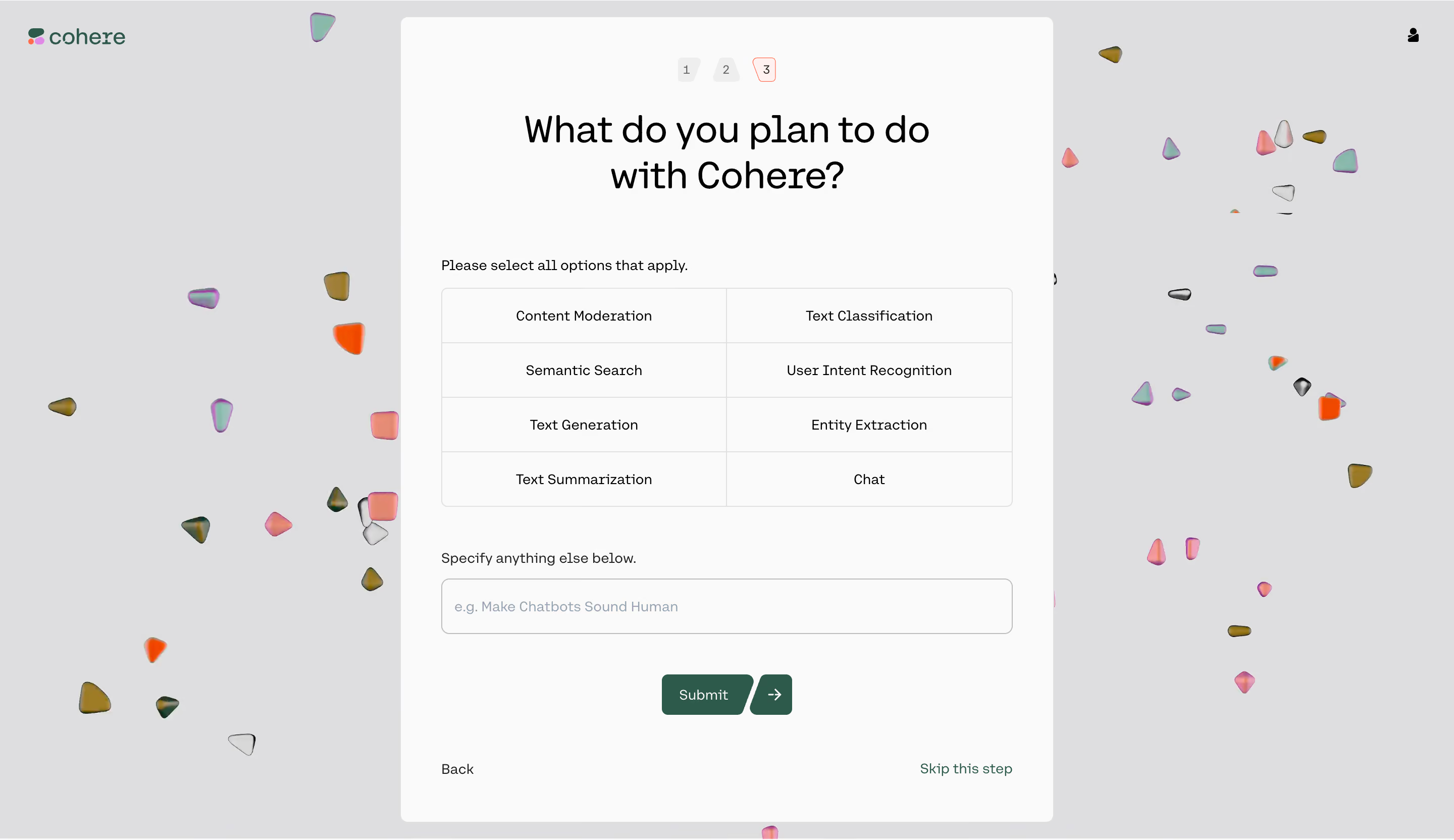
- **Character:** A simple onboarding questionnaire sits on a light-gray field scattered with colorful small abstract shapes.
- **Restraint:** The central near-white panel is plain, with black type, thin borders and dark-green progression controls.
### Page composition
- **Capture scale:** The original is 2880 × 1664 pixels. A 2× capture is plausible but unverified; dimensions below estimate CSS pixels at half source resolution.
- **Shell:** Brand appears upper left and a small account icon upper right.
- **Panel:** A tall centered approximately 650-pixel-wide rounded surface contains three step markers, a large question, option grid, free-text field and actions.
- **Choices:** Eight use cases form a two-column, four-row grid beneath a short instruction.
- **Ending:** Submit is centered, with Back and Skip this step at opposite bottom corners.
### Information hierarchy
- **Question:** Large centered two-line text dominates the panel.
- **Progress:** Three compact numbered shapes sit above, with the third outlined in a warm accent.
- **Choice:** A brief instruction introduces the eight equally weighted options.
- **Alternative:** A labeled free-text field allows another use case, followed by primary and secondary progression controls.
### Typography
- **Family:** A rounded sans serif is used; exact identity is unverified.
- **Question:** Approximately 36 pixels, regular weight with 46-pixel leading.
- **Options:** Around 14 pixels, centered.
- **Labels/actions:** Approximately 14 pixels, with subtle weight emphasis.
- **Progress:** Small numerals use compact muted text.
### Colors & surfaces
- **Measured backdrop:** Light gray #DEDEE0 dominates the surrounding field.
- **Measured panel:** Near-white #FAFAFA provides the form surface.
- **Measured borders:** #E0E0E0 and nearby #DEDEDE support fine divisions.
- **Measured contrast:** Black #000000 supplies text; dark green #2E5A4B marks submit and skip accents.
- **Decoration:** Small pink, orange, olive and iridescent shapes remain outside the form's reading area.
### Components
- **Option grid:** A thin outlined rounded rectangle encloses eight equal cells with internal horizontal/vertical rules.
- **Free-text input:** Approximately 565 × 55 estimated CSS pixels, outlined with a small radius and muted example placeholder.
- **Submit control:** Dark-green label button pairs with a separate arrow segment, both using slanted edges.
- **Step markers:** Three small differently shaped numbered tiles indicate progression.
- **Secondary actions:** Plain Back and green Skip links align along the panel bottom.
### Visual rhythm
- **Padding:** Approximately 40-pixel side insets align instruction, grid and input.
- **Spacing:** Large gaps separate heading, choices, additional field and submit action.
- **Balance:** Symmetric central content contrasts with irregular scattered background shapes.
### Responsive
- **Observed state:** Only desktop is shown; compact behavior is unverified.
- **Recommended panel:** Fit within viewport padding and allow vertical scrolling.
- **Recommended choices:** Stack the grid into one column when labels become cramped, preserving selection hit areas.
### Adaptation guidance
- **Preserve focus:** Keep the decorative shapes outside essential text/control regions.
- **State fidelity:** No use-case selection is visibly emphasized; do not infer submitted answers.
- **Interaction clarity:** Use explicit multi-select semantics and clear selected styling if implementing choices.
- **Accessibility:** Associate labels, announce the current step and keep skip/back actions keyboard accessible.
Use this context to reproduce the reference's visual language: layout, typography, colors, spacing, borders, radii, and distinctive elements. The screenshot takes priority if descriptions conflict.
## Direction
{{preferences.fidelityInstructions}}
## Output
{{output.instructions}}
Deliver a polished, cohesive design with precise alignment, hierarchy, and spacing. Produce the requested visual artifact, not just a description. If unsupported, explain the limitation.
.webp)




.avif)