Design with AI
Generate a new design based on this screen using your own content.
# Design from Reference: Checkout.com Top Up Account
Create an original, high-fidelity visual design inspired by the reference. Prioritize composition, typography, colors, spacing, and component styling over technical implementation.
## Reference
- **Product:** Checkout.com
- **Category:** Empty
- **Screenshot:** https://cdn.prod.website-files.com/5e9dc792e1210c5325f7ebbc/6acad4c41025e911ae518476_6acad3d8fef6904ce0087cc3_cms-60412f295d3052b625cacfc8.webp
Analyze the screenshot first. If inaccessible, request it rather than guessing.
## Content
{{content.instructions}}
{{content.data}}
Preserve essential messaging and factual accuracy. Adapt structure and copy length for visual balance; never invent product claims.
## Visual Design
### Overall aesthetic
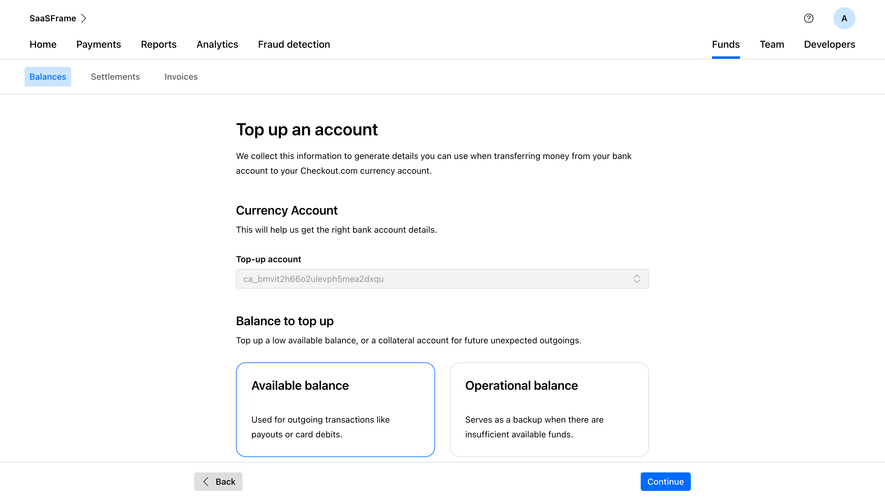
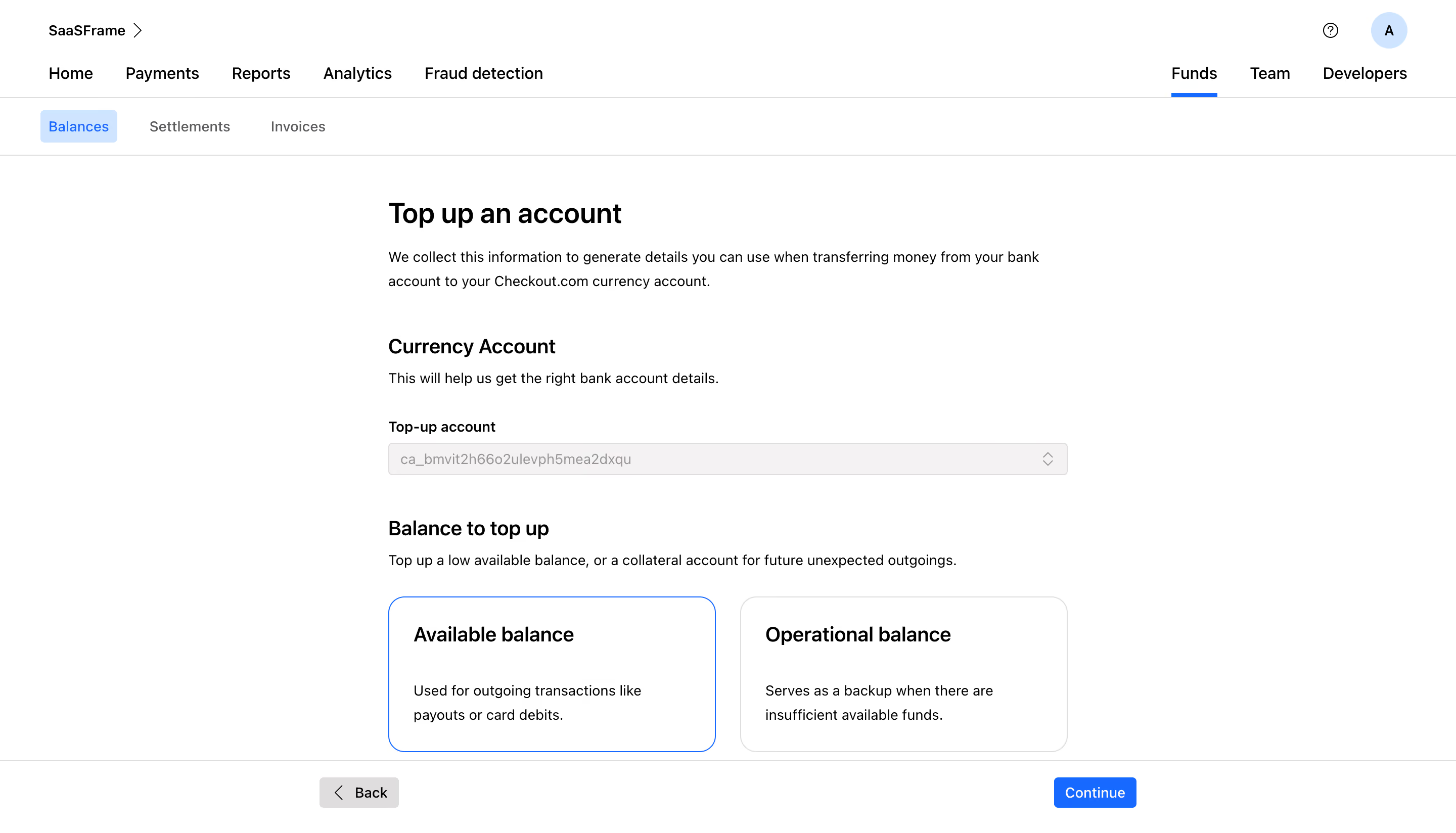
- **Style:** Minimal financial workflow with black typography, white surfaces and a focused blue selection/action accent.
- **Character:** Open form layout and generous whitespace keep account selection straightforward.
### Page composition
- **Canvas:** Source 2880 × 1648 pixels; geometry uses the 1400 × 801 inspection rendering. Approximate 2× source-to-CSS capture is plausible but unverified.
- **Header:** Workspace label and utilities occupy the first row; global navigation beneath has Funds selected with a blue underline.
- **Subnavigation:** Balances is highlighted in a pale blue chip, followed by two quiet text tabs.
- **Form:** A roughly 654px-wide column begins around x373, y194. Page introduction, currency account field and two balance-choice cards follow vertically.
- **Bottom bar:** A full-width top rule separates a bottom action row with Back left and blue Continue right, aligned to a wider centered region.
### Information hierarchy
- **Task:** Top up an account is the primary heading, followed by two-line explanatory copy.
- **Account selection:** Currency Account subsection has a short helper sentence, external field label and a muted account selector.
- **Balance choice:** A second subsection explains the choice, then offers Available balance and Operational balance cards.
- **Selection:** Available balance has a blue outline; the alternate card has a gray outline.
- **Progression:** Continue is the primary action. No transfer amount or payment confirmation appears at this stage.
### Typography
- **Page heading:** Approximately 28px semibold sans serif with 34px line height.
- **Section/card titles:** Around 20px medium-to-semibold, 25px line height.
- **Body:** Approximately 14px regular with 23px line height.
- **Navigation and actions:** Around 14–16px; field label is bold. Exact font family is unverified.
### Colors & surfaces
- **Measured base:** #FFFFFF white dominates, with #000000 dark text.
- **Measured neutrals:** #F4F2F2 field fill, #DFDDDD outlines and #999595 muted field text.
- **Measured blue:** #006BFF active navigation and primary action; #CAE5FF supplies pale selected-tab fill.
- **Secondary text:** #5C5B60 appears among muted gray text pixels.
- **Depth:** Flat surfaces, thin borders and no pronounced card shadows.
### Components
- **Account selector:** Approximately 654 × 32px, muted neutral fill, thin border, small radius and chevron control at right. Actual disabled semantics are unverified.
- **Choice cards:** Roughly 315 × 150px, about 16px radius, 24px padding and approximately 24px gap.
- **Selected card:** Thin vivid blue outline without a prominent filled background or visible radio circle.
- **Bottom actions:** Compact gray Back control with left chevron and blue Continue button, both around 30px tall.
- **Header utilities:** Small help icon and pale-blue circular avatar.
- **States:** Selected balance option is visible; dropdown contents, validation and subsequent transfer details are not shown.
### Visual rhythm
- **Form spacing:** Around 40px separates page copy from the first subsection; around 40px separates the selector from the next subsection.
- **Field cadence:** Label sits about 9px above the field; helper sentences follow headings with roughly 8–10px gaps.
- **Choice text:** Large gap separates each card title from its two-line explanation.
- **Alignment:** All form text and cards share a common left edge; the bottom bar visually brackets the workflow.
### Responsive
- **Observed scope:** Desktop only; mobile behavior is unverified.
- **Recommended form:** Use a fluid maximum-width column and 20–24px viewport gutters.
- **Recommended choices:** Stack the two cards at narrow widths while retaining selected outline and readable descriptions.
- **Recommended navigation:** Condense global navigation and keep Back/Continue reachable without covering form content.
### Adaptation guidance
- **Preserve:** Clear task introduction, externally labeled account selector and descriptive two-option balance selection.
- **Data:** Use supplied account identifiers and balance descriptions; avoid exposing unnecessary account details in shared previews.
- **Interaction:** Implement semantic selection controls with keyboard support and visible focus.
- **Complete states:** Define account-loading, unavailable-account, validation and next-step behavior explicitly; they are not established by this screenshot.
Use this context to reproduce the reference's visual language: layout, typography, colors, spacing, borders, radii, and distinctive elements. The screenshot takes priority if descriptions conflict.
## Direction
{{preferences.fidelityInstructions}}
## Output
{{output.instructions}}
Deliver a polished, cohesive design with precise alignment, hierarchy, and spacing. Produce the requested visual artifact, not just a description. If unsupported, explain the limitation.
.webp)




.avif)