Design with AI
Generate a new design based on this screen using your own content.
# Design from Reference: Blobr Add API Source
Create an original, high-fidelity visual design inspired by the reference. Prioritize composition, typography, colors, spacing, and component styling over technical implementation.
## Reference
- **Product:** Blobr
- **Category:** Add & Edit
- **Screenshot:** https://cdn.prod.website-files.com/5e9dc792e1210c5325f7ebbc/6acb6d9eb206c0d3f8f3a544_6acb6b8a0e8221f130827311_cms-36cebb5d3c0984059e945062.webp
Analyze the screenshot first. If inaccessible, request it rather than guessing.
## Content
{{content.instructions}}
{{content.data}}
Preserve essential messaging and factual accuracy. Adapt structure and copy length for visual balance; never invent product claims.
## Visual Design
### Overall aesthetic
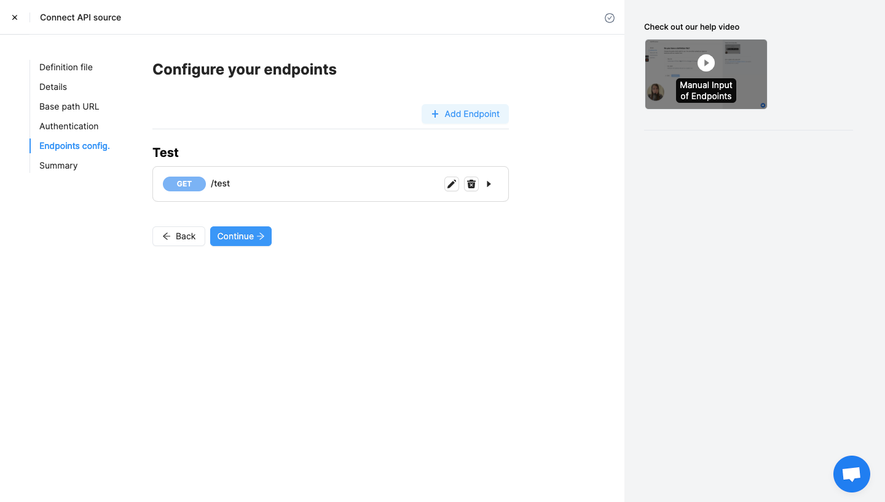
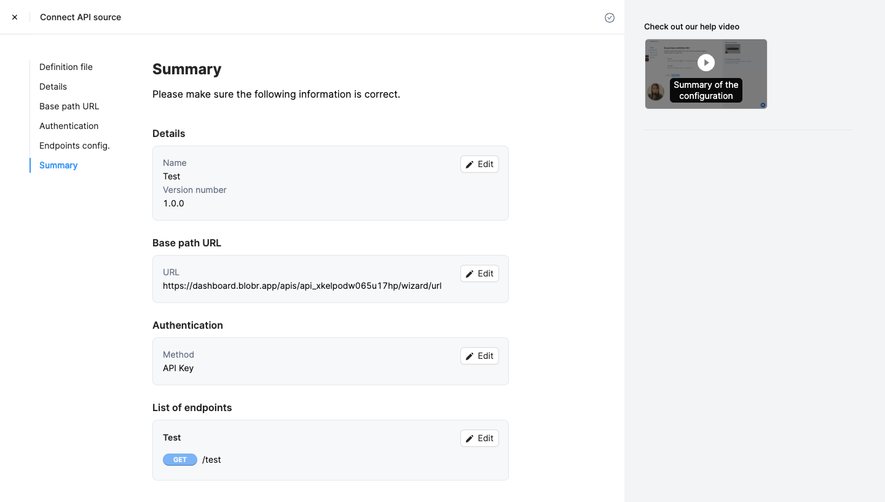
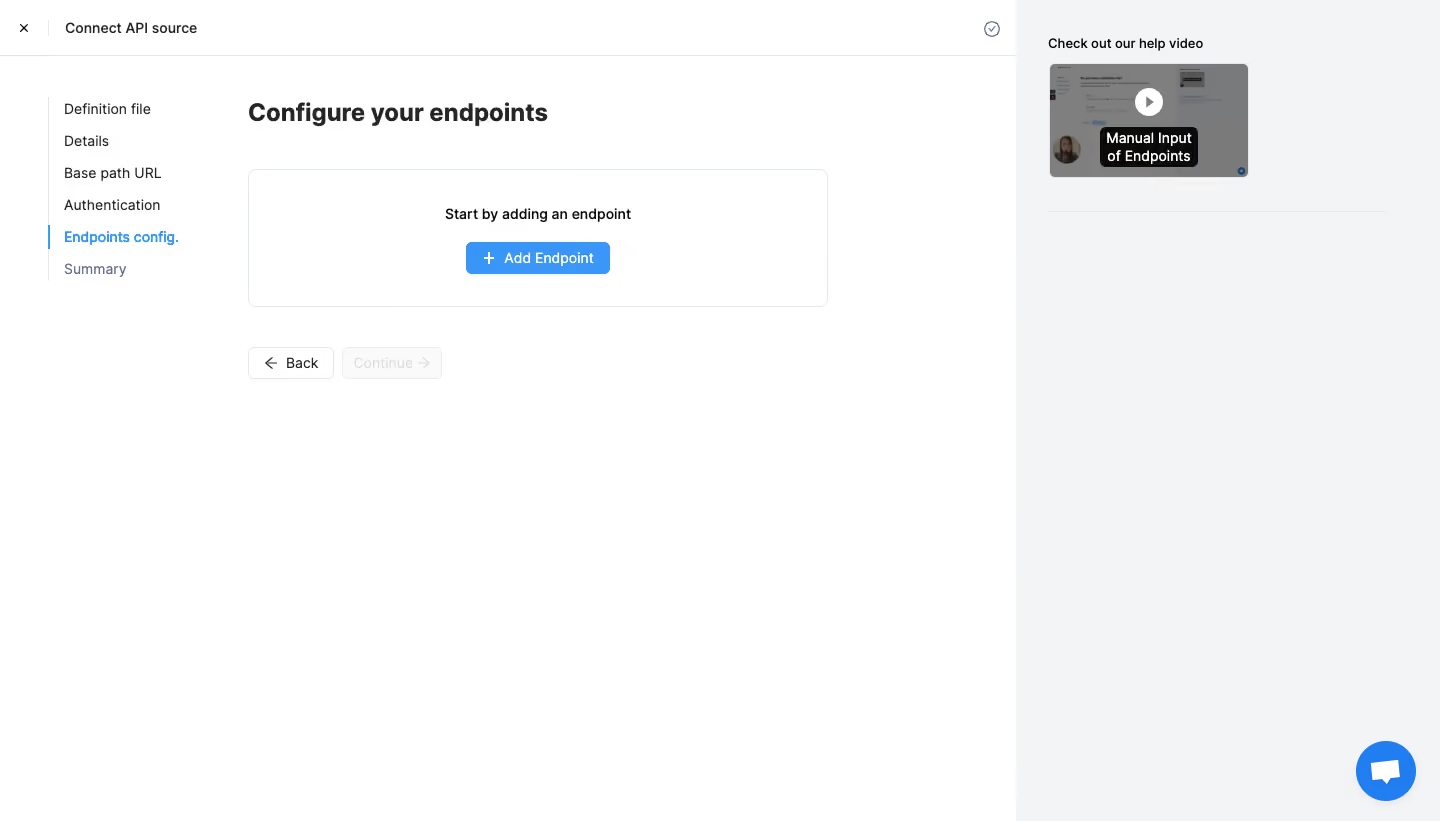
- **Character:** Sparse API-connection wizard with white workspace, fine gray borders and bright blue progression accents.
- **Layout tone:** A plain step rail and separate pale-gray help column keep technical setup uncluttered.
- **Scale:** The screenshot measures 1440 × 821 image px. Dimensions below are image estimates; CSS scale is unverified.
### Page composition
- **Top bar:** A close icon and Connect API source title sit left; a small circled-check symbol appears near the workspace's upper right.
- **Step rail:** Six setup stages stack in a narrow left column below the header.
- **Main task:** A bold Configure your endpoints heading sits above a wide empty-state panel with one instruction and blue Add Endpoint button.
- **Navigation:** Back and disabled Continue controls sit below the panel.
- **Help rail:** A roughly 425 px pale-gray column on the right contains a help-video heading, thumbnail and divider, with a blue chat control near the bottom.
### Information hierarchy
- **Current stage:** Endpoints config. is blue and marked by a short blue vertical rule; earlier steps are dark and Summary is muted.
- **Empty state:** The panel explicitly requests an endpoint before showing any configured rows.
- **Primary action:** Add Endpoint is the strongest action; Continue is visibly disabled.
- **Help:** A small paused video preview offers supplementary guidance. No video playback or endpoint creation is demonstrated.
### Typography
- **Family:** Neutral sans-serif; exact identity is unverified.
- **Task heading:** Approximately 25–27 image px, bold, with compact leading.
- **Navigation/body:** Around 14–15 px, regular-to-medium; current step and empty instruction are stronger.
- **Buttons:** Approximately 14–15 px with clear centered labels.
- **Video caption:** Small bold white text overlays the darkened poster.
### Colors & surfaces
- **Measured base:** ICC-aware sRGB sampling yields #FFFFFF and #F3F4F5 for main/help surfaces.
- **Measured accent:** #3A97F7 appears in blue action/selection treatment.
- **Measured text:** #0A0A0A and #262626 are dark foreground tones; #7F7F7F and #7A7A7A are muted details.
- **Measured rules:** #E4E7EB defines subtle outlines.
- **Depth:** Flat panels with small rounded corners and minimal shadows dominate.
### Components
- **Step rail:** A thin pale vertical line connects plain text stages; the current item has a blue segment and bold blue label.
- **Empty panel:** Approximately 580 × 138 image px with thin gray border, 7 px corners and centered contents.
- **Add action:** A compact blue rectangle pairs plus icon with white Add Endpoint text.
- **Back/Continue:** Two small outlined buttons include directional arrows; Continue uses pale disabled styling.
- **Video:** A landscape poster has centered play symbol and dark caption overlay.
- **Chat:** A large blue circular message button floats at the bottom of the help rail.
### Visual rhythm
- **Alignment:** Main heading, panel and navigation share one left axis around x248.
- **Spacing:** The task panel sits about 40 px below the heading; navigation follows after another generous gap.
- **Whitespace:** Most of the lower workspace is blank, reinforcing the single setup task.
- **Rail contrast:** Compact stages left and compact help content right frame a spacious central region.
### Responsive
- **Evidence limit:** Only desktop is shown; recommendations follow.
- **Wizard:** Collapse stages to a compact progress indicator on narrow screens.
- **Help:** Move video below the task or into a help drawer.
- **Controls:** Keep the empty panel fluid and actions comfortably touchable.
### Adaptation guidance
- **Reusable pattern:** Use explicit step navigation, a focused empty-state action and optional contextual video help.
- **State clarity:** Explain why continuation is unavailable and show configured endpoints after addition.
- **Accessibility:** Expose current step and disabled state semantically, label icon controls and preserve visible focus.
- **Interaction truth:** Do not infer a completed API connection from this empty endpoint stage.
Use this context to reproduce the reference's visual language: layout, typography, colors, spacing, borders, radii, and distinctive elements. The screenshot takes priority if descriptions conflict.
## Direction
{{preferences.fidelityInstructions}}
## Output
{{output.instructions}}
Deliver a polished, cohesive design with precise alignment, hierarchy, and spacing. Produce the requested visual artifact, not just a description. If unsupported, explain the limitation.
.webp)


.avif)