Sort
28
Controls that change the ordering of records or content.
.webp)
Sorting changes the order of a collection without changing which records qualify for inclusion. It helps people scan recent work, compare quantities, locate names, or prioritize attention. A useful sorting interface makes the active rule visible and applies it consistently across the relevant collection.
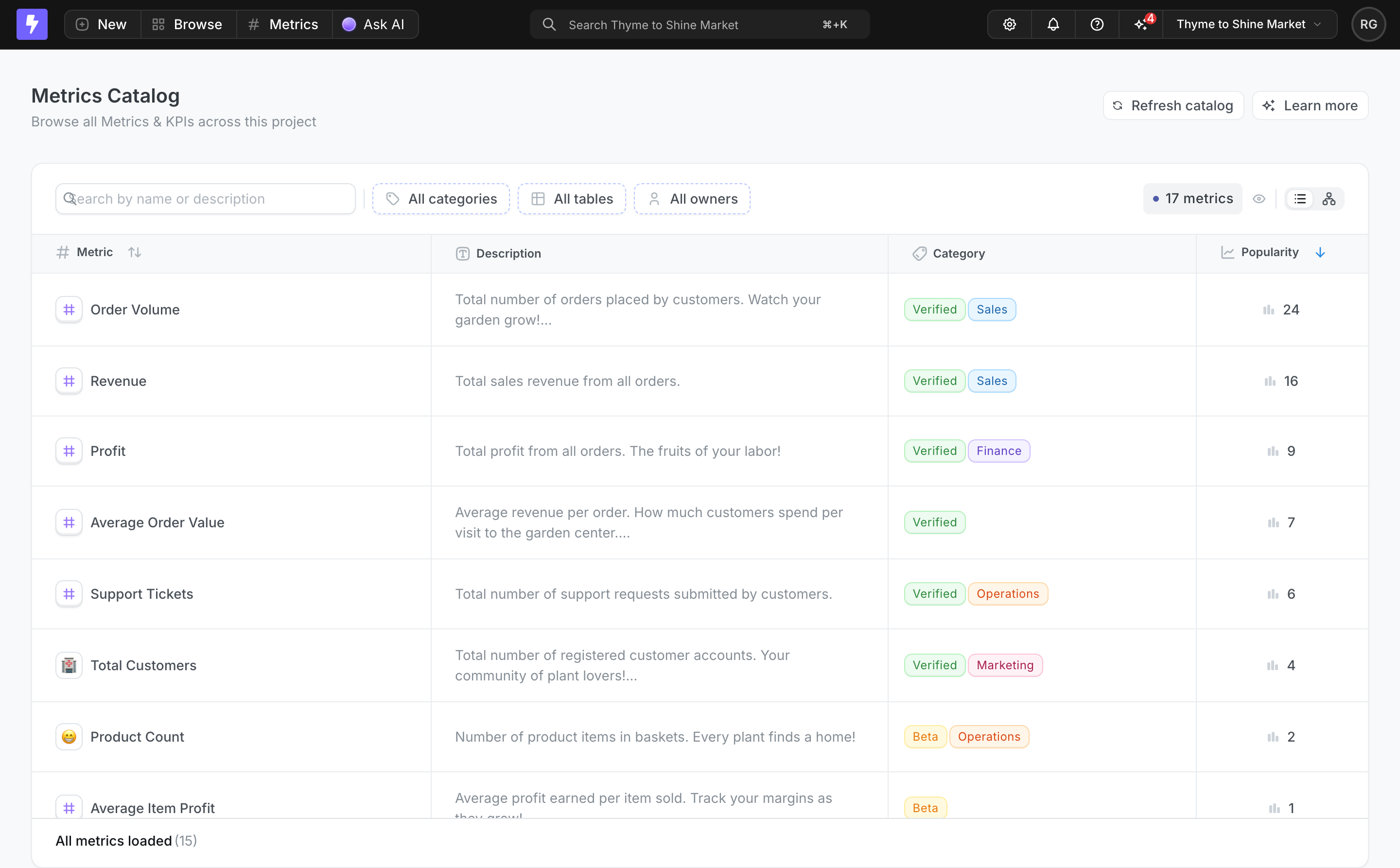
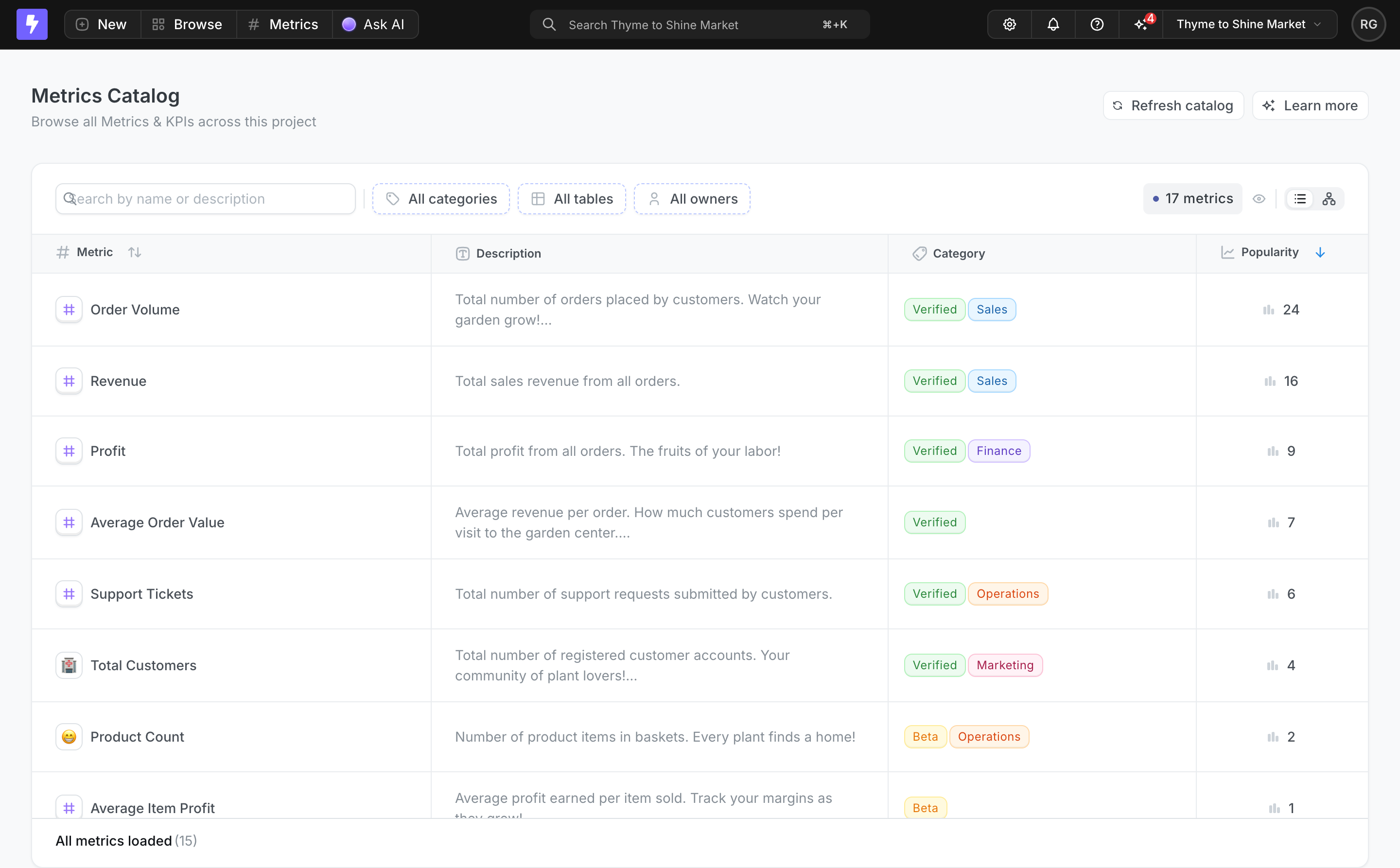
Lightdash’s captured Metrics Catalog shows sortable column cues and a highlighted downward arrow beside Popularity. Its search and category, table, and owner filters appear separately above the records. This example supports analysis of visible ordering and the relationship to other collection controls; the screenshot does not establish how toggling, pagination, or persistence is implemented.
A default order shapes what people see first. Recent activity may help in an operational inbox, alphabetical order may help in a directory, and a relevant ranking may help in a catalog. Choose the default according to the task rather than simply using database insertion order.
Lightdash’s capture places high-popularity metrics near the top and shows the corresponding values in the table. A catalog visitor can compare both the ordering cue and the data that explains it. The screenshot does not define how popularity is calculated, so that measure should not be described as quality or accuracy.
A useful default can still be inappropriate for another task. Someone looking for a specific metric name may prefer alphabetical order. Someone auditing changes may need an update date. Offer the meaningful alternatives without making every available attribute a sort choice.
A filter removes records that do not match a condition. Search identifies relevant matches. Sort arranges the resulting set. These controls can work together, but their effects should remain distinguishable.
In Lightdash, the filters sit above the table while the visible sorting cue sits beside a column label. That separation connects the order to the attribute being compared. A person should not mistake selecting a category for changing the order.
When several controls are active, make the result state understandable. Clearing search should not silently remove a chosen sort unless that is the intended model. Likewise, a filtered result should still disclose its ordering so the first item is not mistaken for an arbitrary recommendation.
A sort control needs to communicate both the attribute and direction. A highlighted arrow beside Popularity gives a visible cue in the captured table. The other column cue is quieter, distinguishing an available control from the active state.
Do not rely on an arrow without a meaningful label. Ascending and descending have different practical interpretations for dates, quantities, and names. A standalone menu can use wording such as newest first or name A to Z when that helps people predict the result.
Keep the active state visible after the menu closes. A selected option inside a hidden dropdown does little to help someone interpret the current list. Use a concise summary near the collection or a clear state on the relevant header.
Clickable headers are useful in a table where people can inspect the values being ordered. The interaction stays close to the data. It can reduce the need for a separate sort menu, particularly when only a few columns have meaningful ordering.
Make sortable headers recognizable as controls rather than plain text with decorative arrows. Preserve a usable activation area and a visible focus state. If an icon explains the direction, ensure the control has a programmatically available name and state.
For card grids or mobile layouts where columns disappear, a separate menu may be clearer. The same ordering options can remain available without forcing the table’s desktop interaction into a different presentation.
A header can alternate between ascending and descending, or include a return to the default unsorted state. Choose a consistent cycle and test whether people can predict it. A third state is useful only if its meaning is clear.
Changing the sort key also needs a rule for the initial direction. Numeric popularity might naturally begin with larger values, while names might begin alphabetically. Consistency does not require every attribute to start in the same mathematical direction if a task-specific default is more understandable.
Explain what reset means. Returning to the default order is different from restoring the last saved view or removing all collection controls. Label a reset action according to the state it actually restores.
Many records can share the same popularity, status, or date. Define a secondary order so the result does not reshuffle unpredictably when the collection refreshes. A stable order helps people retain their place and compare changes.
The secondary rule can be a readable attribute or a stable identifier, depending on the data model. If the tie-break affects a consequential ranking, explain enough for people to understand it. Avoid presenting arbitrary placement as evidence that one record is more important.
Test repeated refreshes and records arriving with equal values. The design should not make a person lose the row they were reviewing simply because an unresolved tie was returned differently by the server.
A missing value is different from zero, an empty string, or an unknown value. Sorting needs a defined treatment for those states. Otherwise people may interpret an unmeasured record as the lowest score or the oldest date.
Choose where missing values belong according to the task and show them honestly. A dash can represent unavailable data if its meaning is clear. Do not quietly replace missing data with a fabricated default merely to simplify ordering.
Consider how the treatment changes by direction. If missing values move between the beginning and end, test whether that helps or interrupts scanning. A consistent “unknown last” policy may be useful in some collections, but it should follow the product’s actual comparison model.
Formatted quantities, currency labels, dates, and version-like names can look sortable while producing misleading results if compared as raw text. Define the underlying comparison so the visible order matches the person’s expectation.
For example, a numeric sequence should not put 100 before 20 merely because the text begins with 1. A displayed date needs to be ordered by the relevant timestamp. If several currencies appear, a meaningful comparison may require additional context rather than simply sorting the numbers.
Names and mixed alphanumeric labels also need deliberate behavior. Test accents, case, numbered items, and localized text with representative data. Avoid promising one universal alphabetical rule across every locale.
In a paginated collection, people usually expect sorting to arrange all matching records, not only the rows currently visible. If the product sorts only loaded results, disclose that limitation so the first row is not mistaken for the highest value in the entire collection.
Changing order may move records to different pages. Decide how pagination responds and keep that transition predictable. Returning to the first page can be sensible, but should not erase unrelated filters or selection without reason.
For infinite scrolling, handle already loaded rows and new pages consistently. A sort change should not leave old and new ordering rules mixed in one list. Show loading while the authoritative new result is retrieved when needed.
Some workflows need a priority order such as status first and due date second. A multi-key interface should show the keys, their directions, and their precedence. The second key refines ties within the first; it is not an independent competing order.
Do not introduce multi-key sorting for every simple list. A single visible order can be easier to understand and operate. Add complexity when realistic tasks require it, such as an operational queue with several prioritization rules.
If the product saves the configuration, make the saved state recognizable. A shared view may have an established sort order while a person temporarily explores another. Explain whether changing it updates the shared view or only the current session.
Live data can change the value used for sorting and move a row. Consider whether to reorder immediately, provide a refresh route, or communicate that updates are available. The right behavior depends on whether freshness or stable inspection matters more.
When a request fails, avoid leaving the header in a new state while the rows remain in the previous order without explanation. Keep the control and result consistent, or show that the update is pending or failed.
Selection should refer to records rather than row positions. After sorting, a selected record should remain the same record. Otherwise a bulk action could affect a different item merely because it moved into the selected visual slot.
W3C’s sortable-table example uses a control in the header and exposes the active sort state. The relevant principle is that a sorting operation needs both operable controls and an understandable resulting state.
Test keyboard activation, focus visibility, and the announcement of the order. An arrow’s color alone should not be the only distinction between inactive and active controls. A screen-reader user needs to identify the sorted column and direction.
On mobile, retain the order summary even if the table becomes cards. Keep direction labels comprehensible and avoid tiny controls squeezed beside long headings. Changing presentation should not remove a core collection task.
No. Sorting changes order. Filtering changes which records qualify. They can be combined, but the interface should show their separate effects.
Only when ordering by that attribute supports a useful task. Decorative or action columns may not have a meaningful comparison.
Match the expected collection scope. If sorting is limited to loaded rows, make that limitation explicit.
Explore Search for locating records, Table for comparing attributes, Saved Views for persistent configurations, and Status Indicator for interpreting record states.
For accessible header controls and sort-state semantics, see W3C’s sortable-table example. Compare the gallery by how reliably the order supports a decision, rather than by the arrow treatment alone.