Design with AI
Generate a new design based on this screen using your own content.
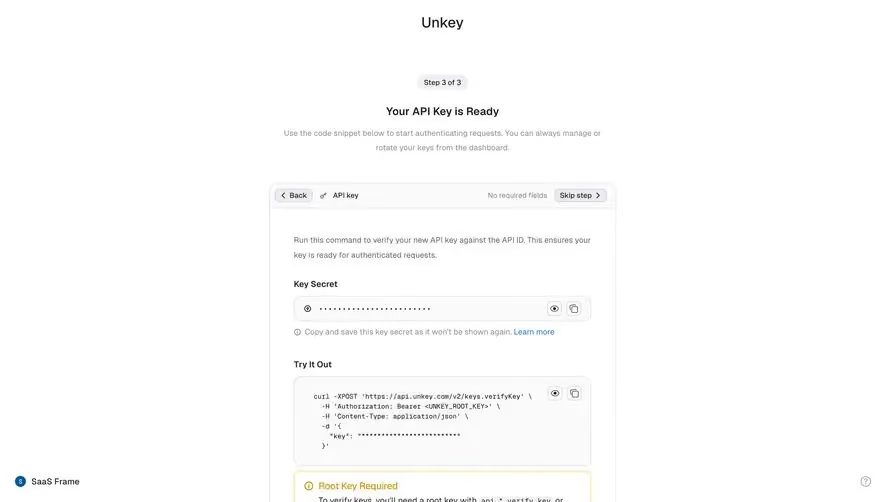
# Design from Reference: Unkey API Key Ready
Create an original, high-fidelity visual design inspired by the reference. Prioritize composition, typography, colors, spacing, and component styling over technical implementation.
## Reference
- **Product:** Unkey
- **Category:** Account Setup
- **Screenshot:** https://cdn.prod.website-files.com/5e9dc792e1210c5325f7ebbc/697b75e80ae8aee68520382e_ewUBRCchW66XL988eYPYg2w5yLkaqmxno_RxciXayYY.avif
Analyze the screenshot first. If inaccessible, request it rather than guessing.
## Content
{{content.instructions}}
{{content.data}}
Preserve essential messaging and factual accuracy. Adapt structure and copy length for visual balance; never invent product claims.
## Visual Design
### Overall aesthetic
- **Character:** A spare developer onboarding completion screen with a narrow centered panel, masked credential controls and a restrained warning callout.
- **Evidence scale:** Original 2940 × 2400 pixels. CSS estimates assume an unverified approximately 2× capture scale.
### Page composition
- **Top:** Centered Unkey wordmark, small step badge, readiness heading and short helper copy.
- **Panel:** Roughly 576 px wide rounded white card with compact header strip.
- **Body:** Introductory instruction, masked secret field, helper line, code example, warning box, divider and full-width dashboard action.
- **Peripheral context:** Small workspace identity at lower left and help icon at right.
### Information hierarchy
- **Completion:** Step 3 of 3 badge and readiness heading establish the captured state.
- **Credential:** Key Secret label and masked field are the first main controls.
- **Verification example:** Monospaced command block follows, with separate reveal/copy utilities.
- **Warning:** Amber Root Key Required callout stands out from neutral fields.
- **Next step:** Dark dashboard action closes the panel.
### Typography
- **Heading:** Unverified sans-serif around 18–20 px semibold.
- **Body:** Approximately 14 px regular, 24 px line height.
- **Labels:** Around 14 px semibold.
- **Code:** Monospaced around 11–12 px with line breaks and indentation.
- **Utilities:** Approximately 12 px compact labels.
### Colors & surfaces
- **Base:** White #FFFFFF.
- **Controls:** Near-white #FAFAFA and pale #F0F0F0.
- **Primary ink/action:** Dark #1D2125 and #212121.
- **Borders:** Gray #E1E1E1 and cool #DCDDE2.
- **Accents:** Blue helper links and amber warning outline/icon.
### Components
- **Panel shell:** Approximately 16 px radius and thin neutral border.
- **Header strip:** Small Back and Skip step pills, key icon/label and muted status text.
- **Secret field:** Full-width approximately 42 px pale rounded row with masked dots and two small reveal/copy controls.
- **Code block:** Approximately 148 px tall, 12 px radius, monospaced command and matching utility icons; credential characters remain masked.
- **Warning:** Amber outlined rounded box, icon/title, two-line explanatory copy and blue link.
- **Final action:** Full-width approximately 40 px dark button, 6 px radius, with muted completion reassurance below.
### Visual rhythm
- **Panel padding:** Approximately 40 px horizontal inset.
- **Groups:** Around 32–40 px separates secret, code and final-action areas.
- **Alignment:** Labels, blocks and action share one left/right axis.
### Responsive
- **Observed limit:** Desktop only; mobile onboarding behavior is unverified.
- **Recommendation:** Keep a fluid narrow panel and allow code to scroll horizontally.
- **Controls:** Preserve accessible labels and focus for reveal/copy utilities.
### Adaptation guidance
- **Retain:** Separate credential display, verification example and next action clearly.
- **Implement:** Use neutral surfaces with one amber warning treatment.
- **Verify:** Confirm font, scale and copy/verification behavior separately; no key was revealed, copied or used.
Use this context to reproduce the reference's visual language: layout, typography, colors, spacing, borders, radii, and distinctive elements. The screenshot takes priority if descriptions conflict.
## Direction
{{preferences.fidelityInstructions}}
## Output
{{output.instructions}}
Deliver a polished, cohesive design with precise alignment, hierarchy, and spacing. Produce the requested visual artifact, not just a description. If unsupported, explain the limitation.
.webp)




.avif)