Design with AI
Generate a new design based on this screen using your own content.
# Design from Reference: ProductBoard Invite Team Members
Create an original, high-fidelity visual design inspired by the reference. Prioritize composition, typography, colors, spacing, and component styling over technical implementation.
## Reference
- **Product:** ProductBoard
- **Category:** Invite Team Members
- **Screenshot:** https://cdn.prod.website-files.com/5e9dc792e1210c5325f7ebbc/6acbc994f9eac5af75463bdc_6acbc735a8c4cc6828548069_cms-238c6673773386fc3b15b015.webp
Analyze the screenshot first. If inaccessible, request it rather than guessing.
## Content
{{content.instructions}}
{{content.data}}
Preserve essential messaging and factual accuracy. Adapt structure and copy length for visual balance; never invent product claims.
## Visual Design
### Overall aesthetic
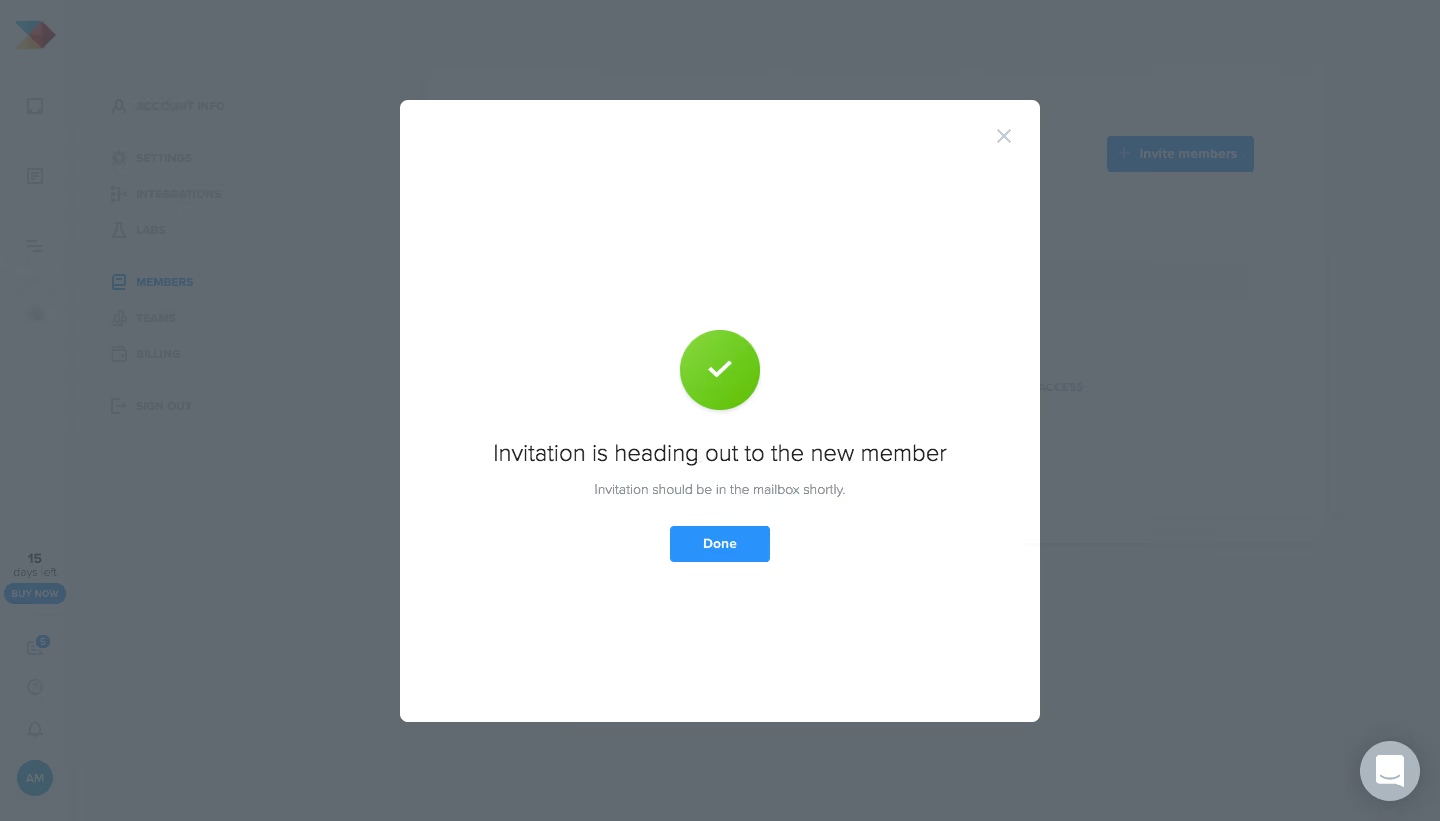
- **Style:** Spacious invitation-success modal with a large green status symbol and one completion action.
- **Visual character:** White square-like dialog against a cool darkened administration screen.
- **Contrast:** Success green draws attention first; blue Done provides the next step.
- **Decoration:** No ornamental artwork; the checkmark is the sole focal graphic.
### Page composition
- **Screenshot size:** 1440 × 821 image px. Capture-to-CSS scale is unverified; dimensions below use screenshot pixels.
- **Dialog:** Approximately 640 × 622 px, centered horizontally, starting about 100 px below the top.
- **Status group:** Green circle near the upper-middle, followed by one-line confirmation, short helper, and Done.
- **Background:** Narrow icon rail, settings navigation, and member-management content remain dimly visible.
- **Dismissal:** Pale close cross sits near the upper-right corner of the dialog.
### Information hierarchy
- **Primary status:** Green circle/check confirms invitation submission.
- **Main message:** Centered sentence communicates that the invitation is on its way.
- **Supporting message:** Smaller gray line explains expected mailbox arrival.
- **Action hierarchy:** Done is the only central action; close provides a secondary dismissal path.
- **Context:** Invitation action and Members navigation remain visible behind the overlay.
### Typography
- **Family:** Neutral proportional sans serif; exact family unverified.
- **Main message:** Approximately 24 screenshot px, regular weight, line-height 32 px.
- **Helper:** Approximately 14 screenshot px, regular, line-height 20 px.
- **Button:** Approximately 14 screenshot px, semibold.
- **Background typography:** Smaller administrative labels are visually reduced by the overlay.
- **Precision:** These are pixel-based estimates and do not identify browser CSS scale.
### Colors & surfaces
- **Dialog fill:** Sampled sRGB #FFFFFF.
- **Overlay:** Sampled #616971, #636B72, and #626A71 describe the dimmed composited background.
- **Primary blue:** Sampled #2993FB corresponds to interface action emphasis.
- **Muted gray:** Sampled #ACB6BF is visible in subdued interface elements.
- **Success accent:** Bright lime-green circular status graphic; its exact flat fill was not isolated in the dominant-color samples.
- **Text treatment:** Main sentence is dark gray; helper is cooler and lighter.
### Components
- **Shell:** Approximately 6 screenshot px radius with a subtle border.
- **Success graphic:** Approximately 80 px diameter, white check centered inside, with a small shadow below.
- **Completion button:** Approximately 100 × 36 screenshot px, blue fill, white label, and 4 px corners.
- **Close control:** Small pale cross, inset about 30 px.
- **Message group:** All elements are centered, with no surrounding inner card.
- **Observed state:** Invitation success only; form entry and delivery completion are not demonstrated.
### Visual rhythm
- **Whitespace:** Large blank upper and lower regions create a celebratory, uncomplicated pause.
- **Status spacing:** About 32–36 px between the circle and message, then 12–16 px to helper.
- **Action spacing:** Approximately 28 px between helper and Done.
- **Alignment:** The circle, text, and button share a single centered vertical axis.
### Responsive
- **Observed version:** Desktop only.
- **Width recommendation:** Fit dialog within 20 px side margins on small screens.
- **Height recommendation:** Reduce excessive blank space while preserving the status-message-action grouping.
- **Text recommendation:** Allow the confirmation sentence to wrap into two balanced lines.
- **Dismissal recommendation:** Keep both Done and close accessible.
### Adaptation guidance
- **Preserve:** Green status graphic, concise confirmation, secondary delivery guidance, and one blue completion action.
- **Content fidelity:** Describe the real invitation state; successful submission does not by itself prove inbox delivery.
- **Starting proportions:** Large status circle, modest 24 px message, 14 px helper, and compact action.
- **Visual restraint:** Avoid introducing extra actions or decorative graphics into this simple success state.
- **Interaction fidelity:** Implement dismissal and focus behavior according to the actual application; screenshot only establishes appearance.
Use this context to reproduce the reference's visual language: layout, typography, colors, spacing, borders, radii, and distinctive elements. The screenshot takes priority if descriptions conflict.
## Direction
{{preferences.fidelityInstructions}}
## Output
{{output.instructions}}
Deliver a polished, cohesive design with precise alignment, hierarchy, and spacing. Produce the requested visual artifact, not just a description. If unsupported, explain the limitation.
.webp)



.avif)