.webp)
Thank you! Your submission has been received!
Oops! Something went wrong while submitting the form.
Get SaaSFrame Pro
Monthly
$18
Quarterly
$48
Yearly
$180
Upgrade to access this feature
Browse all screens & flows
Filter and search screens & flows
Access Figma files
Access mobile versions
Bookmark screens & flows
Join now

Clutch Calculator

Clutch
Securing Non-Human Identities
Designed by
No items found.

Bookmark
Bookmark

Design with AI
Thank you! Your submission has been received!
Oops! Something went wrong while submitting the form.
# Design from Reference: Clutch Calculator
Create an original, high-fidelity visual design inspired by the reference. Prioritize composition, typography, colors, spacing, and component styling over technical implementation.
## Reference
- **Product:** Clutch
- **Category:** Calculator
- **Screenshot:** https://cdn.prod.website-files.com/5e9dc792e1210c5325f7ebbc/6acad45c886583e9d96b6e02_6acad301cdf07ad61497a7b6_cms-54bade47b4463a8cfd0ee155.webp
Analyze the screenshot first. If inaccessible, request it rather than guessing.
## Content
{{content.instructions}}
{{content.data}}
Preserve essential messaging and factual accuracy. Adapt structure and copy length for visual balance; never invent product claims.
## Visual Design
### Overall aesthetic
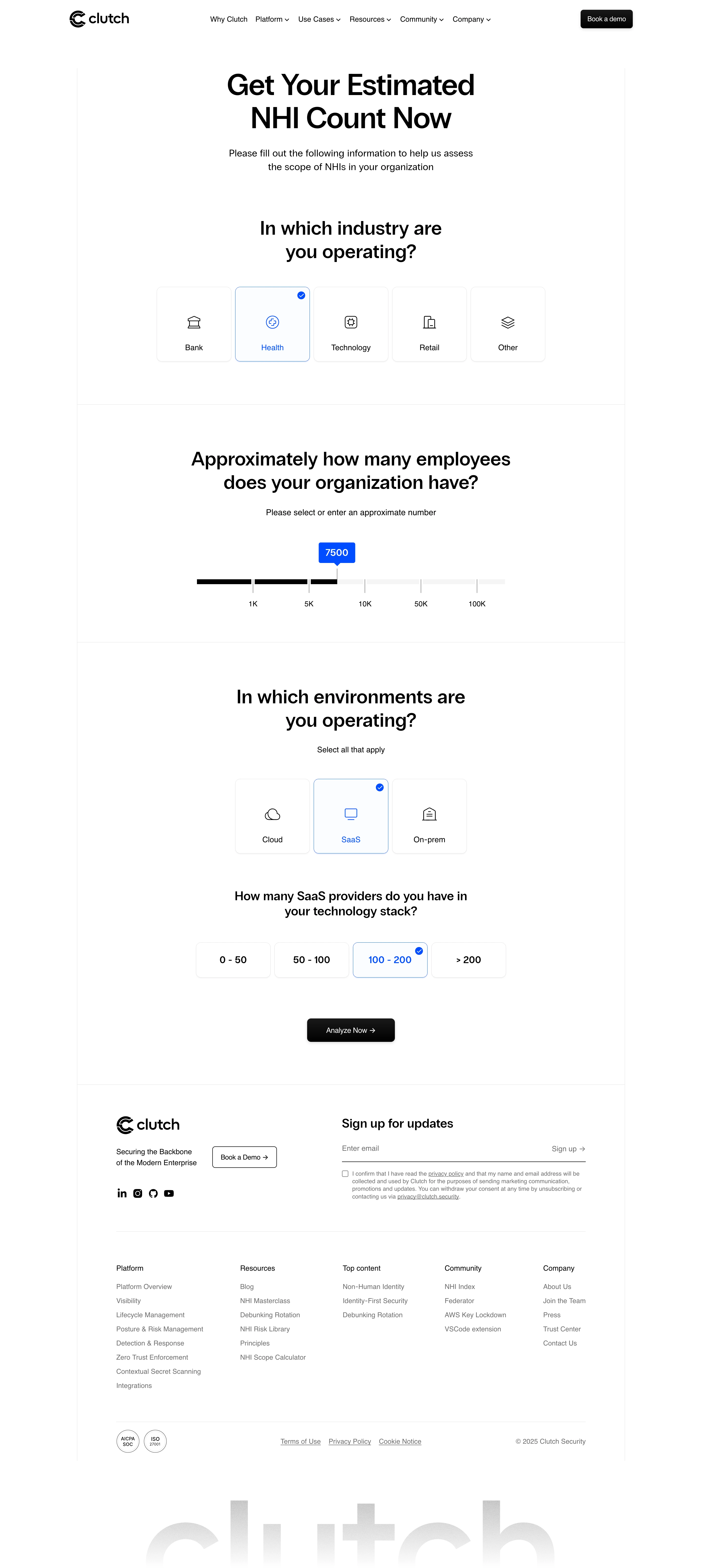
- **Character:** A minimal calculator landing page uses bold black typography, white space, thin structural rules, line icons, and electric-blue selection cues.
- **Evidence:** Original dimensions are 2880 × 6434 px, inspected across three readable crops at 1400 px width. Dimensions below estimate a 1440 px CSS layout at 2× capture; ratio is unverified.
- **Tone:** Large centered questions and spacious option groups make the calculator feel like a guided questionnaire.
### Page composition
- **Header:** Clutch branding sits left, product/resource navigation across the center, and a black demo button right.
- **Introduction:** A large two-line calculator heading and shorter centered explanation sit inside faint vertical rails.
- **Industry:** A bold question precedes five square icon cards. Health is selected.
- **Employee count:** A separate ruled section contains a large question, helper text, and a broad segmented slider showing 7500.
- **Environment:** A third group offers Cloud, SaaS, and On-prem cards, with SaaS selected. A dependent provider-count question shows four smaller range choices, with 100–200 selected.
- **Action and footer:** A black Analyze Now action closes the form. Brand/demo/social content, newsletter signup, five link columns, certification marks, legal links, and a huge faded wordmark follow.
### Information hierarchy
- **Primary:** Large centered headings introduce the calculator and each major question.
- **Selection:** Blue outlines, blue labels/icons, and small checked badges identify selected cards and range choices.
- **Quantity:** A blue speech-bubble marker above the slider displays the current employee value.
- **Dependent detail:** The SaaS-provider question is smaller than the major environment heading.
- **Completion:** Analyze Now is the strongest form action, followed by quieter footer newsletter and demo controls.
### Typography
- **Family:** A clean sans serif is used; exact identity is unverified.
- **Hero:** Approximately 60 px bold with about 68 px line-height.
- **Questions:** Major questions are around 38–40 px semibold with 48 px leading; dependent question is around 25–27 px.
- **Body and options:** Introductory copy is about 20 px; card labels and helpers are roughly 16 px.
- **Footer:** Group headings/links are around 14 px, with smaller gray newsletter consent copy.
### Colors & surfaces
- **Measured palette:** Source samples include white #FFFFFF, black #000000, near-white #FCFDFF, border gray #DFDFDF, muted gray #6E6E6E, and blue #004DFF.
- **Semantic use:** Blue is reserved for selection borders, icons, check badges, and slider value marker.
- **Neutral controls:** Unselected tiles use faint gray outlines and soft lower shadows. Black fills primary actions and the selected portion of the slider track.
- **Footer:** Gray text, fine rules, and a low-contrast oversized wordmark preserve the monochrome character.
### Components
- **Industry cards:** Approximately 153 × 153 CSS px, with around 10 px radii, centered line icon and lower label.
- **Selected state:** A thin blue border and small blue check badge at upper right accompany blue icon/text.
- **Slider:** Roughly 630 px wide, with a shallow black/pale-gray track, vertical tick marks, labels for increasing count thresholds, and blue value bubble.
- **Environment cards:** Reuse the icon-card anatomy in a centered three-item row.
- **Provider choices:** Four approximately 153 × 72 px rounded rectangles contain bold range labels.
- **Analyze:** A black rectangle around 180 × 48 px with 8 px radii, white label, right arrow, and subtle shadow.
- **Newsletter:** A long underline-style email field and inline signup arrow sit above a small consent checkbox/text block.
- **Footer:** Five link groups and small certification circles align within a wide ruled container.
### Visual rhythm
- **Main frame:** Faint vertical rails bound roughly 1120 CSS px of content.
- **Section spacing:** Large 80–110 px vertical padding separates questions; horizontal rules mark major breaks.
- **Option spacing:** Narrow consistent 8–10 px gaps keep option groups visually unified.
- **Centered layout:** Questions, slider, choices, and analyze action share a central axis.
- **Footer density:** A compact multi-column directory contrasts with the airy calculator.
### Responsive
- **Observed limit:** Only desktop is visible; actual calculation results and mobile behavior are unverified.
- **Recommended choices:** Wrap industry/environment cards into readable rows or a single column without shrinking labels.
- **Recommended slider:** Keep the track fluid, prevent tick labels from colliding, and provide a keyboard-accessible numerical alternative.
- **Recommended footer:** Stack newsletter and navigation groups, keeping consent text readable and buttons tappable.
### Adaptation guidance
- **Preserve:** Keep the question-by-question progression, blue selected states, visible slider quantity, and one clear analysis action.
- **Implement:** Use radio groups for industry/ranges and a checkbox-style group where multiple environments are permitted.
- **Accessibility:** Associate questions with controls, expose selected values, support keyboard slider operation, and provide visible focus.
- **State design:** Treat Health, 7500 employees, SaaS, and 100–200 providers as the displayed reference state. Define results/loading/error views independently.
- **Validate:** Confirm font, true CSS scale, responsive option wrapping, slider labeling, and dependent-question logic. No calculated result is shown.
Use this context to reproduce the reference's visual language: layout, typography, colors, spacing, borders, radii, and distinctive elements. The screenshot takes priority if descriptions conflict.
## Direction
{{preferences.fidelityInstructions}}
## Output
{{output.instructions}}
Deliver a polished, cohesive design with precise alignment, hierarchy, and spacing. Produce the requested visual artifact, not just a description. If unsupported, explain the limitation.

.avif)
Category
Patterns
No items found.
Tech Stack

Added on
August 13, 2025
Similar screens





Upgrade to SaaSFrame Pro now to see similar examples.
Monthly
$18 /month
Billed $18 monthly
Browse all screens & flows
Filter and search screens & flows
Search text in screenshots
Access Figma files
Access mobile versions
Join now
Quarterly
$16 /month
Billed $48 quarterly
Browse all screens & flows
Filter and search screens & flows
Search text in screenshots
Access Figma files
Access mobile versions
Join now
Yearly
$15 /month
Billed $180 yearly
Browse all screens & flows
Filter and search screens & flows
Search text in screenshots
Access Figma files
Access mobile versions
Join now