Generate a new design based on this screen using your own content.
Thank you! Your submission has been received!
Oops! Something went wrong while submitting the form.
# Design from Reference: Checkout.com API Keys Overview
Create an original, high-fidelity visual design inspired by the reference. Prioritize composition, typography, colors, spacing, and component styling over technical implementation.
## Reference
- **Product:** Checkout.com
- **Category:** Empty
- **Screenshot:** https://cdn.prod.website-files.com/5e9dc792e1210c5325f7ebbc/6acad4c41025e911ae51848c_6acad3d850cf4647822ceb2f_cms-4251746eb221d6e9d69d6937.webp
Analyze the screenshot first. If inaccessible, request it rather than guessing.
## Content
{{content.instructions}}
{{content.data}}
Preserve essential messaging and factual accuracy. Adapt structure and copy length for visual balance; never invent product claims.
## Visual Design
Use this context to reproduce the reference's visual language: layout, typography, colors, spacing, borders, radii, and distinctive elements. The screenshot takes priority if descriptions conflict.
## Direction
{{preferences.fidelityInstructions}}
## Output
{{output.instructions}}
Deliver a polished, cohesive design with precise alignment, hierarchy, and spacing. Produce the requested visual artifact, not just a description. If unsupported, explain the limitation.
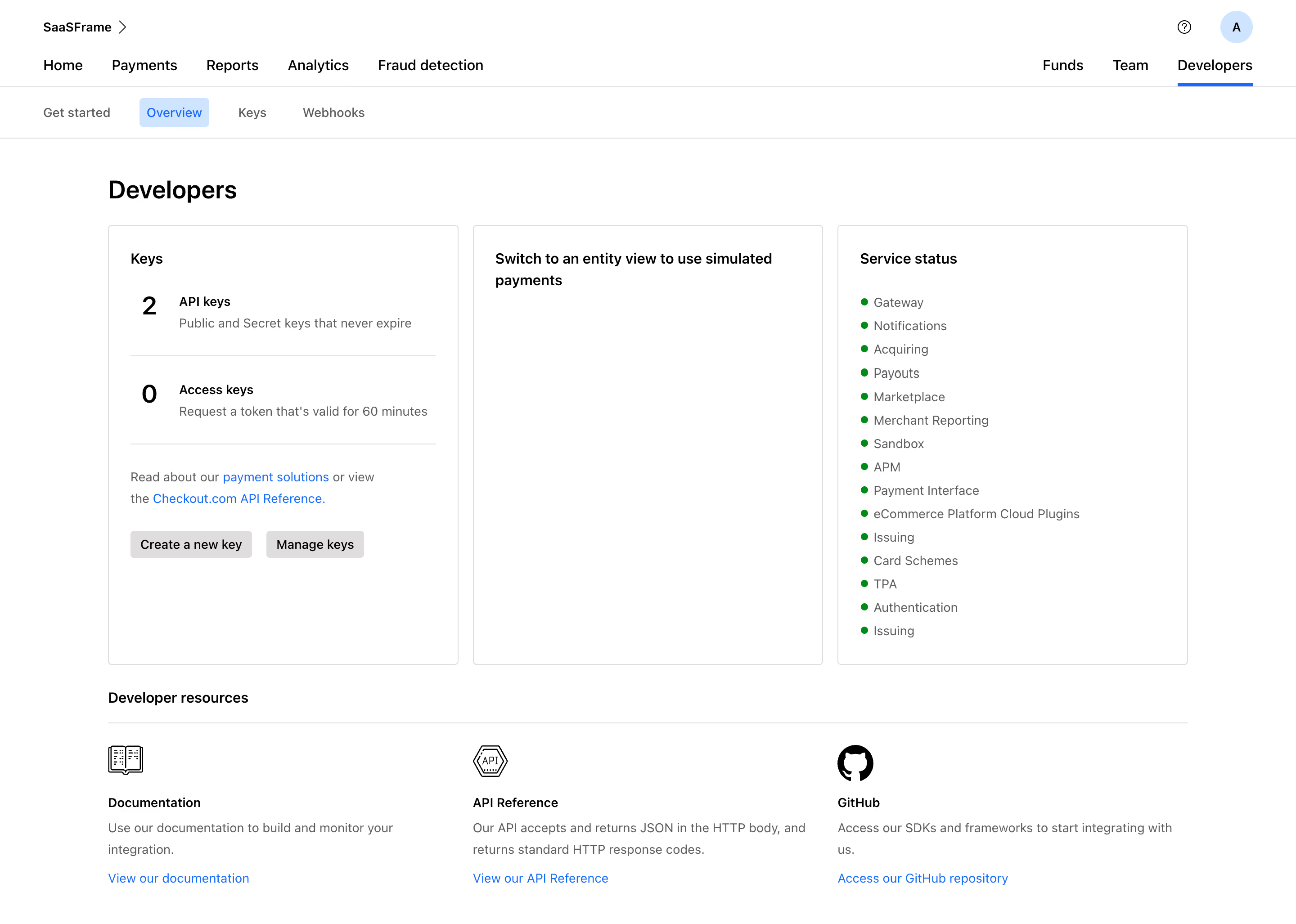
Checkout.com's developer overview page is clean without being sterile. The three-card layout up top immediately gives you the hierarchy: keys on the left, entity switching in the middle, service status on the right. That service status column with all the green dots is weirdly satisfying. You scan it in two seconds and know everything's operational.
Typography Does the Heavy Lifting
Big bold "2" and "0" counters for API keys and access keys. They pop against the lighter descriptive text below. The type is simple, likely a system font or something close to Inter. Nothing fancy, just readable. Sub-navigation tabs at the top feel lightweight with that blue underline on "Overview" acting as the only real color accent in the whole upper section.
Developer Resources That Actually Look Useful
The bottom section with Documentation, API Reference, and GitHub cards is practical. Each gets an icon, a short blurb, and a blue link. No fluff. The monochrome icons keep things grounded while the blue CTAs give just enough contrast to guide your next click. Functional design done right.
.webp)




.avif)