Waitlist
0
A signup experience for collecting interest before a product or feature becomes available.
.webp)
A waitlist collects interest when a SaaS product, feature, or access tier is not immediately available to everyone. It is a promise about what may happen next: an invitation, a launch notification, an eligibility review, or a place in an ordered queue. A useful design tells people which promise they are accepting and does not present joining as equivalent to receiving access.
Loops’ captured early-access landing page and form builder show a compact email-based entry point. Routine’s captured email addresses a returning person who already has access. These examples support analysis of registration, implementation consistency, and recovery. They do not establish current availability or an invitation schedule for either product.
“Join waitlist” can represent several different systems. An ordered queue has a position. A manually selected beta has eligibility rules. A launch notification list may have no queue or selection process at all. Explain the relevant model rather than borrowing the language of scarcity.
State what people can expect to receive and what they cannot yet do. If joining leads to an invitation only when capacity opens, make that distinction clear. If the product is collecting applications for review, use wording that reflects an application rather than automatic admission.
Avoid making an access promise the team cannot support. If timing is uncertain, explain the uncertainty plainly. A confident launch date or guaranteed invitation should follow the actual operational plan, not the visual rhythm of the landing page.
Loops’ early-access capture introduces an email product for SaaS, distinguishes marketing and transactional email, and places the email field and waitlist action beneath that proposition. Product imagery and company logos provide additional context farther down the page.
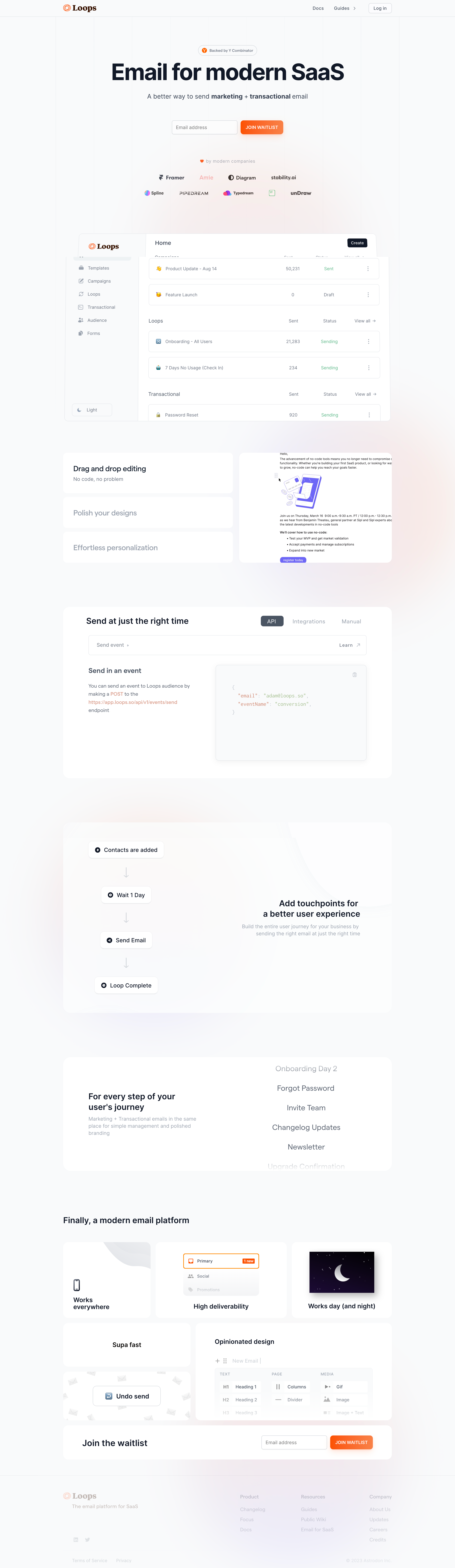
The form does not need to carry the entire product explanation. The surrounding page should answer what is being offered, whom it is for, and why someone might want access. A bare field can collect addresses but leaves people uncertain about the commitment.
Use evidence proportionate to the product’s stage. A real interface preview can clarify the intended experience. Avoid implying that a mockup proves the product is ready or that decorative logos establish endorsements beyond what the team can substantiate.
An email-only form is a low-effort starting point when the immediate task is receiving a future message. Additional questions need a clear purpose. A work role or use case can help a selective beta, but requiring a full company profile for a simple launch alert may discourage useful interest.
Ask whether each field is needed now or can be collected after invitation. Some information becomes easier to answer once people understand the product. Progressive collection can keep the waitlist focused while still supporting later setup.
If qualification matters, explain it. A person should know whether team size or a company domain affects eligibility, merely helps tailor communication, or is optional. Do not make required fields appear optional through vague supporting copy.
Loops’ form builder shows a preview with an email input and a Join Waitlist button. The interface also exposes separate configuration areas for the form, button, success state, and settings. This highlights that submission and its feedback are part of one designed experience.
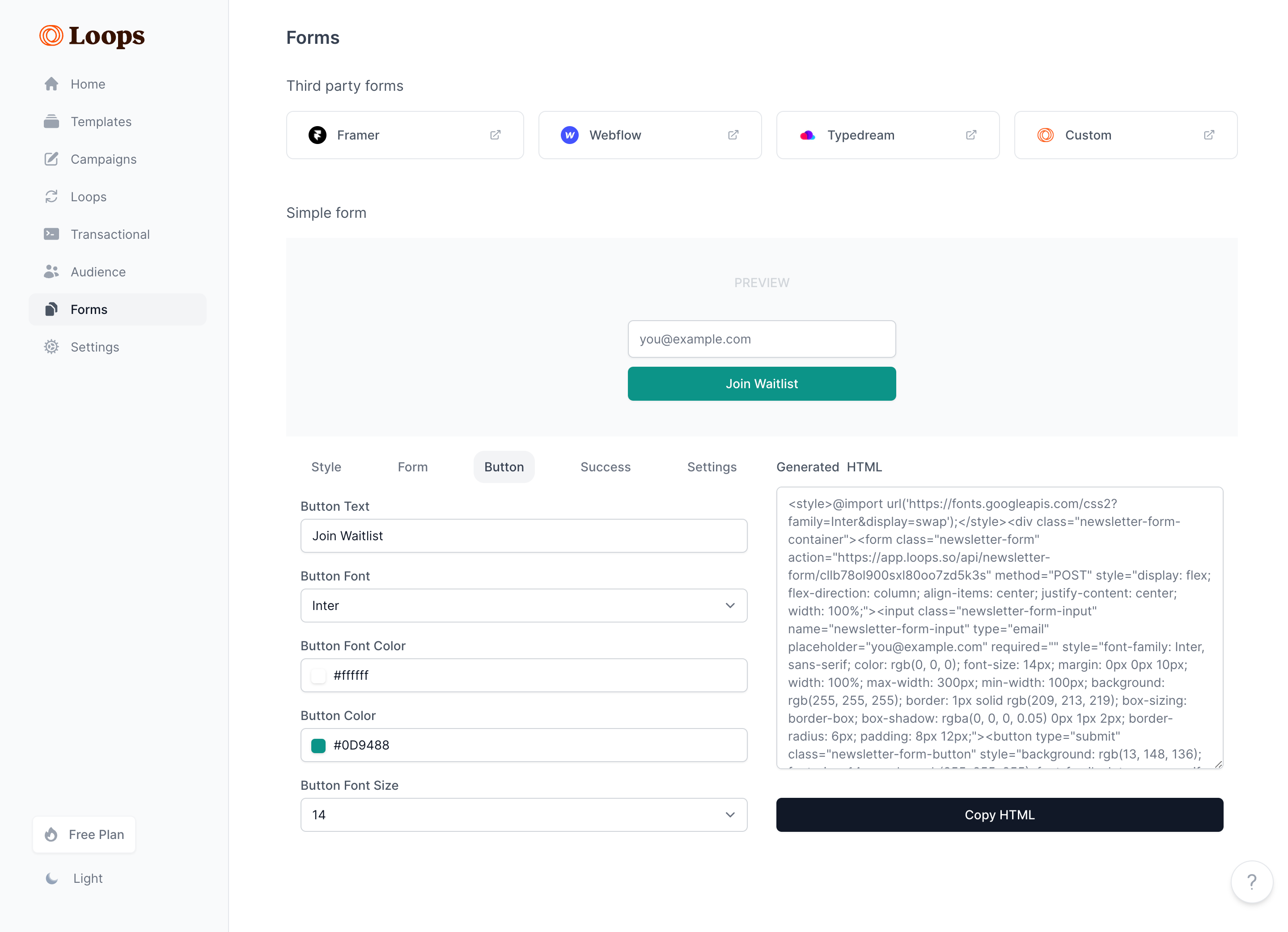
If the button promises to join a waitlist, the resulting message should confirm the appropriate state. It should not suddenly describe a newsletter subscription without explaining the relationship. Likewise, a confirmation email should not claim the person can start using a product that remains unavailable.
Check the complete chain: landing-page wording, button, local success state, confirmation email, and eventual invitation. A coherent chain helps people recognize later messages and understand why they are receiving them.
Some waitlists accept an address immediately. Others require email confirmation before the registration becomes active. Choose the model according to the actual process and explain the next action clearly.
If confirmation is required, tell the person where the message was sent and what completing it does. Offer a supported correction route for a mistyped address. If sending is delayed, avoid making the page look like the operation failed.
Do not use a generic success toast as the only record of an important next step. A stable confirmation state can explain what happens next and provide relevant support or resend options when the implementation supports them.
People may forget that they already registered or use a different device later. Define whether another submission updates the existing record, resends confirmation, or produces a duplicate. The interface should support the chosen behavior without exposing information beyond the product’s privacy model.
A returning person may already have access rather than simply be waiting. Routine’s captured email recognizes that situation, explains that access was previously granted, and points to downloading the app again. It replaces another waiting experience with a route back into the product.
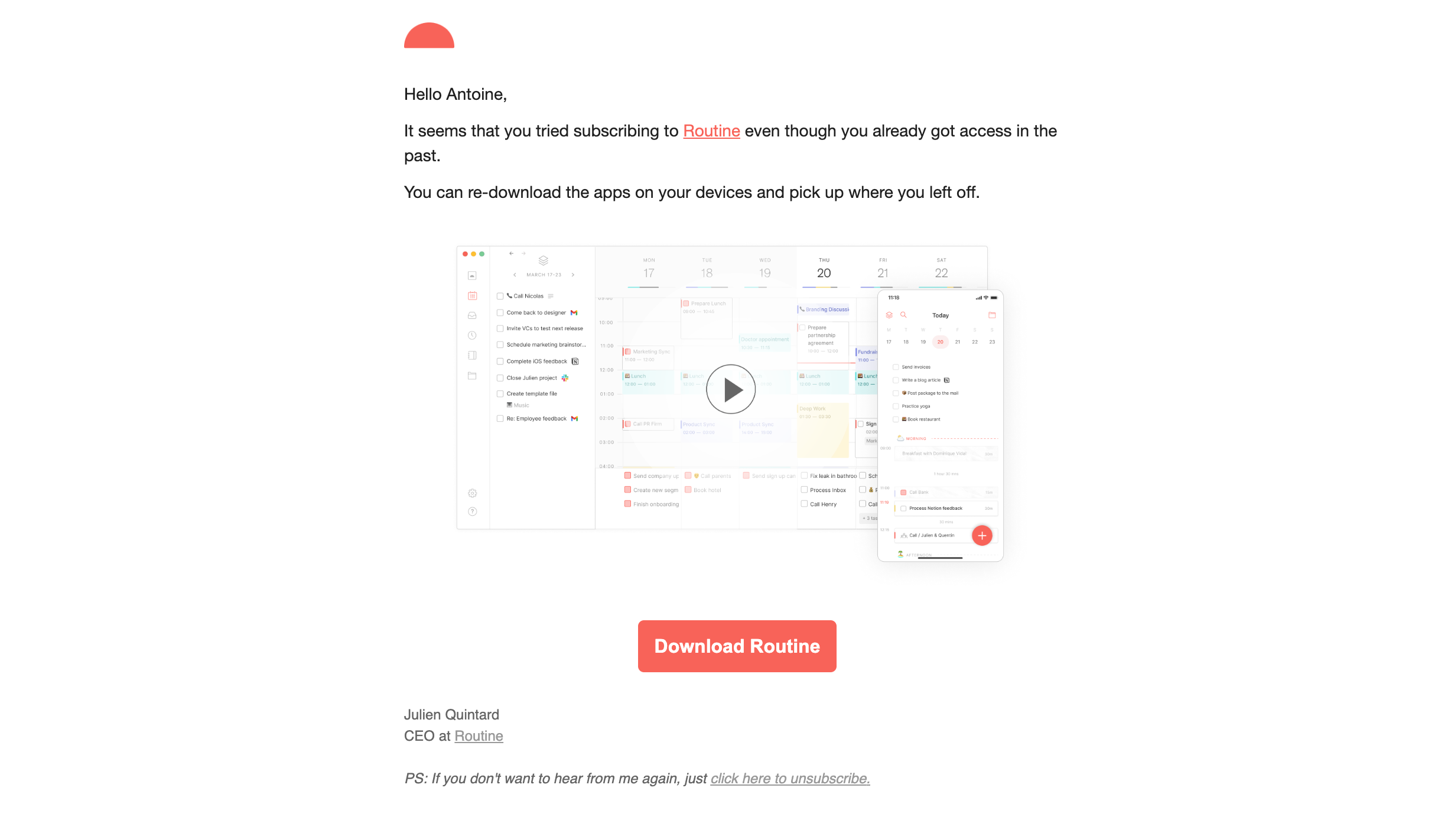
Design the path for the person’s actual state: unconfirmed interest, confirmed waiting, invited, or already active. Avoid sending an established user back to the start of an access process merely because they entered the same address again.
A queue position can make progress tangible, but it creates an expectation about ordering. Explain what the number counts and whether invitations genuinely follow that order. If eligibility or capacity changes the sequence, make that qualification understandable.
Do not display a fabricated countdown or arbitrary position to make the product seem popular. Such devices can attract attention while making later communication less credible. A simple statement that interest is registered may be more accurate and useful.
If the queue is real, consider what happens when people leave, duplicate records are merged, or capacity expands in batches. A changing position needs a coherent explanation. The design should represent the underlying system rather than simulate progress independently of it.
Some waitlists offer referral links or invitations that can affect priority. If the product uses that model, state how the benefit works and which activity counts. Sharing a link, a click, and a confirmed registration are different events.
Keep referral activity separate from the original registration unless it is genuinely required. A person who only wants a launch notification should understand whether their place depends on recruiting others.
Explain the destination of a shared link and avoid misleading the sender about access. A referral to join a waitlist is not an invitation to an available workspace. Those actions imply different benefits and expectations for the recipient.
The eventual invitation should connect back to the original request. Identify the product, explain why the recipient is receiving access, and provide a clear next action. A message that arrives months later may need more context than one sent immediately.
If access is time-limited or tied to the registered address, explain that condition. The landing page should help with an existing account or a different signed-in identity rather than silently creating a duplicate.
Expired invitations need an intentional recovery route. That may involve requesting another invitation, contacting support, or signing in to already established access. Match the route to the product’s actual capacity and membership rules.
A waitlist can outlast the initial launch plan. Decide what useful information people should receive while access remains unavailable. Product progress, a changed schedule, or a relevant eligibility update can be helpful when communicated clearly.
Do not turn waiting into a stream of unrelated messages without explaining the relationship. Tell people what communication they are signing up for and provide an appropriate way to leave it. Use wording that matches the actual contact policy.
When access opens, distinguish an announcement to everyone from an individual invitation. A public launch message should not sound like a personal eligibility approval if the person still needs to complete another process.
Give the email field a persistent accessible label and explain relevant format requirements. A placeholder can provide an example, but it should not be the only way to identify the input. Errors need a correction the person can understand.
Preserve the address when a network request fails and prevent unclear repeated submissions while the request is pending. Report the state the system can establish. “We received your request” and “your registration is confirmed” may be different claims.
Test the form on mobile with autofill and the on-screen keyboard. The action, error, and success message should remain perceivable. A compact hero form is only effective when completing it works beyond the ideal desktop screenshot.
A large waitlist does not establish that people understand or want the available product. Evaluate the journey from registration through confirmation, invitation, first use, and the relevant activation task. Those stages can reveal different problems.
A weak confirmation rate may point to unclear messaging or delivery issues. A low invitation-to-start rate may reflect changed interest, a delayed launch, or a confusing access route. Avoid treating every loss as a reason to make the initial form more aggressive.
Review the quality of expectations as well as the volume of addresses. A smaller list of people who understand the offer can be more useful for learning than a larger list created by an ambiguous promise.
No. A waitlist usually records interest or a request for future access. Explain any account-creation or confirmation step separately.
Only when a meaningful queue exists and the position reflects the actual invitation process. Otherwise describe the registered state without inventing progress.
Provide the appropriate sign-in or recovery route. Avoid putting an active user through another waiting process unnecessarily.
Explore Sign Up for account creation, Verification for confirming an address, Referral for invitation incentives, and Newsletter Signup for a different communication promise.
Compare the gallery across the whole access journey: the original offer, registration feedback, and the eventual route into the product. The most useful waitlist communicates a credible next step rather than simply collecting an address.