.webp)
Thank you! Your submission has been received!
Oops! Something went wrong while submitting the form.
Get SaaSFrame Pro
Monthly
$18
Quarterly
$48
Yearly
$180
Upgrade to access this feature
Browse all screens & flows
Filter and search screens & flows
Access Figma files
Access mobile versions
Bookmark screens & flows
Join now
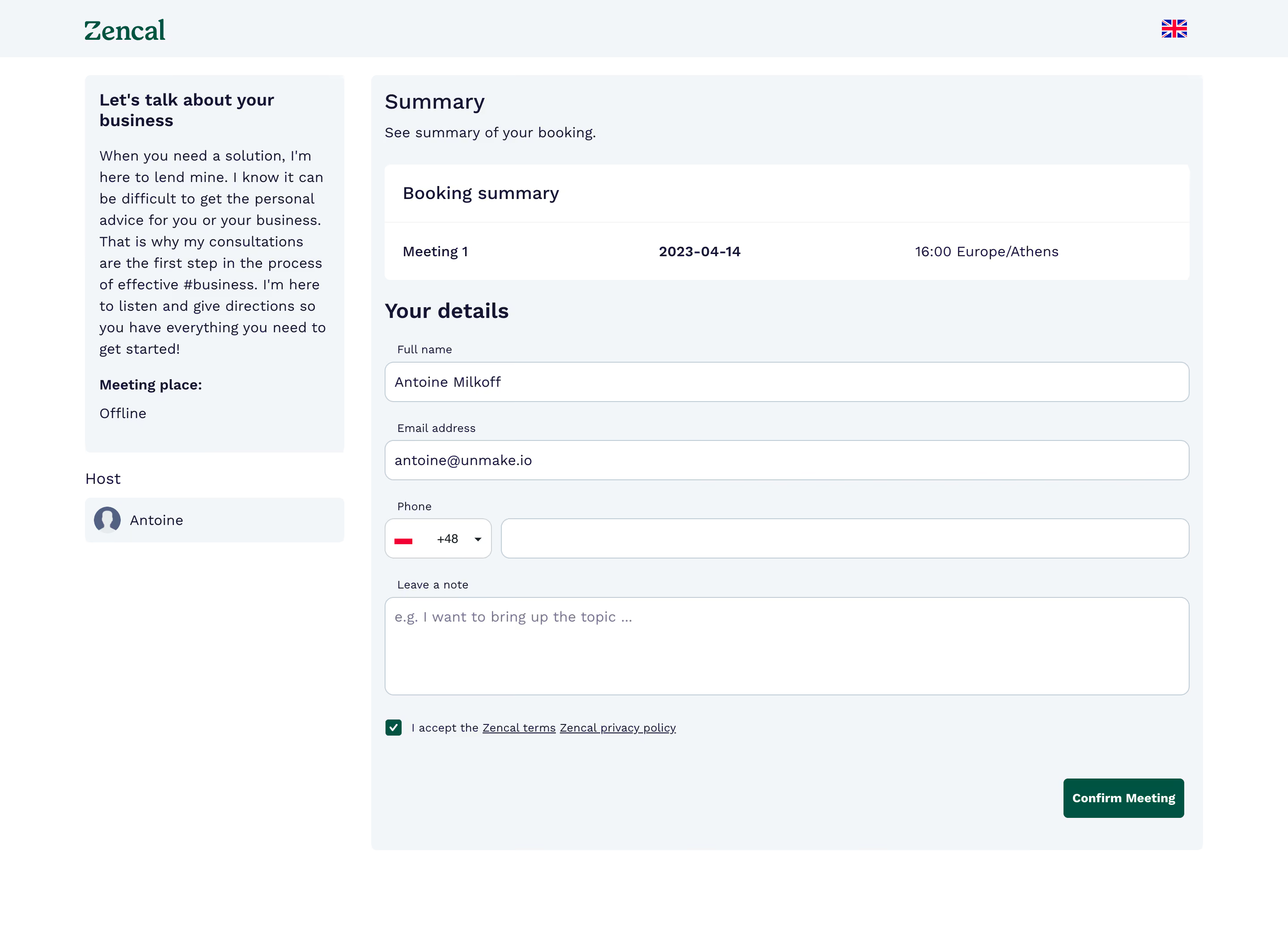
Zencal Meeting Form

Zencal
Scheduling for paid meetings & teams
Designed by
No items found.

Bookmark
Bookmark

Design with AI
Thank you! Your submission has been received!
Oops! Something went wrong while submitting the form.
# Design from Reference: Zencal Meeting Form
Create an original, high-fidelity visual design inspired by the reference. Prioritize composition, typography, colors, spacing, and component styling over technical implementation.
## Reference
- **Product:** Zencal
- **Category:** Empty
- **Screenshot:** https://cdn.prod.website-files.com/5e9dc792e1210c5325f7ebbc/6acb699c5e515b69c7964f1b_6acb67ca2500c91871cdc882_cms-50340d3141b7fc6d09b48361.webp
Analyze the screenshot first. If inaccessible, request it rather than guessing.
## Content
{{content.instructions}}
{{content.data}}
Preserve essential messaging and factual accuracy. Adapt structure and copy length for visual balance; never invent product claims.
## Visual Design
### Overall aesthetic
- **Style:** A calm scheduling-confirmation form with pale blue-gray panels, dark navy text, and a deep green completion action.
- **Character:** Functional and spacious, with clear booking context beside the attendee-details form rather than decorative marketing content.
### Page composition
- **Capture and scale:** The screenshot measures 2880 × 2120 pixels, consistent with an estimated 2× capture. Following dimensions are estimated CSS pixels under that assumption.
- **Header:** A shallow pale header places the green Zencal wordmark left and a small language flag right, aligned to the central content frame.
- **Columns:** A roughly 290 px-wide left column contains meeting description and a separate host row. A roughly 930 px-wide pale main panel contains the booking summary and details form, separated from the left column by about 30 px.
- **Main sequence:** Summary heading/subtitle, white booking-summary card, Your details heading, name, email, phone, note textarea, checked terms acceptance, and a right-aligned Confirm Meeting action.
### Information hierarchy
- **Context:** The meeting title and explanation establish purpose in the left rail. Date, time, and timezone remain visible in the summary before the user details.
- **Form priority:** Name and email are already populated in the capture. The phone group, note, and consent follow in a straightforward vertical order.
- **Completion:** The green confirmation button occupies the lower-right corner of the main panel, visually separated from the fields.
### Typography
- **Family:** A clean sans serif is used for interface text; the wordmark has a more distinctive serif-like treatment. Exact families are unverified.
- **Headings:** Summary and Your details are approximately 23–24 px CSS, medium/semibold. The meeting-title sidebar heading is around 19–20 px bold.
- **Body:** Descriptions and field values are roughly 16 px with 24 px line-height. Field labels and terms text are approximately 12–13 px.
- **Tracking:** Interface copy has slightly open spacing, particularly in the sidebar prose and summary values.
### Colors & surfaces
- **Foundation:** Sampled sRGB #FFFFFF defines the page and fields; #F2F6F8 defines the header and main/sidebar panels.
- **Brand ink:** Sampled deep navy #141434 supports headings and values. Deep green #005342 fills the confirmation action and checked consent box.
- **Borders and secondary copy:** Sampled #C2CDD6 provides the field-border tone. Muted text samples include #77778A and #526082.
### Components
- **Summary card:** A white rounded rectangle has a heading row separated by a fine rule and one data row with meeting name, bold date, and time/timezone distributed across three columns.
- **Fields:** Full-width inputs are approximately 44 px high with 9–10 px radii and thin blue-gray borders. Labels sit immediately above with a small left inset.
- **Phone and note:** The phone row pairs a compact flag/country-code selector with a wider input. The note field is approximately 110 px tall.
- **Consent and action:** A small green checked square precedes terms/privacy links. The confirmation button is approximately 44 px high with modest 4–5 px rounding and bold white text.
- **Sidebar:** The descriptive panel uses small rounding and generous padding. The host row pairs a generic circular avatar with a name on a matching pale surface.
### Visual rhythm
- **Form spacing:** Use approximately 24 px between field groups and 10 px between labels and inputs. Keep about 28 px between the summary card and details heading.
- **Alignment:** All fields share a common left/right edge. The final action aligns to the field's right edge, while consent stays left.
- **White space:** The sidebar is shorter than the form, leaving open space below rather than stretching its content.
### Responsive
- **Observed state:** Only desktop is visible.
- **Recommended reflow:** Move meeting context above the summary/form, stack summary values, and retain a compact country selector beside the phone input where space permits.
- **Mobile form:** Use 20–24 px page gutters, full-width confirmation on phones, and wrapping consent text with a clearly associated checkbox.
### Adaptation guidance
- **Preserve:** Retain the context/form split, persistent booking summary, simple vertical fields, restrained pale surfaces, and green completion action.
- **Adapt:** Use real meeting details, host identity, timezone, and required attendee fields. Do not reuse the reference's personal data.
- **Avoid:** Do not infer validation errors or successful-booking states; only the pre-confirmation form is visible.
Use this context to reproduce the reference's visual language: layout, typography, colors, spacing, borders, radii, and distinctive elements. The screenshot takes priority if descriptions conflict.
## Direction
{{preferences.fidelityInstructions}}
## Output
{{output.instructions}}
Deliver a polished, cohesive design with precise alignment, hierarchy, and spacing. Produce the requested visual artifact, not just a description. If unsupported, explain the limitation.

.avif)
Category
Patterns
Tech Stack



Added on
April 14, 2023
Similar screens
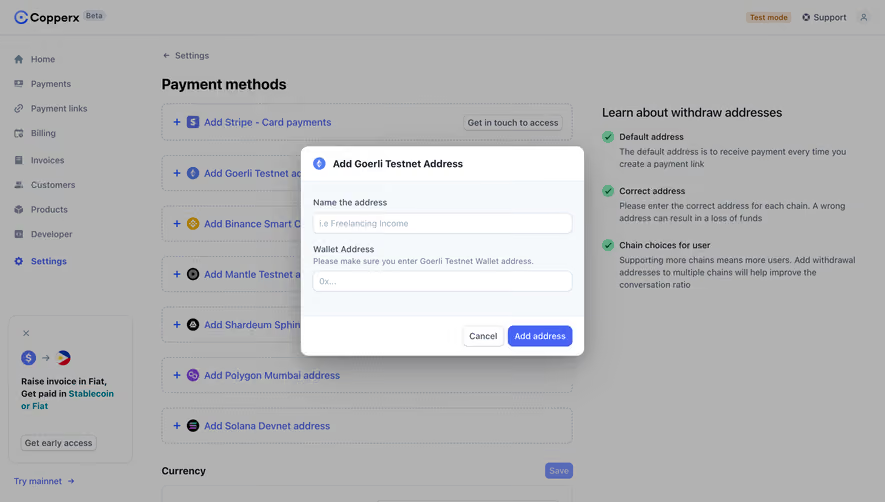


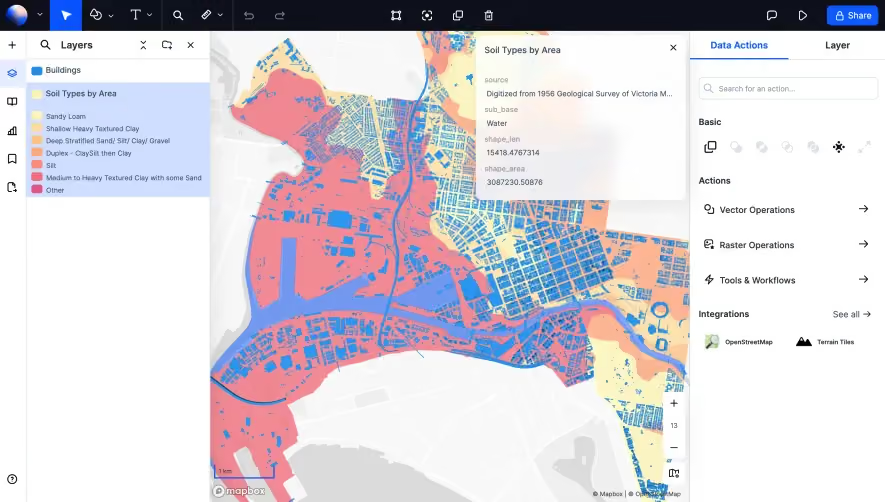


Upgrade to SaaSFrame Pro now to see similar examples.
Monthly
$18 /month
Billed $18 monthly
Browse all screens & flows
Filter and search screens & flows
Search text in screenshots
Access Figma files
Access mobile versions
Join now
Quarterly
$16 /month
Billed $48 quarterly
Browse all screens & flows
Filter and search screens & flows
Search text in screenshots
Access Figma files
Access mobile versions
Join now
Yearly
$15 /month
Billed $180 yearly
Browse all screens & flows
Filter and search screens & flows
Search text in screenshots
Access Figma files
Access mobile versions
Join now