Design with AI
Generate a new design based on this screen using your own content.
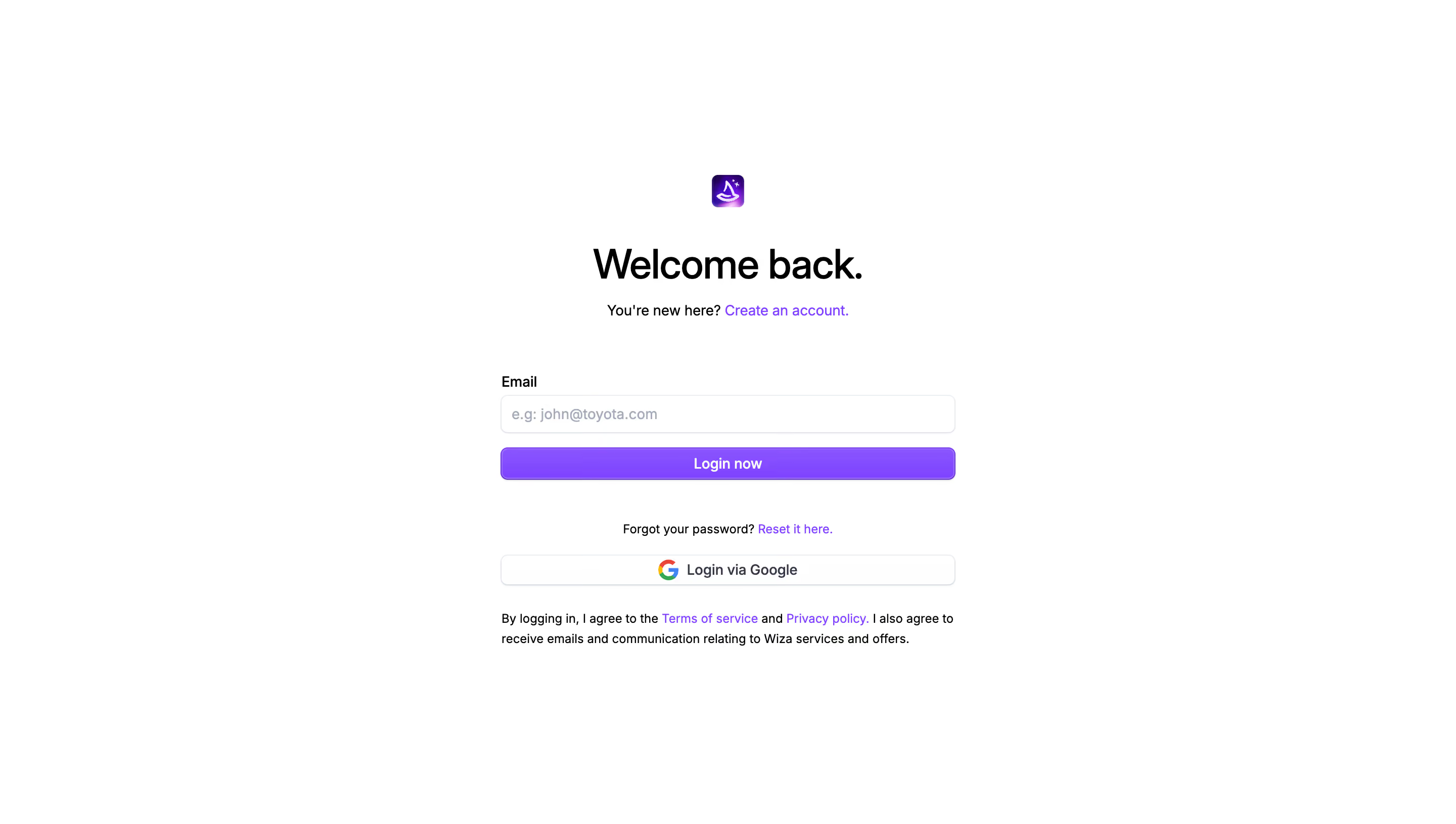
# Design from Reference: Wiza Login Page
Create an original, high-fidelity visual design inspired by the reference. Prioritize composition, typography, colors, spacing, and component styling over technical implementation.
## Reference
- **Product:** Wiza
- **Category:** Login
- **Screenshot:** https://cdn.prod.website-files.com/5e9dc792e1210c5325f7ebbc/6acad57a86f1bee9c3650895_6acad4ebbf4db4ed68052fa1_cms-a45b7878c4b19cfb70138468.webp
Analyze the screenshot first. If inaccessible, request it rather than guessing.
## Content
{{content.instructions}}
{{content.data}}
Preserve essential messaging and factual accuracy. Adapt structure and copy length for visual balance; never invent product claims.
## Visual Design
### Overall aesthetic
- **Character:** A sparse login page centers a narrow form on white, with black text and vivid purple links/action fill.
- **Evidence:** The screenshot is 2880 × 1630 pixels. CSS sizes assume an unverified 2× capture density.
### Page composition
- **Centered stack:** A small purple brand icon sits above a large welcome heading and account-creation prompt.
- **Form:** A roughly 450-pixel-wide region contains an email label/input, primary login action, password-reset line and Google alternative.
- **Legal copy:** A two-line agreement/communications sentence closes the stack; no outer card or navigation is visible.
### Information hierarchy
- **Heading:** Welcome back is the dominant text.
- **Primary route:** The email field and filled Login now action lead the form.
- **Secondary routes:** Create account, password reset and Google login provide alternatives in progressively smaller text.
### Typography
- **Heading:** Approximately 40 pixels semibold with tight tracking.
- **Form:** Labels, field text and action labels are around 14 pixels; supporting and legal copy is about 12–14 pixels.
- **Identity:** A neutral sans-serif is visible; exact font family is unverified.
### Colors & surfaces
- **Measured base:** ICC-to-sRGB sampling identifies #FFFFFF as the canvas and #000000 as a principal text color.
- **Measured purple:** #873FFF, #8F4CFF and #8A43FF occur in the primary action/brand accent, reflecting slight tonal variation.
- **Supporting tones:** Pale blue-gray borders and muted placeholder text distinguish fields from the white page.
- **Treatment:** The primary button has a subtle purple gradient/highlight; the Google control is white and outlined.
### Components
- **Brand icon:** A small rounded purple square, approximately 32 pixels, centers above the heading.
- **Email field:** Roughly 450 × 38 pixels with a thin pale outline and 6-pixel radius.
- **Primary action:** A full-width purple button around 32–34 pixels tall, with centered white semibold text.
- **Alternative action:** A thin outlined Google button includes the multicolor mark and centered label.
- **Links:** Purple inline links appear in the signup, reset and legal sentences.
### Visual rhythm
- **Alignment:** Form fields, actions and legal text share the same edges, while heading and brand are centered.
- **Spacing:** A large gap separates the account prompt from the first field; a similar pause separates primary login from reset/social options.
- **Whitespace:** Broad margins isolate the form without a surrounding card.
### Responsive
- **Observed scope:** Only a desktop email-entry state is shown; no password field, validation or subsequent step is visible.
- **Recommended layout:** Keep a fluid max-width form with 20–24-pixel mobile side padding and comfortable touch target heights.
### Adaptation guidance
- **Login pattern:** Use a single obvious primary route with clear account-creation, recovery and social alternatives.
- **State fidelity:** Do not infer the authentication sequence beyond the visible email step.
- **Implementation:** Verify font/density and define focus, validation and loading states; keep legal links legible and independently accessible.
Use this context to reproduce the reference's visual language: layout, typography, colors, spacing, borders, radii, and distinctive elements. The screenshot takes priority if descriptions conflict.
## Direction
{{preferences.fidelityInstructions}}
## Output
{{output.instructions}}
Deliver a polished, cohesive design with precise alignment, hierarchy, and spacing. Produce the requested visual artifact, not just a description. If unsupported, explain the limitation.
.webp)



.avif)