Design with AI
Generate a new design based on this screen using your own content.
# Design from Reference: Unkey Create Identity
Create an original, high-fidelity visual design inspired by the reference. Prioritize composition, typography, colors, spacing, and component styling over technical implementation.
## Reference
- **Product:** Unkey
- **Category:** Add & Edit
- **Screenshot:** https://cdn.prod.website-files.com/5e9dc792e1210c5325f7ebbc/697b76233d6c3f5ffeb77fc8_i4WKtnr_WO41331-yiucHjVu_K4stAlP37PI9d486DA.avif
Analyze the screenshot first. If inaccessible, request it rather than guessing.
## Content
{{content.instructions}}
{{content.data}}
Preserve essential messaging and factual accuracy. Adapt structure and copy length for visual balance; never invent product claims.
## Visual Design
### Overall aesthetic
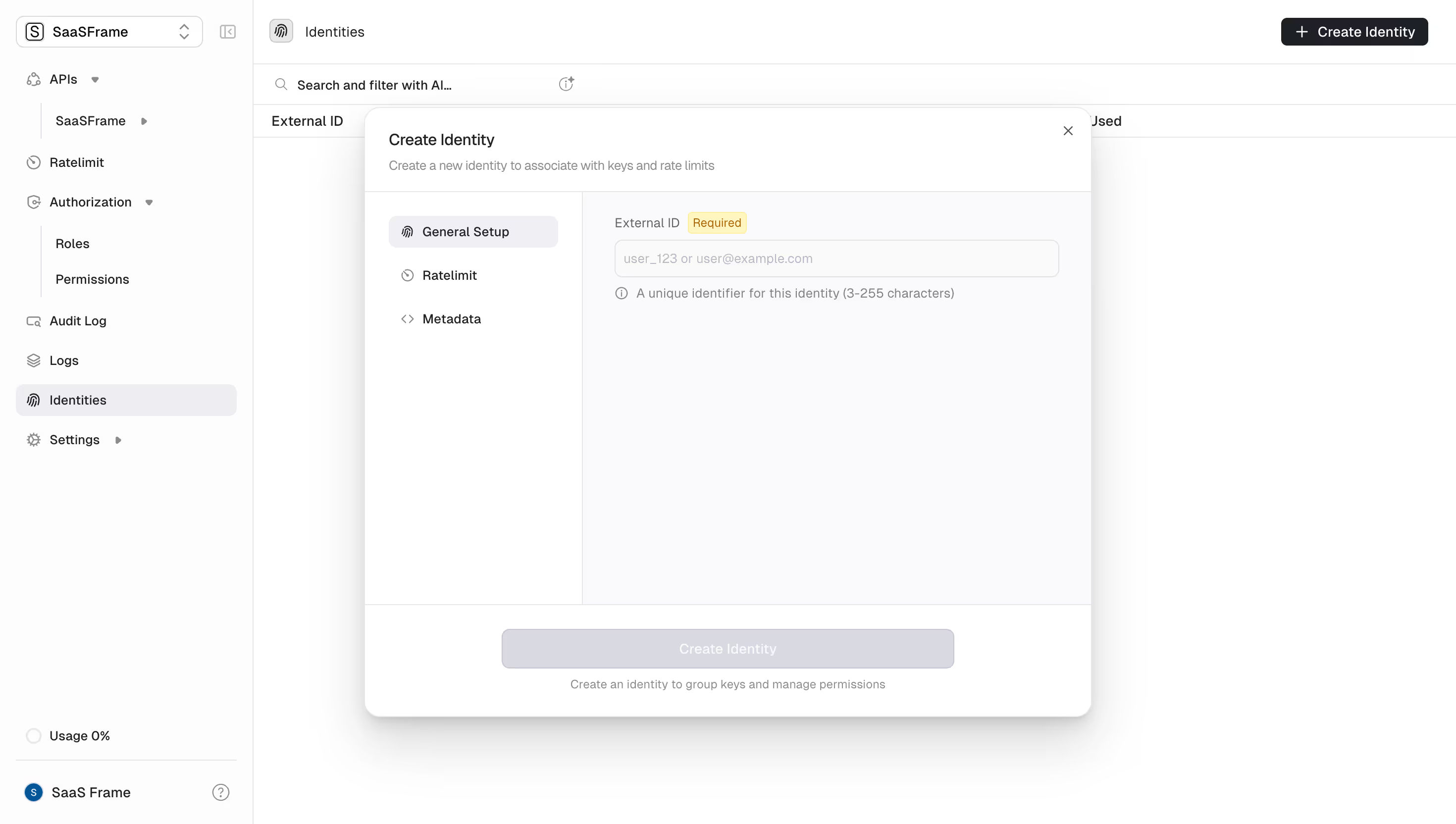
- **Character:** A light developer dashboard with a large structured creation dialog, restrained grayscale surfaces and precise form labeling.
- **Focus:** The modal divides navigation and configuration into separate columns, leaving substantial room for additional settings.
### Page composition
- **Capture scale:** The source is 2940 × 1664 pixels. A roughly 1470 × 832 CSS-pixel viewport at 2× scale is plausible but unverified.
- **Application shell:** A roughly 255-pixel estimated CSS sidebar contains workspace selection and API/authorization utilities. The main area has an Identities header, search/filter strip and empty table structure.
- **Dialog:** A centered panel around 735 × 615 estimated CSS pixels has a header, split body and full-width footer.
- **Body split:** A roughly 220-pixel left menu lists General Setup, Ratelimit and Metadata; the right area shows the selected form.
### Information hierarchy
- **Header:** Create Identity is followed by a muted one-line explanation about associating keys and rate limits.
- **Selected section:** General Setup has a pale filled background, while the other two tabs remain plain.
- **Form:** External ID is paired with a small Required badge, then an empty input and helper line.
- **Footer:** A wide disabled-looking Create Identity button sits above a muted explanation. The top-right close icon provides dismissal.
### Typography
- **Family:** A compact sans serif is visible; exact font identity is unverified.
- **Title:** Approximately 16 estimated CSS pixels, medium weight; subtitle is around 13 pixels.
- **Form and menu:** Labels and menu items are about 14 pixels; helper text and button text are around 13 pixels.
- **Required badge:** Smaller amber text, around 11–12 pixels, inside a compact pale outlined badge.
### Colors & surfaces
- **Measured palette:** ICC-aware sRGB sampling yields white #FFFFFF, near-white #FDFDFD, pale cool surface #FAFAFC and disabled gray #D9D9E0.
- **Hierarchy:** Dark near-black labels contrast with muted gray helper text; the Required badge is the only warm accent in the form.
- **Elevation:** The modal has a fine pale border, approximately 16-pixel estimated CSS corners and a pronounced diffuse lower shadow.
- **Dividers:** Thin light-gray rules separate header, sidebar, form body and footer.
### Components
- **Section menu:** Three icon-and-label rows use approximately 32-pixel heights, with a rounded selected fill.
- **External ID input:** A roughly 448 × 38 estimated CSS-pixel outlined field includes a muted example placeholder; no actual identifier is entered.
- **Helper line:** A small information icon precedes the uniqueness/length guidance.
- **Footer action:** A centered disabled-looking button around 456 × 40 pixels uses a pale gray fill and white text, with a short explanatory caption beneath.
- **Background controls:** The application header includes a dark Create Identity button; the sidebar selection also marks Identities with a pale rounded row.
### Visual rhythm
- **Padding:** Header and content use approximately 24-pixel insets; the form aligns consistently with the menu's upper rows.
- **Whitespace:** The single visible field occupies only the top of the large form pane, leaving a broad calm area beneath.
- **Footer separation:** A horizontal rule and generous padding distinguish final creation controls from configuration.
### Responsive
- **Recommendation:** Fit the dialog within viewport margins, collapse the left menu into compact tabs or a selector and keep the form at full available width.
- **Recommendation:** Allow internal scrolling on short screens while keeping the action area reachable. No mobile arrangement is shown.
### Adaptation guidance
- **Preserve:** Retain the header/body/footer structure, clear required labeling and distinct settings navigation.
- **Implement:** Use accessible form associations, error feedback and an explicit disabled state until required data is valid; behavior is not verified by the screenshot.
- **Scale:** Keep the pane flexible for additional settings while avoiding excessive fixed-height whitespace on small screens.
Use this context to reproduce the reference's visual language: layout, typography, colors, spacing, borders, radii, and distinctive elements. The screenshot takes priority if descriptions conflict.
## Direction
{{preferences.fidelityInstructions}}
## Output
{{output.instructions}}
Deliver a polished, cohesive design with precise alignment, hierarchy, and spacing. Produce the requested visual artifact, not just a description. If unsupported, explain the limitation.
.webp)



.avif)