Design with AI
Generate a new design based on this screen using your own content.
# Design from Reference: Mintlify Text Editor
Create an original, high-fidelity visual design inspired by the reference. Prioritize composition, typography, colors, spacing, and component styling over technical implementation.
## Reference
- **Product:** Mintlify
- **Category:** Text Editor
- **Screenshot:** https://cdn.prod.website-files.com/5e9dc792e1210c5325f7ebbc/6acad5cad05a3f53c0a6e459_6acad5071d50254551a0f782_cms-690d2fb223843886a6b5222a.webp
Analyze the screenshot first. If inaccessible, request it rather than guessing.
## Content
{{content.instructions}}
{{content.data}}
Preserve essential messaging and factual accuracy. Adapt structure and copy length for visual balance; never invent product claims.
## Visual Design
### Overall aesthetic
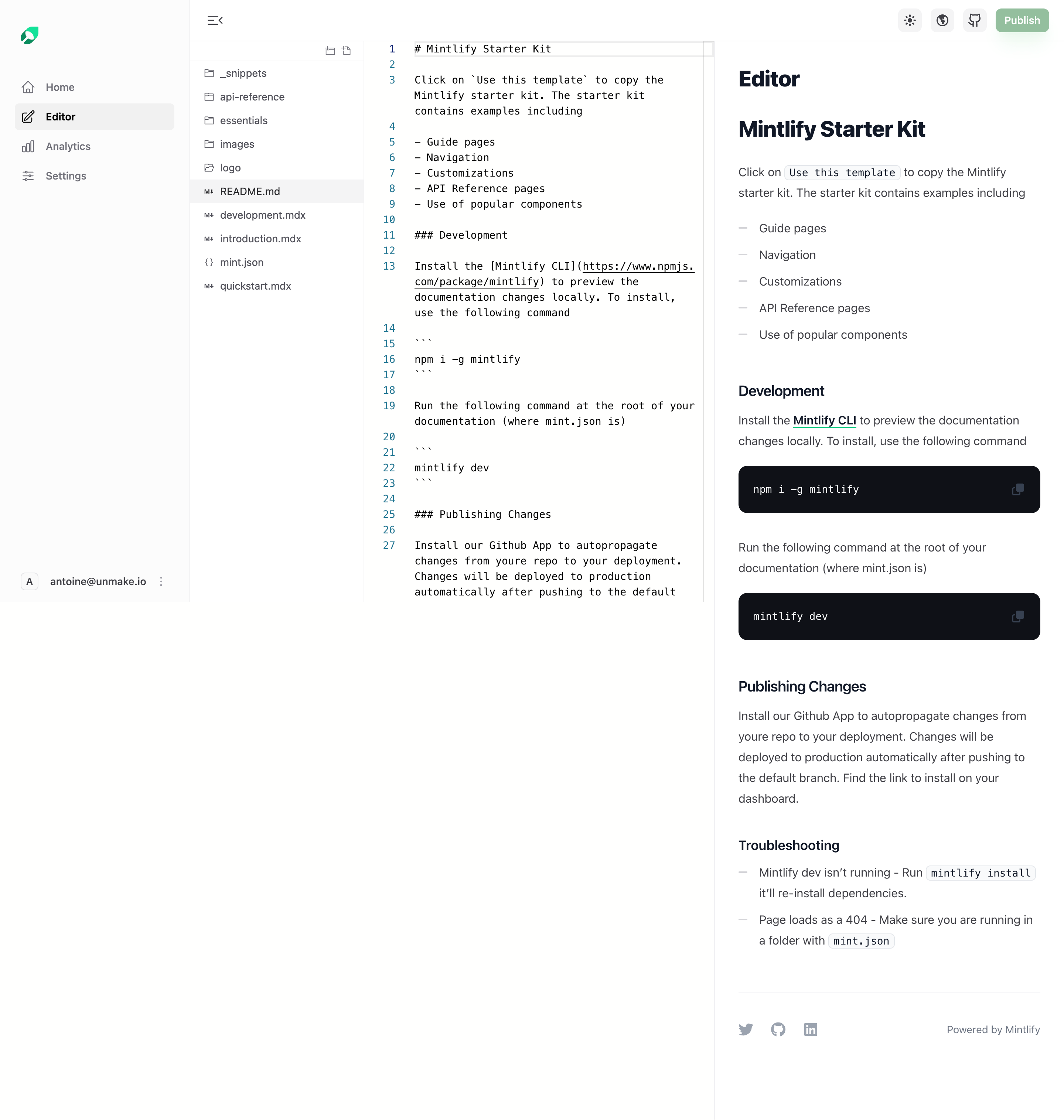
- **Style:** A restrained documentation editor with four vertical regions: application navigation, file tree, Markdown source, and rendered preview.
- **Character:** Technical and legible, with nearly white surfaces, fine separators, dark code blocks, and small green publishing accents.
### Page composition
- **Capture and scale:** 2880 × 3032 screenshot pixels, consistent with estimated 2× capture. Following sizes are estimated CSS pixels.
- **Columns:** The left application rail is roughly 255 px, file tree 235 px, source editor 475 px, and preview the remaining width.
- **Header:** Small toolbar controls span the editor/preview top, with appearance/site/repository icons and Publish right.
- **Content:** README source and corresponding starter-kit documentation are displayed side by side. The rendered preview extends farther down than the visible source/file regions, ending in social/powered-by details.
### Information hierarchy
- **Navigation:** Editor is selected in the application rail; README is highlighted in the file tree.
- **Editing focus:** Monospace source and line numbers contrast with the formatted preview's heading/body/code hierarchy.
- **Action:** Publish is the only filled green toolbar control.
### Typography
- **Family:** Neutral sans serif interface/preview plus monospace source/code; exact families unverified.
- **Roles:** Preview title about 30 px CSS bold, document heading 28 px, subheadings 19–20 px. Body around 16 px with 28 px leading.
- **Source:** Approximately 14 px monospace, with compact line pitch and blue line numbers.
### Colors & surfaces
- **Foundation:** Sampled sRGB #FFFFFE, #FFFFFF, and #FCFCFC define the columns.
- **Ink:** Sampled #0E1118 fills code blocks and supports heading ink; #3F3F46 supports body text.
- **Boundaries:** Sampled #F4F4F5 and #F1F1F1 define selected rows/subtle separators. Green appears in logo, links, and publish action; exact green unverified.
### Components
- **File tree:** Small folder/file icons, indented labels, and a full-width pale selected row establish structure.
- **Source editor:** Narrow line-number gutter and raw Markdown appear without a heavy card boundary.
- **Preview:** Bullets, inline code chips, underlined links, and rounded dark code blocks with copy icons show rendering styles.
- **Shell controls:** Compact square toolbar buttons and a small rounded green Publish action remain unobtrusive.
### Visual rhythm
- **Spacing:** Use tight file/source spacing but generous 25–35 px preview paragraph/section gaps.
- **Alignment:** Keep column borders continuous and preview content consistently inset.
### Responsive
- **Observed state:** Desktop only.
- **Recommended reflow:** Use switchable source/preview views and collapsible navigation/file drawers on narrow screens.
- **Code:** Preserve horizontal code scrolling rather than shrinking source text.
### Adaptation guidance
- **Preserve:** Retain the file/source/preview relationship, quiet separators, readable documentation type, and restrained publishing action.
- **Adapt:** Use real files and document content.
- **Avoid:** Do not copy commands or infer publication behavior from the visual reference.
Use this context to reproduce the reference's visual language: layout, typography, colors, spacing, borders, radii, and distinctive elements. The screenshot takes priority if descriptions conflict.
## Direction
{{preferences.fidelityInstructions}}
## Output
{{output.instructions}}
Deliver a polished, cohesive design with precise alignment, hierarchy, and spacing. Produce the requested visual artifact, not just a description. If unsupported, explain the limitation.
.webp)


.avif)