Design with AI
Generate a new design based on this screen using your own content.
# Design from Reference: Height User Onboarding
Create an original, high-fidelity visual design inspired by the reference. Prioritize composition, typography, colors, spacing, and component styling over technical implementation.
## Reference
- **Product:** Height
- **Category:** User Onboarding
- **Screenshot:** https://cdn.prod.website-files.com/5e9dc792e1210c5325f7ebbc/6acbb9b8d1be8ecd2912dd6f_6acb71b79382ba3bdd6ea05d_cms-c01edae9b436d67a4a53c74c.webp
Analyze the screenshot first. If inaccessible, request it rather than guessing.
## Content
{{content.instructions}}
{{content.data}}
Preserve essential messaging and factual accuracy. Adapt structure and copy length for visual balance; never invent product claims.
## Visual Design
### Overall aesthetic
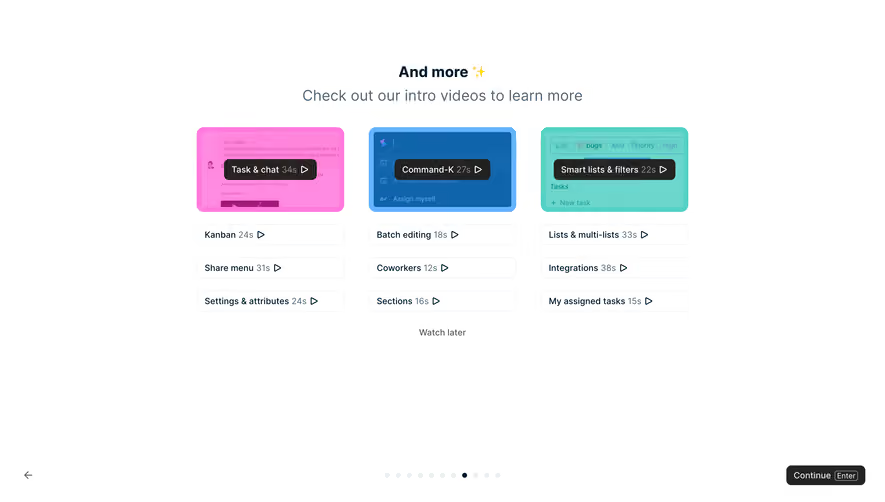
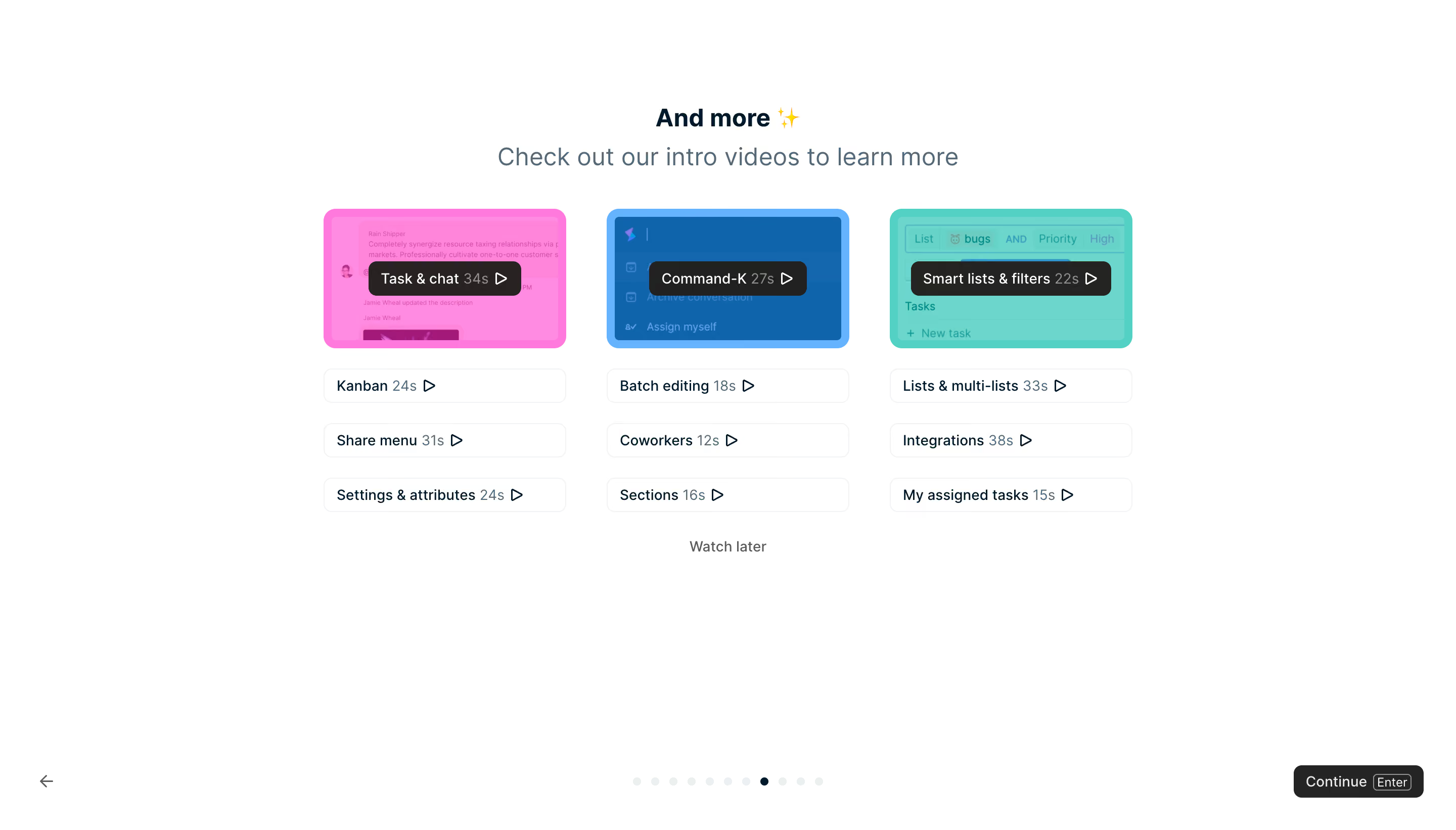
- **Character:** Airy onboarding tutorial screen with white ground, compact video choices and three bright colored feature thumbnails.
- **Evidence and scale:** Screenshot is 2880 × 1642 image pixels. Sizes estimate a 1440 × 821 CSS viewport at 2× capture scale; DPR and font identity are unverified.
### Page composition
- **Centered content:** A narrow heading/subheading stack sits above a three-column tutorial chooser approximately 800px CSS wide.
- **Video columns:** Each column starts with a colored thumbnail and dark overlaid title/duration/play pill, followed by three small outlined video links.
- **Optional path:** A muted Watch later link is centered directly below the tutorial choices.
- **Bottom navigation:** Back arrow sits at lower left, a row of small progress dots at center and dark Continue control with keyboard hint at lower right.
### Information hierarchy
- **Intro:** Short bold heading with sparkle emoji leads to a larger muted explanatory line.
- **Featured tutorials:** Pink, blue and teal thumbnail surfaces distinguish the three main tutorial topics.
- **Secondary clips:** Smaller white outlined rows show topic, muted duration and play triangle without competing with the featured images.
- **Progress/action:** One dark dot identifies the current onboarding position; Continue is a separate dark button, while Watch later is quieter text.
### Typography
- **Intro heading:** Approximately 24px CSS bold sans-serif; subtitle around 24px regular in blue-gray.
- **Tutorial labels:** Approximately 14px; durations use a lighter gray in the same line.
- **Navigation:** Watch later and Continue around 14px, with a smaller outlined Enter key hint. Exact family, weight and tracking remain unverified.
### Colors & surfaces
- **Measured ground:** White #FFFFFF dominates the viewport.
- **Measured thumbnail colors:** Dark blue #0F64AB, teal #6CD6CC and pink #FF8CE2 are prominent in tinted feature images; related #FF85DB and #65B3FF add variation.
- **Foreground:** Dark navy labels contrast with slate secondary text; dark charcoal overlay pills carry white text.
- **Boundaries:** Very light gray outlines define secondary video rows and pale progress dots.
### Components
- **Featured thumbnails:** Approximately 240 × 138px CSS with 12px radii, colored overlay/tint and faint product-interface imagery beneath.
- **Overlay pills:** Dark rounded rectangles centered over thumbnails, containing title, duration and outlined play icon.
- **Secondary video rows:** Approximately 240 × 34px, thin pale border, radius near 8px and about 12px horizontal padding.
- **Progress:** Roughly a dozen evenly spaced tiny dots; only one is dark in the visible state.
- **Continue:** Compact dark button around 128 × 32px, small radius, white label and outlined keyboard shortcut badge.
### Visual rhythm
- **Column spacing:** Approximately 40px gutters separate three equal tutorial columns.
- **Vertical cadence:** About 20px separates thumbnail and first row; subsequent rows use roughly 20px gaps.
- **Whitespace:** Large margins above, around and below the chooser keep it from feeling like a dense video library.
- **Navigation separation:** Bottom controls are anchored far from the tutorial group, clearly distinguishing learning choices from onboarding progression.
### Responsive
- **Observed limit:** Only desktop onboarding is visible; playback, skipping and progress transitions are unobserved.
- **Recommended layout:** Stack or horizontally page tutorial columns on narrow screens while preserving topic/duration labels.
- **Recommended navigation:** Keep Back, progress and Continue reachable, allow subtitle wrapping and enlarge small video-row touch targets when needed.
### Adaptation guidance
- **Preserve choice:** Offer a small set of visually distinct intro clips with short durations and an obvious optional-skip route.
- **Keep hierarchy:** Use colorful thumbnails only for featured topics and quiet rows for additional lessons.
- **Implementation:** Provide accessible video names, keyboard controls, captions and progress semantics. Static thumbnails do not establish playback behavior or exact onboarding step count.
Use this context to reproduce the reference's visual language: layout, typography, colors, spacing, borders, radii, and distinctive elements. The screenshot takes priority if descriptions conflict.
## Direction
{{preferences.fidelityInstructions}}
## Output
{{output.instructions}}
Deliver a polished, cohesive design with precise alignment, hierarchy, and spacing. Produce the requested visual artifact, not just a description. If unsupported, explain the limitation.
.webp)



.avif)