Activity Feed
15
Keep users updated with dynamic SaaS Activity Feed patterns. Explore how to display chronological updates, system notifications, and social actions in a readable, scrollable format.

An activity feed records what happened to an object, account, or workflow over time. It can help users understand recent work, reconstruct a sequence, or decide what to do next. The pattern becomes useful when each entry identifies an event clearly and the overall feed has an understandable scope.
An activity feed is different from a chat conversation or a social discovery feed. It may contain human notes, system events, or both, but its central job is to explain a history. Design the event model, timestamps, filtering, and relationship to the current record before deciding how to decorate the timeline.
Identify whether the feed concerns one record, one person, a project, or an entire workspace. The same event can be relevant at several scopes, but visitors should know which scope they are viewing. A page title and nearby object identity can make that relationship clear.
Choose events that support the task. A customer record may need calls, notes, and status changes. An analytics profile may need measured product events. A project history may need assignments and approvals. Including every low-level event can obscure the actions people actually need to understand.
Distinguish a curated activity summary from a complete audit history. A feed that omits some events can still be useful, but it should not imply exhaustive evidence if that is not its purpose. Scope and completeness are part of the information design.
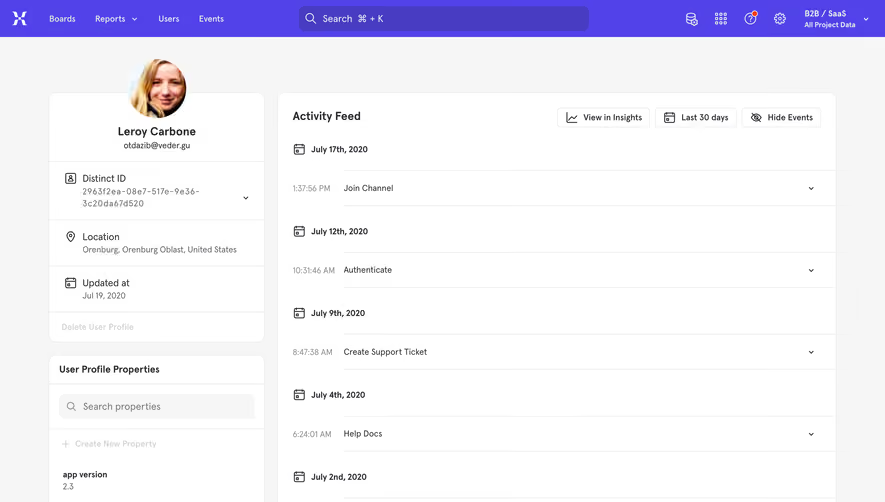
The Mixpanel capture places an activity feed next to an individual profile and its properties. Events are grouped under date headings, with times and event names in separate rows. Controls above the feed indicate a time range and other available routes.
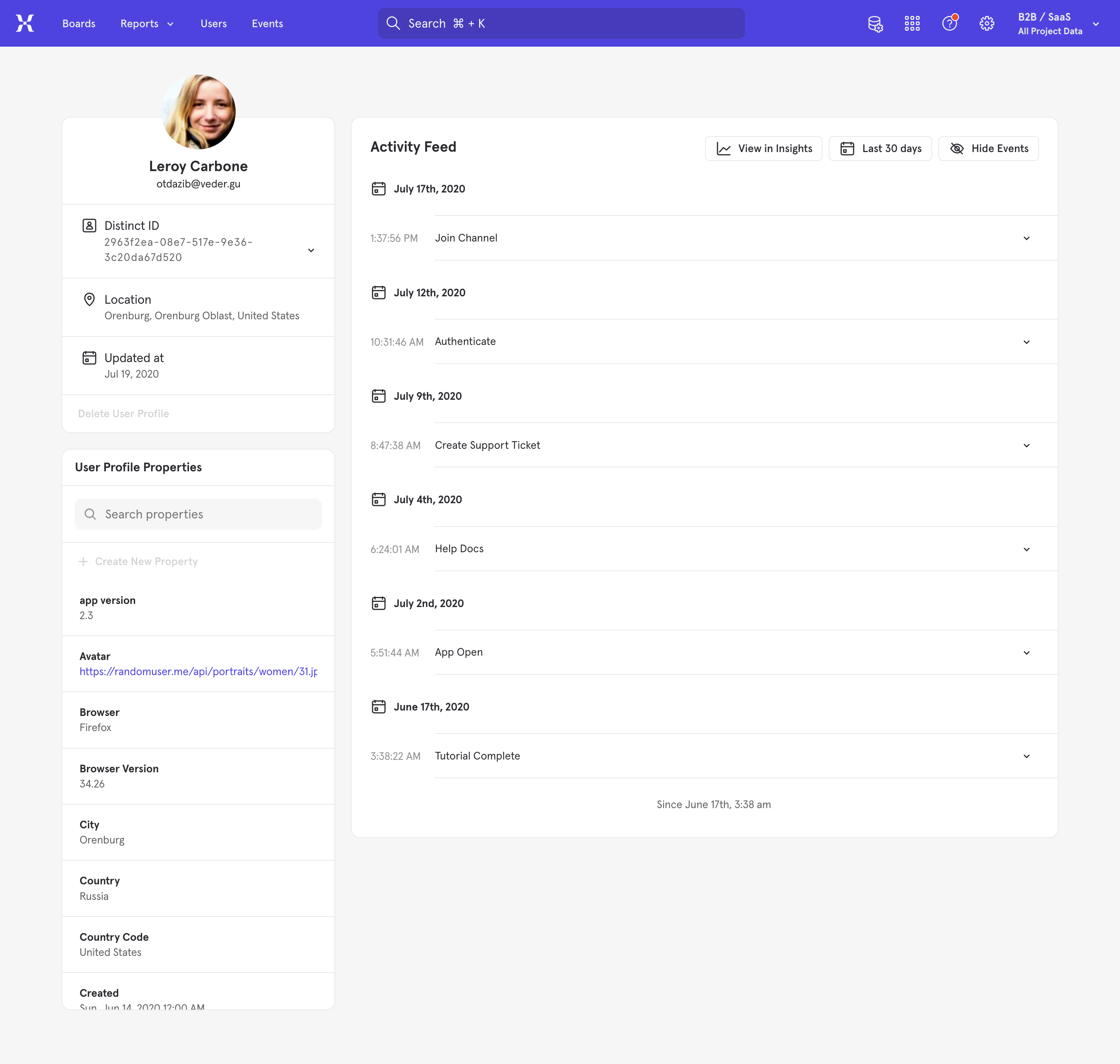
The layout helps explain whose activity is being inspected and when the visible events occurred. Expand indicators suggest further detail without making every row dense. The screenshot does not verify expansion behavior, event completeness, or current product capabilities.
For a new feed, preserve enough object context that the event list does not become anonymous. A user who scrolls or arrives through a direct link should be able to understand which record the events belong to. Avoid repeating so much profile information that it overwhelms the actual history.
The Glide CRM capture includes an activity timeline beneath a deal summary. A logging area has an activity-type control, a subject field, a body field, and a Log activity action. Below it, a dated call entry includes a subject and explanatory text.
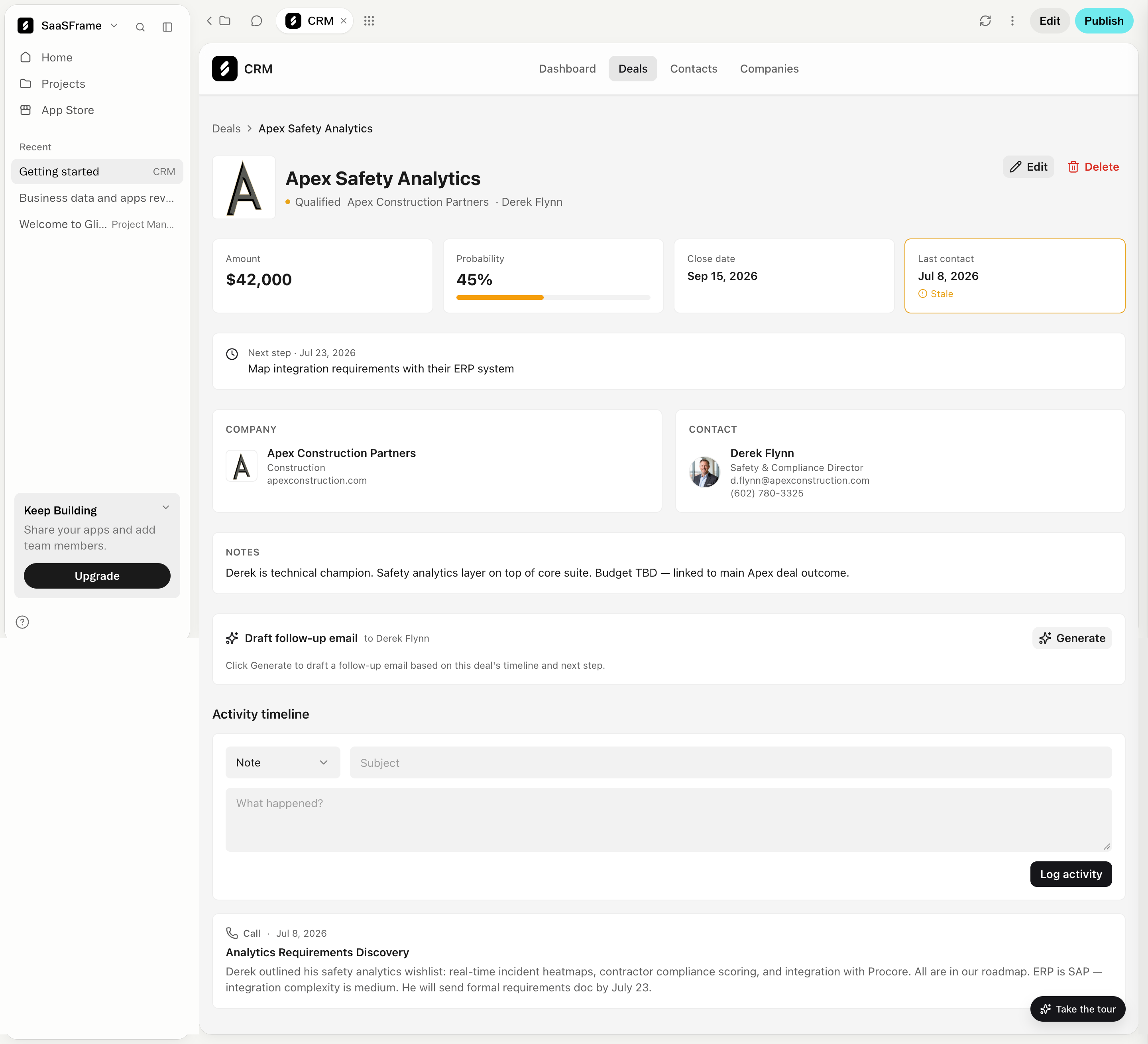
This composition connects recorded activity to the working record and offers a route to add another entry. It differs from the measured-event presentation in the Mixpanel reference. The still image does not establish persistence, editing, or whether logging updates other deal fields.
Make authorship and event origin clear when the feed mixes sources. A human note, an automatically recorded status change, and an imported event should not look identical if their origin affects trust or interpretation. Labels can explain that distinction without turning each entry into a technical log.
An event should identify what happened, to what, and by whom when that information matters. A compact title can summarize the action, while detail can explain changed values or additional context. Avoid internal event codes as the only visible label unless the audience actually uses them.
For change events, show the meaningful difference when possible. Status changed is less informative than a readable account of the old and new state. If sensitive values are not available to the viewer, explain the limited scope appropriately rather than exposing them through the history.
Keep repetitive metadata subordinate to the event itself. An avatar, type icon, timestamp, and menu can support scanning, but they should not push the action description into a narrow unreadable area.
Newest-first ordering supports checking recent activity. Oldest-first ordering can support following a complete narrative. Either can work if the order is clear and the user's task determines the choice.
Date groups, as in the Mixpanel capture, make a long sequence easier to scan. Grouping several similar events can reduce noise, but the group needs an understandable summary and access to detail when the individual events matter.
Avoid silently reordering the feed while someone reads. New activity can be signaled with a clear update route rather than immediately pushing the current entries away. Preserve a useful position when the visitor loads older events or returns from a detail view.
Relative labels such as a few minutes ago are convenient for recent activity, but absolute dates help investigation and comparison. Provide enough context to understand the relevant time zone and distinguish events close to a boundary.
If an event's occurrence time differs from its recording or import time, decide which one the feed displays and explain the distinction when it matters. A late-arriving event should not quietly change the apparent order of work without an understandable basis.
Use consistent formatting and preserve a route to precise time when the task requires it. Do not add unsupported precision to inferred or approximate events. The visible timestamp should reflect the data the system actually has.
A feed may allow users to add notes or activities, but the input area should have its own clear state. Preserve drafts through recoverable errors and show whether submission is pending, successful, or failed. An entry should not look persisted when the save did not complete.
If editing or deletion is allowed, define how that affects the history. Some workflows may need a visible edited state or a separate record of the change. Others may treat notes as ordinary mutable content. The interface should follow the product's actual model.
Avoid using the activity form as a hidden way to change unrelated record fields. If logging a call also affects a last-contact date or status, explain the relevant relationship where it affects the user's intention.
Filters can help users isolate event types, authors, or time ranges. Show the active scope so a filtered sequence is not mistaken for the complete history. Keep a practical route back to the broader feed.
An empty filtered feed needs a different explanation from a record with no activity. Offer a way to revise the criteria. If the request fails, provide recovery rather than reporting that nothing happened.
When search is available, help users understand whether it searches descriptions, event types, related objects, or other fields. A result should preserve enough event context to be interpreted outside the unfiltered sequence.
Expand-on-demand detail can keep the feed compact, as suggested by the indicators in the Mixpanel reference. The collapsed summary must still communicate the meaningful event. Do not hide the only description behind an unlabeled control.
For rich entries with attachments or long notes, keep the timestamp and identity association clear. A large image should not make the next event appear to belong to the same entry. Use spacing and structure to preserve boundaries.
On mobile, prioritize the event text over decorative timeline elements. A vertical line and oversized avatars can consume space without improving understanding. Keep actions reachable and preserve readable descriptions at text zoom.
Use a coherent reading order for event identity, description, time, and actions. Icons should support readable labels rather than replace them. Expansion controls need meaningful names and visible focus states.
If additional entries load dynamically, preserve the user's position and explain the loading state. A request for older history should not reset the feed to the newest event. When loading fails, keep the already available history usable.
Respect access rules consistently across summaries and expanded details. A compact event title should not reveal information that the user cannot access in the underlying record. Review the feed as another presentation of the same data, not a separate exception to its scope.
Ask users to determine what happened, who acted, and what changed next. Check whether grouping, timestamps, and origin labels help them reconstruct the story accurately. A visually attractive timeline is not sufficient if people confuse recorded time with occurrence time.
Test long histories, repeated events, late arrivals, empty filters, failed submissions, and return navigation. Verify that the displayed entries belong to the intended object and that creation feedback matches actual persistence.
Explore the SaaSFrame activity-feed collection to compare measured-event histories with human-entered activity timelines. Adapt the event structure to the investigation your users need to perform.
Should the newest activity appear first? Use the order that supports the task and make it clear. Recent checking often benefits from newest-first order; narrative reconstruction may need a different route.
Is an activity feed a complete audit record? Only if the product actually provides that completeness and reliability. A summarized or filtered feed should describe its scope rather than imply exhaustive evidence.
Can human notes and system events share one feed? Yes, when their origins and meanings remain clear. Use readable labels and consistent event boundaries so users can distinguish recorded observations from automatic changes.