Design with AI
Generate a new design based on this screen using your own content.
# Design from Reference: Wope Login Page
Create an original, high-fidelity visual design inspired by the reference. Prioritize composition, typography, colors, spacing, and component styling over technical implementation.
## Reference
- **Product:** Wope
- **Category:** Login
- **Screenshot:** https://cdn.prod.website-files.com/5e9dc792e1210c5325f7ebbc/6acbbd133b6b24eada5489a8_6acbbc4ef9eac5af754314db_cms-c04dfeda70b3266df0e11941.webp
Analyze the screenshot first. If inaccessible, request it rather than guessing.
## Content
{{content.instructions}}
{{content.data}}
Preserve essential messaging and factual accuracy. Adapt structure and copy length for visual balance; never invent product claims.
## Visual Design
### Overall aesthetic
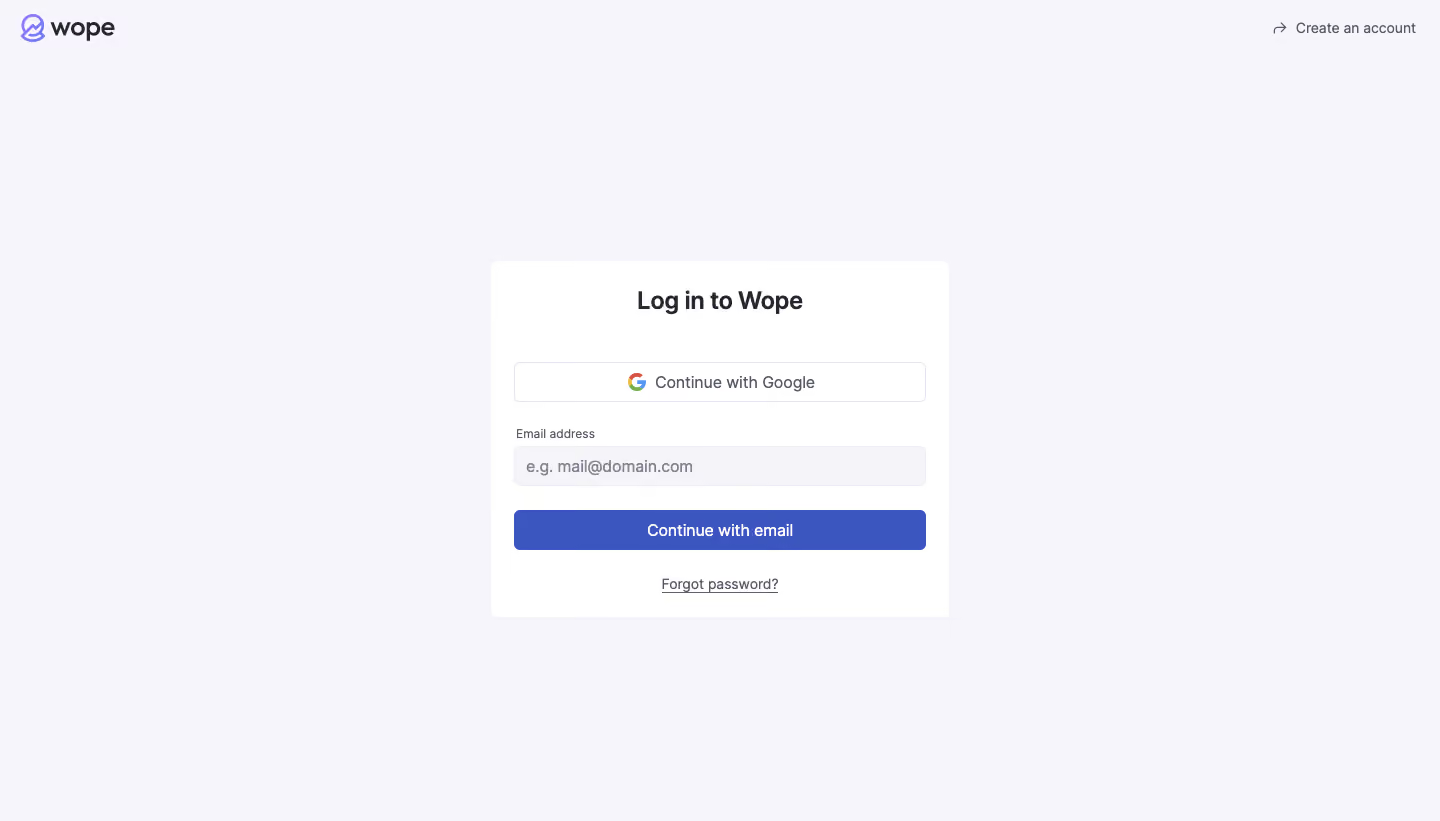
- **Style:** A quiet login screen uses a pale lavender-gray canvas, a white form card and restrained indigo actions.
- **Character:** Minimal branding and extensive whitespace keep attention on authentication.
### Page composition
- **Capture:** The source measures 1440 × 821 pixels. Dimensions below approximate image pixels; CSS scale is unverified.
- **Header:** A small brand mark sits at the upper left; an arrow-led account-creation link aligns upper right.
- **Form card:** A centered white rectangle around 460 × 356 pixels contains title, Google option, email field, email action and password-recovery link.
- **Canvas:** The rest of the screen is open, with no promotional illustration or footer visible.
### Information hierarchy
- **Heading:** A bold centered login title introduces the card.
- **Authentication choices:** An outlined Google option precedes the labeled email field and filled email-continuation button.
- **Secondary routes:** Password recovery sits below the primary action; account creation remains outside the card.
### Typography
- **Family:** Neutral sans serif throughout; exact identity is unverified.
- **Heading:** Approximately 24 pixels, bold, with compact leading.
- **Controls:** Around 16 pixels, regular or medium weight.
- **Label:** Email address is around 12 pixels; recovery and header links around 14 pixels.
### Colors & surfaces
- **Measured canvas:** Pale #F5F5FA dominates, with nearby #F5F5F9 variation.
- **Card:** White #FFFFFF provides the central surface.
- **Action:** Indigo #3C56BF fills the email button.
- **Ink:** Dark #25262E supplies strong text; secondary text is muted gray.
- **Borders:** Fine pale lavender outlines define the Google button and input. No prominent card shadow is visible.
### Components
- **Card shell:** Small roughly 8-pixel corners and around 24-pixel horizontal padding.
- **Google option:** Approximately 412 × 40 pixels, white fill, fine outline, small radius and centered multicolor icon/label group.
- **Email field:** Similar width and height, with pale filled background and left-aligned example placeholder.
- **Primary button:** Approximately 412 × 40 pixels, indigo fill, small radius and centered white label.
- **Recovery link:** Centered, gray and underlined.
- **Brand:** A small violet abstract symbol precedes a dark wordmark.
### Visual rhythm
- **Alignment:** Heading, buttons and recovery link share a central axis; label and input text align left.
- **Spacing:** A generous gap separates heading and Google option; smaller consistent gaps connect label, field and primary action.
- **Whitespace:** Broad outer margins isolate the small authentication card.
### Responsive
- **Evidence:** Only desktop is observed; mobile and error states are unverified.
- **Recommended width:** Keep the card fluid with 20–24-pixel viewport insets and a reasonable maximum width.
- **Recommended height:** Allow scrolling on short screens rather than enforcing fixed vertical centering.
- **Accessibility:** Preserve readable input text, visible focus and labeled validation.
### Adaptation guidance
- **Preserve:** Keep the pale canvas, white card, equal-width controls and indigo primary action.
- **Implementation:** Separate external account creation from card-level authentication and recovery.
- **Behavior:** Subsequent email/password steps and Google authentication results are not shown.
- **Fidelity:** Use supplied brand assets and avoid adding unseen fields or promotional regions.
Use this context to reproduce the reference's visual language: layout, typography, colors, spacing, borders, radii, and distinctive elements. The screenshot takes priority if descriptions conflict.
## Direction
{{preferences.fidelityInstructions}}
## Output
{{output.instructions}}
Deliver a polished, cohesive design with precise alignment, hierarchy, and spacing. Produce the requested visual artifact, not just a description. If unsupported, explain the limitation.
.webp)




.avif)