Design with AI
Generate a new design based on this screen using your own content.
# Design from Reference: Supernotes Account Verification Email
Create an original, high-fidelity visual design inspired by the reference. Prioritize composition, typography, colors, spacing, and component styling over technical implementation.
## Reference
- **Product:** Supernotes
- **Category:** Verification Email
- **Screenshot:** https://cdn.prod.website-files.com/5e9dc792e1210c5325f7ebbc/6acbca8cf1e28b554221d139_6acbc8f90f0c77113b5af0a6_cms-eb738014ac622c8b6ea9245f.webp
Analyze the screenshot first. If inaccessible, request it rather than guessing.
## Content
{{content.instructions}}
{{content.data}}
Preserve essential messaging and factual accuracy. Adapt structure and copy length for visual balance; never invent product claims.
## Visual Design
### Overall aesthetic
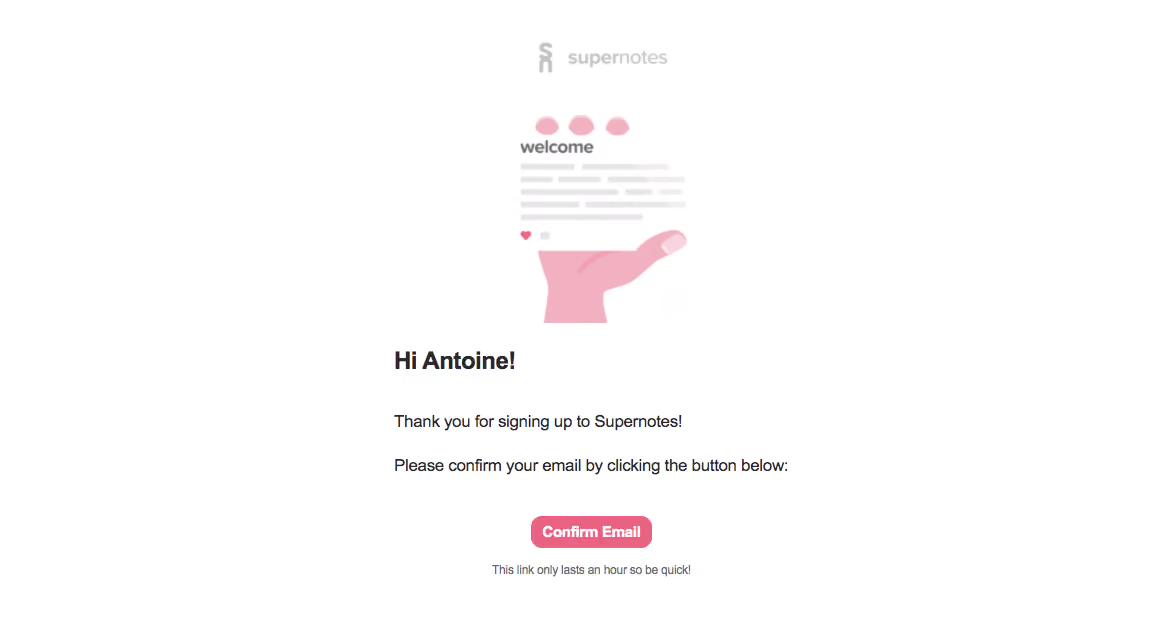
- **Character:** A minimal verification email uses a white canvas, soft pink illustration and compact pink confirmation action.
- **Tone:** A friendly welcome-card graphic and personalized greeting make the message feel warm without adding dense promotional content.
### Page composition
- **Capture:** The source measures 1168 × 636 image pixels. Email CSS scale and device-pixel ratio are unverified; dimensions below describe source pixels.
- **Upper stack:** A pale centered Supernotes wordmark sits above an illustration of a hand holding a welcome note.
- **Message block:** A roughly 400 px wide left-aligned region contains a bold greeting and two short confirmation paragraphs.
- **Action area:** A small centered Confirm Email button follows, with a short muted expiry note below.
- **Frame:** Broad white margins surround the content; no visible enclosing card or footer is present.
### Information hierarchy
- **Illustration:** The welcome note provides the main visual identity.
- **Greeting:** A bold personalized line is the strongest live text.
- **Instruction:** Two short paragraphs explain signup and confirmation.
- **Primary action:** The pink button is the clearest interactive element.
- **Expiry:** A small gray line beneath it communicates time sensitivity.
### Typography
- **Family:** A conventional sans serif is visible; exact identity is unverified.
- **Greeting:** Approximately 24 px in the source, bold.
- **Body:** Approximately 16 px with 22–24 px line height.
- **Action:** Approximately 14 px, bold and white.
- **Expiry note:** Approximately 12 px in muted gray, centered beneath the button.
### Colors & surfaces
- **Measured foundation:** ICC-aware sRGB sampling yields #FFFFFF.
- **Measured illustration:** Soft pink #F2B1C0 and pale gray #E7E5E7 form the hand/note graphic.
- **Measured action accent:** Stronger pink #EA6281 appears in the confirmation treatment.
- **Measured text:** Dark #2B292E anchors the greeting and message.
- **Restraint:** The illustration uses low-contrast pastel detail, while the action remains more saturated.
### Components
- **Wordmark:** A small pale-gray symbol and name are centered at the top.
- **Welcome illustration:** A pink hand supports a compact note with pink decorative marks, gray placeholder lines and a small heart.
- **Confirmation button:** A compact rounded pink rectangle, approximately 120 × 32 source px, contains white text.
- **Expiry message:** A single plain-text line sits directly below the action.
### Visual rhythm
- **Centered imagery:** Wordmark, illustration and action align to a central axis.
- **Reading alignment:** Greeting and paragraphs share a left edge within the centered message column.
- **Spacing:** Generous gaps separate illustration, greeting, body and action, while the expiry note stays close to the button.
- **Whitespace:** Broad outer margins keep the short transactional message focused.
### Responsive
- **Evidence boundary:** Only one email capture is shown; responsive behaviors are recommendations.
- **Fluid column:** Reduce side gutters on mobile while maintaining readable body text.
- **Illustration scaling:** Scale the welcome graphic proportionally without shrinking the live confirmation copy.
- **Action access:** Preserve a comfortable touch target and allow the expiry note to wrap.
### Adaptation guidance
- **Verification pattern:** Reuse a friendly brand illustration, concise confirmation instruction and one clear action.
- **Dynamic data:** Treat greeting and expiry policy as maintained content rather than fixed screenshot copy.
- **Email resilience:** Keep text and button live, with meaningful image alternatives.
- **State boundaries:** No confirmation result or destination is verified.
- **Measurement boundary:** Validate source-image scale before mapping dimensions to email CSS.
Use this context to reproduce the reference's visual language: layout, typography, colors, spacing, borders, radii, and distinctive elements. The screenshot takes priority if descriptions conflict.
## Direction
{{preferences.fidelityInstructions}}
## Output
{{output.instructions}}
Deliver a polished, cohesive design with precise alignment, hierarchy, and spacing. Produce the requested visual artifact, not just a description. If unsupported, explain the limitation.
.webp)



.avif)