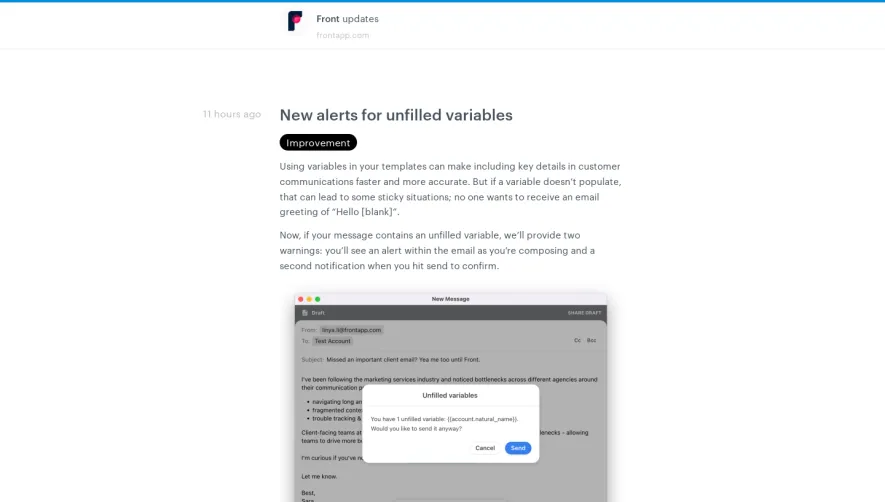
Generate a new design based on this screen using your own content.
Thank you! Your submission has been received!
Oops! Something went wrong while submitting the form.
# Design from Reference: Sketch Changelog
Create an original, high-fidelity visual design inspired by the reference. Prioritize composition, typography, colors, spacing, and component styling over technical implementation.
## Reference
- **Product:** Sketch
- **Category:** Changelog
- **Screenshot:** https://cdn.prod.website-files.com/5e9dc792e1210c5325f7ebbc/6acb6def0e8221f130836664_6acb6bdb18ad202d01d8d076_cms-b4d3d0eafa04b1a57096a246.webp
Analyze the screenshot first. If inaccessible, request it rather than guessing.
## Content
{{content.instructions}}
{{content.data}}
Preserve essential messaging and factual accuracy. Adapt structure and copy length for visual balance; never invent product claims.
## Visual Design
Use this context to reproduce the reference's visual language: layout, typography, colors, spacing, borders, radii, and distinctive elements. The screenshot takes priority if descriptions conflict.
## Direction
{{preferences.fidelityInstructions}}
## Output
{{output.instructions}}
Deliver a polished, cohesive design with precise alignment, hierarchy, and spacing. Produce the requested visual artifact, not just a description. If unsupported, explain the limitation.
Sketch’s Updates page radiates a modern, minimalist elegance—delivering professionalism without feeling sterile. The interface strikes a balance between openness and intimacy, thanks to ample white space and understated design elements that place content center-stage.
Layout and Structure
The page structure is clean and intuitive. A compact hero section immediately orients visitors with a simple title and explanatory text. Below, update blocks flow vertically with clear visual separation. There’s no overwhelming feature bloat—content is portioned into digestible, scrollable tidbits, with navigation controls (“Filter by”) for effortless historical searching. The sticky navigation enables swift access to other critical sections of the product.
Visual Elements
Playful yet professional, each update is paired with vibrant custom illustrations or animated previews that succinctly demonstrate new features. Lightweight iconography is sprinkled throughout, enhancing understanding without visual clutter. Occasional use of motion (subtle hover effects and micro-animations) injects energy and guides user attention smoothly.
Color Palette and Typography
The palette is calming and fresh—crisp white backgrounds, soft gray accents, and tasteful pops of Sketch’s signature yellow and blue. This ensures emphasis sits naturally on interactive elements and visuals. Typography is clean and contemporary, with bold sans-serif headings providing clear hierarchy, and legible body text ensuring easy reading across devices.
User Experience Patterns
Navigation is frictionless, with logical filters and omnipresent search. Calls-to-action are sparingly and thoughtfully placed, never overwhelming the core content. The page employs smooth scrolling and anchor links for seamless transitions, eschewing intrusive forms in favor of organic exploration.
Unique or Notable Design Choices
A standout feature is the visual-first approach to updates—where graphical snippets serve as intuitive, inviting entry points for deeper exploration. The restrained layout is surprisingly dynamic, relying on elegant motion and color shifts to foster delight and engagement.
Tone and Feel
The tone is quietly innovative and deeply trustworthy—a forward-thinking showcase that inspires confidence while sparking creative energy. It demonstrates how SaaS can blend warmth with clarity, making technical information deeply accessible and visually inspiring.
.webp)





.avif)