Design with AI
Generate a new design based on this screen using your own content.
# Design from Reference: Sidebird Settings
Create an original, high-fidelity visual design inspired by the reference. Prioritize composition, typography, colors, spacing, and component styling over technical implementation.
## Reference
- **Product:** Sidebird
- **Category:** Settings
- **Screenshot:** https://cdn.prod.website-files.com/5e9dc792e1210c5325f7ebbc/6acbbb67151c40fa407461ae_6acbba6aaa23dc1cf5a88888_cms-f96cad46672bf33b8d656d36.webp
Analyze the screenshot first. If inaccessible, request it rather than guessing.
## Content
{{content.instructions}}
{{content.data}}
Preserve essential messaging and factual accuracy. Adapt structure and copy length for visual balance; never invent product claims.
## Visual Design
### Overall aesthetic
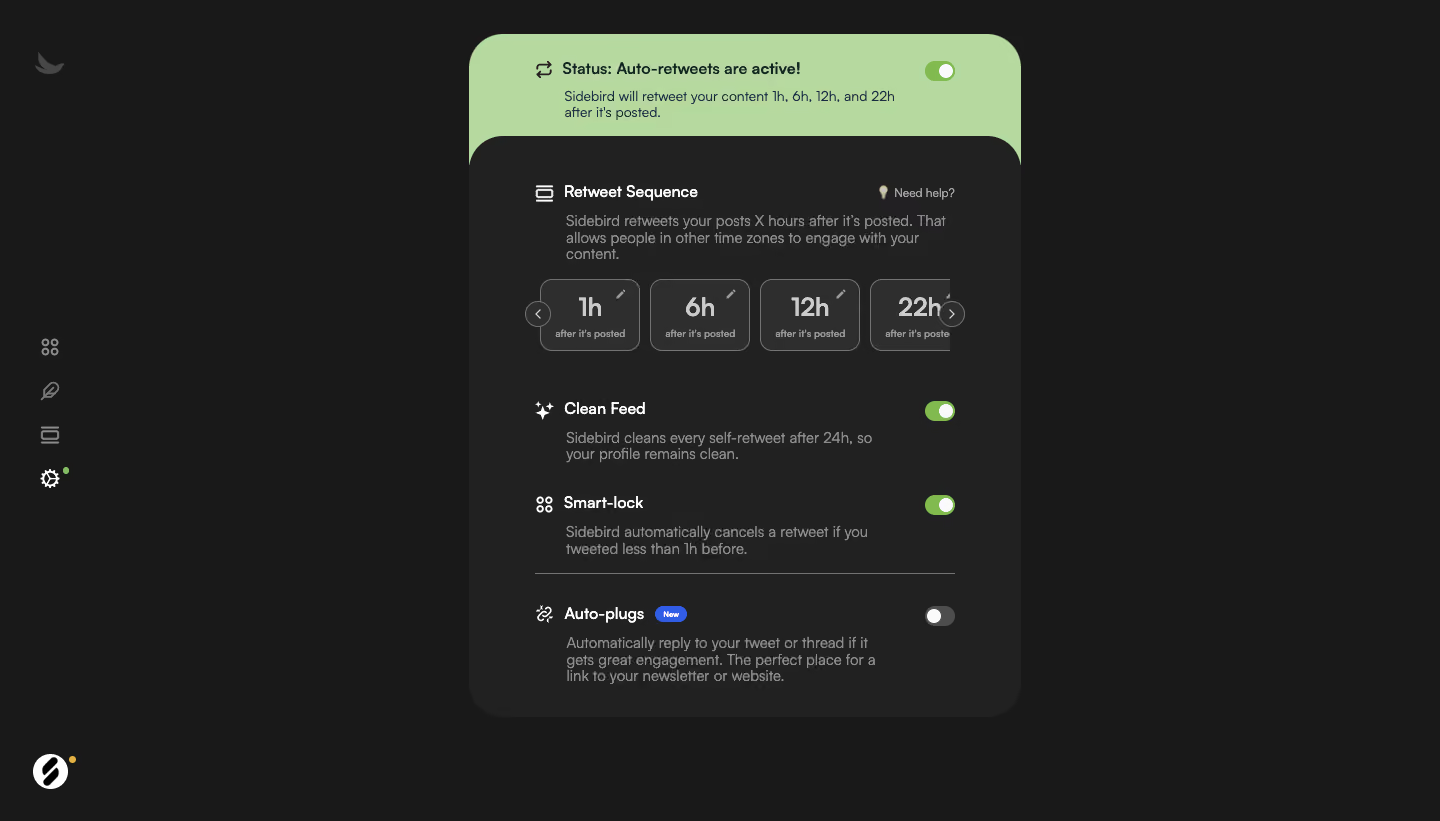
- **Character:** A dark automation-settings screen uses a narrow charcoal panel, pale-green active-status header, and compact toggle-based preference groups.
- **Evidence:** Source dimensions are 1440 × 821 px. Measurements below are approximate image pixels; CSS scale is unverified.
- **Focus:** One central settings card occupies a small portion of the wide dark canvas.
### Page composition
- **Navigation:** A slim icon-only rail sits at far left, with brand symbols at top and bottom.
- **Status:** A green rounded header above the main panel states that automation is active and summarizes scheduled intervals.
- **Settings panel:** A dark rounded body contains sequence controls, two enabled preferences, a divider, and a disabled newer feature.
- **Sequence:** Four small interval cards appear in one horizontal strip with edge navigation arrows; the last card is partly clipped.
- **Whitespace:** Broad dark margins surround the central panel.
### Information hierarchy
- **Overall status:** The green header and on-toggle communicate enabled automation.
- **Sequence:** A white heading and muted explanation precede large interval values.
- **Preferences:** White labels sit above muted descriptions, with toggles aligned right.
- **States:** Clean Feed and Smart-lock are on; Auto-plugs is off and includes a small blue New badge.
### Typography
- **Family:** A compact sans serif is used; exact identity is unverified.
- **Labels:** Approximately 16 px semibold; status text uses a similar bold scale.
- **Descriptions:** Around 14 px with 16–18 px line-height.
- **Intervals:** Approximately 24–26 px semibold, with tiny captions underneath.
- **Utility:** Help and badge text are around 10–12 px.
### Colors & surfaces
- **Measured palette:** Samples include background #191919, panel #212121, pale green #B5D99F, card gray #2E2E2E, muted #8C8D8D, and #727373.
- **Semantic use:** Pale green distinguishes global active status; brighter green marks enabled switches.
- **Text:** White identifies section labels; gray supports explanations and interval captions.
- **Secondary accent:** A small blue badge marks the newer feature.
### Components
- **Main panel:** Approximately 552 px wide with strongly rounded 32–34 px corners.
- **Status header:** Pale-green upper region with rounded top corners and a compact trailing switch.
- **Interval cards:** Roughly 100 × 72 px, thin gray outlines, 12 px radii, large centered values, and small edit-pencil icons.
- **Switches:** Compact capsules around 30 × 20 px; on-states have green tracks and right-side white thumbs, off-state is gray with left thumb.
- **Preference groups:** Leading line icons, label/description text, and right-aligned switches.
- **Divider:** A thin gray rule separates the last feature from the preceding enabled options.
### Visual rhythm
- **Padding:** Content is inset roughly 64 px from panel edges.
- **Grouping:** Sequence explanation/cards form the densest area; lower preferences have larger vertical gaps.
- **Alignment:** Labels and descriptions share consistent edges, while switches form a right column.
- **Canvas:** Empty side regions emphasize the compact settings stack.
### Responsive
- **Observed limit:** Only desktop is visible; actual switch/edit behavior is unverified.
- **Recommended fit:** Make the panel fluid with safe mobile gutters and reduce excessive internal padding.
- **Recommended sequence:** Keep interval cards horizontally scrollable with accessible controls, or wrap them without clipping essential values.
- **Recommended access:** Provide large switch hit targets, labels, and keyboard focus.
### Adaptation guidance
- **Preserve:** Keep global status distinct from individual preferences and maintain explicit on/off states.
- **Implement:** Use accessible switches and named interval-edit controls; do not infer automation execution from the screenshot.
- **Layout:** Separate status, sequence, and feature groups into reusable components.
- **Validate:** Confirm fonts, CSS sizes, contrast, interval overflow, and focus/disabled states. Only resting settings are shown.
Use this context to reproduce the reference's visual language: layout, typography, colors, spacing, borders, radii, and distinctive elements. The screenshot takes priority if descriptions conflict.
## Direction
{{preferences.fidelityInstructions}}
## Output
{{output.instructions}}
Deliver a polished, cohesive design with precise alignment, hierarchy, and spacing. Produce the requested visual artifact, not just a description. If unsupported, explain the limitation.
.webp)



.avif)