.webp)
Thank you! Your submission has been received!
Oops! Something went wrong while submitting the form.
Get SaaSFrame Pro
Monthly
$18
Quarterly
$48
Yearly
$180
Upgrade to access this feature
Browse all screens & flows
Filter and search screens & flows
Access Figma files
Access mobile versions
Bookmark screens & flows
Join now
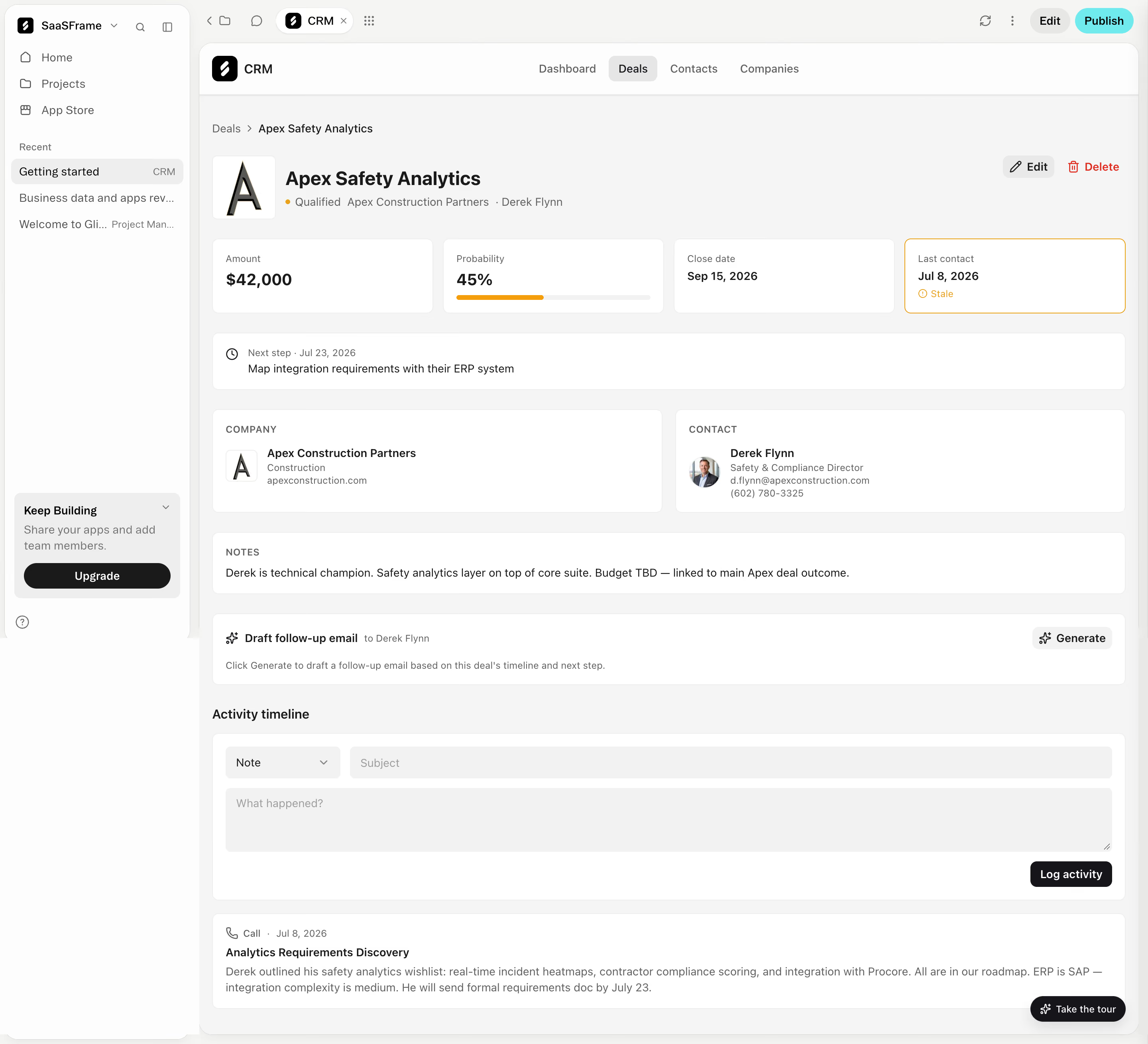
Glide CRM account details

Glide
Turn spreadsheets into apps
Designed by
No items found.

Bookmark
Bookmark

Design with AI
Thank you! Your submission has been received!
Oops! Something went wrong while submitting the form.
# Design from Reference: Glide CRM account details
Create an original, high-fidelity visual design inspired by the reference. Prioritize composition, typography, colors, spacing, and component styling over technical implementation.
## Reference
- **Product:** Glide
- **Category:** Details
- **Screenshot:** https://cdn.prod.website-files.com/5e9dc792e1210c5325f7ebbc/6acacffb7796407cec1416eb_6ac574d19e3792c70ef19a76_richtext-a9e98bf23266c2e2da84.webp
Analyze the screenshot first. If inaccessible, request it rather than guessing.
## Content
{{content.instructions}}
{{content.data}}
Preserve essential messaging and factual accuracy. Adapt structure and copy length for visual balance; never invent product claims.
## Visual Design
### Overall aesthetic
- **Style:** Restrained CRM detail dashboard with white cards on a pale neutral canvas, compact sans-serif typography and fine gray boundaries.
- **Visual emphasis:** Black text and dark actions carry most hierarchy; orange flags deal risk, while turquoise is confined to the outer builder's publish action.
- **Capture:** The image measures 2880 × 2618 pixels. CSS estimates assume a 2× capture, corresponding to approximately 1440 × 1309 CSS pixels; actual scale and font identity are unverified.
### Page composition
- **Outer workspace:** A roughly 240-CSS-pixel left sidebar contains workspace identity, navigation, recent projects and a lower upgrade card. A thin builder toolbar runs across the remaining width.
- **App frame:** The CRM occupies a rounded panel starting around x250 CSS pixels, with its own header and centered Dashboard, Deals, Contacts and Companies navigation.
- **Record header:** A breadcrumb precedes a square company mark, bold deal title and a muted stage/company/contact line. Edit and red Delete controls align to the right.
- **Summary row:** Four equal cards present amount, probability, close date and last contact. A full-width next-step card follows.
- **Relationship details:** Company and contact cards form a two-column row, followed by full-width notes and an AI follow-up generation module.
- **Activity area:** A section heading introduces a large activity composer and one visible call-history card. A small tour pill overlays the lower-right corner.
### Information hierarchy
- **Record identity:** The deal title is the strongest in-app heading, supported by its logo and secondary metadata.
- **At-a-glance metrics:** Monetary amount and probability use large bold numerals; dates are smaller. The stale-contact card adds an orange outline and labeled warning.
- **Next action:** A clock icon, muted dated label and darker task sentence form a dedicated full-width action reminder.
- **Related entities:** Uppercase muted labels distinguish company, contact and notes, while names use darker semibold text.
- **Assisted action:** The follow-up module pairs a bold title with a right-aligned Generate control and subdued explanatory text.
- **Activity hierarchy:** The composer precedes the logged call, whose type/date line is muted, subject bold and description regular.
### Typography
- **Family:** A neutral UI sans-serif is visible; exact font identity is unverified.
- **Deal title:** Approximately 24-pixel CSS size, bold, with around 30-pixel line height.
- **Metric values:** Amount and probability are approximately 20–22 pixels and bold; date values approximately 14–15 pixels and semibold.
- **Body and controls:** Most text is approximately 14 pixels with 20-pixel line height, including navigation, notes and activity descriptions.
- **Metadata:** Card labels and secondary details are approximately 12–13 pixels. Uppercase section labels use medium weight and slight tracking.
- **Section title:** Activity timeline is approximately 16 pixels and semibold, with a modest gap before the composer.
### Colors & surfaces
- **Measured surfaces:** White #FFFFFF, light gray #F5F5F5 and warm off-white #FDFDFC are prominent sampled image colors.
- **Measured controls:** #F2F2F2 and #EEEEEE support filled inputs, selected navigation and secondary controls.
- **Measured text:** Near-black #1A1A1A appears among the main text pixels; secondary text is medium gray.
- **Semantic accents:** Orange appears in the qualification dot, probability fill and stale-contact treatment; red marks Delete. These hues are visually observed without assigning unmeasured exact hex values.
- **Layering:** Fine borders distinguish white cards from the gray page. The outer workspace and app frame use larger rounded corners than the interior cards.
### Components
- **Workspace sidebar:** Approximately 234 pixels wide inside its rounded shell, with icon-label rows and a gray selected recent item. The upgrade panel combines short copy and a black full-width pill.
- **App tabs:** A light-gray rounded rectangle marks Deals as selected; other tabs remain plain text.
- **Identity block:** A roughly 80-pixel square logo tile sits beside the title and metadata; the company card repeats a smaller version of the mark.
- **Metric cards:** Approximately 277 × 94 CSS pixels, with 8-pixel corners and 16-pixel padding. Probability includes a thin horizontal track filled to roughly 45%.
- **Risk card:** The last-contact card uses an orange outline and an icon-plus-text stale state, conveying status through more than color alone.
- **Relationship cards:** Two approximately equal-width cards use 16-pixel padding; the contact includes a small circular portrait and stacked role/contact details.
- **Notes and AI module:** Separate white rounded panels span the content width. Generate is a small light-gray button with a sparkle-style icon.
- **Activity composer:** A type dropdown and subject field share the first row; a wide multiline textarea follows. A black Log activity button aligns at lower right.
- **History card:** A call icon and date lead a bold subject and two-line narrative. The capture shows one visible entry and no expanded history state.
### Visual rhythm
- **Content inset:** Approximately 16 pixels separate the app frame edges from the main card grid.
- **Grid gaps:** Summary cards use roughly 12–14-pixel horizontal gaps; major card rows use about 24-pixel vertical gaps.
- **Card rhythm:** Repeated 8-pixel corners, fine borders and 16-pixel insets produce a consistent dense business interface.
- **Reading flow:** The screen moves from identity to metrics, next step, related people, notes, assisted action and activity.
- **Density balance:** Compact metric and metadata groups contrast with wider notes and activity regions, limiting visual clutter despite substantial content.
### Responsive
- **Recommendation — shell:** Collapse the workspace sidebar and adapt app navigation for narrow viewports without confusing workspace and CRM controls.
- **Recommendation — metrics:** Wrap the four summary cards into two columns and then a single column while retaining the stale-contact warning.
- **Recommendation — details:** Stack company and contact panels and allow long metadata to wrap without horizontal overflow.
- **Recommendation — composer:** Stack type and subject controls, keep the textarea full width and preserve a clear submission action.
- **Recommendation — overlays:** Reposition the tour pill so it does not obscure activity content. No mobile behavior is shown.
### Adaptation guidance
- **Preserve record-first organization:** Keep the deal identity, status and key metrics above longer notes and history.
- **Build reusable cards:** Share padding, border, radius and typography tokens across metrics, entity details, notes and activity modules.
- **Keep risk explicit:** Retain icon and text labels alongside orange risk styling; distinguish destructive actions with clear wording.
- **Separate workspace from app:** Maintain the two navigation layers when adapting this builder-hosted view, or intentionally simplify the shell for a standalone CRM.
- **Protect readable content:** Allow long notes and activity descriptions to wrap and use stable label/value hierarchy.
- **Define real interaction states:** Implement edit, deletion, generation and activity validation states separately; the screenshot only evidences the displayed default record and composer.
Use this context to reproduce the reference's visual language: layout, typography, colors, spacing, borders, radii, and distinctive elements. The screenshot takes priority if descriptions conflict.
## Direction
{{preferences.fidelityInstructions}}
## Output
{{output.instructions}}
Deliver a polished, cohesive design with precise alignment, hierarchy, and spacing. Produce the requested visual artifact, not just a description. If unsupported, explain the limitation.

.avif)
Category
Patterns


Added on
September 29, 2026
Similar screens
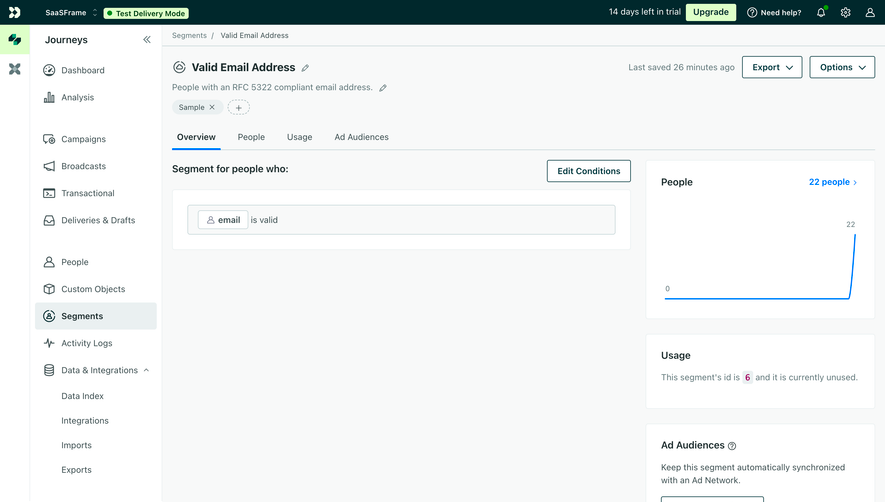





Upgrade to SaaSFrame Pro now to see similar examples.
Monthly
$18 /month
Billed $18 monthly
Browse all screens & flows
Filter and search screens & flows
Search text in screenshots
Access Figma files
Access mobile versions
Join now
Quarterly
$16 /month
Billed $48 quarterly
Browse all screens & flows
Filter and search screens & flows
Search text in screenshots
Access Figma files
Access mobile versions
Join now
Yearly
$15 /month
Billed $180 yearly
Browse all screens & flows
Filter and search screens & flows
Search text in screenshots
Access Figma files
Access mobile versions
Join now