Design with AI
Generate a new design based on this screen using your own content.
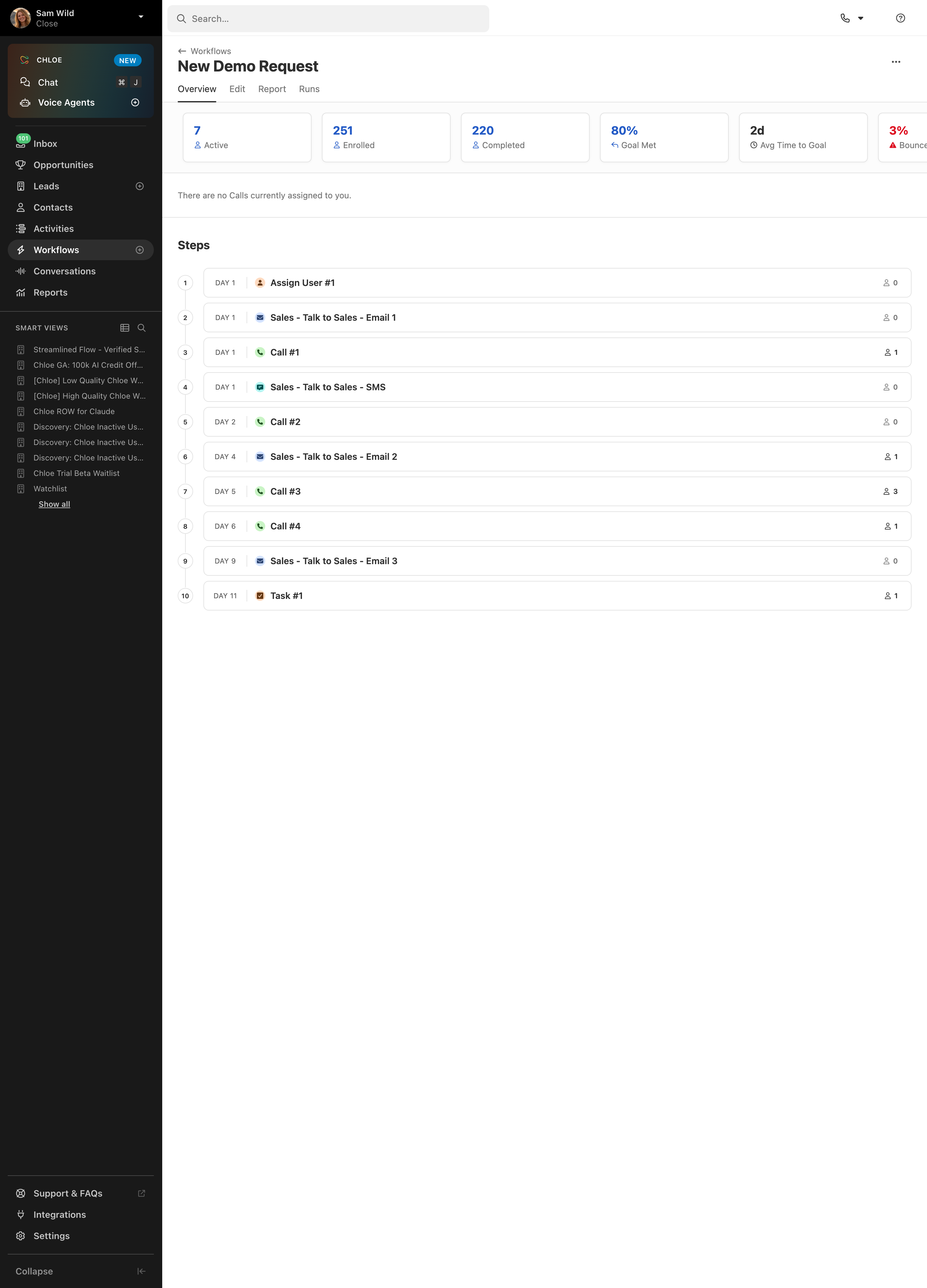
# Design from Reference: Close Sales automation workflow steps
Create an original, high-fidelity visual design inspired by the reference. Prioritize composition, typography, colors, spacing, and component styling over technical implementation.
## Reference
- **Product:** Close
- **Category:** Flowchart
- **Screenshot:** https://cdn.prod.website-files.com/5e9dc792e1210c5325f7ebbc/6acad09751f927271bf81e98_6acad02e053419932ab47f00_cms-44b1d93dd2352bba706ce4a3.webp
Analyze the screenshot first. If inaccessible, request it rather than guessing.
## Content
{{content.instructions}}
{{content.data}}
Preserve essential messaging and factual accuracy. Adapt structure and copy length for visual balance; never invent product claims.
## Visual Design
### Overall aesthetic
- **Character:** Operational CRM workflow overview with a dark navigation rail and a bright, highly structured main workspace.
### Page composition
- **Canvas:** 2880 × 4000 screenshot px; CSS estimates assume 2× capture.
- **Structure:** Approximately 250 CSS px sidebar; search/top controls; workflow title and tabs; horizontal metric cards; a numbered vertical sequence of ten steps; extensive lower whitespace.
### Information hierarchy
- **Priority:** Workflow name and performance metrics establish context; numbered step sequence carries the main task detail.
- **Navigation:** Overview is underlined; Workflows is selected in the sidebar. Counts and completion rate use blue, while the bounce metric uses red.
### Typography
- **Family:** Compact sans serif, exact font unverified.
- **Scale:** Estimated CSS title 24 px, section heading 18 px, step label/body 14 px, day labels 11–12 px and metric values 20 px.
### Colors & surfaces
- **Sampled palette:** White #FFFFFF content, charcoal #191919 sidebar, selected navigation #2E2E2E, separators #E2E2E2 and pale backgrounds #F1F1F1.
- **Accents:** Blue metric values; pastel channel icons distinguish email, calls, SMS, assignment and tasks.
### Components
- **Metrics:** Small outlined white cards with faint shadows and paired value/label text.
- **Timeline:** Fine vertical connector links numbered circles to rounded step rows; each row has day, channel icon, bold label and right-aligned participant count.
- **Sidebar:** Primary destinations above a dense smart-view list; support, integrations and settings anchored near the bottom.
### Visual rhythm
- **Spacing:** Estimated CSS row height 46 px with 8 px gaps; repeated geometry keeps the ten-step sequence scannable. Content is concentrated in the upper half.
### Responsive
- **Observed:** Desktop only.
- **Adaptation:** Collapse the sidebar, allow metric cards to scroll horizontally and wrap long step labels while retaining day/count alignment.
### Adaptation guidance
- **Preserve:** Numbered workflow logic, compact metric strip and strong sidebar/content separation.
- **Replace:** Use real steps, timing and outcomes; adapt the screenshot's unusually tall empty area to the target viewport.
Use this context to reproduce the reference's visual language: layout, typography, colors, spacing, borders, radii, and distinctive elements. The screenshot takes priority if descriptions conflict.
## Direction
{{preferences.fidelityInstructions}}
## Output
{{output.instructions}}
Deliver a polished, cohesive design with precise alignment, hierarchy, and spacing. Produce the requested visual artifact, not just a description. If unsupported, explain the limitation.
.webp)



.avif)