.avif)



1. Header: The top of the page features a header that includes a logo on the left side, a navigation menu on the right side, and a call-to-action button in the center. The menu items include "Product," "Pricing," "Integrations," "Resources," "Community," and "Contact." 2. Hero Section: The hero section is the first thing that catches your eye when you visit the page. It has a background video featuring Abstract’s product in action. There are two call-to-action buttons in the center of the video with options to “start your free trial” and “learn more.” 3. Product Overview: The next section provides an overview of Abstract’s product, including how it can help design teams work faster and more collaboratively. 4. Features: The features section highlights the key functionalities of Abstract, including version control, file management, and collaboration. 5. Case Studies: The page includes several case studies that show how Abstract has helped companies improve their design workflow. 6. Integrations: Abstract integrates with several design tools, including Sketch, Figma, and Adobe Creative Cloud. The integrations section highlights these integrations and provides more information on how they work. 7. Pricing Plans: Abstract offers a free plan for individuals and small teams, as well as paid plans for larger teams with additional features. The pricing section provides an overview of these plans and their respective features. 8. Resources: Abstract offers a variety of resources to help design teams improve their workflow, including webinars, whitepapers, and templates. The resources section provides links to these resources. 9. Blog: Abstract also maintains a blog that features articles on design best practices, industry trends, and more. The blog section provides links to recent articles. 10. Footer: The footer of the page includes links to various pages on the Abstract website, as well as social media icons and a subscription form for Abstract’s newsletter.
.webp)
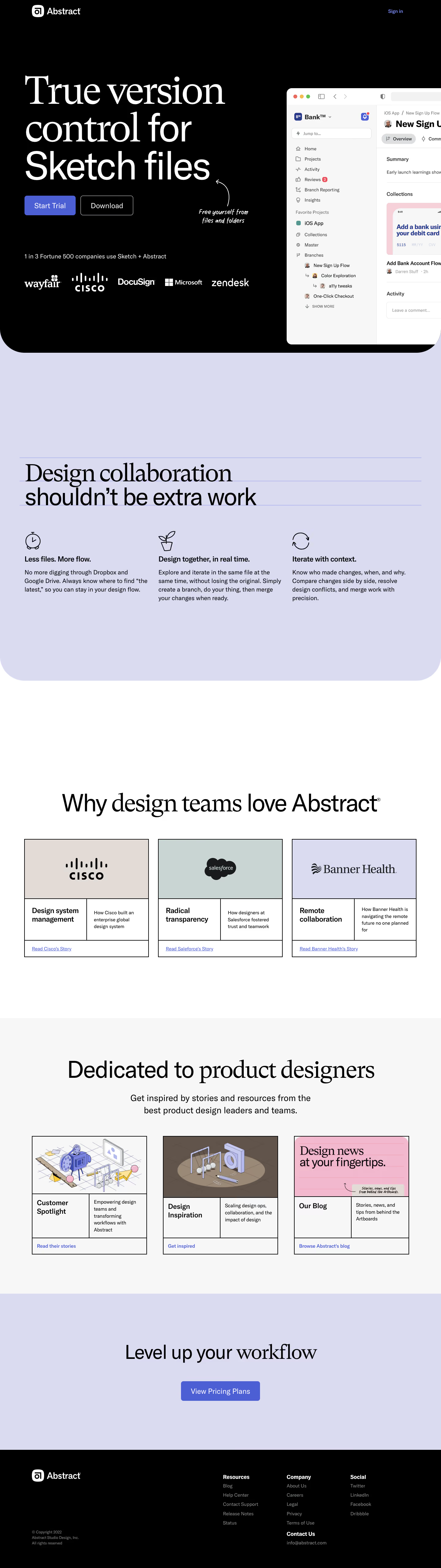

Abstract Landing Page

Abstract
Version, Collaborate & Share
Designed by
No items found.
Category
Patterns
No items found.
Tech Stack
Added on
May 4, 2020