Toast Notification
5
A temporary non-blocking message confirming an action or reporting a system event.
.webp)
A toast notification gives concise feedback without replacing the current interface. It commonly confirms a completed action, reports a recoverable problem, or offers a brief next step. The pattern is useful when the message supplements a task that remains understandable after the toast disappears.
A toast should not become the only place where essential information exists. If users need to correct a field, inspect a lasting failure, or make a consequential decision, provide feedback in the relevant workflow as well. The design challenge is to communicate clearly while preserving the person's focus and context.
Use a toast when a short result can be understood without moving to another page or opening a dialog. Saving a preference, copying a link, or completing a straightforward update may suit this format. The message should confirm what happened rather than merely indicate that something occurred.
Avoid using a transient toast for a problem that requires careful correction. A field error belongs near the field; a blocked operation may need a persistent explanation. The toast can draw attention to the result, but it should not disappear with the only recovery instructions.
Distinguish toast feedback from a notification inbox. A toast usually concerns the immediate interaction, while an inbox may preserve events for later review. If the message must remain available, define where that lasting record exists.
The Hygraph capture shows a small green message at the lower right of an editing interface. Its wording identifies both saving and publishing, with a success symbol and a close control. The surrounding editor remains visible rather than being replaced by a full confirmation screen.
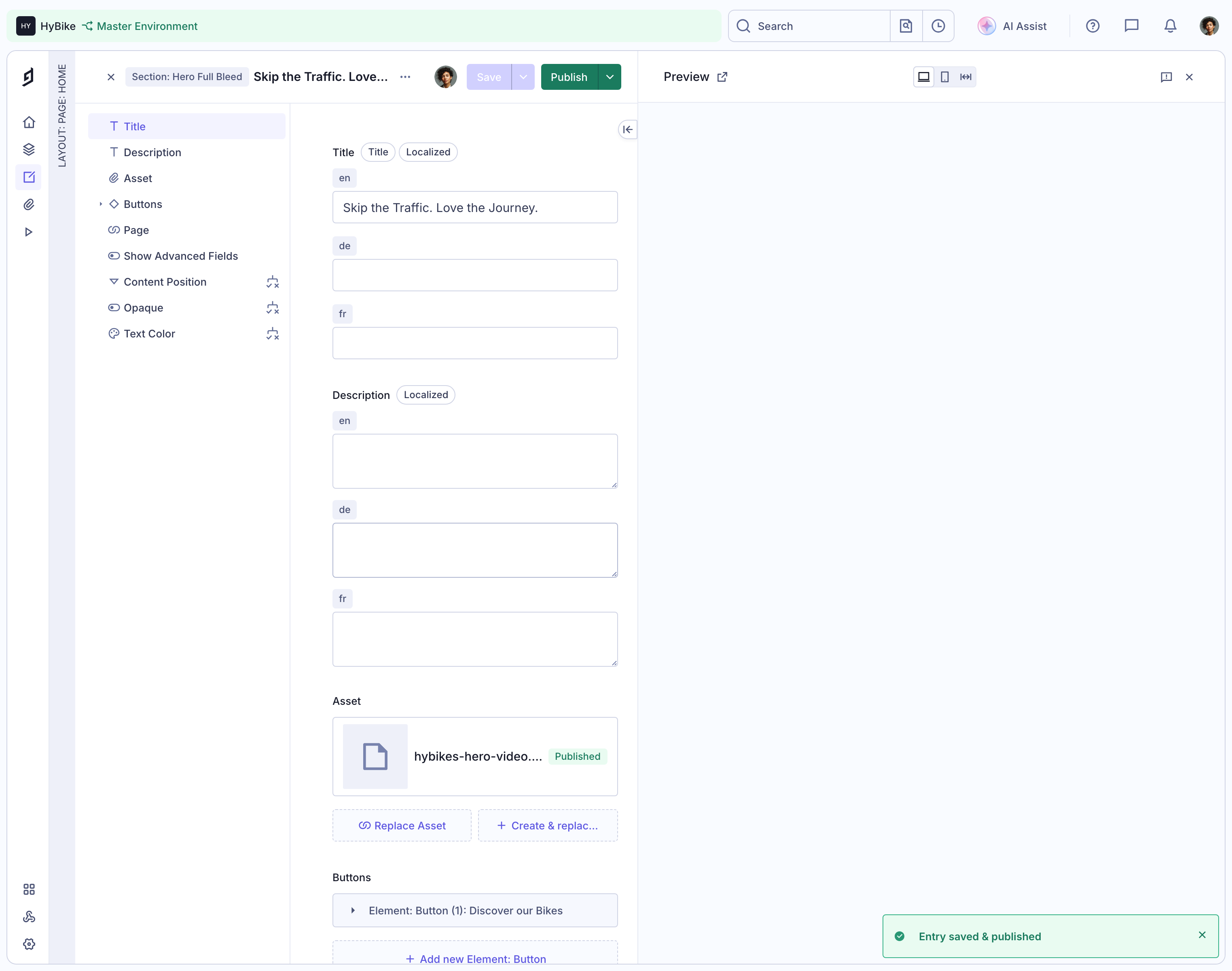
The message's specificity matters: saved and published describe two outcomes that an editor may distinguish. A generic success label would communicate less. The screenshot records the displayed message, not independent evidence of persistence, publication timing, automatic dismissal, or announcement behavior.
For your product, describe the actual completed operation. If data was saved as a draft but not published, say that. If a request was accepted for later processing, do not label it as fully completed. A concise toast can still preserve these important distinctions.
A user may activate an action before the system knows its outcome. The interface should not immediately show a success toast merely because the click was received. Use an appropriate pending state when the operation takes time.
When completion arrives, make sure the feedback belongs to the intended action and current context. Rapid repeated actions can produce several results, and a delayed toast can appear after the user has moved elsewhere. Include enough object context to avoid ambiguity where that is likely.
If the outcome is uncertain, explain that state rather than choosing success for visual simplicity. A network interruption after submission may require checking the result before retrying. The message should help the user avoid accidental duplicate work.
Lead with the meaningful result: what was saved, copied, removed, or made available. Add a useful qualification only when it changes interpretation. A compact notification should not require the visitor to reconstruct the action from a generic Done label.
For errors, state what could not be completed and identify the next step. Avoid technical codes as the only explanation. If detailed diagnostics are relevant, provide a route to them while keeping the immediate message understandable.
Use a calm tone that matches the consequence. Routine feedback does not need exaggerated celebration, and a recoverable issue does not need alarming language. The toast should help someone continue their work rather than compete with the task emotionally.
A toast may offer Undo, retry, view details, or another concise action. The label should identify what it changes or opens. An undo route should correspond to an actual reversible operation, not a promise the system cannot reliably fulfill.
If an action expires, make its availability understandable and provide a longer-lived route when the consequence warrants one. Do not make recovery depend entirely on noticing a button during a brief interval. Important corrections should remain possible in the workflow when appropriate.
Keep action and dismissal separate. A close control should hide the message, not reverse the operation. An action should not be placed so close to dismissal that users are likely to activate the wrong one.
Automatic dismissal can suit routine information that does not require action. Messages with important choices, long explanations, or recovery steps may need persistence. Choose the lifetime according to the content and task rather than one duration for every toast.
Give users time to read and interact. Consider what happens when focus or pointer interaction reaches the message, and avoid removing an action while someone is preparing to use it. A reduced-motion preference does not by itself answer how long a message should remain readable.
The close control in the Hygraph image shows an explicit dismissal affordance. It does not prove whether the message also disappears automatically. Treat timing as a behavior to define and test in your own implementation.
A lower corner can keep feedback visible without covering central work, as the Hygraph capture illustrates. Other placements may fit different layouts. Review the position within the complete interface, including fixed navigation, chat launchers, and other floating elements.
Avoid covering the action that just produced the message or a field the user is still editing. On mobile, a desktop-style corner stack may obscure a large share of the available screen. A responsive placement should preserve readable content and practical controls.
Keep important feedback within the visible area without assuming a particular scroll position. The visitor should not need to search the page for a toast, but the feedback should not unexpectedly move the document or steal the reading position.
Several actions can produce several toasts. Decide whether messages queue, stack, replace one another, or consolidate related results. The policy should preserve important outcomes while avoiding a wall of repeated notifications.
Repeated success messages may be combined when they describe a coherent set of operations. Separate failures may need individual context. Do not replace a failure with a later routine success in a way that hides the unresolved problem.
Provide an appropriate lasting summary when many records are affected. A bulk operation with partial failures should not become a series of fleeting messages that the user must count. The toast can point to the result summary rather than attempting to contain it all.
Use readable text and meaningful symbols where helpful. Green can reinforce success, but the wording should identify the outcome. A red background alone cannot explain what failed or how to recover.
Communicate the message appropriately to people who are not looking at the toast's visual position. Routine status should be available without unexpectedly moving keyboard focus. More urgent feedback may need a different strategy, but urgency should reflect the actual consequence.
If the toast contains an action, ensure it can be reached and operated by keyboard with a visible focus state. The reading experience should associate the action with its message rather than presenting an isolated Undo button without context.
A saved state can remain visible through an updated record or indicator. An error can remain near the affected content. An undoable removal may have a longer-lived recovery route if the product supports it. These persistent cues help users verify outcomes without relying on memory.
If the notification is missed, the underlying task should still make sense. Someone returning after a moment away should not find a changed interface with no explanation of what happened. Important operations may need a history, summary, or another discoverable result state.
Do not use toasts to compensate for unclear action design. A message after an accidental operation is weaker than an interface that made the intention and scope understandable before execution.
Check quick success, slow completion, failure, uncertain outcomes, repeated actions, and navigation before a response arrives. Verify that each message describes the correct operation and that important failures remain recoverable.
Ask users to explain what happened and how they would verify it later. Test narrow screens, keyboard use, text zoom, overlapping floating elements, and message actions near dismissal. Visual polish is secondary to accurate, usable feedback.
Explore the SaaSFrame toast-notification collection to study concise status presentation. Use the reference to plan hierarchy and placement, then define timing, persistence, and recovery in the actual workflow.
Should every successful action produce a toast? No. An obvious inline change may already provide sufficient feedback. Use a toast when it adds a meaningful confirmation without creating repetitive noise.
Can an error toast replace field validation? It should not carry the only correction instructions for a field problem. Keep the relevant explanation near the affected input and use broader feedback only when it helps.
Should a toast move keyboard focus? Routine status usually needs to preserve the current task. If an action requires attention or a consequential decision, consider a more appropriate persistent interaction rather than treating every toast as a focus destination.