Pricing Toggle
0
A control used to switch billing periods, currencies, pricing units, or other pricing dimensions.
.webp)
A pricing toggle lets visitors compare billing arrangements without leaving the pricing page. The common monthly–annual selector changes the commercial terms displayed in the same plan cards. It should clarify both the recurring commitment and the amount due, while preserving enough context to compare plans confidently.
The control is small, but the decision is substantial. A visitor may prefer monthly flexibility even when annual billing offers a lower equivalent rate. A team may need annual invoicing but still want a monthly unit for budget comparison. Good pricing toggle UX makes these different questions answerable rather than hiding them behind a discount badge.
“Per month” describes a unit; “billed annually” describes a payment schedule. Those are not interchangeable. A plan shown as $20 per month with annual billing may require $240 upfront, before any other applicable charges. Both pieces of information should be readable near the price and repeated in the purchase summary.
Visitors should not need to infer annual billing from the highlighted side of a switch several screens away. Put the relevant condition in each affected card. On mobile, the first and last plan may be separated by a long scroll, making a distant selector particularly easy to forget.
If annual billing is actually collected in installments, say that clearly rather than reusing language intended for an upfront payment. If the interval changes contractual commitment but not collection frequency, label the commitment itself. Design the control around the actual offer.
The same principle applies to per-seat prices. A monthly equivalent per seat is not the total account charge. Provide a way to estimate the team total when headcount is a common purchase question. For usage-based plans, state which allowances reset monthly and which amounts apply to the full contract period.
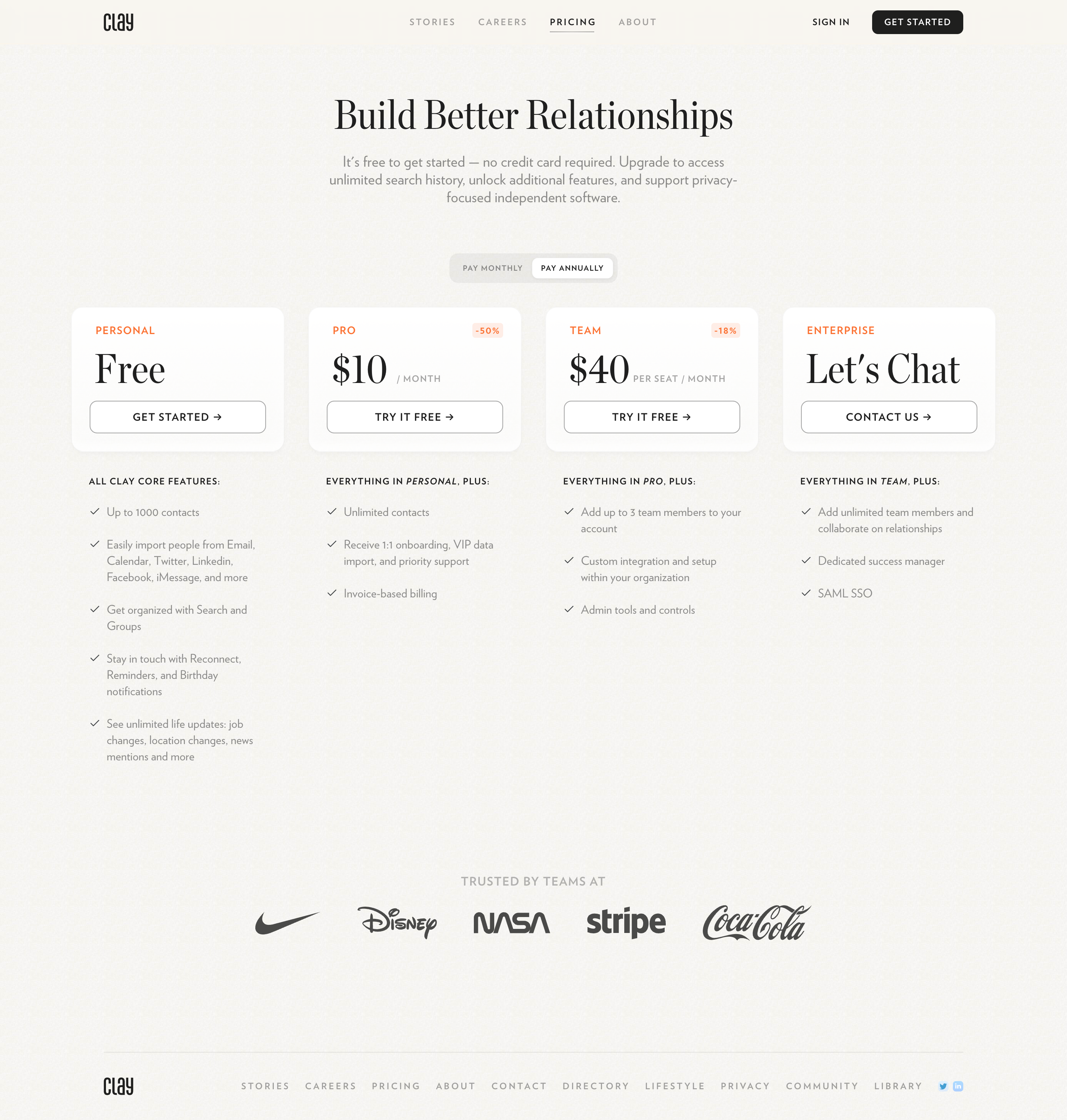
In the archived Clay screenshot, “Pay Annually” is visibly selected above Personal, Pro, Team, and Enterprise cards. Pro displays $10 per month with a 50% badge; Team displays $40 per seat per month with an 18% badge. The discounts sit on their respective cards rather than implying that one percentage applies to the entire offer.
This is a useful distinction when annual savings vary by tier. A single “Save 50%” label on the selector could lead someone evaluating Team to assume a discount that belongs only to Pro. Card-level savings keep the claim close to the price it qualifies.
The screenshot also illustrates a question to check before borrowing the design: the visible monthly units need an equally clear explanation of annual collection. The selected segment supplies some context, but the payment amount should remain understandable from the card alone. A designer should evaluate this separately from the strong visual grouping.
These figures describe the captured interface, not Clay’s current pricing. Use the screenshot to study hierarchy, selection, and plan-specific messaging rather than as a source for today’s commercial terms.
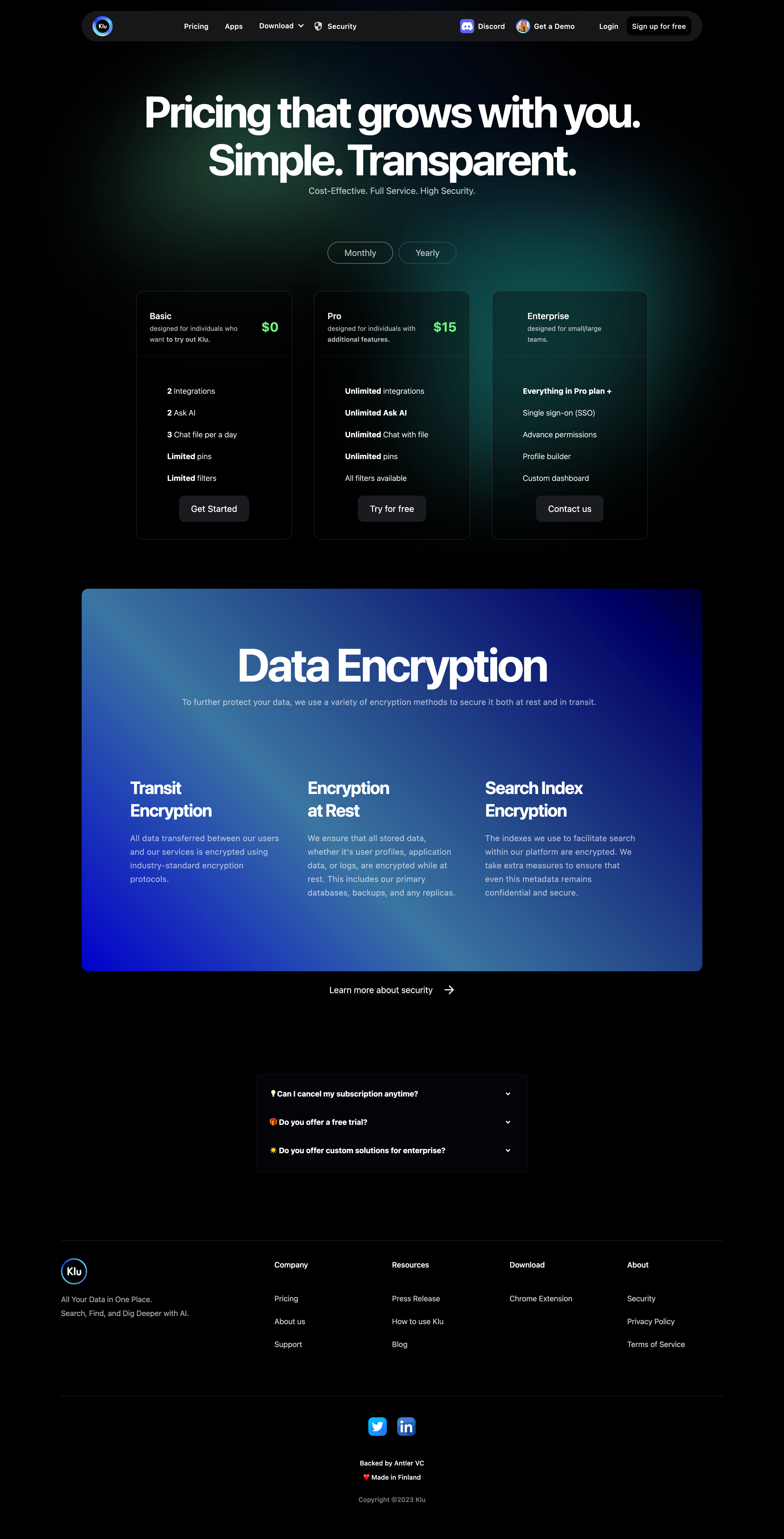
Klu’s captured pricing page places a compact Monthly–Yearly selector between its headline and three plan cards. Basic, Pro, and Enterprise remain in the same layout. The selector is positioned where a visitor can see it before scanning the prices, avoiding a separate page for each frequency.
The tradeoff is that a shared control must communicate its selected state unmistakably. A subtle outline or tint can be difficult to distinguish against a dark background. Selection needs more than a stylistic difference that only becomes obvious after clicking. Test the resting state with people who have not seen the component before.
The visible Pro amount is also an opportunity to review the price suffix. A number needs its unit and collection condition to be interpretable. The screenshot alone cannot establish how the numbers change when the control is activated or whether the checkout preserves the choice. Those require interaction testing.
There is no universal rule that annual billing must be selected first. A default establishes the first price visitors see and can shape their understanding of affordability. Choose it deliberately, then evaluate comprehension alongside conversion rather than treating a lower visible number as sufficient evidence of a better experience.
An annual default can work when the equivalent rate and annual payment are both explicit. A monthly default can work when visitors are exploring and value low commitment. Whichever you choose, make the alternative equally discoverable and avoid styling the monthly option as though it were disabled.
If a campaign links to a particular billing frequency, preserve that intent in the initial state. A visitor following an annual offer should see the matching conditions. If a returning visitor has already selected an interval, consider preserving the preference in a way that does not override a deliberate new campaign choice.
Do not preselect annual billing merely to create a favorable price impression while postponing the actual charge until checkout. The design should support a considered commitment, including the option with fewer obligations.
Switching intervals should update the affected prices, savings, and terms together. Keep plan order and feature placement stable unless the interval genuinely changes the product entitlement. If a feature changes with billing frequency, make that variation explicit instead of silently rewriting a long comparison table.
Reserve space for longer price labels and annual totals. A card that jumps vertically after activation can move the purchase button away from the pointer and interrupt scanning. On mobile, preserve scroll position so visitors can compare the same tier before and after the change.
If prices load from a remote service, show a clear pending state and prevent purchase using a mismatched interval and amount. An old price displayed beside a new “Annual” selection creates a false representation of the offer. Handle errors by preserving a coherent last-confirmed state or explaining that the comparison could not update.
Animations can make the update noticeable, but clarity comes first. Avoid long number-counting effects that make prices temporarily ambiguous. The settled amount should be available immediately to assistive technology and should not rely on motion to communicate the change.
An annual saving compares equivalent periods and quantities. If the monthly rate is $25 and the annual rate is $240 for the same entitlement, the annual alternative saves $60 against twelve monthly payments of $25. That is 20% of the $300 monthly-billing baseline. Treat this as an illustrative calculation, not a claim about a captured product.
Comparisons become misleading when one figure is per seat and another is per workspace, or when the included usage changes. A discount also needs a clear reference if promotional pricing applies only to the first year. Distinguish an introductory offer from the renewal rate.
Where a percentage adds complexity, show the actual annual difference in money. Some buyers make decisions based on cash flow rather than discount magnitude. The total due, the renewal terms, and cancellation expectations may matter more than a badge.
Avoid attaching a savings label to free or custom-priced plans unless there is a concrete comparison behind it. Clay’s captured separation of savings by plan is a useful example of keeping a claim scoped.
The pricing page and checkout must agree. Activating “Get started” from an annual card should open the corresponding annual offer and display the expected amount. A return from checkout should retain enough state to avoid making the visitor reconstruct the comparison.
Repeat the plan name, interval, seat quantity when relevant, and amount due before commitment. A trial should explain whether billing begins automatically and which interval applies when it ends. If the signup flow requires plan selection later, carry the visitor’s preference forward rather than dropping it silently.
Enterprise contact forms need the same attention. If a prospect has selected annual billing, the sales form can retain that preference as context without promising a fixed annual price that the page never offered. Do not force a pricing frequency onto custom arrangements.
Review deep links, browser back navigation, cached pages, and analytics parameters. A shared pricing selector is only reliable when every entry point produces a coherent combination of state, price, and destination.
Use a control whose semantics express a choice between billing options. Depending on the implementation, labeled radio inputs or appropriately implemented selection buttons may fit better than a generic on/off switch. “Monthly” and “Annual” are two named arrangements, not a feature being enabled.
Expose the selected option programmatically, provide a visible focus indicator, and make both labels operable. A tiny decorative thumb should not be the only clickable area. Keyboard users should be able to choose an interval and reach the updated plan actions without unexpected focus movement.
Do not announce every price and feature on the page at once after activation. Provide concise feedback that the interval changed while leaving the updated cards navigable. Test the real interface with assistive technology rather than assuming a visually clear selector is accessible.
Ask someone to identify the selected billing interval, the amount due at purchase, and the cost for the quantity they need. Then have them switch intervals and explain what changed. Confusion about any of these questions is a stronger signal than the selector’s click rate alone.
Review the first mobile card, the last card after scrolling, and checkout after switching twice. Include free, paid, per-seat, and contact-sales options where the page contains them. Check whether discounts and annual allowances remain consistent across the pricing table and purchase summary.
Choose based on the offer and visitor context. An annual default requires clear disclosure of the annual commitment and amount due. Evaluate understanding as well as purchase behavior.
No. A monthly equivalent helps comparison, but visitors also need the collection schedule and actual payment amount. Put those conditions near the price and repeat them before purchase.
Keep plan order, visual hierarchy, and comparison context stable. Change entitlements only if the billing arrangement genuinely changes them, and explain that difference.
Explore SaaSFrame’s pricing toggle screenshots alongside pricing plan comparisons and usage-based billing to study how different commercial models make commitment understandable.