Bulk Actions
0
Actions applied to multiple selected records or items at once.
.webp)
Bulk actions apply a command to several selected records at once. They reduce repetitive work in SaaS tables, inboxes, file libraries, and operational queues. The central design problem is scope: users must understand exactly which items are included before a change affects many records.
The command itself may be familiar, such as archive, assign, export, or delete. Its consequences become less obvious when selection spans pages, filters, or mixed permissions. A useful bulk-action interface treats selection as a visible state with a clear boundary, then explains progress and partial results without losing the original context.
Decide whether users select individual rows, the current page, all filtered results, or a complete collection. These sets can have very different sizes. A header checkbox cannot communicate all of them by itself.
Use separate steps when selection expands beyond what is visible. Selecting the current page and then choosing all matching records makes the change in scope explicit. The wording should distinguish “all 25 items on this page” from “all 8,420 matching items.”
Do not use an ambiguous “Select all” label when the context contains pagination or hidden results. Users should be able to predict the target set without inspecting implementation details. Scope is part of the task, not an advanced preference.
The Height detail capture shows a selected task in the central list and a selection count at the bottom of that list. The detail panel remains open beside it. This reference demonstrates the value of a visible selection summary even though it shows only one selected item and not a complete bulk toolbar.
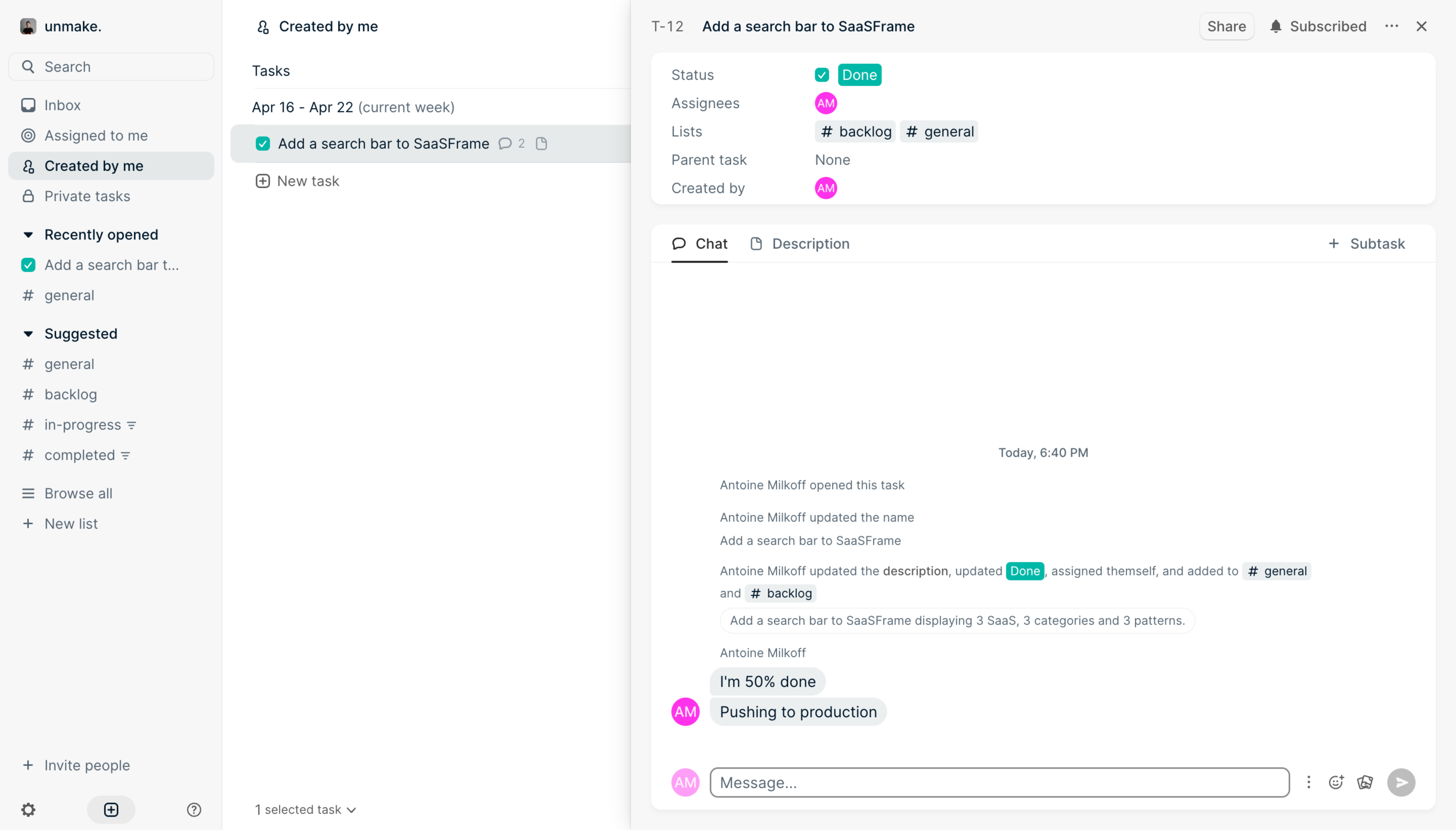
The useful relationship is between the selected row, the count, and the ongoing task context. A bulk-action design can extend that relationship to several records. The screenshot does not establish select-all behavior, cross-page persistence, or which commands support a group.
When adapting the pattern, place the summary where users can relate it to the collection. If a toolbar floats far from the selected rows, include enough scope to avoid confusion. Keep the count accurate as the selection changes.
Rows often have both a detail route and a checkbox. Make these interactions distinguishable so users can inspect an item without accidentally adding it to a batch. A selected state should also differ from the row currently open in a detail panel.
Keyboard users need practical routes to both tasks. Repeated checkbox labels should identify their records, and focus should remain visible. If clicking anywhere in the row selects it, preserve an explicit way to open the record and communicate the mode.
Avoid entering selection mode unexpectedly. On mobile, a deliberate selection control or clearly explained mode can work better than an undiscoverable long press. Once the mode is active, keep the count, exit route, and available commands reachable.
The toolbar should identify the selected count and relevant collection context. “Assign 12 conversations” communicates more than a generic person icon. If the batch includes hidden selected items, make that fact visible before execution.
For important changes, repeat the scope in the review or confirmation surface. The user should not have to remember a count from a toolbar that disappeared. Describe the actual consequence, including any shared or irreversible effect.
If selection can include exceptions to a broad set, explain them. “All matching records except 3” is a different target than a simple list of selected IDs. Keep the interface aligned with the saved selection model even when filters or pagination change.
Users may select records, adjust a filter, and continue selecting elsewhere. Decide whether selection persists, resets, or remains with a visible hidden-item count. Any of these models can work if the interface makes the rule understandable.
Do not silently expand a selection when the matching result set grows. A newly arriving conversation may not belong to the batch the user reviewed. If the operation applies to a live query rather than a fixed set, communicate that model explicitly.
Sorting should not make selected items lose their identity. Preserve the actual record relationship and update the visible state. A highlight attached to a row position instead of its record can create serious scope mistakes.
A group can contain records with different states, owners, or permissions. Determine which actions are valid for the whole selection and how exceptions are handled. Do not offer a command that will silently change only an unspecified subset.
Use explanation where it helps users resolve the issue. “3 selected records cannot be archived” is more actionable than a disabled archive icon. If eligible items can proceed, state the subset and leave a useful route to the exceptions.
For fields with mixed values, avoid implying a common current state. A bulk owner editor can show that the selection has several owners before the user chooses a replacement. The replacement applies to the batch; it should not be mistaken for merely viewing one record's value.
Not every bulk action needs an interruption. Adding a reversible label can be direct, while deleting many shared records may need a clear review step. The amount of friction should reflect risk and recovery, not only the selected count.
The Supabase delete-column capture shows a confirmation that names the target column and mentions dependent objects through an additional cascade option. It is a single-target schema operation, not a bulk-record interface, but it demonstrates how a consequence can extend beyond the obvious object.
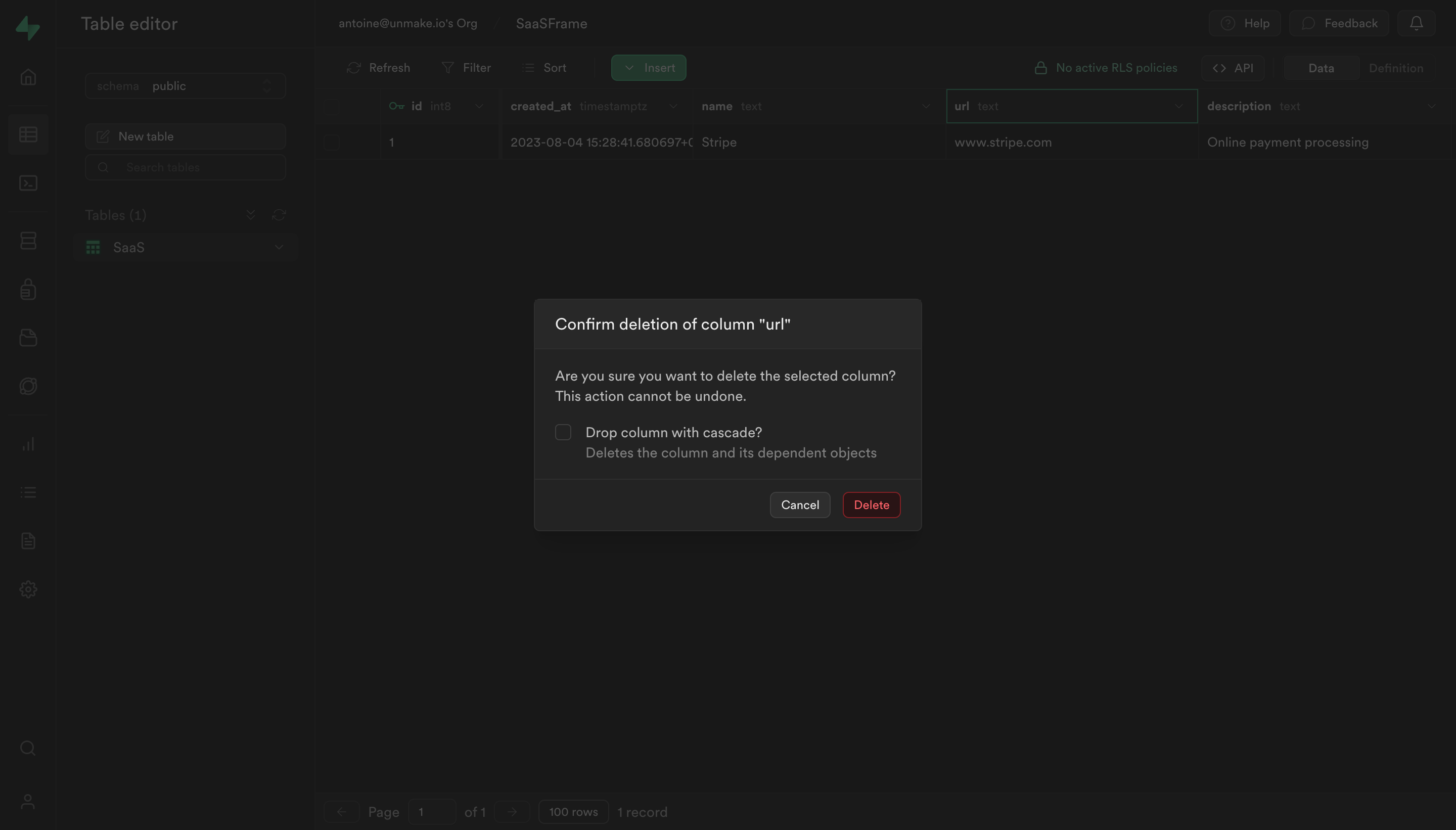
Use that distinction when designing batch changes. Deleting many records may affect linked data, exports, or shared workflows. Explain the real dependency at the point of commitment rather than using a generic “Are you sure?” message.
A large batch may take time. Show whether the action has started, what is processing, and how the user can return to its result. Prevent repeated activation from scheduling duplicate work.
If cancellation is supported, explain its scope. Canceling a queued batch may differ from stopping future items after some have already changed. Do not imply that cancellation restores completed changes unless the product actually provides that recovery.
Keep selection and result feedback coherent. A disappearing toolbar could mean completion, reset, or navigation. Provide a meaningful outcome, especially when a batch changes the records so they no longer match the current filter.
Some items may succeed while others fail because of changed permissions, validation, or concurrent edits. An unqualified success message hides the work still needed. Summarize what changed and provide a route to the unsuccessful items.
Make retry safe and scoped. Users should not have to rerun the complete batch to fix a few failures, especially if successful actions are not idempotent. Preserve a useful failure set or downloadable report where the workflow warrants it.
Explain failure categories in terms the operator can act on. A validation problem may need corrected input; a permission problem may need another role; a temporary service failure may support retry. Avoid presenting every exception as the same generic error.
Undo can work for reversible batch changes if it restores the actual previous state. A single replacement value may not be enough when records originally had different owners or labels. Design recovery around each item's prior state.
If rollback is unavailable, communicate that before the consequential step. Do not show an undo affordance that only hides a notification. For operational tasks, an audit trail can help users understand who changed what and when.
Recovery should also account for later edits. Restoring a batch after someone else has updated a record may create a conflict. The interface needs a coherent result rather than blindly treating every record as unchanged since the original action.
Use scenarios with multiple pages, filters, live arrivals, mixed permissions, and records that change while the batch is open. Ask users to state the exact selection before executing. Their prediction is the most useful test of scope clarity.
Include keyboard operation, touch selection, enlarged text, asynchronous completion, partial failure, and a retry. Verify that the reported counts and actual modified records agree. A polished toolbar is not enough if its target set is ambiguous.
Explore the SaaSFrame bulk-actions collection, compare data grids, and review confirmation dialogs for consequential changes. Design selection, execution, and recovery as one continuous task.
Should select-all include every filtered result? Only when that scope is clear. Distinguish the visible page from the full result set and make expansion explicit.
What if only some selected records support an action? Explain the ineligible subset and decide whether users must resolve it first or can proceed with a clearly defined eligible set.
Is one success toast enough? It can be enough for a small successful operation. Large or partially failed batches need an accurate summary and a practical route to remaining work.