Design with AI
Generate a new design based on this screen using your own content.
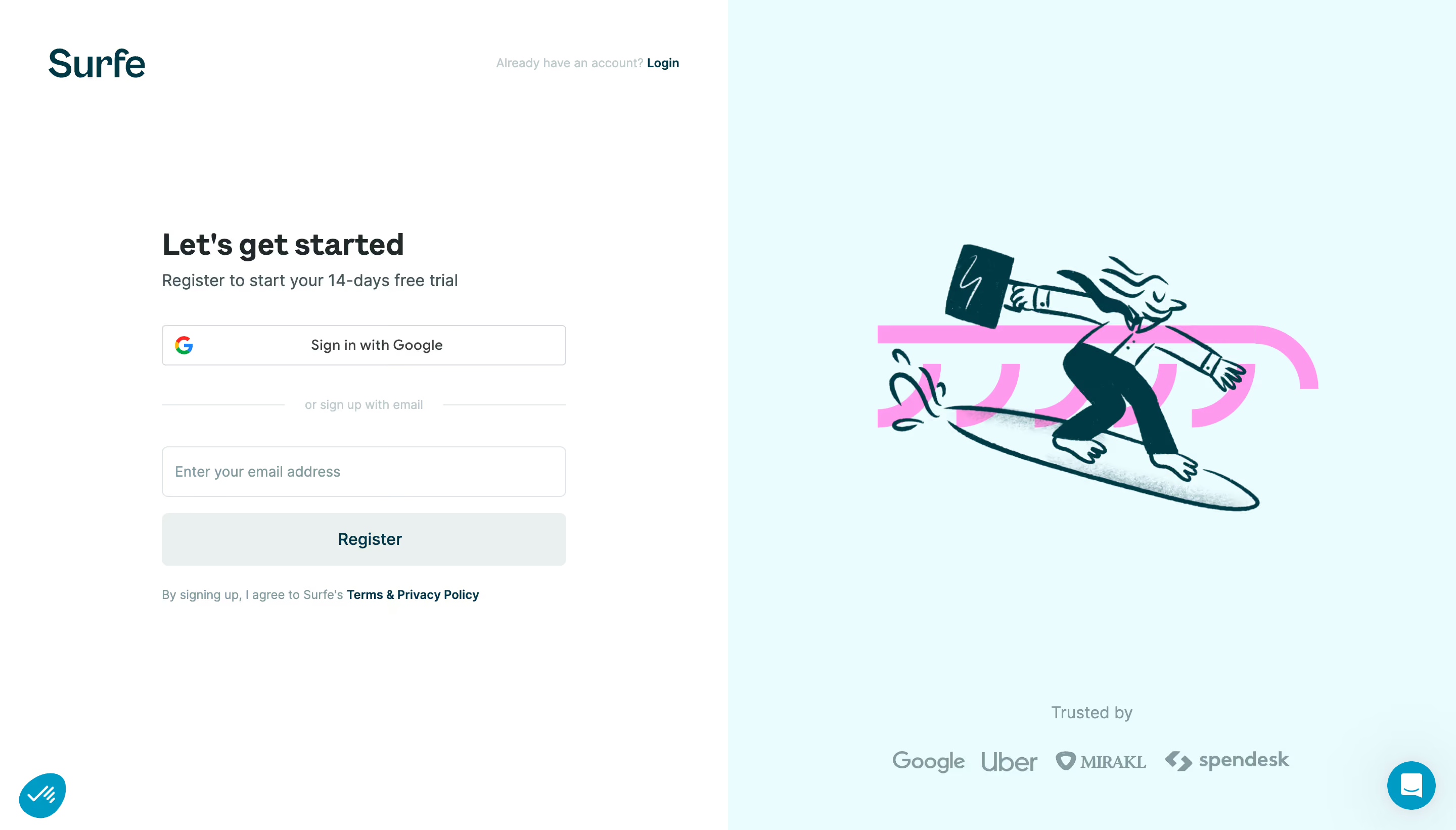
# Design from Reference: Surfe Signup
Create an original, high-fidelity visual design inspired by the reference. Prioritize composition, typography, colors, spacing, and component styling over technical implementation.
## Reference
- **Product:** Surfe
- **Category:** Signup
- **Screenshot:** https://cdn.prod.website-files.com/5e9dc792e1210c5325f7ebbc/6acb6a5303442b22fb62ac80_6acb6952994832179b5663ed_cms-0fb70933ccc25fe84c071798.webp
Analyze the screenshot first. If inaccessible, request it rather than guessing.
## Content
{{content.instructions}}
{{content.data}}
Preserve essential messaging and factual accuracy. Adapt structure and copy length for visual balance; never invent product claims.
## Visual Design
### Overall aesthetic
- **Character:** A split signup page pairs a clean white form with pale cyan illustration space, dark teal branding and a bright pink decorative accent.
- **Evidence:** The screenshot is 2880 × 1642 pixels. CSS sizes assume an unverified 2× capture density.
### Page composition
- **Left half:** Brand and login prompt sit above a centered narrow registration form.
- **Form sequence:** Heading/trial line, Google option, divider, email field, Register action and legal sentence.
- **Right half:** A large surfer-with-briefcase illustration sits above a trust label and four customer marks.
- **Utilities:** Small circular controls occupy both bottom corners.
### Information hierarchy
- **Task:** Let's get started is the strongest form text.
- **Routes:** Google sign-in precedes an explicit email alternative.
- **Trust:** The illustration creates personality while customer logos support credibility below.
- **Legal:** Terms/privacy and existing-account login are visually subordinate.
### Typography
- **Heading:** Approximately 32 pixels bold.
- **Subtitle/controls:** Around 16 pixels, with medium-weight button labels.
- **Legal/login prompt:** Approximately 12–13 pixels; exact sans-serif identity is unverified.
### Colors & surfaces
- **Measured palette:** ICC-to-sRGB sampling identifies #FFFFFF as form canvas, #EBFCFF as the illustration half and #003843 as dark teal.
- **Measured accents:** #FF9BEE supplies the pink decorative shape; #EAEFF0 is the pale Register surface.
- **Supporting variation:** #EAFBFE occurs in the cyan area.
- **Treatment:** Flat halves and thin outlined fields dominate, with soft shadows reserved for floating utilities.
### Components
- **Form width:** Approximately 400 CSS pixels.
- **Google/email controls:** Rounded outlined fields are roughly 40–50 pixels tall.
- **Register:** A full-width pale-gray filled action uses dark teal text; its enabled state cannot be confirmed solely from appearance.
- **Divider:** Short horizontal rules flank a muted email-alternative label.
- **Illustration:** Dark teal sketch lines and fills depict a surfer carrying a case, over a large pink glyph-like motif.
- **Trust row:** Four muted logos align beneath a short centered label.
### Visual rhythm
- **Half split:** Equal white/cyan regions create a stable balance.
- **Form spacing:** Generous gaps separate heading, social route, email route and legal copy.
- **Illustration placement:** Large open margins surround the artwork, with trust marks low in the panel.
### Responsive
- **Observed scope:** One desktop empty-email state is visible; validation and provider flow are not shown.
- **Recommended layout:** Prioritize the form on phones, moving or reducing illustration/trust content below it.
- **Recommended access:** Preserve field labels, visible focus and adequate action contrast.
### Adaptation guidance
- **Signup pattern:** Offer social and email routes with a concise trial promise and supporting customer evidence.
- **Brand system:** Reuse dark teal, pale cyan and pink illustration accents without overwhelming functional controls.
- **Implementation:** Verify fonts/density and define validation/loading/disabled states explicitly.
Use this context to reproduce the reference's visual language: layout, typography, colors, spacing, borders, radii, and distinctive elements. The screenshot takes priority if descriptions conflict.
## Direction
{{preferences.fidelityInstructions}}
## Output
{{output.instructions}}
Deliver a polished, cohesive design with precise alignment, hierarchy, and spacing. Produce the requested visual artifact, not just a description. If unsupported, explain the limitation.
.webp)


.avif)